Introduction
Thank you for choosing the Vaydeer 2 Tiers Dual Monitor Stand. This product is designed to elevate your monitors to an ergonomic viewing height, reduce desk clutter, and provide convenient connectivity options including wireless charging and USB 3.0 ports. Please read this manual carefully before use to ensure proper setup and operation.
Product Features
- Wireless Charger Device: Integrated charging pad for compatible smartphones.
- 4 USB 3.0 Ports: Provides high-speed data transmission and charging capabilities for various USB devices.
- Sturdy and Durable Construction: Made of high-quality aluminum alloy, capable of holding up to 88 lbs (39.92 kg).
- 2 Tiers & Space Saving Design: Offers additional storage space for desktop accessories, keyboards, and mice, promoting an organized workspace.
- Ergonomically Designed: Raises monitors to an optimal viewing height to improve posture and comfort.
Package Contents
- Vaydeer 2 Tiers Dual Monitor Stand (Main Platform)
- Side Support Legs (2 pieces)
- USB Connection Cable
- Power Adapter (for wireless charging and USB hub)
- Assembly Screws and Tools (if required for leg attachment)
- User Manual
Setup and Assembly
- Unpack Components: Carefully remove all items from the packaging and ensure all listed components are present.
- Assemble the Stand: Attach the two side support legs to the main platform of the monitor stand using the provided screws and tools. Ensure they are securely fastened.
- Position the Stand: Place the assembled monitor stand on a stable, flat desk surface.
- Connect Power: Connect the provided power adapter to the stand's power input port and then plug it into a wall outlet. This powers the wireless charger and USB hub.
- Connect to Computer: Use the provided USB connection cable to link the monitor stand's USB input port to an available USB port on your computer. This enables data transfer and charging via the USB 3.0 hub.
- Place Monitors: Carefully place your monitors on the top tier of the stand. Ensure they are centered and stable. The stand can accommodate two monitors up to 27 inches each.

Operating Instructions
Wireless Charging
To use the wireless charging feature, simply place your compatible smartphone on the designated charging pad located on the stand. The device will automatically begin to charge. For optimal charging speed, use a fast charging adapter for the stand's power supply instead of relying solely on the USB ports for power. If the indicator light of your earbud goes off after charging for a few seconds, this is normal; charging is still active.
USB 3.0 Hub Ports
The monitor stand features four USB 3.0 ports. These ports provide both data transmission and charging capabilities. Connect your USB devices such as hard drives, keyboards, mice, mobile phones, iPads, or Kindle devices to these ports for convenient access and power.
Ergonomic Positioning
The stand elevates your monitor(s) to help you achieve a more comfortable and ergonomic viewing position. Adjust your monitor's height and distance to reduce strain on your neck and eyes.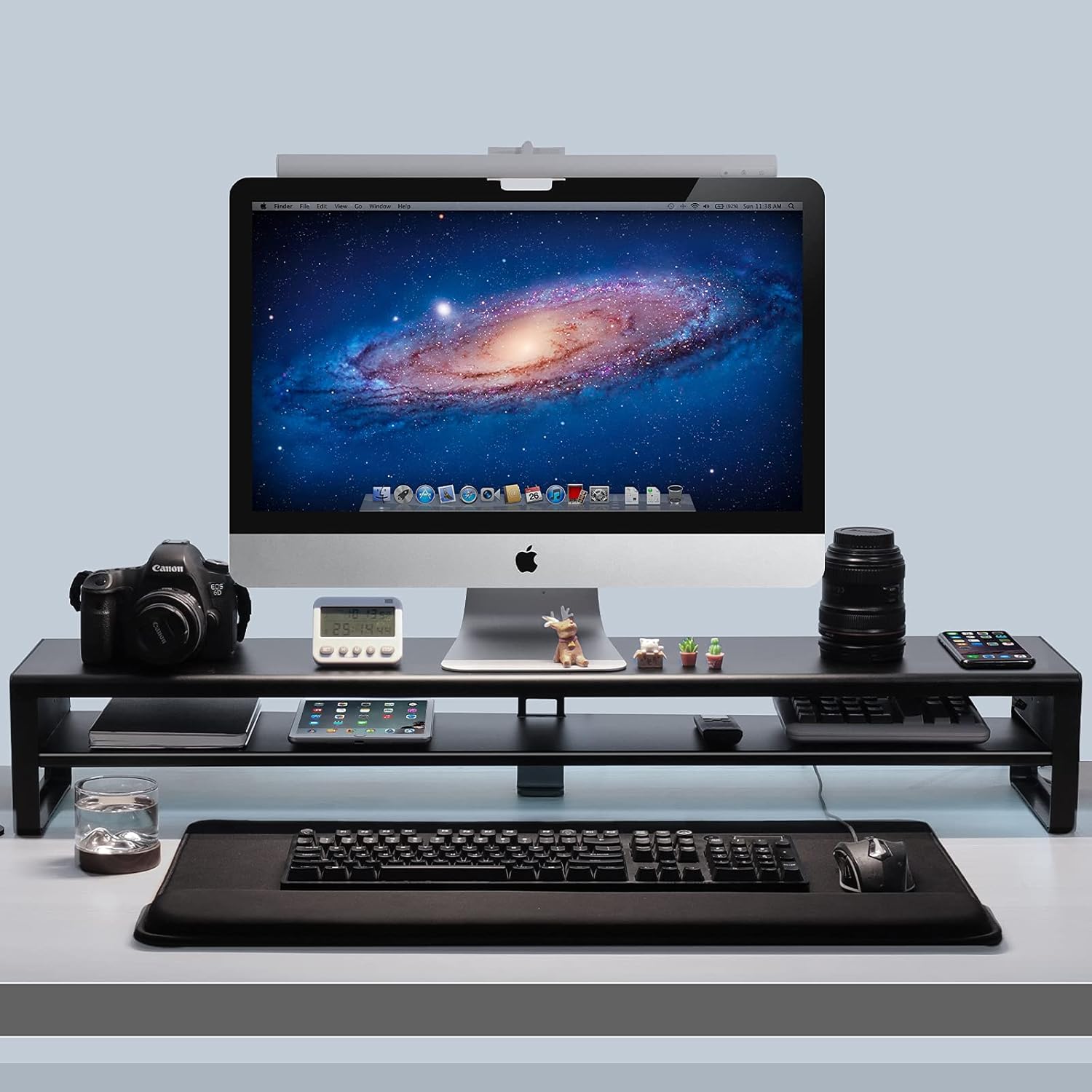
Maintenance
To maintain your Vaydeer monitor stand, regularly wipe its smooth coating surface with a soft, damp cloth. Avoid using abrasive cleaners or solvents that could damage the finish. Ensure no liquids enter the USB ports or wireless charging area.
Troubleshooting
- Wireless Charging Not Working:
- Ensure your phone is placed correctly on the charging pad.
- Verify the stand is connected to a power source using the provided adapter.
- If using an iPhone and it's not charging, try rebooting your phone.
- Confirm your phone is wireless charging compatible.
- Ensure you are using a fast charging adapter for the stand's power, not just a computer's USB port.
- USB Ports Not Functioning:
- Check that the USB connection cable is securely plugged into both the stand and your computer.
- Ensure the stand is receiving power from the power adapter.
- Try connecting the USB cable to a different USB port on your computer.
- Stand Instability:
- Verify that all assembly screws are tightened.
- Ensure the stand is placed on a flat and stable surface.
- Do not exceed the maximum load capacity of 88 lbs (39.92 kg).
Specifications
| Feature | Specification |
|---|---|
| Brand | Vaydeer |
| Model | B08Z7LR2GK |
| Material | Aluminum, Metal |
| Color | Black |
| Product Dimensions (L x W x H) | 38.7 x 7.8 x 5.9 inches (98.3 x 19.8 x 15 cm) |
| Item Weight | 4.8 pounds (2.18 kg) |
| Load Capacity | 88 Pounds (39.92 kg) |
| USB Ports | 4 x USB 3.0 Hub Ports |
| Wireless Charging | Yes (compatible with Qi-enabled devices) |
| Assembly Required | Yes |

Safety Information
- Do not exceed the maximum load capacity of 88 lbs (39.92 kg) to prevent damage or injury.
- Ensure the stand is placed on a stable and level surface to prevent tipping.
- Keep liquids away from the electronic components (USB ports, wireless charging pad) to avoid electrical hazards.
- Do not attempt to disassemble or modify the product, as this may void the warranty and pose safety risks.
- Keep out of reach of children.
Product Video
Warranty and Support
Vaydeer products come with a standard manufacturer's warranty. For specific warranty details, product support, or any inquiries, please refer to the warranty card included with your purchase or visit the official Vaydeer website. You may also contact Vaydeer customer service through the retailer where the product was purchased.


