1. Introduction
Thank you for choosing the MESTEK AC20 Digital Non-Contact AC Voltage Detector. This device is designed for safe and convenient detection of AC voltage in electrical circuits without direct contact. Its pen-style design, intelligent features, and robust construction make it an essential tool for electricians, homeowners, and DIY enthusiasts. Please read this manual thoroughly before using the device to ensure safe and proper operation.
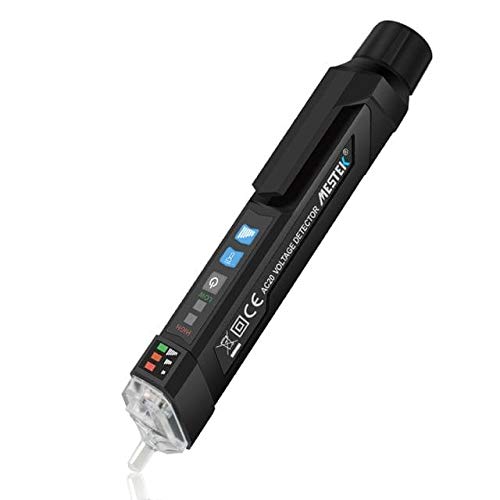
Figure 1: MESTEK AC20 Digital Non-Contact AC Voltage Detector. This image displays the sleek, pen-shaped design of the device, highlighting its compact form factor and the integrated clip for portability. Both the front with its display and buttons, and the back with warning labels, are visible.
2. Safety Information
WARNING: Failure to follow these safety instructions may result in electric shock, fire, or serious injury.
- Always assume that any circuit is live until proven otherwise.
- Do not use the device if it appears damaged or is not operating correctly.
- Do not attempt to measure voltages exceeding the specified range (1000V AC).
- Do not use the device in wet environments or during electrical storms.
- Ensure batteries are correctly installed and replaced when the low battery indicator appears.
- This device is designed for non-contact detection. Do not make direct contact with live conductors.
- Always follow local and national safety codes.
- Keep out of reach of children.
3. Product Features
The MESTEK AC20 is equipped with several features to enhance safety and usability:
- Non-Contact Voltage (NCV) Detection: Safely detects AC voltage without physical contact.
- Dual Sensitivity Modes: Switch between 12V~1000V (high sensitivity) and 48V~1000V (low sensitivity) for various applications.
- Zero/Fire Wire Distinction: Identifies live (fire) and neutral (zero) wires.
- Live Line Breakpoint Detection: Helps locate breaks in live wires.
- Sound and Light Alarm: Visual and audible alerts for voltage detection.
- LED Flashlight: Integrated flashlight for working in dimly lit areas.
- Automatic Power-Off: Conserves battery life by automatically shutting down after 5 minutes of inactivity.
- Low Battery Indicator: Alerts when batteries need replacement.
- Durable and Fall Resistant: Constructed from ABS anti-falling materials.
- IP67 Water Resistant: Provides protection against dust and temporary immersion in water.

Figure 2: The MESTEK AC20 is IP67 water resistant. This image shows the device partially submerged in water, illustrating its ability to withstand wet conditions, making it suitable for use in various environments.
4. Setup: Battery Installation
The MESTEK AC20 requires two 1.5V AAA batteries (not included) for operation.
- Unscrew the battery compartment cap at the rear of the device by turning it counter-clockwise.
- Insert two 1.5V AAA batteries, ensuring the correct polarity (+/-) as indicated inside the compartment.
- Replace the battery compartment cap and turn it clockwise until securely fastened.
- The device will power on briefly to confirm battery installation.
Note: If the low battery indicator appears during use, replace the batteries promptly to ensure accurate readings.
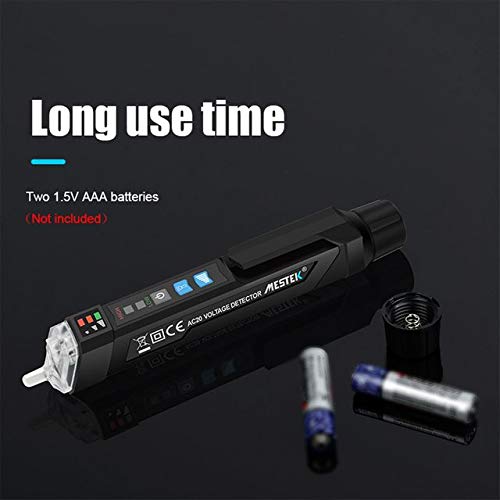
Figure 3: Battery installation for the MESTEK AC20. This image shows the rear cap removed, revealing the battery compartment, and two AAA batteries positioned nearby, indicating the power source for the device.
5. Operating Instructions
5.1 Power On/Off
- Press the power button (usually marked with a power symbol) to turn the device on.
- Press and hold the power button to turn the device off. The device will also automatically power off after 5 minutes of inactivity.
5.2 Non-Contact AC Voltage Detection (NCV)
- Turn on the device.
- Bring the tip of the detector close to the wire, outlet, or electrical component you wish to test.
- If AC voltage is detected, the device will emit an audible beep and the LED indicator lights will illuminate, with more lights indicating higher voltage strength.
5.3 Sensitivity Adjustment
- The device has two sensitivity modes:
- High Sensitivity (12V~1000V): Suitable for detecting lower voltages or for more precise detection.
- Low Sensitivity (48V~1000V): Ideal for general detection and reducing false positives from ambient electrical fields.
- Press the sensitivity switch button (often labeled "SENS" or with a sensitivity icon) to toggle between high and low sensitivity modes. The current mode may be indicated by an LED or on the display.
5.4 Zero/Fire Wire Distinction
- Place the tip of the test pen near the wire or insert it into the socket.
- The device will indicate the live (fire) wire with a stronger induction signal (e.g., faster beeping, more illuminated LEDs) compared to the neutral (zero) wire.
5.5 LED Flashlight
- Press the flashlight button (often marked with a light bulb icon) to turn the LED flashlight on or off. This is useful for working in dark environments.
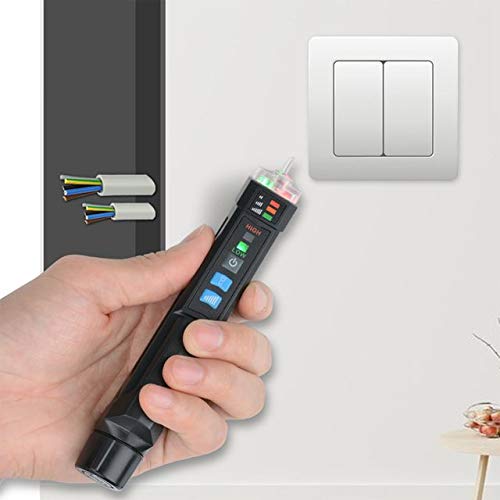
Figure 4: MESTEK AC20 in operation. The image shows a hand holding the voltage detector near a wall-mounted electrical switch, demonstrating its non-contact detection capability in a typical household setting.
6. Maintenance
- Cleaning: Wipe the device with a dry, soft cloth. Do not use abrasive cleaners or solvents.
- Storage: Store the device in a cool, dry place, away from direct sunlight and extreme temperatures. If storing for extended periods, remove the batteries to prevent leakage.
- Battery Replacement: Replace batteries promptly when the low battery indicator is active to ensure optimal performance and prevent damage from battery leakage.
7. Troubleshooting
| Problem | Possible Cause | Solution |
|---|---|---|
| Device does not power on. | Dead or incorrectly installed batteries. | Replace batteries with new 1.5V AAA batteries, ensuring correct polarity. |
| Inconsistent or no voltage detection. | Low battery; device too far from voltage source; incorrect sensitivity mode. | Replace batteries; bring the tip closer to the source; switch to high sensitivity mode (12V~1000V). |
| False positive readings. | High sensitivity mode in an electrically noisy environment. | Switch to low sensitivity mode (48V~1000V). |
| Flashlight not working. | Low battery; LED malfunction. | Replace batteries. If problem persists, contact support. |
8. Specifications
| Model | AC20 |
| Safety Level | CE CAT.III 1000V / CAT.IV 600V |
| AC Voltage Range | 12V~1000V (High Sensitivity) / 48V~1000V (Low Sensitivity) |
| Frequency | 50/60Hz |
| Alarm Method | Sound-light alarm |
| Flashlight | White LED lighting lamp |
| Auto-off | 5 minutes (no operation/no voltage signal) |
| Low Battery Indicator | Yes |
| Zero/Fire Wire Test | Yes |
| Use Temperature | 0~40°C |
| Storage Temperature | -10~50°C |
| Altitude | 2000m |
| Power Supply | 2 * 1.5V AAA battery |
| Item Size | 156 * 20 * 20mm / 6.14 * 0.79 * 0.79in |
| Item Weight | 45g / 1.59oz |
| Material | ABS |
| Water Resistance | IP67 |
9. Warranty and Support
For warranty information and technical support, please refer to the documentation provided with your purchase or contact the retailer/manufacturer directly. Keep your purchase receipt as proof of purchase.
Manufacturer: MESTEK


