
1. Introduction
Thank you for choosing the JISULIFE Clip Fan Life1 Plus. This portable, battery-operated fan is designed to provide personal cooling in various settings, including strollers, cribs, desks, and car seats. It features a 4000mAh battery, offering extended operation, and multiple speed settings for customized airflow. Please read this manual thoroughly before use to ensure proper operation and maintenance.
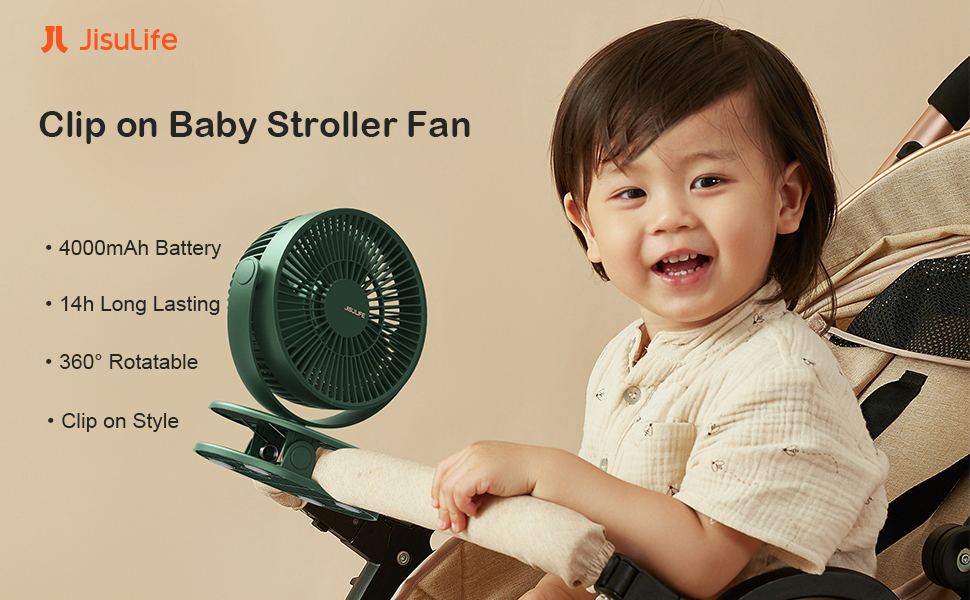
Image 1.1: The JISULIFE Clip Fan Life1 Plus attached to a baby stroller, providing cooling for a child.
2. Safety Instructions
- Do not insert fingers or any objects into the fan grille. The fan features a narrow slot design (0.2 inches) for child safety, but caution is always advised.
- Keep the fan away from water or other liquids to prevent electric shock.
- Do not disassemble, repair, or modify the fan. Contact customer support for assistance.
- Ensure the fan is placed on a stable surface or securely clipped to prevent it from falling.
- Keep the fan out of reach of small children when not in use or when unsupervised.
- Use only the provided Type-C cable for charging.
- Do not expose the fan to extreme temperatures or direct sunlight for prolonged periods.

Image 2.1: A close-up view highlighting the narrow fan grille slots, designed to prevent small fingers from reaching the blades.
3. Package Contents
Verify that all items are present in the package:
- 1 x JISULIFE Versatile Clip Fan (Life1 Plus)
- 1 x Type-C Charging Cable
- 1 x User Manual
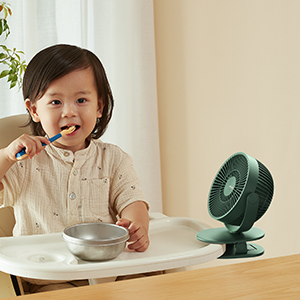
Image 3.1: The complete package contents, showing the fan, Type-C charging cable, and user manual.
4. Product Overview
The JISULIFE Clip Fan Life1 Plus features a compact design with a robust clip for versatile placement. It includes a power button, a Type-C charging port, and a fan head that offers 360-degree rotation.

Image 4.1: A side view of the dark green JISULIFE Clip Fan Life1 Plus, showcasing its design and clip.

Image 4.2: A detailed view of the fan's rear, showing the power button and the Type-C charging port.
5. Setup
The fan can be used as a clip-on fan or a desktop fan.
5.1 Clipping the Fan
Open the clip at the base of the fan and attach it securely to a stable surface such as a stroller handle, crib rail, or desk edge. Ensure the clip has a firm grip to prevent the fan from dislodging.

Image 5.1: The fan securely clipped to a crib rail, demonstrating its use in a nursery setting.
5.2 Adjusting Fan Direction
The fan head can be rotated 360 degrees both vertically and horizontally. Gently adjust the fan head to direct airflow as desired.

Image 5.2: An illustration demonstrating the fan's ability to rotate 360 degrees both vertically and horizontally for optimal airflow.
6. Operating Instructions
The fan features four adjustable speed settings, including a natural wind mode.
6.1 Power On/Off and Speed Adjustment
- To Power On: Press the power button once. The fan will start at Speed 1.
- To Adjust Speed: Press the power button repeatedly to cycle through speeds: Speed 1 (2000 rpm), Speed 2 (2500 rpm), Speed 3 (3000 rpm), and Speed 4 (Natural Wind Mode, 2000-2500 rpm).
- To Power Off: Hold down the power button for approximately 2 seconds.

Image 6.1: Visual representation of the four fan speed settings, including the unique natural wind mode.
6.2 Natural Wind Mode
In Natural Wind Mode (Speed 4), the fan's wind force periodically changes, simulating a natural breeze for enhanced comfort.
7. Charging
The JISULIFE Clip Fan Life1 Plus is equipped with a 4000mAh rechargeable battery, providing 4-14 hours of operation depending on the speed setting.
7.1 Charging Procedure
- Connect the provided Type-C charging cable to the fan's charging port.
- Connect the other end of the cable to a USB power source (e.g., USB charger, power bank, computer, car charger).
- The charging indicator light will illuminate during charging and turn off when fully charged.
- The fan can be used while charging.
8. Maintenance
Regular cleaning ensures optimal performance and longevity of your fan.
8.1 Cleaning the Fan
- Ensure the fan is powered off and unplugged before cleaning.
- The front cover of the fan is detachable for easy cleaning. Gently twist or unclip the front cover to remove it.
- Use a soft, dry cloth to wipe dust from the fan blades and grille. For stubborn dirt, a slightly damp cloth can be used, followed by a dry cloth.
- Do not use abrasive cleaners or solvents.
- Once clean and dry, reattach the front cover securely.

Image 8.1: A demonstration of cleaning the fan blades after detaching the front cover.
9. Troubleshooting
If you encounter issues with your JISULIFE Clip Fan Life1 Plus, please refer to the following common problems and solutions:
| Problem | Possible Cause | Solution |
|---|---|---|
| Fan does not turn on | Battery is depleted | Charge the fan using the provided Type-C cable. |
| Fan does not charge | Charging cable or adapter issue | Ensure the Type-C cable is properly connected. Try a different USB adapter or power source. |
| Weak airflow | Fan speed is too low or battery is low | Increase the fan speed. If the battery is low, charge the fan. |
| Unusual noise during operation | Obstruction in fan blades or loose parts | Power off and unplug the fan. Carefully check for any obstructions and remove them. If the issue persists, contact customer support. |
10. Specifications
| Brand | JISULIFE |
| Model Name | Clip Fan Life1 Plus |
| Color | Green |
| Product Dimensions | 5.47"D x 6.1"W x 8.03"H |
| Item Weight | 405 Grams (14.3 ounces) |
| Power Source | DC (Battery Operated) |
| Battery Type | 2 Lithium Ion batteries (included) |
| Battery Capacity | 4000mAh |
| Working Hours | 4-14 hours (depending on speed) |
| Number of Power Levels | 4 |
| Noise Level | <40 dB |
| Control Method | Push Button |
| Main Power Connector Type | USB Type-C |
| Special Feature | 14h Long-lasting, 4 Speed Natural Wind, 40dB Ultra-quiet |
| Recommended Uses | Clip on Stroller, Crib, Desk, Table |
11. Warranty and Support
JISULIFE values customer experience and provides worry-free customer service. If you have any questions or require assistance with your Clip Fan Life1 Plus, please do not hesitate to contact JISULIFE customer service.
- Customer Service Response: We aim to reply within 24 hours.
- Contact Information: Please refer to the contact details provided on the product packaging or the official JISULIFE website for the most up-to-date support channels.