
1. Product Overview
The Casio STR-400-7V is a digital watch designed for active individuals, featuring functions for tracking walking activity and estimated calorie consumption. It includes a digital time display, stopwatch, vibratory alarm, and backlight. The watch is water-resistant up to 50 meters and features a durable rubber strap, making it suitable for various daily activities and light water exposure.
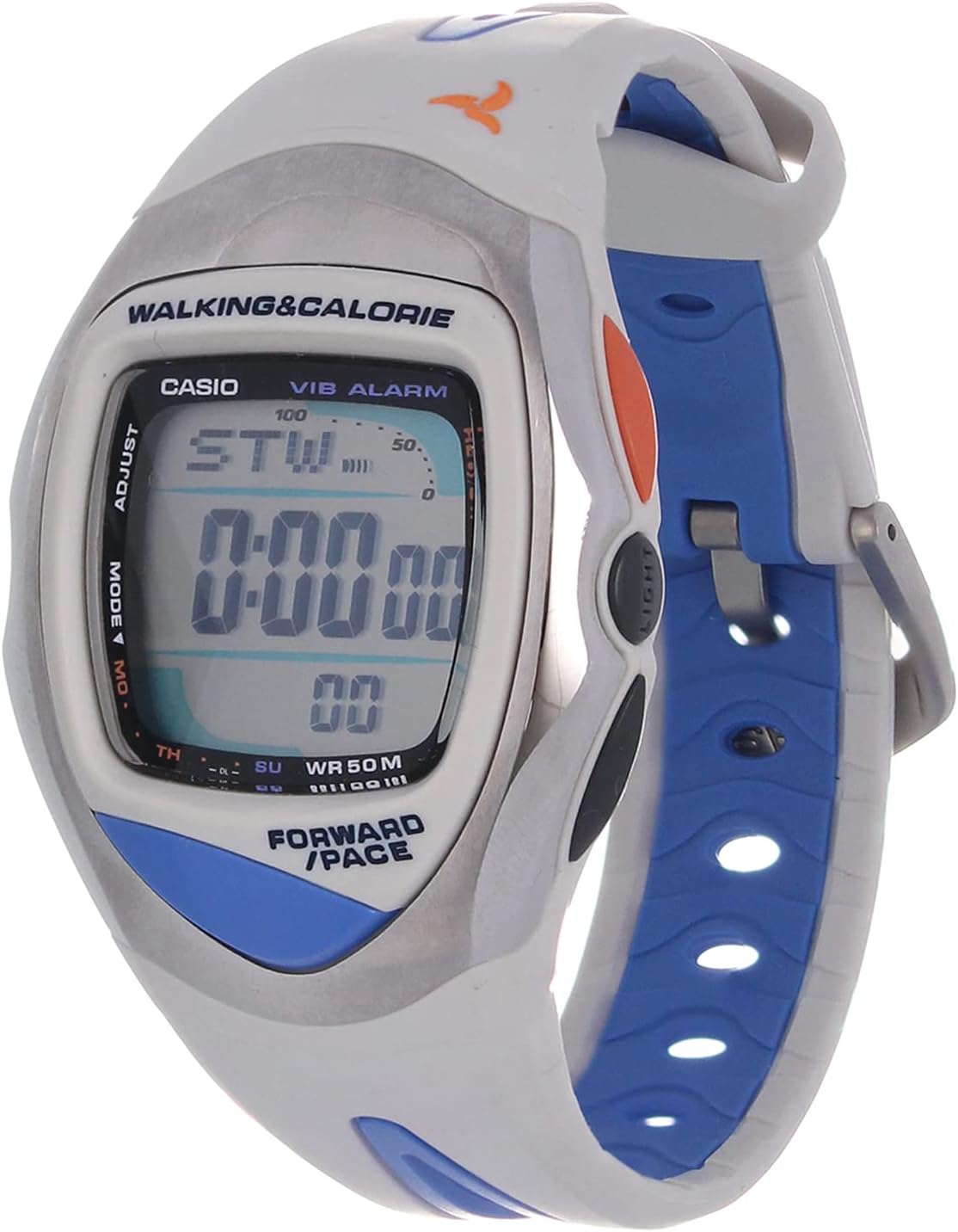
Figure 1: Front view of the Casio STR-400-7V digital watch, showing the display and strap design.
2. Initial Setup
Before using your Casio STR-400-7V watch, perform the following initial setup steps to ensure accurate timekeeping and function performance.
2.1 Setting Time and Date
- In Timekeeping Mode, press and hold the ADJUST button until the seconds digits begin to flash, indicating the setting screen.
- Press the MODE button to cycle through the settings: Seconds → Hour → Minute → Year → Month → Day.
- Use the FORWARD/PAGE button to increase the flashing value. Hold the button to change values rapidly.
- Once all settings are correct, press the ADJUST button to exit the setting screen.
2.2 User Profile Setup (for Walking & Calorie Tracking)
To ensure accurate calorie and step tracking, it is recommended to input your personal data.
- From Timekeeping Mode, press the MODE button repeatedly until you reach the Pedometer/User Profile setting mode.
- Press and hold the ADJUST button. The first setting (e.g., Weight) will flash.
- Use the FORWARD/PAGE button to adjust the value.
- Press MODE to move to the next setting (e.g., Height, Stride Length). Repeat step 3.
- After setting all personal data, press ADJUST to save and exit.
Figure 2: Detail of the watch face, highlighting the 'ADJUST' and 'MODE' buttons used for settings.
3. Operating Instructions
This section details how to use the various functions of your Casio STR-400-7V watch.
3.1 Mode Navigation
Press the MODE button to cycle through the watch's different functions:
- Timekeeping Mode: Displays current time, day, and date.
- Stopwatch Mode (STW): Used for measuring elapsed time.
- Vibratory Alarm Mode (VIB ALARM): Set and activate a vibrating alarm.
- Pedometer/Calorie Mode: Displays steps taken and estimated calories burned.
3.2 Using the Stopwatch
- Navigate to Stopwatch Mode using the MODE button.
- Press FORWARD/PAGE to start the stopwatch.
- Press FORWARD/PAGE again to stop the stopwatch.
- Press ADJUST to reset the stopwatch to zero.
3.3 Setting and Using the Vibratory Alarm
- Navigate to Vibratory Alarm Mode using the MODE button.
- Press and hold the ADJUST button until the alarm time digits flash.
- Use MODE to select between hour and minute settings.
- Use FORWARD/PAGE to adjust the flashing value.
- Press ADJUST to save the alarm time.
- To turn the alarm on/off, press FORWARD/PAGE in Alarm Mode. An indicator will show if the alarm is active.
3.4 Pedometer and Calorie Tracking
The watch automatically tracks steps and estimates calories burned based on your user profile settings.
- Navigate to Pedometer/Calorie Mode using the MODE button.
- The display will show your current step count and estimated calories.
- To reset the daily step count and calorie data, press and hold the ADJUST button in Pedometer/Calorie Mode.
3.5 Backlight Function
Press the LIGHT button (located on the side of the watch) to illuminate the display for a few seconds in low-light conditions.
4. Maintenance
Proper care will extend the life and maintain the performance of your Casio STR-400-7V watch.
4.1 Cleaning
- Wipe the watch case and strap with a soft, dry cloth.
- For stubborn dirt, use a soft cloth dampened with water and a mild neutral detergent. Wipe thoroughly and then dry.
- Avoid using volatile agents like thinner, gasoline, alcohol, or chemical cleaners, as they may damage the watch's finish or components.
4.2 Water Resistance (WR 50M)
Your watch is water-resistant up to 50 meters. This means it is suitable for everyday use, showering, and swimming in shallow water. However, it is not suitable for diving or snorkeling.
- Do not operate buttons while the watch is wet or submerged in water.
- Avoid exposing the watch to hot water or steam, as this can compromise the water resistance seals.
- After exposure to saltwater, rinse the watch with fresh water and wipe it dry.
4.3 Battery Replacement
When the display becomes dim or functions become erratic, the battery may need replacement. Battery replacement should be performed by an authorized Casio service center or a qualified watch technician to ensure proper sealing and water resistance.
5. Troubleshooting
If you encounter issues with your watch, refer to the following common problems and solutions.
| Problem | Possible Cause | Solution |
|---|---|---|
| Display is blank or dim. | Low battery. | Replace the battery at an authorized service center. |
| Time is incorrect. | Time settings are wrong. | Refer to Section 2.1 "Setting Time and Date" to adjust the time. |
| Vibratory alarm does not activate. | Alarm is turned off or set incorrectly. | Ensure the alarm is set and activated (Section 3.3). Check battery level. |
| Pedometer/Calorie count is inaccurate. | Incorrect user profile settings or inconsistent arm movement. | Verify user profile settings (Section 2.2). Ensure the watch is worn securely on the wrist. |
6. Specifications
Below are the detailed specifications for the Casio STR-400-7V watch.
- Brand Name: Casio
- Model Name: STR-400-7V
- Item Model Number: STR-400-7V
- Part Number: STR-400-7V
- Display Type: Digital
- Movement Type: Chipset
- Case Diameter: 26 millimeters
- Item Shape: Square
- Band Material Type: Rubber
- Band Color: Multi-color (Grey and Baby Blue)
- Strap Type: Two Piece Strap
- Clasp Type: Tang Buckle
- Closure Type: Buckle
- Dial Color: Grey
- Material: Rubber
- Department: Unisex (Adult)
- Sport Type: Walking
- Style: Strap
- Water Resistance: 50M (WR 50M)
- Shipping Dimensions: 12.4 x 8 x 7 cm; 140 grams
- First Available Date: March 16, 2021
- Manufacturer: Casio
7. Warranty and Support
For warranty information, service, or technical support regarding your Casio STR-400-7V watch, please refer to the warranty card included with your purchase or visit the official Casio website. You may also contact Casio customer service directly for assistance.
Official Casio Website: www.casio.com