1. Introduction
The Avidsen Multifunction Flashlight, Model 103640, is a versatile lighting device designed for various applications. It features both a focused flashlight beam and a broader area light, making it suitable for general illumination and emergency situations. This device is rechargeable and includes an automatic emergency light function during power outages.
2. Safety Instructions
- Read all instructions before use and retain for future reference.
- Do not expose the device to water or excessive moisture. This product is not water-resistant.
- Do not disassemble or attempt to repair the device yourself. Refer all servicing to qualified personnel.
- Keep out of reach of children.
- Do not look directly into the LED light source to avoid eye injury.
- Ensure the power outlet voltage matches the device's specifications (220-240V, 50/60Hz) before charging.
- Do not operate the device if it has been damaged in any way.
- Dispose of the battery according to local regulations.
3. Product Overview
The Avidsen Multifunction Flashlight combines a powerful front flashlight with a broad side lamp, offering flexible lighting options. It is designed for ease of use and reliability.
3.1 Components
- Front LED Flashlight: Provides a focused beam.
- Side LED Panel: Offers wider area illumination.
- Power Switch: Controls the flashlight and side lamp modes.
- Integrated Mains Plug: For direct charging from a wall socket.
- Charging Indicator Light: Shows charging status.
- Handle/Stand: For carrying or positioning the device upright.
3.2 Product Views

Figure 1: The Avidsen Multifunction Flashlight with its front LED beam active, demonstrating its primary flashlight function. The device is shown in a horizontal position, highlighting the focused light output.
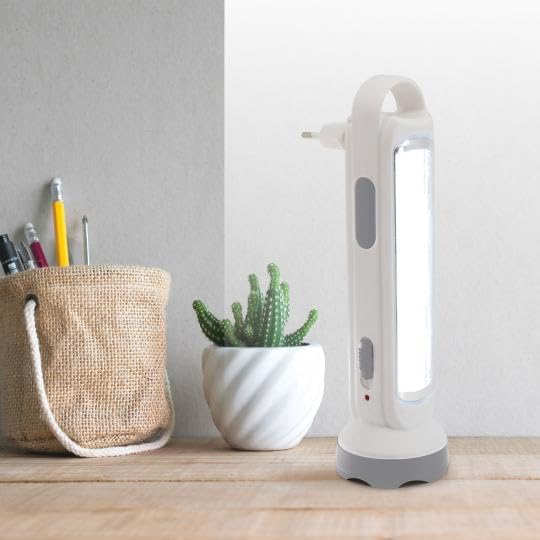
Figure 2: The Avidsen Multifunction Flashlight positioned vertically on a surface, with its side LED panel illuminated. This view illustrates its use as a portable lantern or emergency light, providing broad area illumination.

Figure 3: A side profile view of the Avidsen Multifunction Flashlight, clearly showing the integrated mains plug extended from the top. This image highlights the compact design and the direct charging capability of the device.
4. Setup
4.1 Initial Charging
- Before first use, fully charge the flashlight.
- Extend the integrated mains plug from the top of the device.
- Plug the flashlight directly into a standard 220-240V, 50/60Hz wall socket.
- The charging indicator light will illuminate.
- Allow approximately 3 hours for a full charge. The indicator light may change or turn off once fully charged (refer to specific product behavior if detailed in packaging).
Note: For optimal battery life, it is recommended to fully charge the device before its first use and to recharge it regularly, especially if stored for extended periods.
5. Operating Instructions
5.1 Manual Operation
The device features a sliding power switch to select different lighting modes:
- Position 0 (Off): The device is off.
- Position 1 (Flashlight): Activates the front 1 LED flashlight (150 lumens).
- Position 2 (Side Lamp): Activates the 18 LED side panel (350 lumens).
Slide the switch to the desired position to activate the corresponding light source. Slide back to Position 0 to turn off the device.
5.2 Automatic Emergency Light Function
The Avidsen Multifunction Flashlight is equipped with an automatic emergency light feature:
- Plug the flashlight into a wall socket and ensure it is charging.
- Set the power switch to Position 2 (Side Lamp).
- In the event of a power outage, the 18 LED side panel will automatically illuminate.
- When power is restored, the side lamp will automatically turn off and resume charging.
This feature ensures continuous illumination during unexpected power interruptions, providing up to 3 hours of light in this mode.
6. Maintenance
6.1 Cleaning
- Ensure the device is unplugged from the mains before cleaning.
- Wipe the exterior with a soft, dry cloth.
- Do not use abrasive cleaners, solvents, or harsh chemicals, as these may damage the surface.
6.2 Battery Care
- To prolong the life of the built-in lithium battery, avoid completely draining it frequently.
- If the device is not used for an extended period, charge it at least once every three months to maintain battery health.
- Do not expose the battery to extreme temperatures.
7. Troubleshooting
| Problem | Possible Cause | Solution |
|---|---|---|
| Flashlight does not turn on. | Battery is depleted. Power switch is in the wrong position. | Charge the flashlight for 3 hours. Ensure the switch is in Position 1 (Flashlight) or Position 2 (Side Lamp). |
| Side lamp does not illuminate during power outage. | Flashlight not plugged in. Power switch not in Position 2. Battery depleted. | Ensure the flashlight is plugged into a live wall socket. Set the power switch to Position 2. Charge the flashlight fully. |
| Charging indicator light does not illuminate. | Not properly plugged in. Faulty power outlet. Device malfunction. | Ensure the plug is fully inserted into a working wall socket. Try a different power outlet. Contact customer support. |
If the problem persists after attempting these solutions, please contact Avidsen customer support.
8. Specifications
| Feature | Detail |
|---|---|
| Model Number | 103640 |
| Flashlight Brightness | 150 Lumens (1 LED) |
| Side Lamp Brightness | 350 Lumens (18 LEDs) |
| Power Supply | 220-240 V, 50/60 Hz |
| Battery Type | Rechargeable Lithium-ion (3.7 V; 1500 mAh) |
| Battery Life (Side Lamp) | Up to 3 hours |
| Battery Life (Flashlight) | Up to 6 hours |
| Charging Time | Approximately 3 hours |
| Illumination Range | Up to 50 meters (Flashlight) |
| Material | Aluminum |
| Water Resistance | Not water-resistant |
9. Warranty & Support
9.1 Warranty Information
This Avidsen product is covered by a standard manufacturer's warranty against defects in materials and workmanship. The specific duration and terms of the warranty may vary by region. Please refer to the warranty card included with your purchase or visit the official Avidsen website for detailed information.
9.2 Customer Support
For technical assistance, troubleshooting, or warranty claims, please contact Avidsen customer support. Contact details can typically be found on the product packaging, the official Avidsen website, or through your retailer.
When contacting support, please have your product model number (103640) and proof of purchase readily available.


