
Crouzet MLR1
CROUZET AUTOMATION MLR1 Timer Relay User Manual
Model: MLR1 | Brand: Crouzet
1. Introduction
This user manual provides comprehensive instructions for the installation, operation, and maintenance of the Crouzet Automation MLR1 Timer Relay. Please read this manual thoroughly before using the device to ensure safe and efficient operation. The MLR1 is a versatile timer relay designed for industrial automation applications, offering reliable timing functions.
2. Safety Information
WARNING: Electrical shock hazard. Installation and servicing should only be performed by qualified personnel. Disconnect power before installing or servicing this device.
- Always follow local and national electrical codes.
- Ensure the power supply matches the device's voltage requirements (24VDC, 24-240VAC).
- Do not operate the device if it appears damaged.
- Keep the device away from moisture and extreme temperatures.
3. Product Overview
The Crouzet MLR1 is a multi-function timer relay, specifically configured for Function L (Delay on Energization). It is designed for DIN rail mounting and features clear terminal markings and adjustable rotary dials for precise time setting.
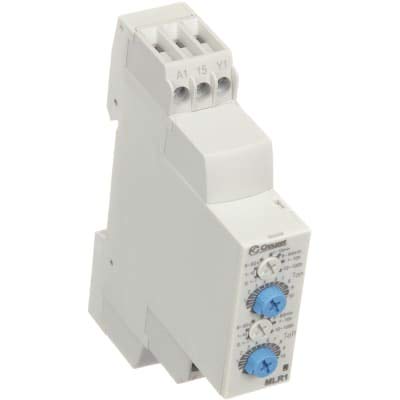
Figure 1: Front view of the Crouzet MLR1 Timer Relay. This image displays the compact, light-grey housing of the timer relay. Visible are the screw terminals at the top, labeled A1, 15, and Y1, indicating connection points. Below the terminals, on the front face, are two blue rotary adjustment dials with white markings, used for setting the time range and value. The Crouzet logo is also visible on the upper right side of the front panel.
Key Features:
- Function L: Delay on Energization
- Wide voltage range: 24VDC and 24-240VAC
- Compact DIN rail mountable design
- Adjustable time ranges and settings
4. Setup and Installation
Before installation, ensure all power is disconnected from the circuit. The MLR1 timer relay is designed for mounting on a standard DIN rail.
4.1. Mounting
- Locate a suitable DIN rail within your control panel or enclosure.
- Align the top clip of the MLR1 with the top edge of the DIN rail.
- Press the bottom of the relay firmly onto the DIN rail until it clicks into place.
- Ensure the relay is securely fastened and does not wobble.
4.2. Wiring Connections
Refer to the wiring diagram provided with your specific unit or the product datasheet for detailed connection instructions. General connections are as follows:
- A1: Power Supply Input (Positive for DC, Line for AC)
- A2: Power Supply Return (Negative for DC, Neutral for AC) - Note: A2 is typically on the opposite side or bottom, not explicitly visible in the provided image but standard for relays.
- 15: Common contact for the output relay.
- 16: Normally Closed (NC) contact of the output relay.
- 18: Normally Open (NO) contact of the output relay.
- Y1: Control Input (e.g., for reset or gate function, depending on specific model variant and function). For Function L, Y1 might not be used or might serve a specific control purpose.
Ensure all connections are tight and secure to prevent loose contacts and potential hazards.
5. Operating Instructions
The MLR1 timer relay operates with Function L, which is a "Delay on Energization" function. This means the output relay will energize (change state) after a set time delay once power is applied to the A1/A2 terminals.
5.1. Setting the Time Delay
The MLR1 features two rotary dials on its front face for setting the time delay:
- Upper Dial (Time Range Selection): This dial selects the overall time range (e.g., seconds, minutes, hours). Rotate this dial to the desired range. Common ranges include 0.1s-1s, 1s-10s, 10s-100s, 1min-10min, 10min-100min, 1h-10h, etc.
- Lower Dial (Time Value Adjustment): This dial fine-tunes the specific time value within the selected range. For example, if the upper dial is set to "1s-10s", the lower dial allows you to set a value from 1 to 10 seconds.
To set the desired delay, first select the appropriate time range, then adjust the time value within that range. The output relay will switch after this set delay once the input power is applied.
6. Maintenance
The Crouzet MLR1 Timer Relay is designed for long-term, maintenance-free operation under normal conditions. However, periodic inspection is recommended.
- Cleaning: Keep the device clean and free from dust and debris. Use a soft, dry cloth for cleaning. Do not use abrasive cleaners or solvents.
- Inspection: Periodically check wiring connections for tightness and signs of wear or corrosion. Ensure the relay is securely mounted.
- No User-Serviceable Parts: Do not attempt to open or repair the device. Refer all servicing to qualified technicians.
7. Troubleshooting
If you experience issues with your MLR1 Timer Relay, consider the following common troubleshooting steps:
| Problem | Possible Cause | Solution |
|---|---|---|
| Relay does not energize. | No power supply; Incorrect wiring; Faulty unit. | Check power supply to A1/A2 terminals; Verify wiring against diagram; Replace unit if faulty. |
| Incorrect time delay. | Dials set incorrectly; External interference. | Re-check time range and value settings; Ensure stable power supply and minimize electrical noise. |
| Relay energizes immediately. | Incorrect function selected (if multi-function); Internal fault. | Verify the model is indeed Function L; Contact support if issue persists. |
If troubleshooting steps do not resolve the issue, contact Crouzet Automation technical support.
8. Specifications
| Attribute | Value |
|---|---|
| Model | MLR1 |
| Function | L (Delay on Energization) |
| Supply Voltage | 24VDC, 24-240VAC |
| Manufacturer | CROUZET AUTOMATION |
| UPC | 709081477168, 709081477908 |
| Date First Available | March 16, 2021 |
9. Warranty and Support
Crouzet Automation products are manufactured to high quality standards and are typically covered by a manufacturer's warranty against defects in materials and workmanship. For specific warranty terms and conditions, please refer to the documentation included with your purchase or visit the official Crouzet Automation website.
For technical assistance, product inquiries, or warranty claims, please contact Crouzet Automation customer support. Contact information can usually be found on their official website or on the product packaging.
Related documentsMLR1


Ask a question about this manual
Ask about setup, troubleshooting, compatibility, parts, safety, or missing instructions. Manuals+ will review the question and use this page’s manual context to help answer it.