
1. Introduction
Thank you for purchasing the Trevi CMP 588 DAB Portable Stereo System. This manual provides essential information for the safe and correct operation of your device. Please read it thoroughly before use and retain it for future reference.
The Trevi CMP 588 DAB is a versatile portable stereo system featuring DAB/DAB+ and FM radio with RDS, a CD/MP3 player, USB input, AUX-in, Bluetooth connectivity, and a headphone jack, all designed for an enhanced audio experience.
2. Safety Information
- Power Source: Use only the specified power adapter or batteries. Ensure the voltage matches the requirements of the unit.
- Water and Moisture: Do not expose the unit to rain, moisture, or immerse it in water. Avoid placing objects filled with liquids, such as vases, on the unit.
- Ventilation: Ensure adequate ventilation. Do not block ventilation openings.
- Heat: Keep the unit away from heat sources such as radiators, heat registers, stoves, or other apparatus (including amplifiers) that produce heat.
- Cleaning: Unplug the unit from the wall outlet before cleaning. Use a soft, dry cloth. Do not use liquid cleaners or aerosol cleaners.
- Servicing: Do not attempt to service this product yourself. Refer all servicing to qualified service personnel.
- CD Player: Never look directly into the laser beam.
3. Package Contents
Verify that all items are present and in good condition:
- Trevi CMP 588 DAB Portable Stereo System
- AC Power Cable
- Remote Control
- User Manual (this document)
4. Product Features
- DAB/DAB+ and FM Radio with RDS
- High Readability Dot Matrix Display
- CD Player (supports CD-DA, MP3)
- USB Input for MP3 Playback
- AUX-in for external audio devices
- Bluetooth Connectivity
- Headphone Jack
- Portable design with carry handle
- Remote Control included
5. Controls and Connections

Figure 1: Front view of the Trevi CMP 588 DAB, showing speakers, display, and main controls.
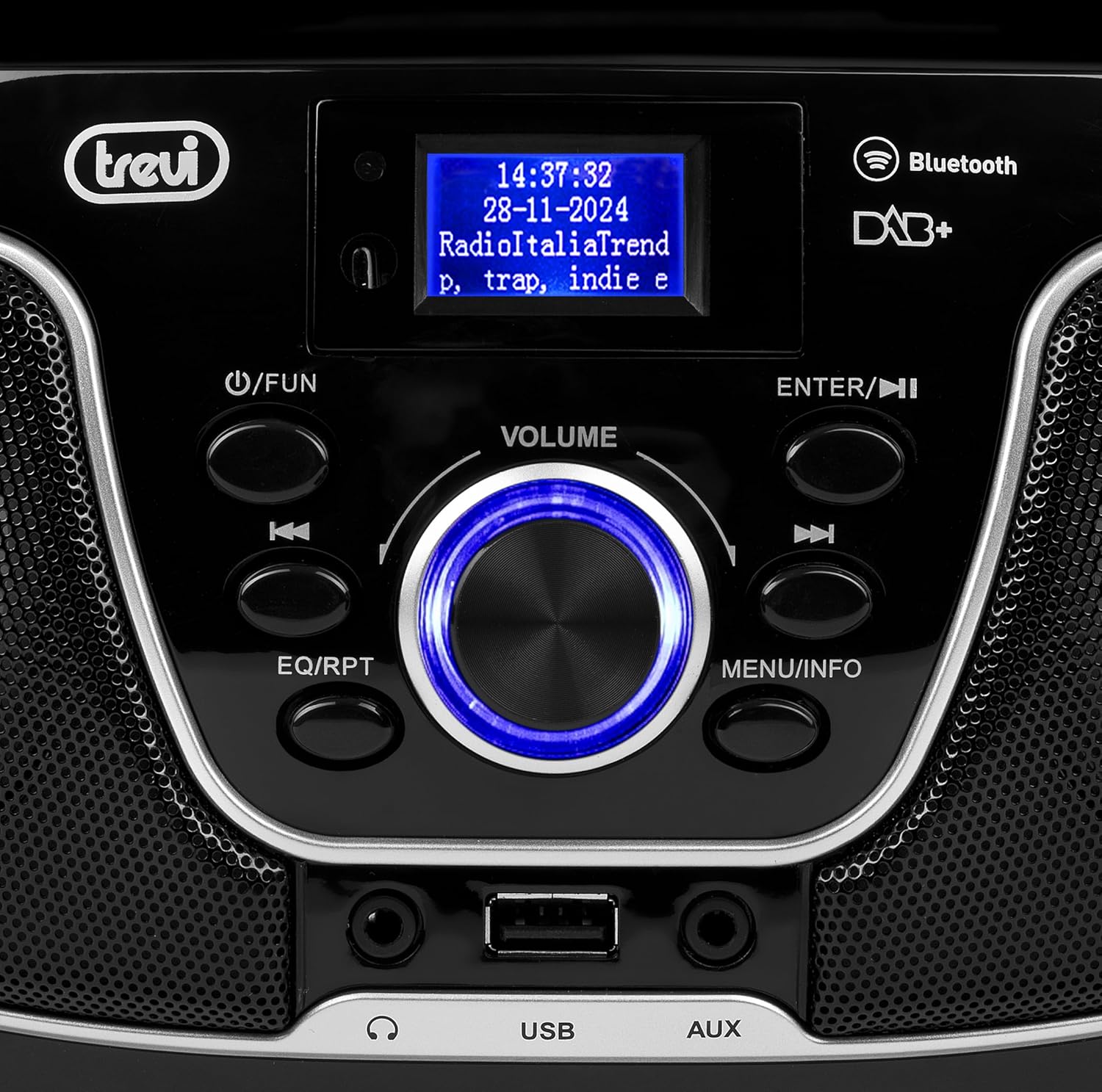
Figure 2: Detailed view of the control panel, including power, function, volume knob, and navigation buttons.
Front Panel Controls:
- POWER / FUN button: Press to turn on/off, press to switch functions (CD/USB/DAB/FM/Bluetooth/AUX).
- VOLUME knob: Rotate to adjust volume. Press to confirm selections.
- ENTER / ►►I button: Confirm selection / Skip to next track/station.
- I▼▼ / EQ/RPT button: Skip to previous track/station / Equalizer settings / Repeat mode.
- MENU / INFO button: Access menu / Display information.
- USB Port: Connect USB storage devices for MP3 playback.
- AUX-in Jack: Connect external audio devices.
- Headphone Jack: Connect headphones for private listening.

Figure 3: Rear view of the Trevi CMP 588 DAB, showing the power input and telescopic antenna.
Rear Panel Connections:
- AC Power Input: Connect the supplied AC power cable.
- Telescopic Antenna: Extend for optimal radio reception.

Figure 4: Remote control for the Trevi CMP 588 DAB, showing various function buttons.
Remote Control Functions:
- STANDBY: Power on/off.
- FUNC: Switch between modes (CD, USB, DAB, FM, Bluetooth, AUX).
- MUTE: Mute/unmute audio.
- RPT: Repeat playback mode.
- SCAN: Auto scan for radio stations.
- F+/CH+, F-/CH-: Navigate folders/channels.
- EQ: Equalizer settings.
- PLAY/PAUSE (►II): Play/pause playback.
- PREV/TUN- (▼▼): Previous track/tune down.
- NEXT/TUN+ (►►): Next track/tune up.
- STOP (■): Stop playback.
- MENU: Access menu.
- INFO: Display information.
- PROG: Program tracks/stations.
- VOL+ / VOL-: Adjust volume.
6. Setup
6.1 Power Connection
- AC Power: Connect the supplied AC power cable to the AC power input on the rear of the unit, then plug the other end into a wall outlet.
- Battery Operation (Optional): For portable use, insert 6 x C-size batteries (not included) into the battery compartment on the bottom of the unit. Ensure correct polarity.
6.2 Initial Power On
Press the POWER / FUN button on the unit or STANDBY button on the remote control to turn on the system. The display will light up.
6.3 Setting Up the Antenna
For optimal radio reception, fully extend the telescopic antenna located at the rear of the unit. Adjust its position for the best signal.
7. Operating Instructions
7.1 DAB/DAB+ Radio Operation
- Press the POWER / FUN button repeatedly until "DAB" mode is selected.
- The unit will automatically scan for available DAB/DAB+ stations on first use. To perform a manual scan, press the MENU button, navigate to "Full Scan" and press ENTER.
- Once scanning is complete, use the ▼▼ or ►► buttons to browse through the available stations. Press ENTER to select a station.
- Press the INFO button to cycle through different information displays (e.g., program type, signal strength, time).
7.2 FM Radio Operation
- Press the POWER / FUN button repeatedly until "FM" mode is selected.
- To auto-scan and store stations, press the SCAN button on the remote. The unit will scan and save strong signals.
- To manually tune, press and hold the ▼▼ or ►► buttons to search for the next available station. Press briefly to fine-tune the frequency.
- The RDS function will display station information (if available).
7.3 CD/MP3 Playback

Figure 5: Top view of the Trevi CMP 588 DAB with the CD compartment open, ready for disc insertion.
- Open the CD compartment cover.
- Place a CD (CD-DA or MP3 CD) onto the spindle with the label side facing up.
- Close the CD compartment cover.
- Press the POWER / FUN button repeatedly until "CD" mode is selected.
- The unit will read the disc. Press PLAY/PAUSE (►II) to start playback.
- Use ▼▼ or ►► to skip tracks. Press and hold to fast forward/rewind.
- Press STOP (■) to stop playback.
7.4 USB Playback
- Insert a USB flash drive containing MP3 files into the USB port.
- Press the POWER / FUN button repeatedly until "USB" mode is selected.
- The unit will automatically detect and begin playing MP3 files.
- Use ▼▼ or ►► to skip tracks.
7.5 Bluetooth Pairing and Playback
- Press the POWER / FUN button repeatedly until "Bluetooth" mode is selected. The display will show "BT" or "PAIRING".
- Enable Bluetooth on your mobile device (smartphone, tablet, etc.).
- Search for available devices and select "TREVI CMP 588 DAB" from the list.
- Once paired, you can play audio from your device through the stereo system.
- Use the controls on your mobile device or the stereo system to manage playback.
7.6 AUX-in Operation
- Connect an external audio device (e.g., MP3 player, smartphone) to the AUX-in jack using a 3.5mm audio cable (not included).
- Press the POWER / FUN button repeatedly until "AUX" mode is selected.
- Play audio from your connected device. The volume can be controlled via both the stereo system and the external device.
8. Maintenance
8.1 Cleaning the Unit
Wipe the exterior of the unit with a soft, dry cloth. Do not use abrasive cleaners, waxes, or solvents as they may damage the finish. Ensure the unit is unplugged before cleaning.
8.2 CD Lens Care
If the CD player experiences reading errors, the lens may be dirty. Use a commercially available CD lens cleaner to clean the lens. Do not touch the lens with your fingers.
8.3 Storage
If the unit will not be used for an extended period, remove the batteries (if applicable) and unplug the power cable. Store the unit in a cool, dry place away from direct sunlight and extreme temperatures.
9. Troubleshooting
| Problem | Possible Cause | Solution |
|---|---|---|
| No power | Power cable not connected; Batteries depleted or incorrectly inserted. | Check power cable connection; Replace batteries or ensure correct polarity. |
| No sound | Volume too low; Mute function active; Incorrect source selected. | Increase volume; Deactivate mute; Select correct function (CD, USB, DAB, FM, BT, AUX). |
| Poor radio reception | Antenna not extended or positioned incorrectly; Weak signal area. | Fully extend and adjust the telescopic antenna; Try moving the unit to a different location. |
| CD/USB not playing | Disc dirty/scratched; Incorrect file format on USB; USB drive not properly inserted. | Clean or replace disc; Ensure MP3 format for USB; Reinsert USB drive. |
| Bluetooth pairing failed | Device too far; Bluetooth not enabled on source device; Unit not in pairing mode. | Move devices closer; Enable Bluetooth on source device; Ensure unit is in Bluetooth mode and searching. |
10. Specifications
- Model: CM 588 DAB
- Power Source: AC 230V ~ 50Hz or 6 x C-size batteries (not included)
- Power Consumption: 15 Watts
- Speaker Type: Stereo (2 speakers)
- Connectivity: Bluetooth, USB, AUX-in
- Supported Audio Formats: CD audio (CD-DA), MP3
- Radio Frequencies: DAB/DAB+, FM with RDS
- Dimensions (L x W x H): 50 x 50 x 28 cm (approximate)
- Weight: 1.5 Kilograms (approximate)
- Color: Black
11. Warranty and Support
This product is covered by a standard manufacturer's warranty. Please refer to the warranty card included in your package for specific terms and conditions, including the warranty period and coverage details.
For technical support, service, or warranty claims, please contact your retailer or the official Trevi customer service. Contact information can typically be found on the Trevi website or in the product packaging.
Please retain your proof of purchase (receipt) for any warranty-related inquiries.


