
1. Introduction
This manual provides essential information for the safe and efficient operation of your BSL-22112V 22-inch LED TV. Please read it thoroughly before using the product and retain it for future reference. This television features a Full HD 1920x1080p LED screen, an integrated DVB-T2 tuner, a USB multimedia player, and versatile power options (12V and 220V), making it suitable for various environments, including homes and recreational vehicles.

Image 1.1: The BSL-22112V TV, designed for flexible use, including in recreational vehicles with 12V power.
2. Safety Information
Always observe the following safety precautions to prevent electric shock, fire, or damage to the unit:
- Do not expose the TV to rain or moisture.
- Ensure proper ventilation; do not block ventilation openings.
- Use only the power adapters provided or specified for this TV (12V and 220V).
- Avoid placing the TV on unstable surfaces.
- Do not open the TV casing; refer all servicing to qualified personnel.
- Keep batteries for the remote control out of reach of children.
3. Package Contents
Verify that all items are present in the box:
- BSL-22112V 22-inch LED TV
- Remote Control (requires 2 AAA batteries, not always included)
- 220V AC Power Adapter
- 12V DC Car Adapter (for vehicle use)
- User Manual (this document)
- TV Stand (if not pre-attached)
4. Product Overview
4.1. Rear View and Connections
The rear panel of your TV features various ports for connecting external devices and on-device controls.

Image 4.1: Detailed view of the TV's rear connections.
- DC 12V Input: For connecting the 12V power adapter.
- VGA: Connect to a computer for use as a monitor.
- PC Audio In: Audio input for VGA connection.
- AV In (CVBS): Composite video and stereo audio input (Yellow, White, Red RCA).
- DVB-T2/S2: Antenna input for digital terrestrial or satellite television.
- Coaxial: Digital audio output.
- HDMI: High-Definition Multimedia Interface for digital video and audio.
- USB 2.0: For connecting USB storage devices for multimedia playback.
- Headphone: 3.5mm audio output for headphones.
4.2. On-Device Controls
Buttons located on the side or rear of the TV allow basic control without the remote.

Image 4.2: On-device control buttons.
- POWER: Turns the TV on or off.
- MENU: Accesses the main menu.
- CH+/CH-: Changes channels or navigates menu options.
- VOL+/VOL-: Adjusts volume or navigates menu options.
- SOURCE: Selects input source.
5. Setup
5.1. Attaching the Stand
If your TV stand is not pre-attached, carefully place the TV face down on a soft, clean surface. Align the stand with the mounting holes on the bottom of the TV and secure it with the provided screws.
5.2. Mounting the TV (VESA)
The TV supports VESA 7.5cm x 7.5cm mounting standards for wall or arm mounts. Ensure you use appropriate screws and a compatible VESA bracket (not included).

Image 5.1: VESA mounting compatibility (7.5cm x 7.5cm).
5.3. Connecting Power
Your TV can be powered by either 220V AC or 12V DC:
- For 220V AC (Home Use): Connect the 220V AC power adapter to the TV's DC 12V input and then plug it into a standard wall outlet.
- For 12V DC (Vehicle Use): Connect the 12V DC car adapter to the TV's DC 12V input and then plug it into your vehicle's 12V power socket.
5.4. Connecting Antenna
Connect a DVB-T2 compatible antenna cable to the DVB-T2/S2 input on the rear of the TV for receiving digital terrestrial television broadcasts.
5.5. Connecting External Devices
Use the appropriate ports (HDMI, AV, VGA, USB) to connect devices such as DVD players, gaming consoles, or USB storage drives.
6. Operation
6.1. Powering On/Off
Press the POWER button on the remote control or on the TV to turn the unit on or off.
6.2. Initial Setup and Channel Scan
Upon first power-on, the TV will guide you through the initial setup process, including language selection and automatic channel scanning for DVB-T2 broadcasts.

Image 6.1: The TV features an integrated DVB-T2 digital tuner.
6.3. Using the Remote Control
The remote control provides full functionality. Insert 2 AAA batteries (not included) into the battery compartment, observing polarity.
6.4. Input Source Selection
Press the SOURCE button on the remote or TV to cycle through available input sources (DTV, ATV, HDMI, AV, VGA, USB).
6.5. Media Playback via USB
Insert a USB storage device into the USB 2.0 port. Use the remote control to navigate to the USB input source and select the desired media files (photos, music, videos) for playback.
7. Maintenance
7.1. Cleaning the TV
- Always unplug the TV before cleaning.
- Use a soft, dry cloth to wipe the screen and cabinet.
- For stubborn marks, lightly dampen the cloth with water or a mild, non-abrasive screen cleaner.
- Never spray liquids directly onto the TV.
7.2. Storage
If storing the TV for an extended period, disconnect it from power, remove batteries from the remote, and store it in a cool, dry place away from direct sunlight and extreme temperatures.
8. Troubleshooting
Refer to the following table for common issues and their solutions:
| Problem | Possible Cause | Solution |
|---|---|---|
| No power | Power cable disconnected, no power from outlet/12V source. | Check power connections. Ensure outlet/12V source is active. |
| No signal | Incorrect input source, antenna not connected/configured, external device off. | Select correct input source. Check antenna connection and perform channel scan. Ensure external device is powered on. |
| Poor picture quality | Weak signal, incorrect picture settings, restricted viewing angle. | Adjust antenna position. Reset picture settings to default. Ensure viewing from a direct angle. |
| Poor sound quality | Volume too low, incorrect audio settings, external speakers not connected. | Increase volume. Check audio settings. Ensure external speakers are properly connected if used. |
| Remote control not working | Dead batteries, obstruction, remote not pointed at TV. | Replace batteries. Remove obstructions. Point remote directly at the TV's IR sensor. |
9. Specifications
| Feature | Specification |
|---|---|
| Model Number | BSL-22112V |
| Screen Size | 22 Inches (56 cm diagonal) |
| Display Technology | LED |
| Resolution | 1920 x 1080p (Full HD) |
| Aspect Ratio | 16:9 |
| Refresh Rate | 60 Hz |
| Connectivity | HDMI, USB 2.0, AV, VGA, PC Audio In, Headphone, Coaxial, DVB-T2/S2 |
| USB Ports | 1 |
| Power Supply | 12V DC / 220V AC (with included adapter) |
| Included Components | Remote Control |
| VESA Compatibility | 7.5cm x 7.5cm |
| Product Dimensions (W x H x D) | Approx. 51 cm x 31 cm x 8 cm (without stand) |

Image 9.1: Front dimensions of the TV.

Image 9.2: Side dimensions of the TV.
10. Energy Efficiency
The BSL-22112V TV has an energy efficiency rating of F. For detailed information regarding the product's energy consumption and other related data, please refer to the official EU EPREL database.
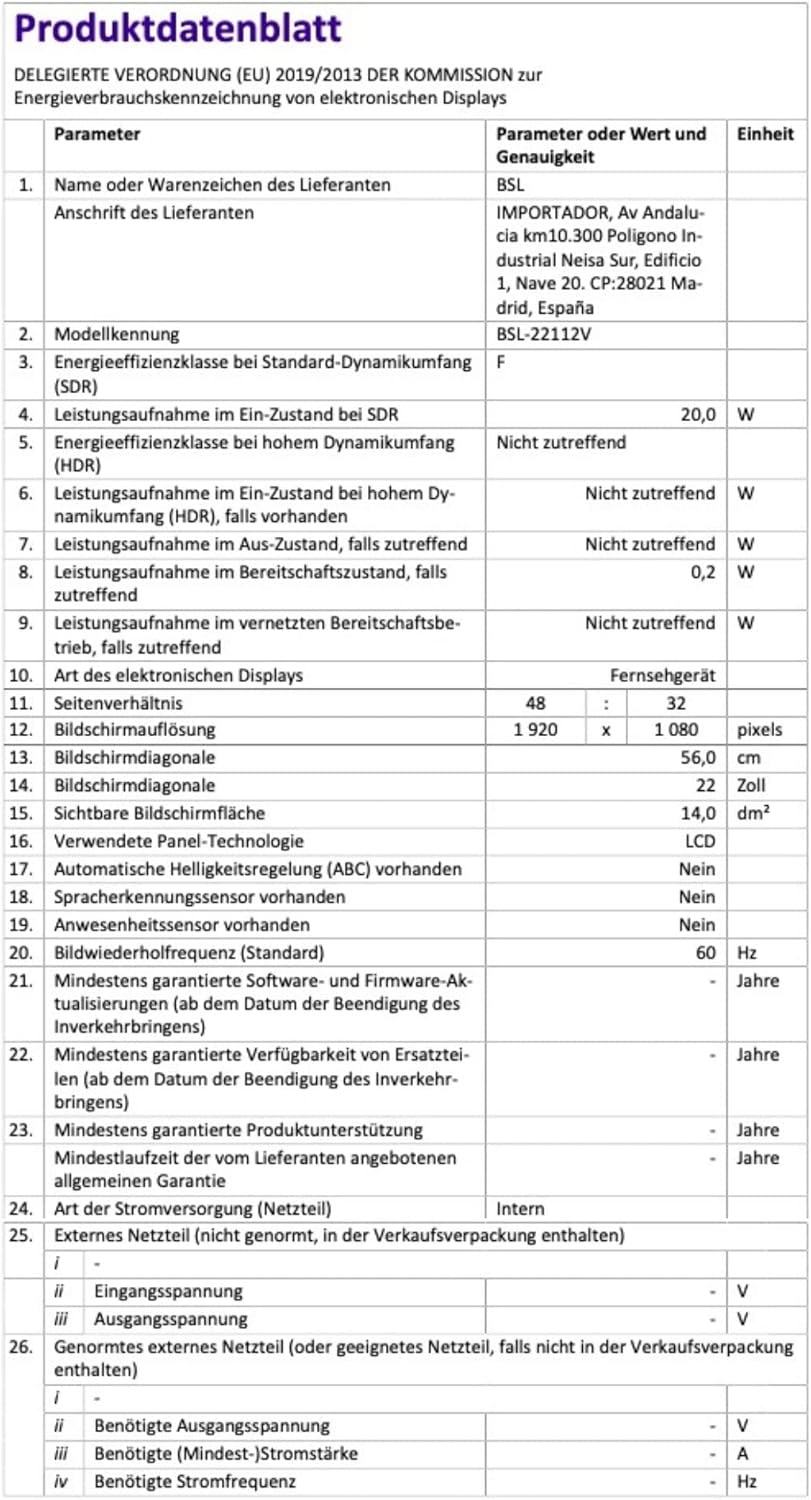
Image 10.1: EU Energy Label for BSL-22112V. For more details, visit the EPREL database.
11. Warranty and Support
Information regarding warranty coverage and customer support for the BSL-22112V TV is typically provided at the point of purchase or within separate documentation included with your product. Please consult these resources for details on warranty periods, service procedures, and contact information for technical assistance.


