
Product Overview
The Lowrance HDS-Live Fish Finder is a state-of-the-art marine electronics device designed to enhance your fishing and navigation experience. It features a multi-touch screen, compatibility with Live Sonar, and comes preloaded with C-MAP US Enhanced Mapping. Key features include Active Imaging 3-in-1 (CHIRP/SideScan/DownScan), LiveSight real-time sonar compatibility, smartphone notifications, and wireless/Bluetooth connectivity.
This manual provides essential information for the setup, operation, maintenance, and troubleshooting of your Lowrance HDS-Live unit.

Figure 1: Front view of the Lowrance HDS-Live Fish Finder unit, showcasing its multi-touch display and control buttons.
Setup and Installation
Proper installation is crucial for optimal performance of your HDS-Live unit. The package includes the main unit, mounting bracket, transducer, and necessary cables and hardware.
Unboxing and Components
Upon unboxing, verify all components are present:
- Lowrance HDS-Live Display Unit
- Mounting Bracket with Swivel
- Active Imaging 3-in-1 Transducer (if included in package)
- Power Cable
- Installation Manuals and Documentation
- Mounting Hardware (screws, bolts, etc.)

Figure 2: The Lowrance HDS-Live unit displaying multiple sonar views simultaneously, including SideScan and DownScan.
Mounting the Display Unit
- Select a suitable location on your boat's dashboard or console that provides clear visibility and easy access.
- Use the provided mounting bracket as a template to mark drill holes.
- Drill pilot holes and secure the mounting bracket using the supplied hardware.
- Attach the HDS-Live display unit to the mounting bracket, ensuring it is firmly secured.
Transducer Installation
The Active Imaging 3-in-1 transducer provides high-resolution sonar data. Refer to the dedicated transducer installation manual for detailed instructions, as placement is critical for accurate readings.
- Ensure the transducer is mounted in a location with minimal water turbulence.
- Route the transducer cable carefully, avoiding sharp bends or interference with other electrical systems.
- Connect the transducer cable to the corresponding port on the back of the HDS-Live unit.
Power Connection
Connect the power cable to a 12 Volt DC power source on your boat. Ensure proper polarity (red to positive, black to negative) and use an inline fuse as recommended in the installation guide.
Operating Your HDS-Live
The HDS-Live features an intuitive multi-touch interface and a responsive processor for quick navigation between functions.
Powering On and Main Screen
Press and hold the power button to turn on the unit. The main screen displays various application icons for quick access to different functions like Chart, Sonar, SideScan, DownScan, and more.
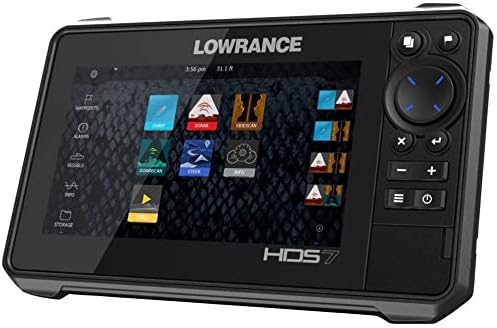
Figure 3: The main menu interface of the Lowrance HDS-Live, showing various application icons for different functions.
Sonar Functions
The HDS-Live offers advanced sonar capabilities:
- CHIRP Sonar: Provides traditional sonar views with excellent target separation and clarity.
- SideScan: Offers a wide, high-resolution view of the bottom and structure to the sides of your boat. Ideal for locating fish-holding structures.
- DownScan: Delivers a picture-like view of the underwater world directly beneath your boat, making it easy to identify fish and structure.
- 3D Sonar: Creates a three-dimensional representation of the underwater environment, allowing for a comprehensive understanding of depth and structure.
- FishReveal: Combines the excellent target separation of CHIRP sonar with the high-resolution views of DownScan Imaging on one screen, making fish easier to identify.
Video 1: An overview of the Lowrance HDS LIVE Series of Fish Finders, highlighting various features and capabilities.
Chartplotter and Navigation
The preloaded C-MAP US Enhanced Mapping provides detailed charts for navigation. You can create waypoints, set routes, and track your position with the built-in GPS.
- Waypoints: Mark specific locations of interest, such as fishing spots or hazards.
- Routes: Plan and follow predefined paths for efficient navigation.
- Trackback: Review your sonar history to pinpoint key areas or structures you may have missed.
Connectivity
The HDS-Live offers extensive connectivity options:
- Wireless and Bluetooth: Connect to compatible devices for software updates, data transfer, and smartphone notifications.
- NMEA 2000: Integrate with other marine electronics such as engines, autopilots, and radar systems for a comprehensive networked system.
- Ethernet: Connect multiple Lowrance displays to share sonar, chart, and radar data across your vessel.
Video 2: A demonstration of the Lowrance HDS 12 Live Interface, showcasing its responsiveness and various display modes.
Maintenance
Regular maintenance ensures the longevity and optimal performance of your HDS-Live unit.
- Cleaning: Wipe the screen and unit exterior with a soft, damp cloth. Avoid abrasive cleaners or solvents.
- Software Updates: Periodically check the Lowrance website for software updates. Updates can improve performance, add new features, and fix bugs. Use the wireless connectivity feature for convenient updates.
- Cable Inspection: Regularly inspect all cables and connections for signs of wear, corrosion, or damage. Ensure all connections are secure.
- Transducer Care: Keep the transducer face clean and free of marine growth or debris.
Troubleshooting
If you encounter issues with your HDS-Live unit, try the following steps before contacting support:
- Unit Not Powering On:
- Check power cable connections and ensure they are secure.
- Verify the fuse in the power line is intact and not blown.
- Confirm the boat's battery has sufficient charge.
- No Sonar Readings:
- Ensure the transducer is properly connected to the unit.
- Check for any obstructions on the transducer face.
- Verify sonar settings (e.g., frequency, range) are appropriate for current conditions.
- Screen Freezing or Unresponsive:
- Perform a soft reset by turning the unit off and on again.
- If the issue persists, a factory reset might be necessary (refer to the full manual for instructions, as this will erase custom settings).
- Ensure the software is up to date.
- GPS Not Acquiring Signal:
- Ensure the unit has a clear view of the sky.
- Check for any nearby electronic interference.
Specifications
| Feature | Detail |
|---|---|
| Brand | Lowrance |
| Model Name | 000-14416-001 |
| Power Source | 12 Volt DC |
| Screen Size | 7 Inches |
| Display Type | LCD |
| Item Weight | 8.7 Pounds |
| Product Dimensions | 12.06"L x 9.06"W x 9.84"H |
| Mounting Type | Adjustable or Portable Mount |
| Color | Black |
| Material | Plastic |
Warranty and Support
Warranty Information
The Lowrance HDS-Live unit comes with a 2-year warranty. Please retain your proof of purchase for warranty claims.
Customer Support
For further assistance, technical support, or warranty service, please visit the official Lowrance website or contact their customer service department. Detailed contact information can be found in the full product manual or on the Lowrance website.


