
devolo 8783
devolo Magic 2 LAN Powerline Adapter Instruction Manual
Model: 8783
1. Product Overview
The devolo Magic 2 LAN Powerline Add-on is designed to expand your existing devolo Magic network, providing a reliable and high-speed internet connection through your home's electrical wiring. Utilizing G.hn Wave 2 technology, this single adapter offers speeds up to 2000 Mbps and features a Gigabit LAN port for direct device connection. It's ideal for extending network coverage to previously unreachable rooms, ensuring stable performance for multimedia streaming and online activities.

Figure 1: The devolo Magic 2 LAN Powerline Adapter and its retail packaging.
2. Package Contents
Ensure all items are present in the package:
- 1 x devolo Magic 2 LAN Powerline Adapter
- 1 x Ethernet Cable
- 1 x Installation Guide (this manual)
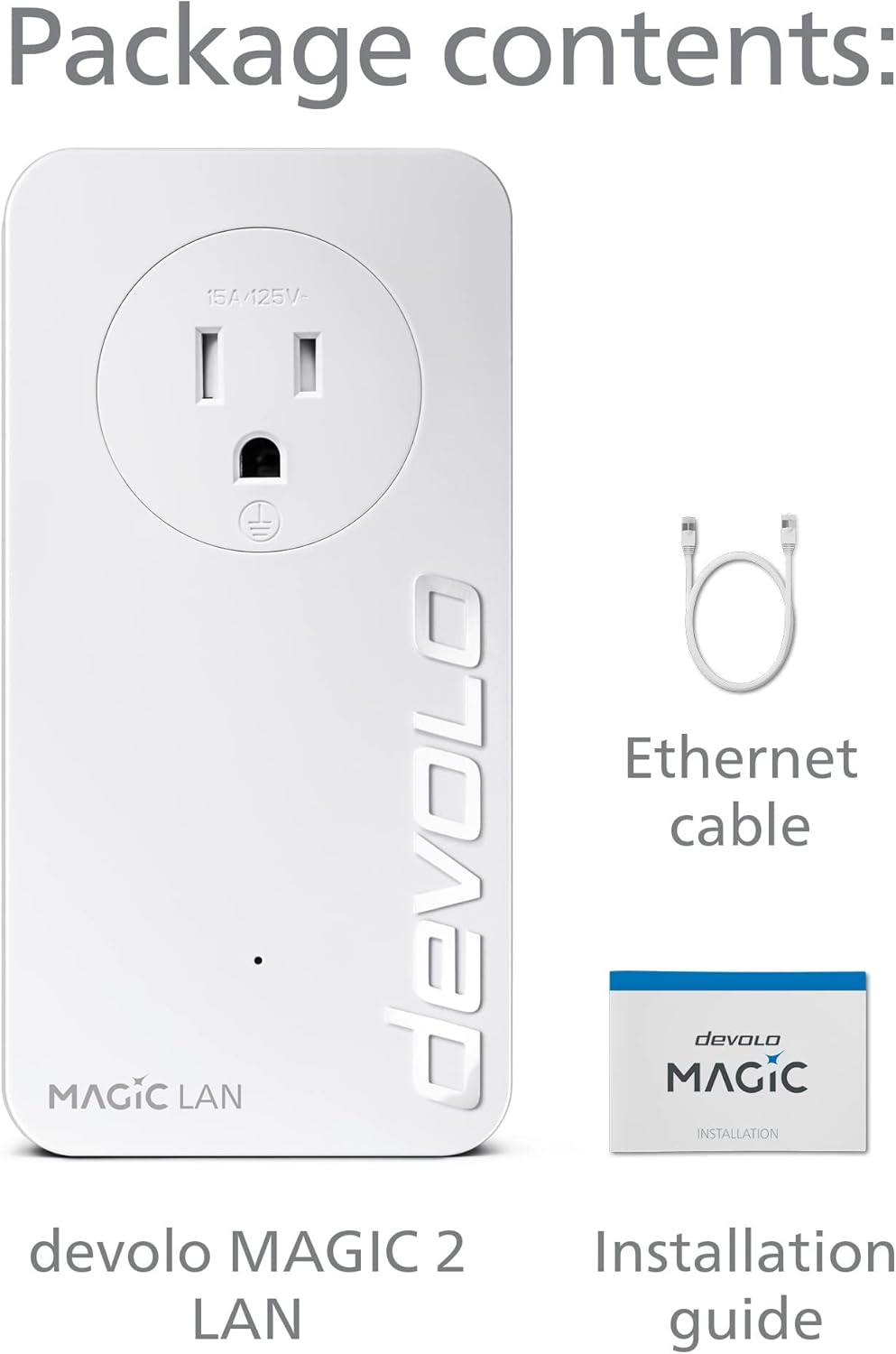
Figure 2: Contents of the devolo Magic 2 LAN package.
3. Setup Instructions
Follow these steps to set up your devolo Magic 2 LAN Powerline Add-on:
- Connect the Main Adapter: Plug one devolo Magic 2 LAN adapter directly into a wall outlet near your internet router. Avoid using power strips or extension cords as they can interfere with the powerline signal.
- Connect to Router: Use the provided Ethernet cable to connect the Gigabit LAN port on the devolo Magic 2 LAN adapter to an available LAN port on your internet router.
- Plug in the Add-on Adapter: Take the second devolo Magic 2 LAN adapter (the add-on unit) and plug it directly into a wall outlet in the room where you need network access.
- Establish Connection: The adapters will automatically connect and establish a secure powerline network. The Powerline LED on both adapters should turn solid white, indicating a successful connection. If the LED flashes or turns red, refer to the Troubleshooting section.
- Connect Your Device: Once the connection is established, use an Ethernet cable to connect your device (e.g., computer, smart TV, gaming console) to the Gigabit LAN port on the add-on adapter.

Figure 3: Example of a devolo Magic powerline network setup within a home, showing adapters connected to wall outlets and devices.
For a visual guide on the setup process, please watch the official devolo powerline adapter video below:
Video 1: Official devolo powerline adapter overview and setup guide. This video demonstrates the ease of setting up a devolo powerline network and its benefits for stable internet connectivity throughout your home.
4. Operating Instructions
Once installed, the devolo Magic 2 LAN adapter operates automatically. It extends your network by transmitting data over your home's electrical wiring.
- Powerline Connection: The adapter continuously uses the electrical wiring to create a high-speed network bridge.
- Ethernet Port: Use the integrated Gigabit LAN port to connect any wired network device. This provides a stable and fast connection for devices like desktop computers, smart TVs, gaming consoles, or network-attached storage (NAS).
- Integrated Power Socket: The adapter features an integrated electrical socket, allowing you to connect other electrical devices or power strips without losing a wall outlet. This ensures no power outlet is wasted.

Figure 4: The devolo Magic 2 LAN adapter features a passthrough electrical socket and a Gigabit Ethernet port.
5. Maintenance
To ensure optimal performance and longevity of your devolo Magic 2 LAN adapter:
- Cleaning: Use a soft, dry cloth to clean the adapter. Do not use liquid or aerosol cleaners.
- Placement: Always plug the adapter directly into a wall outlet. Avoid power strips, surge protectors, or extension cords, as these can significantly reduce performance or block the powerline signal entirely.
- Ventilation: Ensure the adapter is placed in a well-ventilated area and its ventilation slots are not obstructed.
- Firmware Updates: Periodically check for firmware updates using the devolo Home Network App or the devolo website to ensure your adapter has the latest features and performance improvements.
6. Troubleshooting
If you encounter issues with your devolo Magic 2 LAN adapter, try the following solutions:
| Problem | Possible Cause / Solution |
|---|---|
| Powerline LED is off or red. |
|
| Slow network speed. |
|
| Device not connecting via Ethernet. |
|
7. Specifications
| Feature | Detail |
|---|---|
| Brand | devolo |
| Model Number | 8783 |
| Data Transfer Rate | Up to 2000 Mbps (Powerline) |
| Powerline Standard | G.hn Wave 2 |
| Ethernet Ports | 1x Gigabit LAN Port |
| Integrated Socket | Yes (Passthrough) |
| Coverage | Up to 1,600 feet (approx. 400 meters) |
| Dimensions (LxWxH) | 5.12 x 2.6 x 1.65 inches |
| Weight | 15.6 ounces |
| Color | White |
8. Warranty and Support
devolo products come with a manufacturer's warranty. For specific warranty terms and conditions, please refer to the documentation included with your product or visit the official devolo website.
For technical support, frequently asked questions, and additional resources, please visit the devolo support page or contact their customer service directly. You can find contact information and support resources at the official devolo website: www.devolo.com.
Ask a question about this manual
Ask about setup, troubleshooting, compatibility, parts, safety, or missing instructions. Manuals+ will review the question and use this page’s manual context to help answer it.