
KZ KZ-SKS-Blue
KZ SKS True Wireless Earbuds User Manual
Model: KZ-SKS-Blue | Brand: KZ
Introduction
The KZ SKS True Wireless Earbuds offer a high-fidelity audio experience with advanced features designed for comfort and performance. Featuring Qualcomm Bluetooth 5.2 technology, a hybrid 1DD+1BA driver system, and touch controls, these earbuds are suitable for music, gaming, and daily use. This manual provides detailed instructions to help you get the most out of your KZ SKS earbuds.

Image: KZ SKS Hybrid True Wireless Stereo Earphone, showcasing the product name and type.
Package Contents
Before you begin, please ensure all items are present in the package:
- Earphone receiver (left and right earbuds)
- Charging case
- Silicone earplugs (various sizes)
- User Manual (this document)
Setup
1. Charging the Earbuds and Case
Upon first use, fully charge the earbuds and the charging case. Place the earbuds into the charging case. The indicator lights on the earbuds and/or case will show charging status. A full charge typically takes approximately 1-2 hours.

Image: The KZ SKS True Wireless Earbuds resting inside their charging case, indicating they are ready for charging or storage.
2. Bluetooth Pairing
- Ensure the charging case is charged and the earbuds are inside.
- Open the charging case lid. The earbuds will automatically enter pairing mode.
- On your device (smartphone, tablet, etc.), enable Bluetooth.
- Search for "KZ SKS" in the list of available Bluetooth devices.
- Select "KZ SKS" to connect. Once connected, a voice prompt will confirm successful pairing.
The KZ SKS utilizes Qualcomm Bluetooth 5.2 for a stable and efficient connection.

Image: A visual representation of the new generation QCC3040 Bluetooth 5.2 chip, highlighting its role in the earbuds' connectivity.
3. Single and Dual Ear Mode
The KZ SKS earbuds support seamless switching between single and dual ear modes. You can use either the left or right earbud independently. Simply take out one earbud for monaural mode, or take out both for binaural stereo sound. The earbuds will automatically adjust without additional operation.

Image: Hands holding a single earbud and the charging case, illustrating the independent use of each earbud.
Operating Instructions
Touch Controls
The KZ SKS earbuds feature intuitive touch controls for media playback and call management. Specific touch gestures may vary slightly, but common functions include:
- Play/Pause: Single tap on either earbud.
- Next Track: Double tap on the right earbud.
- Previous Track: Double tap on the left earbud.
- Answer/End Call: Single tap on either earbud.
- Reject Call: Long press on either earbud.
- Activate Voice Assistant: Triple tap on either earbud.
Game Mode
For an optimized gaming and video experience, the KZ SKS earbuds offer a high-performance mode with near-zero latency. This mode is ideal for ensuring audio and video synchronization during fast-paced activities.

Image: The KZ SKS earbuds and their charging case next to a smartphone displaying a game, emphasizing the high-performance, low-latency game mode.
Wearing the Earbuds
The earbuds are designed with an ergonomic shape to fit comfortably within the inner auricle, providing a stable and secure fit. This design also contributes to passive noise reduction by effectively isolating external noise.

Image: A person wearing the KZ SKS earbuds, highlighting their lightness, fashion-forward design, and ergonomic fit for comfortable wear.
Maintenance
Proper maintenance ensures the longevity and optimal performance of your KZ SKS earbuds.
- Cleaning: Regularly clean the earbuds, especially the ear tips and charging contacts, with a soft, dry, lint-free cloth. Do not use abrasive cleaners or solvents.
- Storage: When not in use, always store the earbuds in their charging case to protect them from dust and damage.
- Water Resistance: The earbuds are water resistant. However, they are not waterproof. Avoid submerging them in water or exposing them to heavy rain. Dry them thoroughly if they get wet.
Troubleshooting
If you encounter issues with your KZ SKS earbuds, try the following solutions:
| Problem | Possible Solution |
|---|---|
| Earbuds not pairing/connecting |
|
| Only one earbud working |
|
| Low volume or poor sound quality |
|
| Charging issues |
|
Specifications
Key technical specifications for the KZ SKS True Wireless Earbuds:
- Model Name: SKS
- Item Model Number: KZ-SKS-Blue
- Connectivity Technology: Wireless (Bluetooth)
- Wireless Communication Technology: Bluetooth 5.2
- Audio Driver Type: Hybrid Driver (1DD+1BA)
- Sensitivity: 116 dB
- Control Type: Media Control, Touch
- Noise Control: Sound Isolation (Passive Noise Reduction)
- Material: Plastic
- Item Weight: 55 Grams (total), 1.94 ounces
- Product Dimensions: 2.4 x 2.4 x 1.26 inches
- Batteries: 1 Lithium Polymer battery required (included)
- Water Resistance Level: Water Resistant
- Ear Placement: In Ear
- Form Factor: In Ear
- Recommended Uses: Audio Monitoring, Exercising, Gaming, Music, Travel
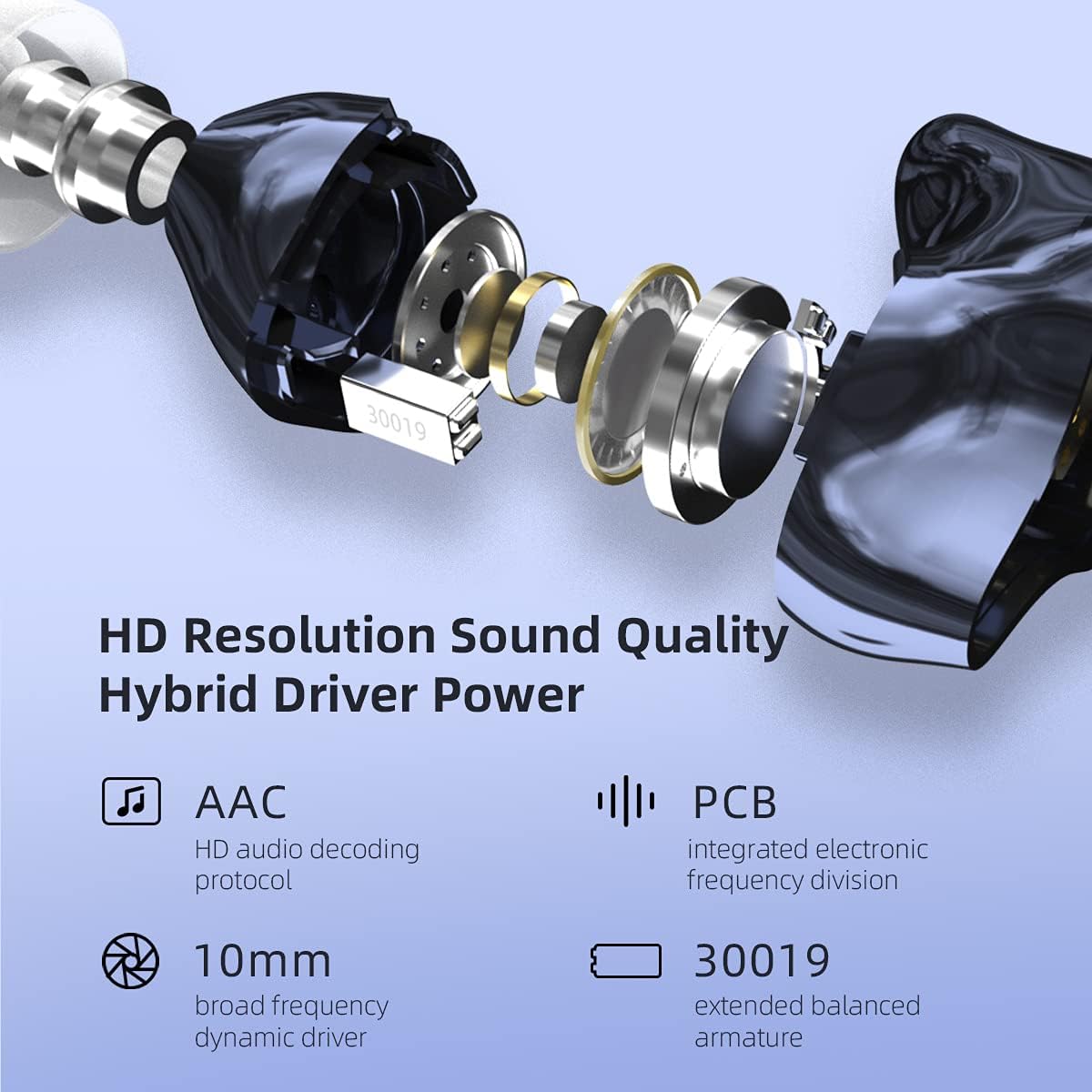
Image: An exploded view of the KZ SKS earbud, detailing its internal components including the 10mm dynamic driver and 30019 balanced armature, highlighting its HD resolution sound quality.
Official Product Video
Video: An official product video showcasing the features and design of the KZ SKS Bluetooth 5.2 Hybrid Earbuds.
Warranty and Support
KZ products are manufactured to high quality standards. For information regarding warranty coverage, please refer to the warranty card included with your product or visit the official KZ website. If you require technical support or have questions not covered in this manual, please contact KZ customer service through their official channels.
For more information, visit the KZ Store on Amazon.
Ask a question about this manual
Ask about setup, troubleshooting, compatibility, parts, safety, or missing instructions. Manuals+ will review the question and use this page’s manual context to help answer it.