
Important Safety Information
Please read and understand this entire manual before attempting to assemble, install, or operate this product. Failure to follow these instructions may result in electric shock, fire, or serious personal injury.
- Always turn off the power at the main circuit breaker before beginning installation.
- If you are not qualified to perform electrical installations, please contact a professional electrician.
- Ensure all electrical connections comply with local codes and ordinances.
- The mounting structure must be capable of supporting the weight of the fan (approximately 29.9 pounds).
- Do not bend the fan blade holders during assembly or installation.
- Keep children away from the fan during operation.
Package Contents
Verify that all components listed below are included in your package. If any parts are missing or damaged, please contact customer support.
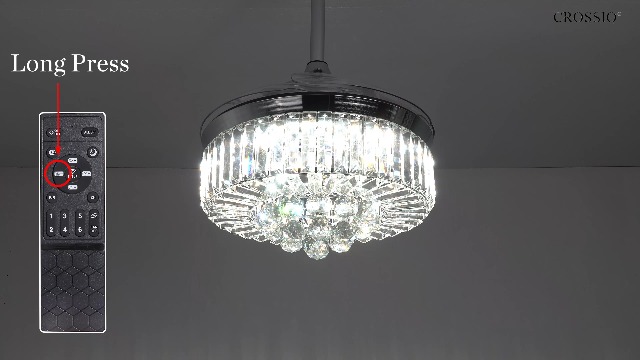
Image: All components of the CROSSIO Crystal Ceiling Fan laid out on a white surface, including the instruction manual, crystal balls, fan motor assembly, light shade, spare crystal bars, hardware bag, remote control, LED panel, LED driver, adapter cover, downrods, canopy, and mounting bracket.
- Instruction Manual
- Crystal Ball (multiple pieces)
- Fan Motor Assembly
- Light Shade (Crystal)
- Spare Crystal Bar
- Hardware Bag (screws, wire nuts, etc.)
- Remote Control
- LED Panel
- LED Driver
- Adapter Cover
- Downrod (5 inches)
- Long Downrod (10 inches)
- Canopy
- Mounting Bracket
Setup and Installation
Follow these steps carefully for proper installation. It is recommended to have two people for installation.
1. Pre-Installation
- Turn off power at the circuit breaker.
- Ensure the ceiling junction box is securely mounted and can support the fan's weight.
- Unpack all components and lay them out on a clean, soft surface to prevent scratches.
2. Assembly of Fan and Light Components
Refer to the official installation video for a visual guide.
Video: Official CROSSIO Crystal Ceiling Fan Light Installation Guide. This video demonstrates the step-by-step assembly and installation process of the ceiling fan, including attaching the light shade, LED panel, and crystal elements.
- Attach the LED panel to the fan motor assembly.
- Secure the crystal light shade to the fan motor assembly.
- Connect the downrod to the fan motor assembly, ensuring all wires are properly routed.
- Slide the canopy over the downrod.
3. Mounting the Fan
- Install the mounting bracket to the ceiling junction box using appropriate screws.
- Hang the fan assembly from the mounting bracket.
- Complete electrical wiring: Connect the fan's wires to the household wiring according to the wiring diagram in the manual. Ensure proper grounding.
- Secure the canopy to the mounting bracket.
4. Attaching Crystal Decorations
Carefully attach the crystal balls and bars to the light shade. Use the provided white gloves to avoid fingerprints.

Image: A close-up view of hands wearing white gloves attaching crystal balls to the bottom of the ceiling fan's light fixture, demonstrating the final decorative assembly step.
Operating Instructions
This fan can be controlled via the included remote control or a mobile application.
Remote Control Functions
Image: A detailed diagram of the remote control for the CROSSIO ceiling fan, highlighting buttons for light on/off, quick change light color, F-forward/R-reverse direction, six fan speeds (1-6), auto wind speeds, night mode, adjust color temperature, time setting, and all off.
- Light On/Off: Press the ON/OFF button to toggle the light.
- Quick Change Light Color: Press the K button to cycle through Warm White (2700K), Natural Light (4500K), and Cool White (6000K).
- Adjust Color Temperature: Use the Up/Down arrows next to the light icon to fine-tune the color temperature.
- Adjust Brightness: Use the Up/Down arrows next to the sun icon to dim or brighten the light.
- Fan Speed: Select from 6 wind speeds using buttons 1 through 6.
- Auto Wind Speeds: Press the FAN button for natural wind mode.
- Reversible Blades: Press F/R to change the fan direction (forward for summer, reverse for winter).
- Timer Function: Set the fan to turn off after 2, 4, or 8 hours using the respective buttons.
- Night Mode: Press the Moon icon for a low-light setting.
- All Off: Press the ALL OFF button to turn off both the fan and light. This also retracts the invisible blades.
Mobile App Control
The fan also supports control via a proprietary mobile application. Download the app from your device's app store and follow the in-app instructions for pairing.

Image: Illustration showing three control methods for the fan: a mobile app interface on a smartphone, the physical remote controller, and a wall switch (not included).
Key Features
- High-quality Materials: Constructed with K9 clear crystal and clear acrylic for durability and aesthetic appeal.
- LED Dimmable Light: Features an LED panel with 3-color changing options (2700K Warm White, 4500K Natural Light, 6000K Cool White). Brightness is also adjustable.
- 6 Wind Speeds: Offers six fan speed settings, including a natural wind mode suitable for sleep.
- Reversible Blades: Allows for seasonal adjustment of airflow direction. Forward mode provides downward airflow for cooling in summer, while reverse mode creates upward airflow to circulate warm air in winter.
- Invisible Blades: The fan blades retract automatically when the fan is turned off, maintaining a sleek chandelier appearance.
- Quiet Operation: Equipped with a DC quiet motor designed for minimal noise, ensuring a peaceful environment.

Image: A graphic illustrating the low noise level of the ceiling fan (35dB) compared to other common sounds like a library (20dB) or a crowded street (55dB), emphasizing its quiet operation for better sleep.
Maintenance
- Cleaning: To clean the fan, wipe with a soft, damp cloth. Do not use abrasive cleaners or solvents.
- Crystal Cleaning: The crystal components can be gently wiped with a soft, lint-free cloth. For deeper cleaning, a mild glass cleaner can be applied to the cloth (not directly to the crystals).
- Bulb Replacement: The LED panel is integrated and generally not user-replaceable. If the LED light fails, contact customer support for assistance.
Troubleshooting
| Problem | Possible Cause | Solution |
|---|---|---|
| Fan does not start | No power to the fan; loose wire connections; remote control battery low. | Check circuit breaker; ensure all wire connections are secure; replace remote control battery. |
| Light does not work | Loose wire connection to LED panel; LED driver malfunction. | Check LED panel connections; contact customer support if LED driver is suspected. |
| Fan makes excessive noise | Loose screws on mounting bracket; fan blades unbalanced. | Tighten all screws; ensure blades are properly installed and balanced. |
| Remote control not working | Battery low or incorrectly inserted; remote not paired with fan. | Replace battery; refer to remote pairing instructions in the full manual. |
Specifications
| Attribute | Detail |
|---|---|
| Brand | CROSSIO |
| Model Name | CFL-8111-48G |
| Size | 48-inch |
| Color | Gold |
| Material | Crystal, Metal |
| Light Source Type | LED |
| Color Temperature | 2700K (Warm), 4500K (Natural), 6000K (Cool) |
| Brightness | Up to 4200 Lumens |
| Voltage | 120 Volts (AC) |
| Control Method | Remote Control, App |
| Special Features | 6 Wind Speeds, Invisible Blades, LED Dimmable, Reversible Motor, Two Downrods |
| Item Weight | 29.9 pounds |
| Product Dimensions | 48"L x 48"W x 26.57"H |
| UPC | 750743750600 |

Image: A diagram illustrating the dimensions of the 48-inch ceiling fan, including diameter and height with different downrod options. Icons also highlight key features such as remote control, reversible motor, dimmable light, night light, 6 speeds, silent operation, timer, and easy installation.
Warranty and Support
This CROSSIO ceiling fan comes with a one-year warranty from the date of purchase. For warranty claims, technical support, or any inquiries, please contact CROSSIO customer service.
For additional support and product information, visit the official CROSSIO Store: CROSSIO Store on Amazon.


