
Introduction
Thank you for choosing the Remax TWS-17 True Wireless Stereo Earbuds. These earbuds are designed to provide a high-quality audio experience with the convenience of true wireless technology. Featuring a comfortable ear-clip design, touch controls, and a portable charging case with an LED display, the TWS-17 offers seamless connectivity and extended listening times. Please read this manual carefully to ensure proper use and optimal performance of your device.

Image: The retail packaging for the Remax TWS-17 True Wireless Stereo Earbuds, showing both black and white color options.
Product Overview
Package Contents
- Remax TWS-17 True Wireless Stereo Earbuds (Left and Right)
- Charging Case
- USB Charging Cable
- User Manual
Earbud Components
The Remax TWS-17 earbuds feature an ergonomic ear-clip design for comfortable and secure fit. Each earbud is equipped with touch-sensitive controls for easy operation.

Image: Remax TWS-17 Earbuds shown inside their charging case, highlighting the LED screen for real-time power display and the ear-clip design.

Image: A close-up of the Remax TWS-17 Earbuds emphasizing the comfortable, painless on-ear wearing design and displaying battery life information on the charging case.
Setup
Charging the Earbuds and Case
- Place both earbuds into the charging case. Ensure they are correctly seated to make contact with the charging pins.
- Connect the charging case to a power source using the provided USB charging cable.
- The LED digital display on the charging case will show the battery level during charging.
- A full charge for the case takes approximately 1 hour. The earbuds will charge automatically when placed in the powered case.
The charging case has a 1200mAh battery capacity, allowing it to recharge the earbuds 10-12 times. Each earbud has a 40mAh battery, providing approximately 3.5 hours of operating time on a single charge.
Pairing with a Device
- Open the charging case. The earbuds will automatically power on and enter pairing mode.
- On your smartphone, tablet, or other Bluetooth-enabled device, go to the Bluetooth settings.
- Search for available devices and select "Remax TWS-17" from the list.
- Once connected, you will hear a confirmation sound, and the earbuds will be ready for use.
- The earbuds feature Bluetooth V5.0 for stable connection and transmission up to 10 meters.
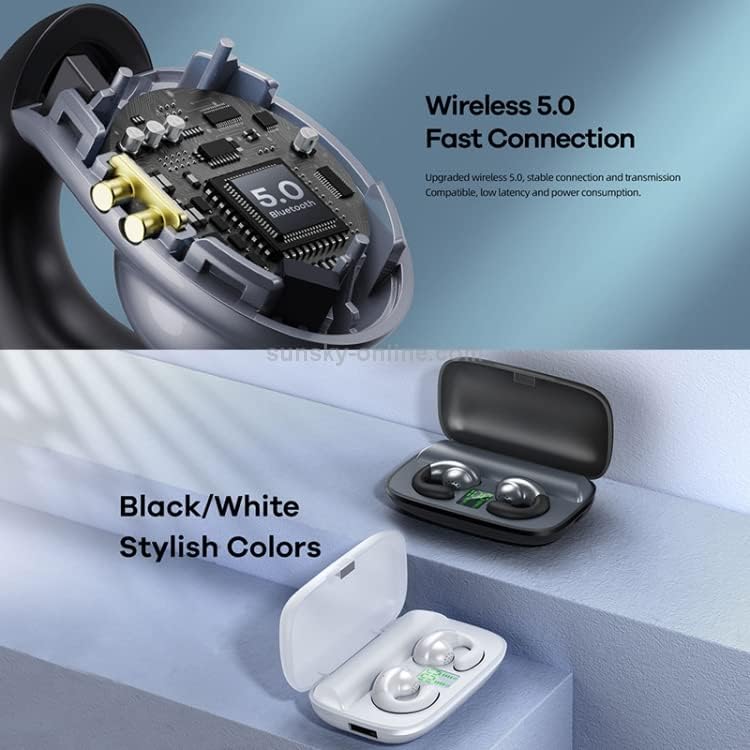
Image: An internal view of the Remax TWS-17 earbud showing the Bluetooth 5.0 chip, alongside images of the black and white versions of the earbuds and charging case.
Operating Instructions
Power On/Off
- Power On: Open the charging case, and the earbuds will automatically power on. Alternatively, long-press the touch area on both earbuds for 3 seconds.
- Power Off: Place the earbuds back into the charging case and close the lid. Alternatively, long-press the touch area on both earbuds for 5 seconds.
Music Playback
- Play/Pause: Single tap the touch area on either earbud.
- Next Track: Double tap the touch area on the right earbud.
- Previous Track: Double tap the touch area on the left earbud.
Call Management
- Answer/End Call: Single tap the touch area on either earbud.
- Reject Call: Long-press the touch area on either earbud for 2 seconds.
Voice Assistant
- Activate Voice Assistant: Triple tap the touch area on either earbud.
Maintenance
- Cleaning: Regularly clean the earbuds and charging case with a soft, dry, lint-free cloth. Do not use harsh chemicals or abrasive materials.
- Storage: When not in use, store the earbuds in their charging case to protect them from dust and damage. Store in a cool, dry place.
- Battery Care: To prolong battery life, avoid fully discharging the earbuds and charging case frequently. Charge them regularly, even if not in constant use.
- Water Resistance: The earbuds are rated as waterproof. However, avoid prolonged submersion in water or exposure to high-pressure water jets. Dry thoroughly if exposed to moisture before placing back in the charging case.
Troubleshooting
| Problem | Solution |
|---|---|
| Earbuds not powering on | Ensure the earbuds are charged. Place them in the charging case and check the LED display. |
| Earbuds not pairing |
|
| No sound or low volume |
|
| One earbud not working |
|
Specifications
| Feature | Detail |
|---|---|
| Brand | Remax |
| Model | TWS-17 |
| Wireless Version | V5.0 |
| Transmission Distance | 10 meters |
| Frequency Response | 20Hz - 20kHz |
| Impedance | 32 Ohms |
| Rated Power | 3mW |
| Charging Case Battery Capacity | 1200mAh |
| Earbud Battery Capacity | 40mAh |
| Charging Times (from case) | 10-12 times |
| Input | DC5V-1A |
| Operating Time | Approx. 3.5 hours |
| Standby Time | Approx. 100 hours |
| Charging Time (Case) | Approx. 1 hour |
| Net Weight | 80 grams |
| Charging Case Size | 80 × 57 × 38 mm |
| Material | Plastic |
| Water Resistance | Waterproof |
| Control Method | Touch |
| Noise Control | Active Noise Cancellation |
| Compatible Devices | Smartphones, Tablets, Laptops, Desktop Computers |
Safety Information
Please observe the following safety guidelines to prevent damage to your device or injury to yourself:
- Do not disassemble, repair, or modify the product.
- Keep the device away from extreme temperatures, direct sunlight, and open flames.
- Avoid exposing the device to strong magnetic fields.
- Do not use the earbuds at excessively high volumes for extended periods to prevent hearing damage.
- Keep out of reach of children and pets.
- Dispose of the product responsibly according to local regulations.
Warranty and Support
For warranty information and customer support, please refer to the warranty card included with your purchase or visit the official Remax website.
