
1. Introduction
The Hantek DSO2D15 is a 2-channel digital storage oscilloscope featuring a 150MHz bandwidth, 1GSa/s sampling rate, and 8M memory depth. It also includes a built-in 25MHz DDS waveform generator. This instrument is designed for various electronic testing and measurement applications, offering advanced trigger modes, serial protocol decoding, and automatic measurement functions.
This manual provides essential information for the safe and efficient operation of your DSO2D15 oscilloscope. Please read it thoroughly before use and retain it for future reference.
2. Safety Information
Always observe the following safety precautions to prevent injury and avoid damage to the instrument or connected devices.
- Power Source: Ensure the oscilloscope is connected to a power source within the specified voltage range (100-240V AC, 50/60Hz). Use only the provided power cord or an approved equivalent.
- Grounding: The instrument must be properly grounded to prevent electric shock. Do not defeat the grounding feature of the power plug.
- Environmental Conditions: Operate the oscilloscope in a dry, well-ventilated area. Avoid exposure to extreme temperatures, humidity, dust, or corrosive gases.
- Hazardous Voltage: Hazardous voltages are present inside the device. Do not remove the cover unless performed by qualified service personnel. Refer to the warning label on the rear panel.
- Probes: Use only probes rated for the voltage and frequency being measured. Ensure probes are properly connected before making measurements.
- Cleaning: Disconnect power before cleaning. Use a soft, damp cloth. Do not use abrasive cleaners or solvents.
- Servicing: Refer all servicing to qualified personnel.

Figure 2.1: Rear panel of the DSO2D15, highlighting the power input and safety warning label regarding hazardous voltage.
3. Setup
3.1 Unpacking and Inspection
Carefully unpack the oscilloscope and all accessories. Inspect for any signs of damage during transit. If any damage is found, contact your supplier immediately.
3.2 Package Contents
The standard package for the Hantek DSO2D15 includes the following items:
- Hantek DSO2D15 Oscilloscope Unit
- 1 PP150B 150MHz Probe
- 1 Hantek PP150 100MHz Probe (for 2nd channel)
- 1 USB Cable
- 2 Clip Lines
- 1 US Power Cable (Note: Some units may include a European power cable. If so, a compatible US power cable will be required for operation in the US.)

Figure 3.1: The DSO2D15 oscilloscope unit shown with its various included accessories, such as probes, cables, and clip lines.

Figure 3.2: A closer look at the included oscilloscope probes, various clip lines, and a wire stripping tool, essential for connecting to circuits.
3.3 Power Connection
- Connect the provided power cable to the AC input on the rear panel of the oscilloscope.
- Plug the other end of the power cable into a grounded AC power outlet.
- Ensure the power switch (usually located near the AC input) is in the OFF position before connecting to power.
3.4 Probe Connection
Connect the oscilloscope probes to the BNC input connectors on the front panel (CH1, CH2). Ensure a secure connection by twisting the BNC connector until it locks.
Before making measurements, perform probe compensation to ensure accurate readings. Refer to the "Probe Compensation" section in the Operating Instructions.
4. Operating Instructions
4.1 Powering On/Off
- To power on, press the power switch located on the rear panel. The display will illuminate, and the system will boot up.
- To power off, press the power switch again.
4.2 Front Panel Overview
The front panel of the DSO2D15 features a large display, control buttons, and input connectors. Familiarize yourself with the layout for efficient operation.
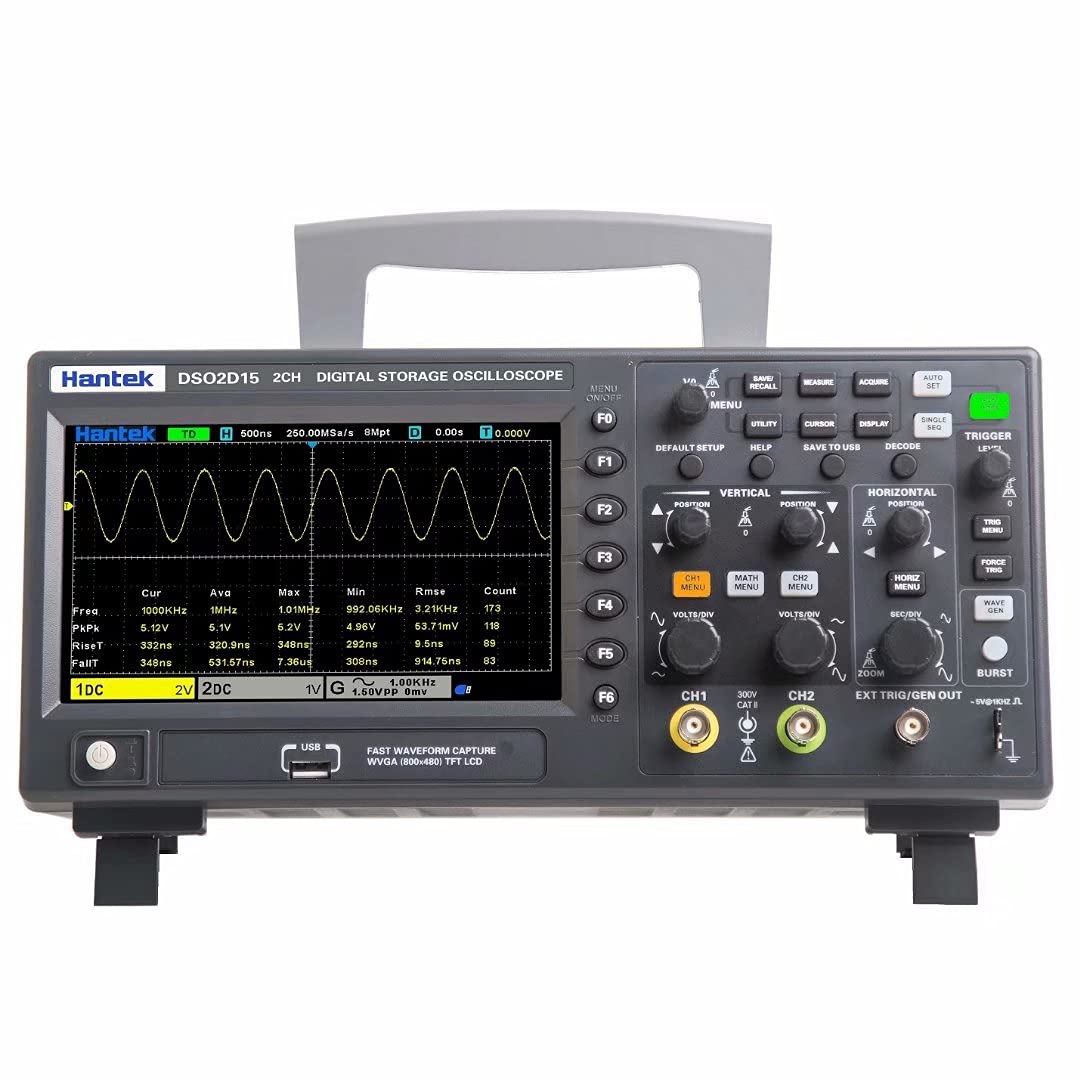
Figure 4.1: Front panel of the DSO2D15, showing the display, function buttons (F1-F6), vertical and horizontal controls, trigger controls, and channel inputs.
4.3 Basic Oscilloscope Functions
- Vertical Controls: Adjust voltage per division (Volts/Div) and vertical position for each channel (CH1, CH2).
- Horizontal Controls: Adjust time per division (Sec/Div) and horizontal position to control the time base.
- Trigger System: Use the trigger controls to stabilize waveforms. Select trigger type (Edge, Pulse, Video, Slope, etc.), source, and level. The DSO2D15 offers 14 kinds of trigger modes.
- Acquisition Mode: Select between Normal, Peak Detect, and Average modes for waveform acquisition.
- Measurements: Access automatic measurement functions (32 kinds available) to display parameters like frequency, period, Vpp, Vmax, Vmin, etc.
- Serial Protocol Decoding: The unit supports 5 kinds of serial protocol decoding. Refer to the on-screen menu for specific setup and analysis.
4.4 DDS Waveform Generator
The DSO2D15 includes a built-in 25MHz DDS waveform generator. This generator can produce various standard waveforms (sine, square, triangle, etc.) for testing circuits.
- Connect the DDS output (labeled EXT TRIG/GEN OUT) to the circuit under test.
- Access the generator menu via the front panel controls.
- Select the desired waveform type, frequency, amplitude, and offset.
- Enable the output to generate the waveform.
Note: The built-in DDS generator is suitable for general testing but should not be confused with a dedicated arbitrary waveform generator for complex signal generation.
5. Maintenance
5.1 General Care
- Keep the instrument clean and dry.
- Avoid dropping or subjecting the unit to strong impacts.
- Store in a dust-free environment when not in use.
5.2 Cleaning
To clean the exterior of the oscilloscope:
- Disconnect the power cord from the AC outlet.
- Use a soft cloth lightly dampened with water or a mild, non-abrasive cleaner.
- Wipe the surfaces gently. Do not allow liquids to enter the instrument.
- Ensure the unit is completely dry before reconnecting power.
5.3 Firmware Updates
Periodically check the Hantek official website for available firmware updates. Updating the firmware can improve performance, add features, or resolve known issues. Follow the instructions provided with the firmware update package carefully.
6. Troubleshooting
This section addresses common issues you might encounter with your DSO2D15 oscilloscope.
| Problem | Possible Cause | Solution |
|---|---|---|
| Unit does not power on. | Power cable not connected or faulty. Incorrect power cord for region. | Ensure power cable is securely connected to both the unit and a live AC outlet. Verify the power cord is appropriate for your region (e.g., US power cable for US outlets). |
| Waveform not displayed or unstable. | Incorrect probe connection. Improper trigger settings. Vertical/Horizontal scale issues. | Check probe connections. Adjust trigger level and source. Verify Volts/Div and Sec/Div settings are appropriate for the input signal. Perform probe compensation. |
| Unit freezes or locks up. | Software glitch. Outdated firmware. | Perform a power cycle (turn off, wait a few seconds, then turn on). Check for and install the latest firmware updates from the Hantek website. |
| Inaccurate voltage readings. | Uncompensated probes. Faulty probes. | Perform probe compensation. Test probes with a known signal source or try a different probe. Ensure probe attenuation settings (1X/10X) match the oscilloscope's settings. |
7. Specifications
The following are key technical specifications for the Hantek DSO2D15 oscilloscope:
- Bandwidth: 150 MHz
- Channels: 2 Analog Channels
- Sampling Rate: 1 GSa/s (Real-time)
- Memory Depth: 8M points
- Built-in DDS Waveform Generator: 25 MHz
- Trigger Modes: 14 types (Edge, Pulse, Video, Slope, etc.)
- Serial Protocol Decoding: 5 types
- Automatic Measurements: 32 types
- Display: 7-inch TFT LCD
- Connectivity: USB Host, USB Device
Physical and Environmental
- Package Dimensions: 14.3 x 8.25 x 7.75 inches
- Item Weight: 6.14 pounds
- Manufacturer: Qingdao Hantek Electronic Co., Ltd.
- Operating Voltage: 100-240V AC, 50/60Hz
- Date First Available: March 24, 2021
8. Warranty and Support
8.1 Warranty Information
Hantek products are typically covered by a limited warranty against defects in materials and workmanship. The specific terms and duration of the warranty may vary by region and retailer. Please retain your proof of purchase for warranty claims.
For detailed warranty information, please refer to the warranty card included with your product or visit the official Hantek website.
8.2 Technical Support
If you encounter issues not covered in this manual or require further assistance, please contact Hantek technical support. You can typically find contact information on the official Hantek website or through your product retailer.
When contacting support, please have your product model (DSO2D15) and serial number ready, along with a detailed description of the issue.
You can also visit the Hantek Store on Amazon for additional product information and resources.


