
Introduction
This manual provides essential instructions for assembling and maintaining your JEKCA Toco Toucan 01S plastic building block model. Please read through these instructions carefully before beginning assembly to ensure a smooth and enjoyable building experience. The JEKCA system utilizes a unique interlocking brick-through technology to create sturdy and detailed models.
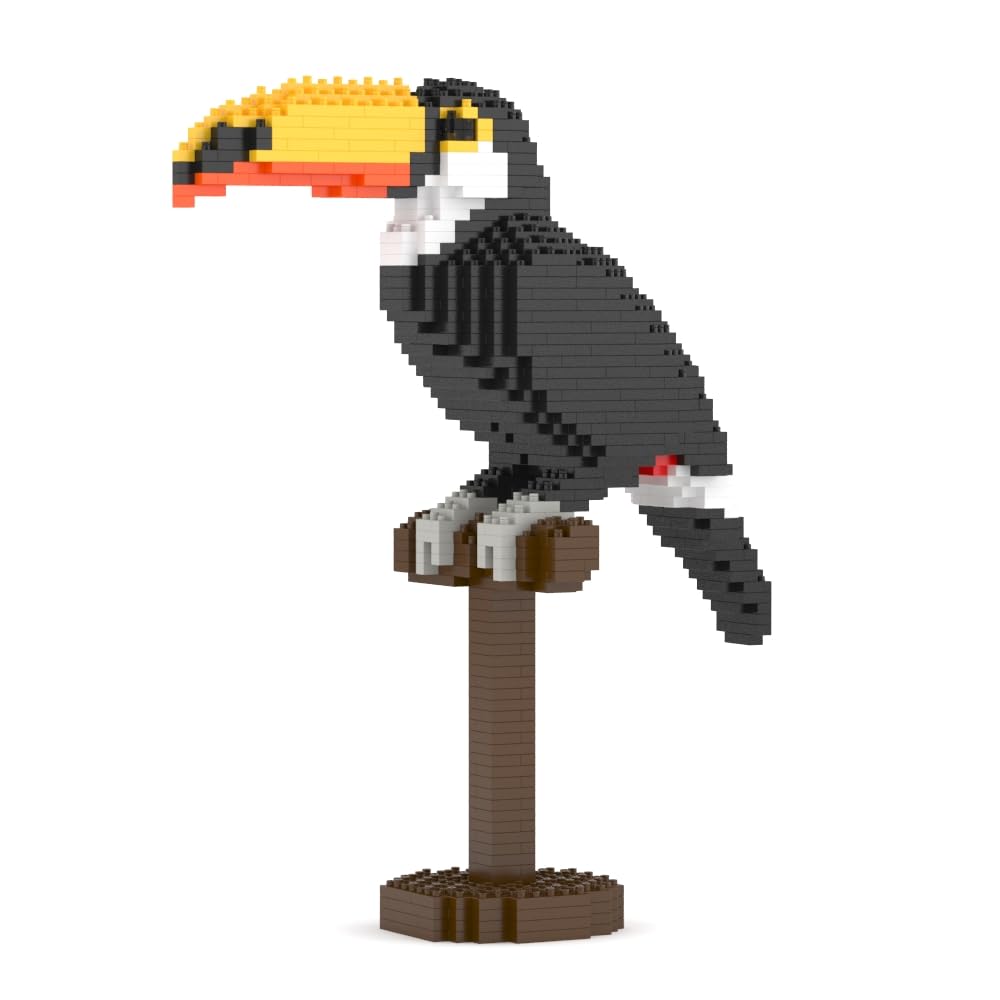
Image: The JEKCA Toco Toucan 01S model, demonstrating its 1:1 scale alongside a 13-inch iPad Pro. The display on the iPad shows the model number ST19BD20, 790 pieces, and dimensions: Length 24.4 cm, Width 9.4 cm, Height 31.7 cm.
Safety Information
- Age Recommendation: This product is recommended for individuals aged 14 years and above.
- Small Parts: The set contains small parts which may pose a choking hazard for young children. Keep out of reach of children under 3 years.
- Adult Supervision: While designed for ages 14+, adult supervision is recommended during assembly.
- Proper Use: Use the included tools (pin driver) as instructed. Do not force parts.
What's in the Box
Upon opening your JEKCA Toco Toucan 01S package, please verify that all the following components are present:
- Building Bricks (over 790 pieces)
- Instruction Manual (detailed step-by-step guide)
- Pins (for interlocking bricks)
- Pin Driver (specialized tool for inserting pins)
- Quick Guide
Setup and Assembly
The JEKCA Toco Toucan 01S model is assembled using a unique interlocking brick-through system. This system ensures the completed model is sturdy and does not easily break apart. Follow the detailed steps provided in the included instruction manual for precise assembly.
Understanding the Interlocking System
Each JEKCA brick is designed to interlock with others using specialized pins. The pin driver tool is essential for securely connecting the bricks.

Image: A visual guide to the JEKCA interlocking system. Step 1 illustrates aligning two bricks. Step 2 shows inserting two pins through the aligned bricks. Step 3 demonstrates using the pin driver to turn the pins 90 degrees, securing the connection.
- Align Bricks: Place the bricks you wish to connect together, ensuring the holes align.
- Insert Pins: Insert the provided pins through the aligned holes.
- Secure with Pin Driver: Use the pin driver to turn the pins 90 degrees. This action expands the pin within the bricks, creating a strong, stable connection.
Refer to the main instruction manual for the specific sequence and placement of each brick to construct the Toco Toucan model.

Image: An illustration demonstrating the interlocking process. A pin is inserted into a stack of colorful JEKCA bricks, and then a screwdriver (pin driver) is used to turn the pin 90 degrees, securing the connection. Text labels indicate "1. Insert screw" and "2. Turn 90°".
Operating (Building Process)
The primary operation of this product is its assembly. The included detailed instruction manual is your primary guide. Each step is illustrated to show brick placement and pin insertion. Take your time and follow the steps sequentially.
- Organize: Sort your bricks by color and shape if necessary to streamline the building process.
- Follow Manual: Adhere strictly to the step-by-step instructions in the provided manual.
- Secure Connections: Ensure each pin is fully inserted and turned 90 degrees with the pin driver for maximum stability.
- Patience: Complex models require patience. If a step is unclear, re-examine the manual's illustration.

Image: A side view of the fully assembled JEKCA Toco Toucan 01S model, showcasing the detailed brick construction and the toucan's distinctive beak and plumage.
Maintenance
To keep your JEKCA Toco Toucan 01S model in optimal condition:
- Cleaning: Dust the model regularly with a soft, dry cloth or a soft brush. For more thorough cleaning, gently wipe with a damp cloth and mild soap, then dry immediately. Avoid harsh chemicals.
- Storage: Store the model in a stable location away from direct sunlight and extreme temperatures to prevent material degradation or discoloration.
- Disassembly: If you need to disassemble the model, carefully reverse the pin-turning process using the pin driver. Avoid pulling bricks apart forcefully.
Troubleshooting
Here are solutions to common issues you might encounter during assembly:
- Difficulty Interlocking Bricks:
- Ensure the pins are correctly aligned with the holes.
- Apply firm, even pressure when inserting pins.
- Confirm the pin driver is properly engaged before turning 90 degrees.
- Model Instability:
- Double-check that all pins are fully inserted and turned 90 degrees.
- Review the instruction manual to ensure no steps were missed or bricks misplaced.
- Missing Pieces:
- Carefully check the packaging and surrounding area.
- If pieces are genuinely missing, contact JEKCA customer support (see Support section).
Specifications
| Feature | Detail |
|---|---|
| Brand | JEKCA |
| Model Name | Toco Toucan 01S |
| Model Number | ST19BD20 |
| Manufacturer Part Number | JEKOTHALL-035011 |
| Number of Pieces | 790+ |
| Material Type | Acrylonitrile Butadiene Styrene (ABS) |
| Item Dimensions (L x W x H) | 9.61 x 3.7 x 12.48 inches (approx. 24.4 x 9.4 x 31.7 cm) |
| Item Weight | 0.72 Kilograms |
| Recommended Age | 14 years and above |
| Assembly Required | Yes |
| Special Feature | Sturdy without glue, Interlocking Brick-through System |
Warranty and Support
JEKCA products are designed for quality and durability. For specific warranty information, please refer to the documentation included with your purchase or visit the official JEKCA website. If you encounter any issues, have questions about assembly, or require replacement parts, please contact JEKCA customer support.
JEKCA Customer Support:
- Website: www.jekca.com (Please check the official website for the most current contact information.)
- Seller Contact: For purchases made through Amazon, you may also contact the seller "Jekca" directly via your Amazon order history for assistance.