
Introduction
Thank you for purchasing the Topping A30 Pro NFCA Headphone Amplifier. This high-performance audio device is designed to deliver exceptional sound quality for a wide range of headphones, from sensitive in-ear monitors (IEMs) to high-impedance over-ear headphones. Featuring a new specifically redesigned NFCA-based circuit, the A30 Pro offers ultra-low distortion and noise, ensuring an accurate and transparent audio experience. Please read this manual thoroughly before operating the device to ensure proper use and optimal performance.
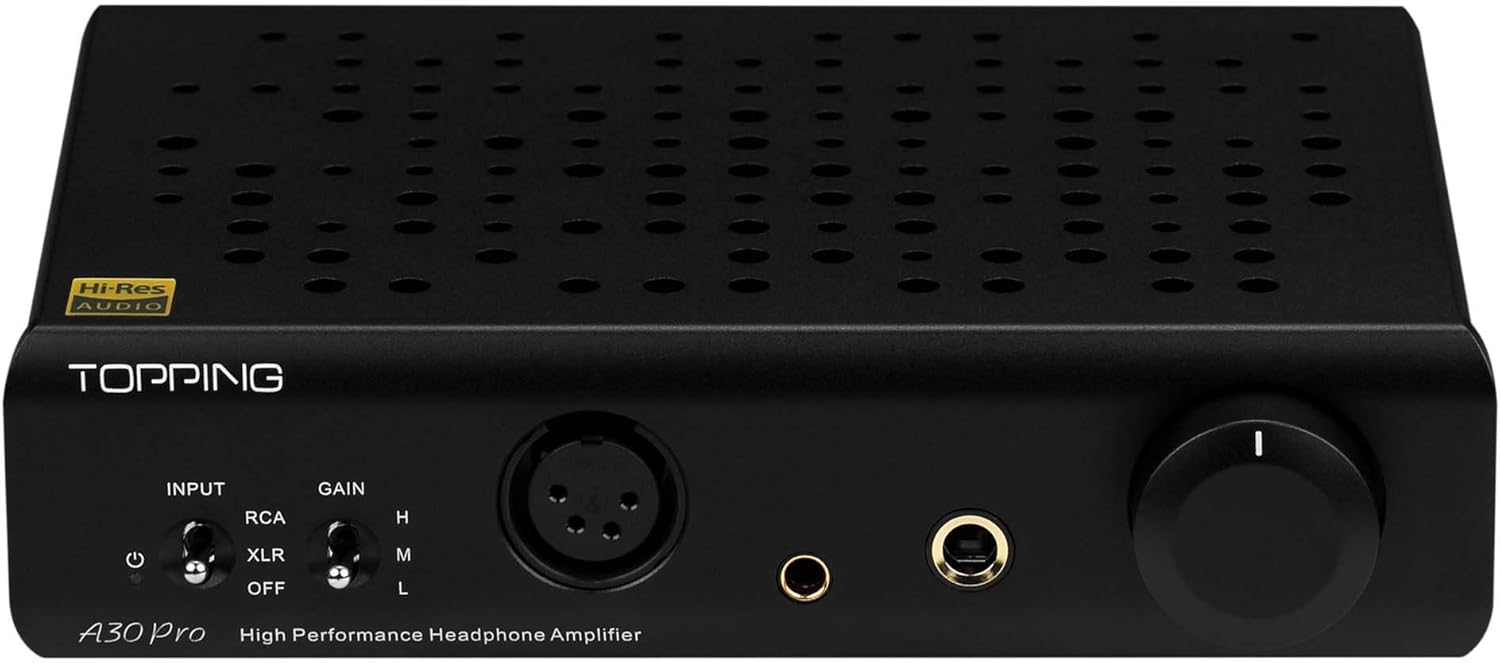
Figure 1: Front view of the Topping A30 Pro Headphone Amplifier, showing inputs, gain switch, and volume knob.
Setup Guide
Follow these steps to set up your Topping A30 Pro amplifier:
- Power Connection: Connect the provided power cable to the AC input on the rear panel of the A30 Pro and then to a suitable power outlet. Ensure the power switch is in the 'OFF' position before connecting.
- Audio Source Connection:
- RCA Input: Connect your audio source (e.g., DAC, preamplifier) to the RCA (L/R) input jacks on the rear panel using high-quality RCA cables.
- XLR Input: Alternatively, connect a balanced audio source to the XLR (L/R) input jacks on the rear panel using XLR cables.
- Headphone Connection: Connect your headphones to one of the output jacks on the front panel:
- 4-PIN XLR: For balanced headphones with a 4-pin XLR connector.
- 4.4mm: For balanced headphones with a 4.4mm Pentaconn connector.
- 6.35mm: For single-ended headphones with a 6.35mm (1/4 inch) stereo plug.
- Input Selection: On the front panel, use the 'INPUT' switch to select between 'RCA' or 'XLR' depending on your connected source. Set to 'OFF' when not in use.
- Gain Setting: Adjust the 'GAIN' switch to 'L' (Low), 'M' (Medium), or 'H' (High) based on the sensitivity of your headphones. Start with 'L' for highly sensitive headphones (like IEMs) and increase if more volume is needed for less sensitive headphones.

Figure 2: Front and rear views of the Topping A30 Pro, illustrating input and output connections.
Operating Instructions
Once the A30 Pro is set up, follow these steps for operation:
- Power On: Ensure the volume knob is turned down to its minimum position. Flip the power switch on the rear panel to 'ON'. The front panel indicator will illuminate.
- Select Input: Use the 'INPUT' toggle switch on the front panel to select the active audio source (RCA or XLR).
- Adjust Gain: Select the appropriate gain setting (L, M, H) using the 'GAIN' switch. This allows the A30 Pro to adapt to a wide range of headphone sensitivities and impedances. For most headphones, start with 'M' and adjust as needed.
- Volume Control: Slowly rotate the large volume knob clockwise to increase the listening volume. Adjust to a comfortable listening level. Avoid excessively high volumes to prevent hearing damage and potential damage to your headphones.
- Power Off: When finished listening, turn the volume knob down to its minimum, then flip the power switch on the rear panel to 'OFF'.
The A30 Pro utilizes Topping's NFCA (Nested Feedback Composite Amplifier) module, which contributes to its extremely low distortion (THD+N no higher than 0.00006%) and high dynamic range, providing a clean and powerful audio signal.
Maintenance
Proper care will ensure the longevity and optimal performance of your A30 Pro:
- Cleaning: Use a soft, dry cloth to wipe the exterior of the unit. Do not use liquid cleaners, aerosols, or abrasive chemicals, as they may damage the finish or internal components.
- Ventilation: Ensure the amplifier has adequate ventilation. Do not block the ventilation holes on the top or sides of the unit. Avoid placing it in enclosed spaces or on soft surfaces that could impede airflow.
- Environment: Keep the unit away from direct sunlight, heat sources, excessive dust, moisture, and strong electromagnetic fields.
- Handling: Handle the unit with care. Avoid dropping or subjecting it to strong impacts.
Troubleshooting
If you encounter issues with your A30 Pro, please refer to the following common problems and solutions:
- No Power:
- Check if the power cable is securely connected to both the amplifier and the power outlet.
- Verify that the power outlet is functional.
- Ensure the power switch on the rear panel is in the 'ON' position.
- No Sound:
- Confirm that your audio source is playing and properly connected to the A30 Pro's input.
- Ensure the 'INPUT' switch on the front panel matches the connected source (RCA or XLR).
- Check that your headphones are securely plugged into the correct output jack.
- Increase the volume knob slowly.
- Verify that the gain setting ('L', 'M', 'H') is appropriate for your headphones.
- Test with a different audio source or headphones to isolate the issue.
- Distorted Sound:
- Reduce the volume level.
- Check if the gain setting is too high for your headphones. Try a lower gain setting.
- Ensure all cables are securely connected and not damaged.
- Test with a different audio source or headphones to determine if the distortion originates from the amplifier or another component.
If the problem persists after trying these solutions, please contact customer support.
Technical Specifications
Below are the key specifications for the Topping A30 Pro Headphone Amplifier:
| Feature | Specification |
|---|---|
| Model Number | A30 Pro |
| Dimensions (Package) | 11.1 x 7.95 x 3.07 inches |
| Item Weight | 2.72 pounds |
| Manufacturer | Fanmusic |
| ASIN | B08Y87LK94 |
| THD+N | No higher than 0.00006% |
| Circuit Design | NFCA-based circuit with OPA1656 |
| Output Connectors | 4-PIN XLR, 4.4mm, 6.35mm |
| Gain Settings | 3-step (L, M, H) |
| Date First Available | February 7, 2021 |
Warranty Information
Topping products typically come with a limited manufacturer's warranty. Please refer to the warranty card included with your product packaging or visit the official TOPPING website for detailed warranty terms and conditions. Retain your proof of purchase for warranty claims.
Customer Support
For further assistance, technical support, or service inquiries, please contact TOPPING customer support through their official website or the retailer from whom you purchased the product. Provide your product model number (A30 Pro) and purchase details when contacting support.
Official TOPPING Website: https://www.tpdz.net/


