
Introduction
Thank you for choosing the JETBEAM JET-RRT03 Raptor Four-Color LED Flashlight. This manual provides detailed instructions for the safe and efficient use of your new flashlight. Please read this manual thoroughly before operation and retain it for future reference.

Image: The JETBEAM JET-RRT03 Raptor flashlight, showcasing its compact design and multi-LED head. This image provides a general overview of the product.
Product Features
The JETBEAM JET-RRT03 Raptor is designed for rapid response and versatility, offering multiple light sources and modes:
- Utilizes 3*CREE XP-G3 or 3*Nichia 219C LEDs with a life expectancy of up to 50,000 hours.
- Maximum output of 1400 lumens with a maximum beam distance of 145 meters.
- Digital constant current drive circuit ensures stable output for up to 6.5 hours.
- Features red, green, blue, and white four-color light sources.
- Includes RGB water light mode.
- Tail tactical switch for quick access and operation.
- Special functions: Strobe, SOS, and Beacon.
- Battery anti-reverse protection for safety.
- Patented temperature control technology prevents overheating.
- New type optical lens provides wide-range illumination.
- Scratch-resistant optical lenses coated on both sides.
- Constructed from aviation-grade aluminum alloy with three-level hard anodizing anti-wear surface treatment.
- IPX-8 waterproof rating (2 meters underwater).
- 1-meter drop height resistance.

Image: An infographic highlighting the five key advantages of the JETBEAM JET-RRT03 Raptor, including 1400 lumens, four-color light, new optical lens, compact body, and tail tactical switch with rotating control ring.

Image: A close-up view of the JETBEAM JET-RRT03 Raptor's LED array, illustrating the three CREE XP-G3 or Nichia 219C LEDs responsible for its powerful output.
Setup
Package Contents
Please check the package for the following items:
- JETBEAM JET-RRT03 Raptor Flashlight
- Battery (pre-installed or separate, depending on packaging)
- User Manual (this document)
- Spare O-rings (if included)
- Lanyard (if included)
Battery Installation
The JETBEAM JET-RRT03 uses a compatible Lithium Ion battery. Ensure the battery is inserted with the correct polarity to prevent damage to the flashlight and battery.
- Unscrew the tail cap of the flashlight counter-clockwise.
- Insert the battery with the positive (+) terminal facing towards the head of the flashlight. The flashlight features anti-reverse protection, but correct insertion is always recommended.
- Screw the tail cap back on clockwise until it is securely tightened. Overtightening is not necessary but ensure a snug fit for proper electrical contact and water resistance.

Image: A detailed view of the JETBEAM JET-RRT03 Raptor, pointing out key components such as the stainless steel holding clip, tail tactical switch, stainless steel rotary control ring, and the LED array with optical lens.
Operating Instructions
Power On/Off
- To Turn On: Press the tail tactical switch completely until it clicks.
- To Turn Off: Press the tail tactical switch completely again until it clicks.
- Momentary On: Lightly press and hold the tail tactical switch for momentary illumination. Release to turn off.
Brightness and Color Mode Selection
The JET-RRT03 features a unique rotary control ring for seamless adjustment of brightness and color modes.
- White Light Brightness: With the flashlight on, rotate the control ring to cycle through different white light brightness levels (e.g., Low, Medium, High).
- Color Light Selection: Continue rotating the control ring past the white light modes to access the red, green, and blue light sources. Each color will activate as you rotate.
- RGB Water Light Mode: This mode may be activated by a specific rotation or combination of rotation and switch press. Refer to the diagram for specific activation.
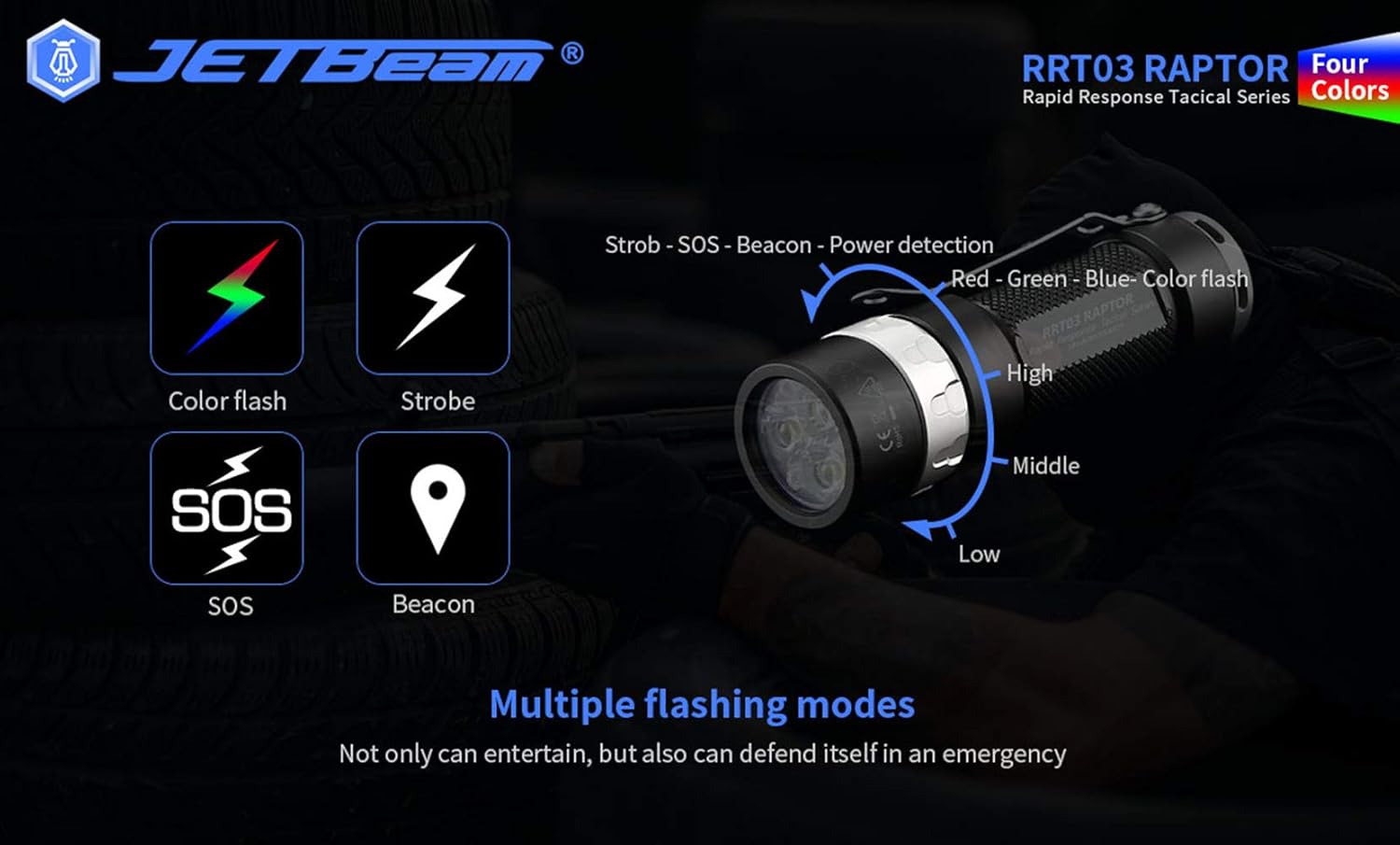
Image: An illustration showing the JETBEAM JET-RRT03 Raptor's rotary control ring with indicators for High, Middle, and Low brightness, and the various flashing modes: Color flash, Strobe, SOS, and Beacon. It also indicates power detection and Red-Green-Blue color flash capabilities.
Special Modes (Strobe, SOS, Beacon, Color Flash)
These modes are typically accessed via the tail tactical switch or a specific rotation of the control ring, often with a quick double-press or press-and-hold action from an ON state.
- Strobe: Produces a disorienting flash, useful for self-defense or signaling.
- SOS: Emits the international Morse code distress signal (three short, three long, three short flashes).
- Beacon: A slow, steady flash for marking a location.
- Color Flash: Cycles through the red, green, and blue colors in a flashing pattern.
Refer to the included diagram or product packaging for precise activation sequences for these special modes.

Image: The JETBEAM JET-RRT03 Raptor flashlight emitting a red light beam onto a map, demonstrating its red light functionality for night vision preservation or signaling.

Image: The JETBEAM JET-RRT03 Raptor flashlight emitting a green light beam across a grassy area, illustrating its green light capability for hunting or specific outdoor activities.

Image: The JETBEAM JET-RRT03 Raptor flashlight emitting a blue light beam into a pond at night, showcasing its blue light function which can be useful for fishing or detecting certain substances.
Maintenance
- Cleaning: Clean the flashlight body and lens with a soft, damp cloth. Do not use abrasive cleaners or solvents.
- O-rings: Periodically inspect the O-rings for wear and tear. Replace them if damaged to maintain the waterproof rating. Lubricate O-rings with silicone grease to prevent drying and cracking.
- Threads: Keep the threads of the tail cap clean. Apply a thin layer of silicone grease to the threads occasionally to ensure smooth operation and prevent wear.
- Battery Care: Remove the battery if the flashlight will not be used for an extended period to prevent leakage and damage. Store batteries in a cool, dry place.
Troubleshooting
| Problem | Possible Cause | Solution |
|---|---|---|
| Flashlight does not turn on. |
|
|
| Light is dim or flickers. |
|
|
| Control ring is stiff or difficult to rotate. |
|
|
Specifications
| Feature | Detail |
|---|---|
| Model | JET-RRT03 Raptor |
| Light Source | 3*CREE XP-G3 or 3*Nichia 219C LED |
| Max Output | 1400 Lumens (White Light) |
| Max Beam Distance | 145 meters |
| Light Colors | White, Red, Green, Blue |
| Power Source | Battery Powered (Lithium Ion compatible) |
| Material | Aviation-grade Aluminum Alloy |
| Surface Treatment | Three-level Hard Anodizing Anti-wear |
| Water Resistance | IPX-8 (2 meters submersible) |
| Impact Resistance | 1 meter |
| Special Features | Rapid Response, Temperature Control, Anti-reverse Protection |
| Manufacturer | JETBEAM |
| UPC | 644925520078 |
Warranty and Support
JETBEAM products are manufactured to high-quality standards. For warranty information, technical support, or service inquiries, please contact your authorized JETBEAM dealer or visit the official JETBEAM website. Please retain your proof of purchase for warranty claims.
For general inquiries, you may refer to the manufacturer's contact information provided with your purchase or on their official website.
Safety Information
- Do not shine the flashlight directly into eyes. The powerful beam can cause temporary vision impairment or permanent eye damage.
- Keep out of reach of children.
- Do not disassemble the sealed head of the flashlight, as this may damage the LEDs and void the warranty.
- Use only recommended batteries. Incorrect battery types or damaged batteries can pose a risk of explosion or leakage.
- Avoid exposing the flashlight to extreme temperatures or direct sunlight for prolonged periods.
- Ensure the tail cap is fully tightened before submerging the flashlight in water to maintain its waterproof integrity.
