
1. Introduction
This manual provides essential instructions for the proper installation, operation, and maintenance of your AISEN Carburetor and Air Filter Kit, specifically designed for the Troy Bilt 3550 Watt Portable Generator Model 01924. Adhering to these guidelines will ensure optimal performance and longevity of your generator components.
2. Safety Information
Always prioritize safety when working with generator components. Failure to follow safety precautions can result in serious injury or damage to equipment.
- Ensure the generator is turned off and cooled down before attempting any installation or maintenance.
- Disconnect the spark plug wire to prevent accidental starting.
- Work in a well-ventilated area to avoid inhaling fuel fumes.
- Wear appropriate personal protective equipment, including gloves and eye protection.
- Handle fuel with extreme care; it is highly flammable.
- If unsure about any step, consult a qualified technician.
3. Package Contents
Verify that all components are present and undamaged before beginning installation.
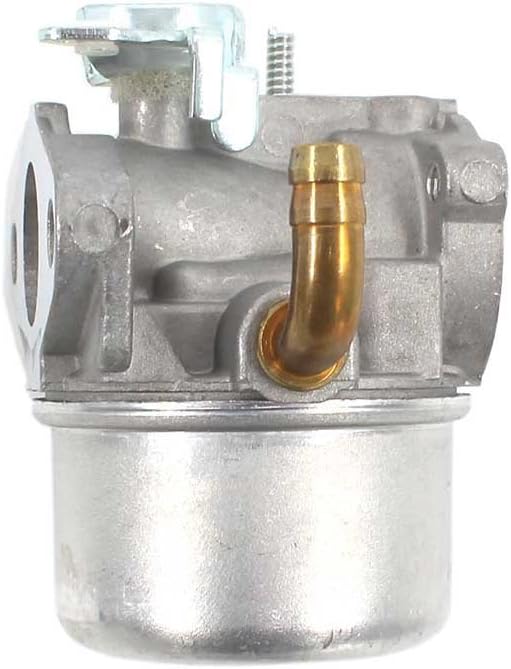
- Carburetor Assembly
- Air Filter
- Gaskets (various sizes)
- Fuel Line
- Spark Plug
- Fuel Filter
- Other small accessories (e.g., clamps, screws)



Product Overview Video
This video provides a general overview of a carburetor kit, demonstrating various components and their appearance. While not specific to the AISEN brand, it offers a visual reference for similar parts.
4. Setup and Installation
This section outlines the steps for replacing the carburetor and air filter on your Troy Bilt 3550 Watt Portable Generator Model 01924.
4.1. Preparation
- Ensure the generator is off, cool, and the spark plug wire is disconnected.
- Place the generator on a stable, flat surface.
- Gather necessary tools: screwdrivers, wrenches, pliers, and a clean cloth.
4.2. Removing the Old Carburetor
- Locate and remove the air filter housing.
- Carefully disconnect the fuel line from the carburetor. Be prepared for minor fuel leakage.
- Disconnect any linkages or wires attached to the carburetor (e.g., throttle, choke). Note their positions for reassembly.
- Unbolt the carburetor from the engine manifold.
- Remove the old carburetor and any old gaskets.
4.3. Installing the New Carburetor and Air Filter
- Clean the mounting surfaces on the engine manifold.
- Place new gaskets in their correct positions.
- Mount the new AISEN carburetor onto the engine, ensuring proper alignment. Secure it with bolts, tightening them evenly.
- Reconnect all linkages and wires to their original positions on the new carburetor.
- Attach the new fuel line and fuel filter, securing them with clamps if provided.
- Install the new air filter into the air filter housing.
- Reattach the air filter housing.
- Replace the old spark plug with the new one provided in the kit.
5. Operating Instructions (After Carburetor Replacement)
After successful installation, follow these steps to start your generator.
- Reconnect the spark plug wire.
- Ensure the generator has fresh fuel.
- Open the fuel valve.
- Set the choke to the appropriate starting position (usually 'Full Choke' for cold starts).
- Pull the recoil starter handle firmly until the engine starts.
- Once the engine starts, gradually move the choke to the 'Run' position as the engine warms up.
- Allow the generator to run for a few minutes to stabilize.
6. Maintenance
Regular maintenance ensures the longevity and efficiency of your carburetor and air filter.
- Air Filter: Inspect the air filter regularly (e.g., every 25 hours of operation or seasonally). Clean or replace it if it appears dirty or clogged. A clean air filter is crucial for proper engine performance.
- Fuel Filter: Replace the fuel filter annually or if you notice reduced fuel flow or engine performance issues.
- Carburetor Cleaning: If the generator experiences rough idling, stalling, or difficulty starting, the carburetor may need cleaning. This typically involves disassembling the carburetor, cleaning jets and passages with carburetor cleaner, and replacing any worn seals. This is an advanced task; consult a professional if uncomfortable.
- Fuel Quality: Always use fresh, clean fuel. Stale or contaminated fuel is a common cause of carburetor issues. Consider using a fuel stabilizer if storing the generator for extended periods.
7. Troubleshooting
Here are some common issues and potential solutions after carburetor replacement.
| Problem | Possible Cause | Solution |
|---|---|---|
| Generator won't start | No fuel, clogged fuel filter, incorrect choke setting, spark plug issue, fuel line kinked. | Check fuel level, replace fuel filter, adjust choke, check/replace spark plug, inspect fuel line. |
| Engine runs rough or stalls | Dirty air filter, carburetor jets clogged, old fuel, loose connections. | Clean/replace air filter, clean carburetor, use fresh fuel, check all connections. |
| Fuel leaks from carburetor | Loose fuel line, damaged gasket, float needle stuck. | Tighten fuel line, replace gaskets, clean float needle. |
8. Specifications
- Brand: AISEN
- Compatibility: Troy Bilt 3550 Watt Portable Generator Model 01924
- Flange Type: Bolt On
- Fuel Type: Designed for Liquefied Petroleum Gas (LPG) applications, but typically used with gasoline in these generators. Refer to your generator's manual for specific fuel requirements.
- Item Weight: Approximately 13.4 ounces (carburetor only)
- Package Dimensions: Approximately 9.69 x 7.6 x 3.15 inches
9. Warranty Information
For specific warranty details regarding your AISEN Carburetor and Air Filter Kit, please refer to the product packaging or contact the retailer where the product was purchased. Keep your proof of purchase for any warranty claims.
10. Customer Support
If you encounter any issues not covered in this manual or require further assistance, please contact AISEN customer support or the authorized dealer from whom you purchased the product. Provide your product model number and purchase details for efficient service.