
1. Introduction
This manual provides instructions for the smartmi P1 Air Purifier Replacement Filter. This filter is designed to maintain the optimal performance of your smartmi P1 Air Purifier by capturing various airborne particles and odors.
Regular replacement of the filter ensures continuous clean air delivery and effective removal of pollutants from your environment.

The smartmi P1 Air Purifier with its filter effectively addresses common household air quality concerns, including pet odors.
2. Product Features
The smartmi P1 Replacement Filter incorporates a multi-stage filtration system to ensure comprehensive air purification:
- H13 True HEPA Filtration: Captures 99.97% of particles as small as 0.3 microns, including pollen, dust mites, pet dander, and other allergens.
- Activated Carbon Layer: Effectively absorbs various odors, such as pet odors, cooking smells, smoke, and volatile organic compounds (VOCs).
- Pre-filter: Traps larger particles like hair and lint, extending the life of the HEPA filter.

Detailed view of the filter's multi-layer construction, highlighting the preliminary, HEPA, activated carbon, and inner filter components.

The filter effectively captures common airborne pollutants, ensuring cleaner air.
3. Compatibility
This replacement filter is designed exclusively for the smartmi P1 Air Purifier. Ensure your air purifier model is P1 before purchasing and installing this filter.

The smartmi P1 Air Purifier, for which this filter is a compatible replacement.
4. Setup and Installation
Follow these steps to replace the filter in your smartmi P1 Air Purifier:
- Ensure the air purifier is turned off and unplugged from the power outlet.
- Carefully turn the air purifier upside down.
- Locate the filter cover at the bottom of the unit. Twist the cover counter-clockwise to unlock and remove it.
- Grasp the old filter and pull it out from the unit.
- Unpack the new smartmi P1 Replacement Filter.
- Insert the new filter into the air purifier, ensuring it is seated correctly.
- Replace the filter cover by aligning it and twisting clockwise until it locks securely.
- Turn the air purifier upright and plug it back into the power outlet.
- Reset the filter life indicator in the smartmi app (refer to Section 5).
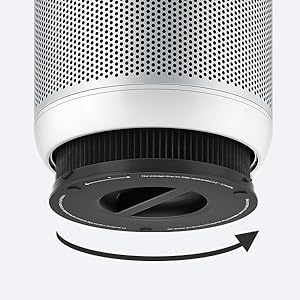
The 'Twist and Pull' method for easy filter replacement.
Official smartmi video demonstrating the H13 True HEPA Filter System and its installation in the P1 Air Purifier.
5. Operating Instructions (Filter Monitoring)
The smartmi P1 Air Purifier allows you to monitor the filter's status and remaining lifespan through the smartmi mobile application.
- Open the smartmi app on your smartphone or tablet.
- Select your smartmi P1 Air Purifier from the device list.
- Navigate to the filter status section within the app. Here you can view the current filter life percentage.
- After replacing the filter, the app will prompt you to reset the filter life. Confirm the reset to ensure accurate tracking of the new filter's lifespan.

Monitor your filter's status conveniently via the smartmi app.
6. Maintenance
For optimal performance, it is recommended to replace the smartmi P1 Air Purifier filter every 6 to 12 months, depending on usage and air quality conditions. The smartmi app will provide a notification when replacement is due.

Visual comparison of a new filter versus one after 6 months of use, demonstrating the need for regular replacement.
7. Troubleshooting
- Filter Does Not Fit: Ensure you have the correct replacement filter for the smartmi P1 Air Purifier. Verify the model number on your air purifier and the filter packaging.
- Air Purifier Not Recognizing New Filter: After installation, ensure the filter cover is securely locked. If the issue persists, try resetting the filter life indicator via the smartmi app. If the problem continues, contact smartmi customer support.
- Reduced Airflow or Odor Persistence: If you notice reduced airflow or persistent odors shortly after replacing the filter, ensure the filter is installed correctly and the air purifier is operating in an appropriate mode. If the issue continues, the filter may be defective, or the air purifier may require servicing.
8. Specifications
| Specification | Detail |
|---|---|
| Brand | smartmi |
| Model Number | P1 Filter |
| Material | Plastic |
| Product Dimensions | 7.17"L x 6.85"W x 7.17"Th |
| MERV Rating | 13 |
| Compatible Devices | smartmi Air Purifier P1 |
| Item Weight | 717 g |
| Air Filter Construction | Pleated |
| Included Components | 1 HEPA filter |
9. Warranty and Support
This smartmi P1 Air Purifier Replacement Filter comes with a 30-day warranty from the date of purchase. This warranty covers manufacturing defects.
For technical support, warranty claims, or any questions regarding your smartmi product, please visit the official smartmi website or contact smartmi customer service through their designated support channels. You can also visit the smartmi Store on Amazon for more information.


