
WLIVE ADSG615WH
WLIVE Low-Type TV Stand Instruction Manual
Model: ADSG615WH | Brand: WLIVE
1. Introduction
Thank you for choosing the WLIVE Low-Type TV Stand. This manual provides essential information for the safe and efficient assembly, operation, and maintenance of your new TV stand. Please read these instructions carefully before beginning assembly and retain them for future reference.

Image 1.1: The WLIVE Low-Type TV Stand in white, featuring a TV with a panda image. This stand is designed for modern living spaces.
2. Key Features
- Ample Storage Capacity: This TV stand offers significant storage space behind its doors, providing more volume compared to traditional drawer designs. It efficiently utilizes space, preventing clutter.
- Adjustable Middle Shelf: The central shelf, approximately 48cm wide, is designed with two tiers and can be adjusted to three different height levels. This flexibility allows you to customize the storage area to fit various electronic devices or other items.
- Backless Design for Ventilation & Cable Management: The open-back structure ensures excellent ventilation for your electronic devices, preventing overheating. It also simplifies cable routing and organization, keeping wires tidy and out of sight.
- Sturdy and Durable Construction: Manufactured from E1 melamine-processed board, this TV stand boasts superior durability and safety. The top panel supports up to 40kg, accommodating various TV sizes and additional items like game consoles or decorative plants.
- Low-Type Design for Comfortable Viewing: Its compact, low-profile design creates a spacious feel in smaller living areas and is ideal for single-person households. Placing the TV lower helps reduce eye and shoulder strain for a more comfortable viewing experience.
- Sleek, Handle-less Doors: The doors feature a sharp, handle-less design, contributing to a clean and streamlined front appearance.

Image 2.1: This image highlights the internal storage, the adjustable middle shelf, and the open-back design for easy cable routing and improved ventilation.

Image 2.2: Demonstrates the ergonomic benefits of the low-type design, allowing comfortable TV viewing whether sitting on the floor or lying down.
3. Assembly Instructions
The WLIVE Low-Type TV Stand requires assembly. A Japanese instruction manual and necessary assembly tools are included. For easier and faster assembly, an electric screwdriver is highly recommended.
3.1 Before You Begin
- Unpack all components and verify against the parts list in the included manual.
- Ensure you have enough clear space for assembly.
- Gather necessary tools, including a manual screwdriver (provided) and an electric screwdriver (recommended).
- Identify each board by its number, which may be small and located in various places.
3.2 Step-by-Step Assembly
- Attach Base Panels: Secure the side panels to the main base using the provided screws. Ensure all connections are tight but do not overtighten to avoid damaging the board.
- Install Fixed Shelves: Insert and secure any fixed shelves into their designated slots.
- Assemble Side Compartments: Construct the side compartments, ensuring the door hinges are correctly aligned. The doors utilize a rotating shaft mechanism instead of traditional hinges for simpler installation.
- Insert Adjustable Shelf: Place the adjustable middle shelf into the central compartment. Adjust its height as needed by selecting one of the three available levels.
- Attach Back Panel (Optional): While the design is backless for ventilation, if a partial back panel is included, attach it as per the manual.
- Final Tightening: Once all components are in place, gently tighten all screws to ensure stability.

Image 3.1: The fully assembled WLIVE TV stand, ready for use in a living room environment.

Image 3.2: An illustration detailing the internal compartments and the convenient backless design for managing cables from electronic devices.
4. Usage and Operation
The WLIVE Low-Type TV Stand is designed for versatile use in your living space.
4.1 Placing Your TV
Place your television centrally on the top panel. Ensure the TV's base fits within the stand's dimensions. The stand is compatible with TVs ranging from 24 to 47 inches and can support up to 40kg.
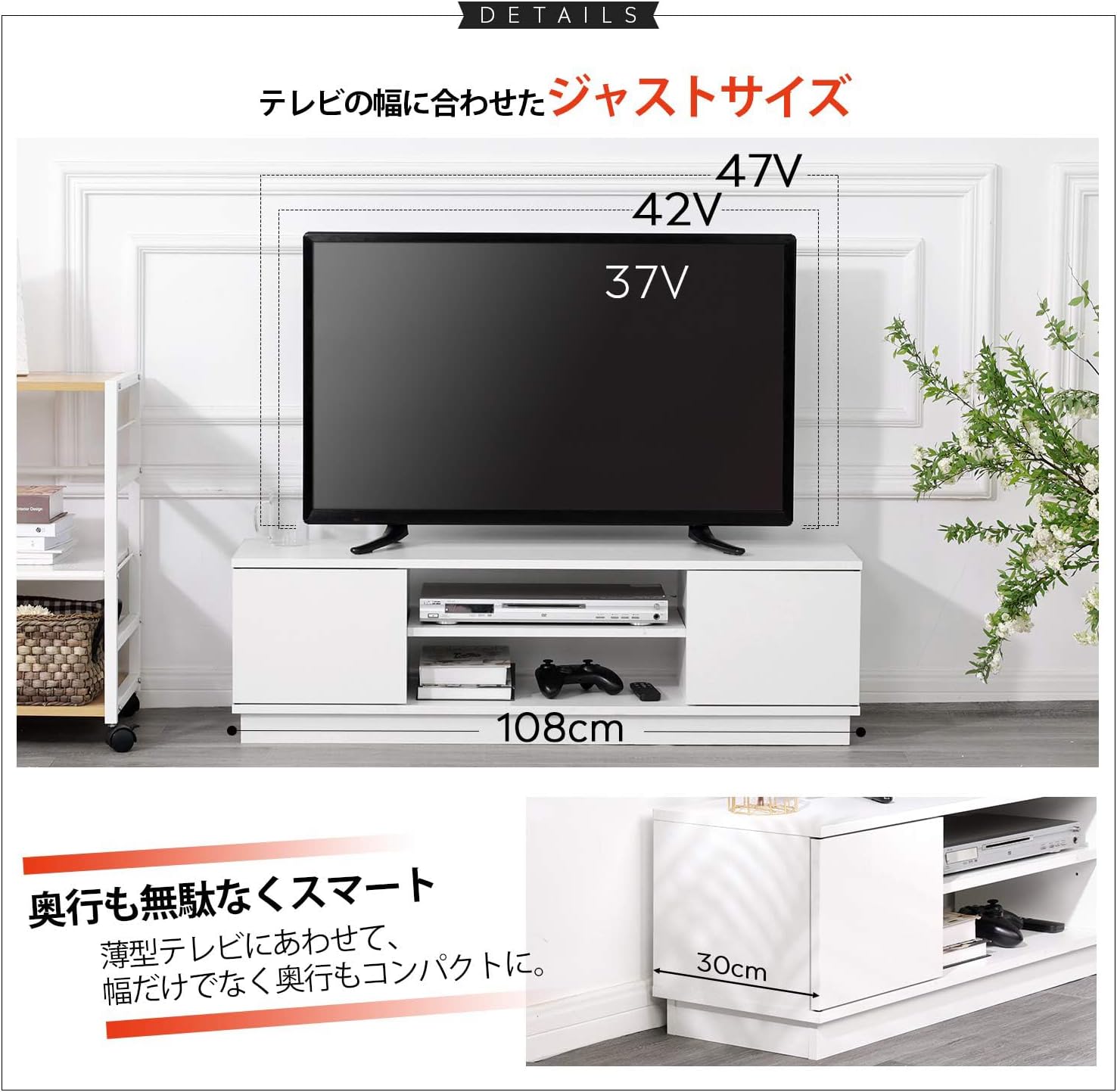
Image 4.1: This diagram illustrates the compatible TV sizes (37V, 42V, 47V) for the 108cm wide TV stand, ensuring a perfect fit.
4.2 Utilizing Storage Compartments
- Side Cabinets: Use the two side cabinets with doors to store items you wish to keep out of sight, such as DVDs, CDs, or small accessories.
- Central Open Shelf: The central open shelf is ideal for media devices like DVD players, game consoles (e.g., PS5), or soundbars. The adjustable height allows you to accommodate taller devices.
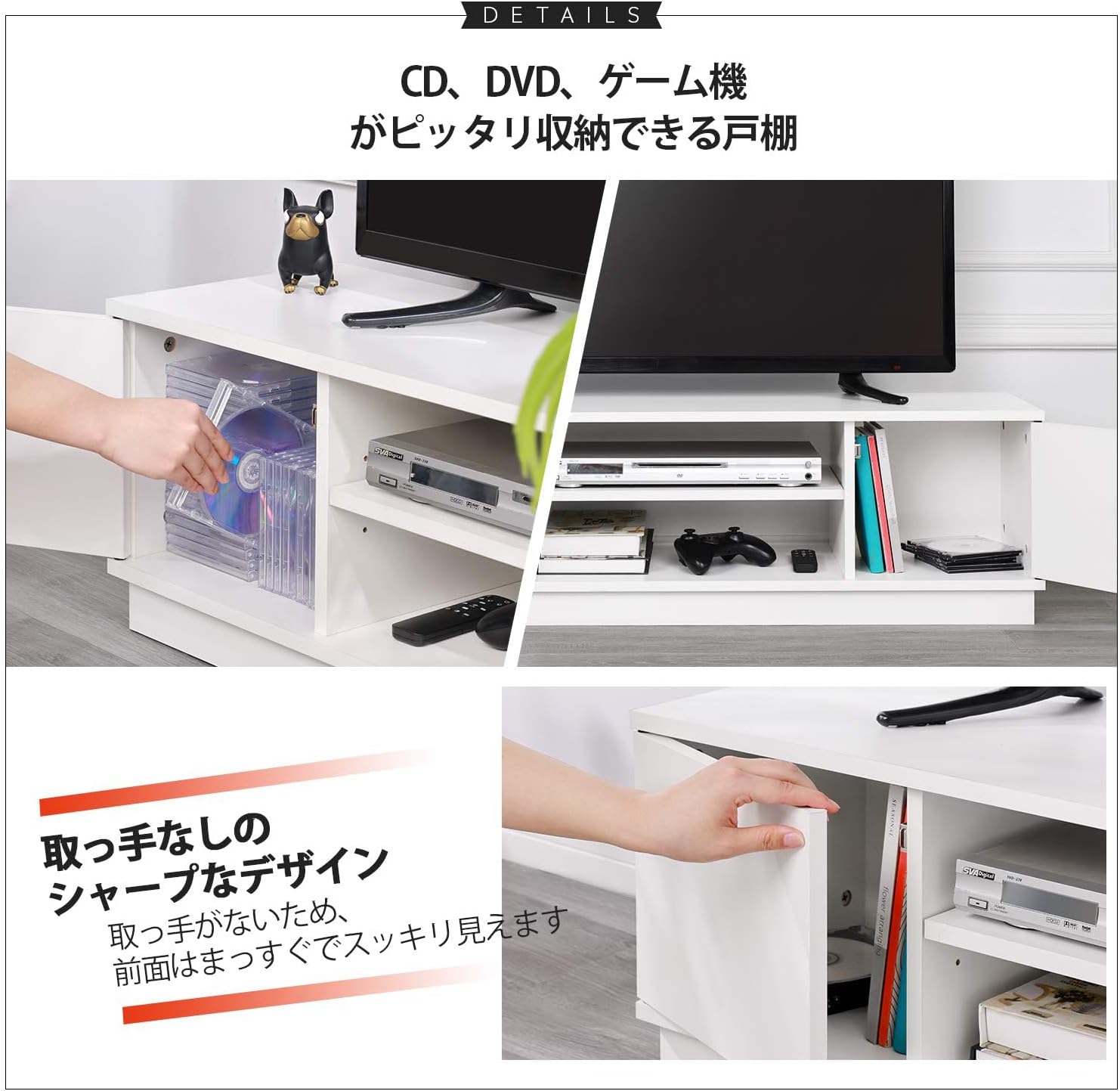
Image 4.2: Demonstrates the practical use of the TV stand's storage, including space for media collections and gaming equipment.
4.3 Cable Management
The backless design of the central compartment allows for easy routing of power cords and AV cables. This helps maintain a clean and organized appearance while ensuring proper airflow for your electronics.
5. Care and Maintenance
To ensure the longevity and appearance of your WLIVE TV Stand, follow these care guidelines:
- Cleaning: Wipe surfaces with a soft, damp cloth. Avoid using harsh chemicals or abrasive cleaners, as they may damage the melamine finish.
- Spills: The melamine-processed board offers excellent water resistance. In case of spills, wipe them immediately with a dry cloth to prevent moisture absorption.
- Scratch Resistance: While the material is designed to be scratch-resistant, avoid dragging sharp or heavy objects across the surface to prevent damage.
- Sunlight Exposure: Avoid prolonged exposure to direct sunlight to prevent fading or discoloration of the finish.
- Screw Hole Covers: Use the included screw hole covers to maintain a neat appearance and protect the screw holes from dust.

Image 5.1: Visual representation of the TV stand's resistance to scratches and water, along with the use of screw hole covers for a finished look.
6. Product Specifications
| Attribute | Detail |
|---|---|
| Brand | WLIVE |
| Model Number | ADSG615WH |
| External Dimensions (WxDxH) | 108 cm x 30 cm x 33 cm (42.5 x 11.8 x 13 inches) |
| Product Weight | 15.25 kg (33.6 lbs) |
| Package Weight | 17 kg (37.5 lbs) |
| Compatible TV Sizes | 24-47 inches |
| Load Capacity (Top Panel) | 40 kg (88 lbs) |
| Load Capacity (Adjustable Shelf) | 15 kg (33 lbs) |
| Board Thickness | 15 mm |
| Material | E1 Grade Melamine Faced Board |
| Assembly Required | Yes |
| Color | White |

Image 6.1: A comprehensive diagram illustrating all key dimensions of the TV stand in centimeters.
7. Troubleshooting
If you encounter any issues during assembly or use, please refer to the following common solutions:
- Difficulty Tightening Screws: Some users report that screws may feel difficult to tighten, potentially causing minor cracking in the coating. This is often due to the tight fit for stability. Ensure you are using the correct screwdriver and apply steady, even pressure. An electric screwdriver can significantly ease this process. The affected areas are typically hidden once assembled.
- Identifying Parts: Board numbers may be small and inconsistently placed. Take your time to carefully locate and match each part to the assembly diagram before proceeding.
- Wobbly Stand After Assembly: Ensure all screws are fully tightened. If the stand still feels unstable, re-check all connections and ensure no parts were missed or incorrectly installed.
- Damaged Parts Upon Arrival: If any parts are damaged during shipping, please contact WLIVE customer support immediately for assistance.
8. Warranty and Support
The WLIVE Low-Type TV Stand comes with a 1-year manufacturer's warranty from the date of purchase. This warranty covers defects in materials and workmanship under normal use.
8.1 What the Warranty Covers
The warranty covers manufacturing defects and issues arising from normal use within the warranty period.
8.2 What the Warranty Does Not Cover
- Damage caused by improper assembly or installation.
- Damage resulting from misuse, abuse, neglect, or accidents.
- Normal wear and tear.
- Damage from unauthorized repairs or modifications.
8.3 Customer Support
For warranty claims, technical assistance, or any questions regarding your WLIVE TV Stand, please contact WLIVE customer support through the retailer where you purchased the product or refer to the contact information provided in your product packaging.
Related documentsADSG615WH


Ask a question about this manual
Ask about setup, troubleshooting, compatibility, parts, safety, or missing instructions. Manuals+ will review the question and use this page’s manual context to help answer it.