
Flame King 2-Stage Auto Changeover LP Propane Gas Regulator
Model: KT12ACR-2a
For RVs, Vans, and Trailers
1. Product Overview
The Flame King KT12ACR-2a 2-Stage Auto Changeover LP Propane Gas Regulator is designed to provide a continuous and reliable propane supply for your RV, van, or trailer. This regulator automatically switches from the primary propane tank to the reserve tank when the primary tank is depleted, ensuring uninterrupted gas flow to your appliances. An integrated indicator changes color to notify you when a tank needs refilling.
Key features include:
- Automatic changeover between two propane tanks.
- Visual indicator for tank status.
- UL Listed for safety and performance.
- Double-stage design for consistent gas pressure.
- Includes two 12-inch pigtail hoses for connection.

Image: The Flame King 2-Stage Auto Changeover LP Propane Gas Regulator, shown with its two attached 12-inch pigtail hoses, ready for installation.
2. What's in the Box
- 1 x 2-Stage Auto Changeover Regulator
- 2 x 12-inch Pigtail Hoses
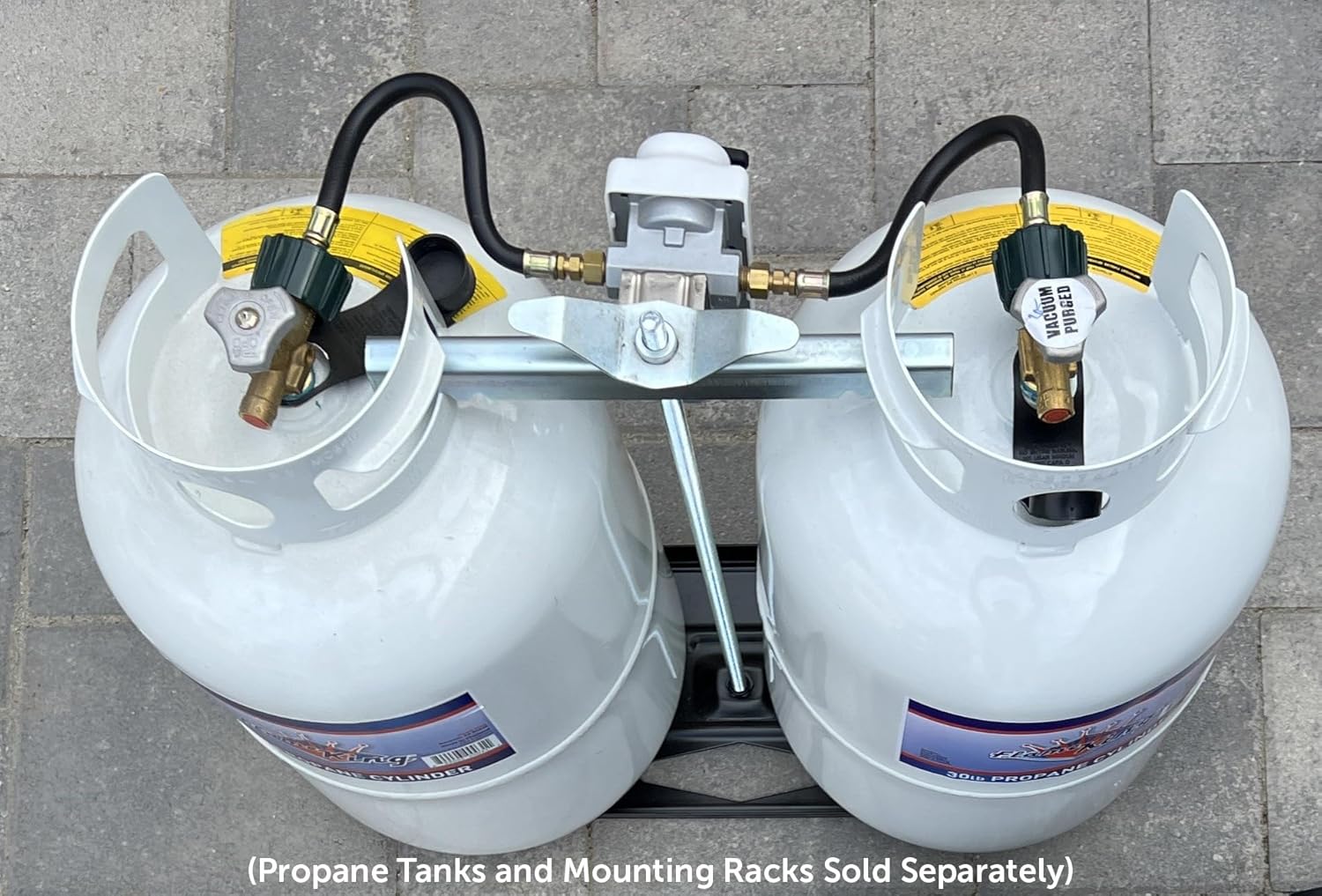
Image: The two 12-inch pigtail hoses included with the regulator, featuring green ACME nuts for easy connection to propane tanks.
3. Important Safety Information
WARNING: Propane gas is highly flammable and explosive. Improper installation, use, or maintenance can result in fire, explosion, property damage, serious injury, or death. Always follow all local codes and regulations.
- Read and understand all instructions before installing or operating this product.
- Ensure all connections are tight and leak-free. Use a leak detection solution (soapy water) to check for leaks after installation and before each use.
- Never use an open flame to check for gas leaks.
- Always turn off propane supply at the tank before disconnecting or performing maintenance.
- Install the regulator in a well-ventilated area, away from ignition sources.
- Do not obstruct the regulator's vent opening.
- Only use this regulator with LP (liquid propane) gas.
- If you smell gas, immediately turn off the propane supply, ventilate the area, and do not operate any electrical switches or appliances. Contact a qualified technician.
4. Installation and Setup
4.1 Components and Connections
The regulator features a 1/4" SAE inverted flare inlet for connecting to the pigtail hoses and a 3/8" NPT female outlet for connecting to your RV's gas system.

Image: A top-down view of the regulator, highlighting the black auto-changeover lever, the red/clear indicator, and the inlet connections on either side.
4.2 Mounting the Regulator
Mount the regulator securely in an upright position, ensuring the vent opening at the bottom is unobstructed and facing downwards. The regulator is designed to mount perfectly on a dual propane tank rack.

Image: The regulator installed on a dual propane tank setup, demonstrating its proper vertical mounting position between two propane cylinders. Propane tanks and mounting racks are not included.
4.3 Connecting Propane Tanks
- Ensure both propane tanks are closed.
- Connect the included 12-inch pigtail hoses to the propane tanks by screwing the green ACME nuts onto the tank valves. Hand-tighten firmly.
- Connect the other end of the pigtail hoses to the inlet ports on either side of the regulator. Use a wrench to tighten these connections securely.
- Connect the 3/8" NPT female outlet of the regulator to your RV's gas supply line. It pairs well with Flame King's 48-inch thermoplastic hose (sold separately).
- Once all connections are made, slowly open the valves on both propane tanks.
- Perform a leak test on all connections using a soapy water solution. Bubbles indicate a leak. Tighten connections until no bubbles appear.
5. Operating Instructions
5.1 Auto Changeover Function
The Flame King 2-Stage Auto Changeover Regulator automatically switches propane supply from the primary tank to the reserve tank when the primary tank is empty. This ensures a continuous flow of gas to your appliances without manual intervention.
- Selecting the Primary Tank: Turn the black lever on the top of the regulator towards the propane tank you wish to designate as the primary supply.
- Indicator Status: If there is propane in the primary tank, the indicator will show CLEAR or GREEN. Propane will flow from this tank to your appliances.
- Automatic Switchover: When the primary tank runs out of propane, the regulator will automatically switch to drawing propane from the other tank. The indicator will then change to RED, signaling that the primary tank is empty and needs refilling.
- Refilling Empty Tank: Once the indicator shows RED, you can close the valve on the empty tank, disconnect it, and take it for refilling. The regulator will continue to supply propane from the reserve tank.
- Resetting the Indicator: After refilling and reconnecting the empty tank, turn the black lever back towards the newly refilled tank. The indicator should return to CLEAR or GREEN.

Image: The regulator with its protective white cover, clearly showing the black lever for tank selection and the red/clear indicator window.
6. Maintenance
Regular maintenance ensures the safe and efficient operation of your propane regulator.
- Leak Checks: Periodically check all gas connections for leaks using a soapy water solution. Do this after any disconnection/reconnection and before each major trip.
- Vent Clearance: Ensure the regulator's vent opening is always clear of obstructions like dirt, debris, snow, or ice. A blocked vent can cause improper operation or gas flow issues.
- Visual Inspection: Regularly inspect the regulator and hoses for any signs of damage, cracks, kinks, or wear. Replace any damaged components immediately.
- Professional Inspection: It is recommended to have a qualified technician perform an annual maintenance check on your propane system, including the regulator.
6.1 Preventing Propane Regulator Freeze-Out in Cold Weather
When temperatures drop, propane regulators can be prone to freezing, leading to reduced gas flow or complete system shutdowns. Follow these best practices:

Image: A detailed guide outlining best practices to prevent propane regulator freeze-out in cold weather, including moisture prevention, protection from snow/ice, proper ventilation, tank overcooling prevention, using a two-stage system, applying heat safely, and regular maintenance.
- Keep Moisture Out: Use high-quality propane, regularly drain moisture from the system, and avoid leaving empty tanks open to the air.
- Protect from Snow and Ice: Install a regulator cover or hood to shield it from direct snow and ice. Avoid placing the regulator in areas where snow runoff can accumulate.
- Proper Tank and Regulator Ventilation: Keep the regulator vent clear and ensure the regulator's vent hole is positioned downward.
- Prevent Overcooling of the Tank: Keep the propane tank at least 30% full and insulate the tank with a weather-resistant thermal blanket. Elevate the tank off the ground.
- Use a Two-Stage Regulator System: A two-stage regulator, like this Flame King model, helps improve propane pressure consistency and prevents freeze-ups.
- Apply Heat Safely: Use a low-wattage electric heat source or heat tape designed for propane regulators. NEVER use an open flame or direct heat source to thaw a frozen regulator.
- Regular Maintenance and Inspections: Inspect the propane system regularly for leaks, moisture buildup, or frost accumulation. Have a qualified technician perform annual maintenance.
7. Troubleshooting
If you experience issues with your Flame King propane regulator, consider the following troubleshooting steps:
- No Propane Flow:
- Check if both propane tank valves are fully open.
- Ensure the auto-changeover lever is pointed towards a tank with propane.
- Verify that the indicator is CLEAR or GREEN for the selected tank. If RED, the tank is empty.
- Check for obstructions in the regulator's vent opening.
- Inspect pigtail hoses for kinks or damage.
- Perform a leak test on all connections.
- Indicator Not Changing:
- Ensure the tank you are switching to has propane.
- Confirm the lever is fully engaged in the desired position.
- If the indicator remains RED even with a full tank, there might be an issue with the regulator or the tank connection.
- Reduced Gas Pressure/Flow:
- This could indicate a partially empty tank, a partially closed tank valve, or a regulator freeze-up in cold weather (refer to Section 6.1).
- Ensure the regulator vent is clear.
- Smell of Propane:
- Immediately turn off propane supply at the tanks.
- Ventilate the area thoroughly.
- Do not operate any electrical switches or appliances.
- Perform a leak test. If the leak persists or cannot be found, contact a qualified technician immediately.
If troubleshooting steps do not resolve the issue, contact Flame King customer support or a certified RV technician.
8. Specifications
| Specification | Value |
|---|---|
| Model | KT12ACR-2a |
| Inlet Connection | 1/4" SAE Inverted Flare |
| Outlet Connection | 3/8" NPT Female Pipe Thread |
| BTU Rating | 345,200 BTU |
| Factory Set Pressure | 11 WC (Water Column) |
| Item Weight | 2.38 pounds |
| Product Dimensions | 7 x 4 x 4 inches |
| Certifications | UL Listed |
9. Warranty and Support
For specific warranty information regarding your Flame King 2-Stage Auto Changeover LP Propane Gas Regulator, please refer to the documentation included with your purchase or visit the official Flame King website. Warranty terms and conditions may vary.
If you require technical assistance, have questions about installation, operation, or maintenance, or need to report a product issue, please contact Flame King customer support directly. You can find contact information on the Flame King website or through your retailer.
Visit the Flame King Store on Amazon for more products and information.


