
Introduction
The Shelly Duo RGBW E27 Smart Wi-Fi LED Bulb offers advanced lighting control for your smart home. This bulb features both color (RGB) and white light modes, allowing you to customize your ambiance with hundreds of color options and various white temperatures. It integrates seamlessly with your existing Wi-Fi network and can be controlled via the Shelly Smart Control app, as well as voice assistants like Amazon Alexa and Google Home.
Safety Information
Your safety is paramount. When installing this device, always follow your country's standards for electrical installation. Before starting any installation, ensure that the power breakers are turned off and there is no voltage on the terminals. This manual provides general guidance; for complex electrical work, consult a qualified electrician.
Package Contents
Upon opening your Shelly Duo RGBW E27 Smart Wi-Fi LED Bulb package, you should find the following items:
- 1x Shelly Duo RGBW E27 Smart Wi-Fi LED Bulb
- 1x User Guide

Image: The Shelly Duo RGBW E27 Smart Wi-Fi LED Bulb shown alongside its retail packaging.
Setup and Installation
Follow these steps to install and set up your Shelly Duo RGBW E27 Smart Wi-Fi LED Bulb:
- Power Off: Before handling the bulb, ensure the power to the light fixture is turned off at the main circuit breaker.
- Install Bulb: Carefully screw the Shelly Duo RGBW E27 bulb into a standard E27 light socket.
- Power On: Restore power to the light fixture from the main circuit breaker. The bulb should light up, indicating it's ready for pairing.
- Download App: Download the Shelly Smart Control app from the App Store (iOS) or Google Play Store (Android).
- Create Account: Open the app and create a new account or log in to your existing one.
- Add Device: In the app, tap on "Add Device" or the '+' icon to begin the inclusion process. The app will guide you through connecting the bulb to your Wi-Fi network. You may use Wi-Fi or Bluetooth for initial discovery.
- Name and Assign: Once discovered, give your bulb a descriptive name and assign it to a room for easier management.

Image: A close-up view of the Shelly Duo RGBW E27 Smart Wi-Fi LED Bulb.
Video: This video demonstrates the inclusion process for a Shelly switch, which is similar to the process for the Shelly Duo RGBW E27 bulb using the Shelly Smart Control app. It covers powering on the device, opening the app, and adding a new device via Bluetooth or Wi-Fi scan.
Operating Instructions
Once your Shelly Duo RGBW E27 bulb is installed and connected to the Shelly Smart Control app, you can begin to enjoy its smart features:
- App Control: Use the Shelly Smart Control app to turn the bulb on/off, adjust brightness (dimming), change white light temperature (warm to cool), and select from a wide spectrum of RGB colors.
- Scene Creation: Create custom scenes within the app to automate your lighting. For example, set a 'Movie Night' scene that dims the lights and sets a specific color.
- Schedules: Program schedules for your bulb to turn on/off or change settings at specific times, such as waking up with a gentle light increase.
- Voice Control: Integrate your Shelly bulb with Amazon Alexa or Google Home. Once linked, you can use voice commands like "Alexa, turn the living room light blue" or "Hey Google, dim the bedroom light to 50%."
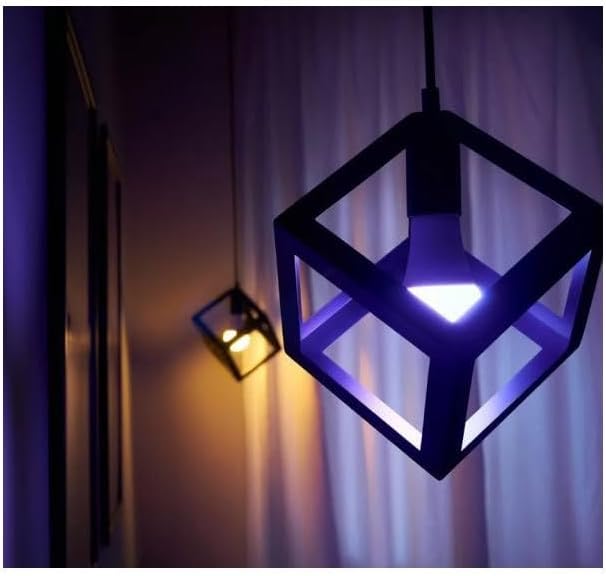
Image: A Shelly Duo RGBW E27 bulb illuminates a modern cube-shaped fixture with a vibrant purple light, showcasing its color capabilities.

Image: Several Shelly Duo RGBW E27 bulbs are installed in decorative pendant lights, casting a mix of blue and purple ambient light.

Image: A Shelly Duo RGBW E27 bulb glows with a bright blue light, enhancing an outdoor green space.

Image: The Shelly Duo RGBW E27 bulb casts a soft pink light, adding a decorative touch to an outdoor area.
Maintenance
To ensure optimal performance and longevity of your Shelly Duo RGBW E27 Smart Wi-Fi LED Bulb, follow these simple maintenance guidelines:
- Cleaning: Disconnect power before cleaning. Use a soft, dry cloth to wipe the bulb. Avoid using liquid cleaners or abrasive materials, as they may damage the bulb's surface or internal components.
- Handling: Handle the bulb with care. Avoid dropping it or subjecting it to strong impacts.
- Environment: Ensure the bulb is used within its specified operating temperature and humidity ranges. Avoid installation in enclosed fixtures that may trap heat, as this can reduce lifespan.
- Firmware Updates: Regularly check the Shelly Smart Control app for available firmware updates. These updates can improve performance, add new features, and enhance security.
Troubleshooting
If you encounter issues with your Shelly Duo RGBW E27 bulb, try the following troubleshooting steps:
- Bulb Not Responding:
- Check if the light fixture is powered on.
- Ensure the bulb is screwed in correctly and making proper contact.
- Verify your Wi-Fi network is active and the bulb is within range.
- Restart the bulb by turning the power off and on at the switch.
- Connectivity Issues:
- Confirm your Wi-Fi password is correct in the Shelly app.
- Move the bulb closer to your Wi-Fi router to improve signal strength.
- If using Bluetooth for initial setup, ensure Bluetooth is enabled on your smartphone.
- Perform a factory reset on the bulb (refer to the full user guide for specific instructions, usually involves a power cycle sequence).
- Incorrect Colors/Dimming:
- Ensure the Shelly app is updated to the latest version.
- Check for any available firmware updates for the bulb.
- Recalibrate the bulb through the app settings if an option is available.
- Short Lifespan:
- Avoid using the bulb in fully enclosed fixtures that can cause overheating.
- Ensure proper ventilation around the bulb.
- Operating the bulb at maximum brightness continuously can sometimes reduce its overall lifespan.
Specifications
| Feature | Specification |
|---|---|
| Brand | Shelly |
| Model Number | 230 |
| Color | Multicolor |
| Product Dimensions (L x W x H) | 12 x 6 x 6 cm |
| Weight | 10 grams |
| Power | 9 Watts |
| Voltage | 230 Volts (AC) |
| Material | Plastic |
| Special Features | Dimmable |
| Light Type | LED |
| Bulb Shape Size | B17 |
| Bulb Base | E27 |
| Equivalent Incandescent Power | 50 Watts |
| Specific Uses | Lamp |
| Light Color | Cool White (adjustable) |
Warranty and Support
Shelly products typically come with a 2-year warranty. For detailed warranty information, please refer to the official Shelly website or contact customer service.
For further assistance, product guides, tutorials, and technical support, please visit the official Shelly support page: