
1. Introduction
Thank you for purchasing the dretec CL-131WT Vibrator Timer with Calculator and Light. This versatile device combines the functionality of a calculator, a timer with vibration alerts, and a convenient light source, making it ideal for various tasks requiring precise timing and calculations. This manual provides detailed instructions for its proper use and maintenance.
2. Safety Information
- Keep the device away from water and excessive moisture.
- Avoid dropping the device or subjecting it to strong impacts.
- Do not attempt to disassemble or repair the device yourself. Contact customer support for assistance.
- Keep batteries out of reach of children. If swallowed, seek immediate medical attention.
- Dispose of used batteries according to local regulations.
3. Product Features
- Integrated Calculator: Performs basic arithmetic operations including addition, subtraction, multiplication, division, percentage calculations, squared constant, and decompression functions.
- Vibrator Timer: Features a countdown timer with a vibration alert, suitable for environments where audible alarms are not desired.
- Backlight and LED Light: Equipped with a convenient backlight for the display and an LED light for use in dark places.
- Clear LCD Display: Provides easy-to-read numerical output.
- Durable Construction: Made from Acrylonitrile Butadiene Styrene (ABS) material.
4. Setup
4.1 Battery Installation
- Locate the battery compartment cover on the back of the device.
- Using a small screwdriver (if required), gently remove the battery compartment cover.
- Insert the required batteries (type typically indicated inside the compartment) ensuring correct polarity (+ and -).
- Replace the battery compartment cover and secure it.
4.2 Initial Power-On
After installing batteries, the device should power on automatically, displaying the default time or calculator screen. If not, press the 'ON/C' button to activate.
5. Operating Instructions
5.1 Device Layout
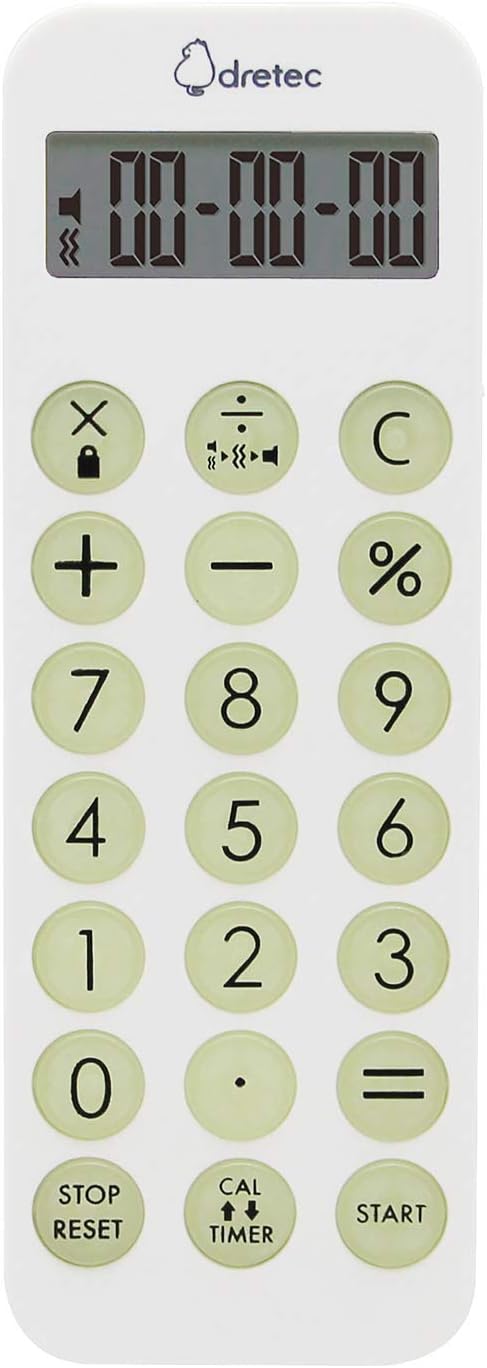
Image 1: Front view of the dretec CL-131WT device. This image displays the LCD screen at the top, followed by a grid of calculator and timer function buttons. The calculator keys include numbers 0-9, decimal point, addition, subtraction, multiplication, division, percentage, and equals. Timer keys include STOP/RESET, CAL/TIMER toggle, and START. The overall color is white with light green circular buttons.

Image 2: A detail view of a section of the dretec CL-131WT device. This image shows a narrow, light-colored strip, likely representing a side or top edge of the product, providing a closer look at its material finish.
5.2 Switching Between Calculator and Timer Modes
Press the 'CAL ↕ TIMER' button located at the bottom center of the keypad to toggle between calculator and timer functions. The display will indicate the active mode.
5.3 Calculator Mode
When in calculator mode, use the numerical keypad and operation buttons for calculations.
- Basic Operations: Enter numbers and use '+', '-', '×', '÷' for addition, subtraction, multiplication, and division. Press '=' for the result.
- Percentage Calculation: Enter a number, then the operation (e.g., '×'), then the percentage value, and finally '%'.
- Squared Constant: This function allows for repeated multiplication by a constant. Refer to the specific instructions on the device or packaging for detailed usage.
- Decompression Function: This advanced calculation function is used for specific mathematical operations. Consult the device's quick guide or online resources for its application.
- Clear: Press 'C' to clear the current entry or calculation.
5.4 Timer Mode
When in timer mode, the display will show time values. The timer can be set for countdown.
- Setting the Timer: Use the numerical keypad to enter the desired time (e.g., minutes and seconds).
- Start/Stop: Press the 'START' button to begin the countdown. Press it again to pause.
- Reset: Press the 'STOP/RESET' button to stop the timer and reset it to the last set time or zero.
- Vibration Alert: When the timer reaches zero, the device will vibrate to alert you.
5.5 Light and Backlight Functions
The device features both a display backlight and an LED light.
- Backlight: The display backlight typically activates automatically when a button is pressed or can be toggled with a dedicated button (if available, refer to device markings).
- LED Light: Locate the dedicated button for the LED light (often on the side or top). Press it to turn the LED light on or off.
6. Maintenance
- Cleaning: Wipe the device with a soft, dry cloth. Do not use abrasive cleaners or solvents.
- Storage: Store the device in a cool, dry place away from direct sunlight and extreme temperatures. If storing for an extended period, remove the batteries to prevent leakage.
7. Troubleshooting
- Device not powering on: Check battery installation and ensure batteries are not depleted. Replace if necessary.
- Display is dim or blank: Replace batteries. Ensure the backlight is activated if in a dark environment.
- Buttons not responding: Ensure the device is not in a locked mode (if applicable). Try removing and reinserting batteries to perform a soft reset.
- Timer not vibrating: Check battery level. Ensure the vibration function is enabled (if there's a setting).
8. Specifications
- Model Number: CL-131WT
- Brand: dretec
- Material: Acrylonitrile Butadiene Styrene (ABS)
- Display Type: LCD
- Color: White
- Calculator Type: Standard Function
9. Warranty and Support
For warranty information and customer support, please refer to the documentation included with your purchase or visit the official dretec website. Keep your proof of purchase for any warranty claims.