
Garza 401303
Garza Smart WiFi Irrigation Controller with Smart Hub - User Manual
Model: 401303
1. Introduction
Thank you for choosing the Garza Smart WiFi Irrigation Controller with Smart Hub. This device is designed to provide intelligent and efficient watering for your garden, pots, terraces, and various irrigation systems. With remote control capabilities via your smartphone and voice assistants, managing your watering schedule has never been easier. This manual provides essential information for setup, operation, and maintenance of your new irrigation system.
2. Product Overview
The Garza Smart WiFi Irrigation Controller system consists of two main components: the outdoor irrigation controller and the indoor smart hub plug. The controller manages water flow, while the hub extends the WiFi signal and can also function as an independent smart plug.

Figure 2.1: Garza Smart WiFi Irrigation Controller and Smart Hub. The image shows the blue and grey irrigation controller connected to a hose, alongside the grey smart hub plug, and a smartphone displaying the water consumption interface of the control app.

Figure 2.2: Close-up of the Garza Smart Hub Plug. This image provides a detailed view of the smart hub, highlighting its ON/OFF button and power outlet.
Key Features:
- Outdoor WiFi Irrigation Controller: Program and manage your garden's watering plan intelligently, controllable via smartphone or manually on the device.
- Additional Smart Hub Plug: Installs indoors, connects to your router via 2.4 GHz WiFi, and communicates with the irrigation controller via 433 MHz radio frequency, enabling control over long distances where WiFi might not reach.
- Independent Smart Plug Functionality: The hub can be used as a standalone smart WiFi plug, supporting up to 3680W and 16A. It allows scheduling, timing, and countdown for connected appliances without affecting irrigation operations.
- Automation and Scene Creation: Create custom automations and scenes, scheduling watering cycles based on time or weather conditions to optimize water consumption.
- Water Consumption Monitoring: Measures water usage and provides a history of irrigation events, allowing you to monitor and control expenses.
- Versatile Application: Optimal for gardens, pots, terraces, drip irrigation systems, misters, sprinklers, and more.
- Remote Control: Control your smart irrigation programmer remotely from multiple devices using the Garza Smart, Tuya Smart, and Smart Life applications.
- Simple Setup: Designed for easy installation and configuration.
- 2.4 GHz WiFi Compatibility: Compatible only with 2.4 GHz WiFi networks (does not work with 5 GHz networks).
3. Setup
3.1 Battery Installation (Irrigation Controller)
- Locate the battery compartment on the irrigation controller.
- Open the battery compartment cover.
- Insert 4 x AA batteries (not included), ensuring correct polarity (+/-).
- Securely close the battery compartment cover to ensure water resistance.
3.2 Physical Installation
- Irrigation Controller: Connect the irrigation controller to your outdoor water tap. Ensure a tight fit to prevent leaks. Then, connect your garden hose or irrigation system to the controller's outlet.
- Smart Hub Plug: Plug the smart hub into an indoor power outlet, preferably centrally located within your home to ensure good WiFi coverage.
3.3 App Connection
- Download the Garza Smart, Tuya Smart, or Smart Life app from your mobile device's app store (iOS or Android).
- Register or log in to your account.
- Ensure your mobile device is connected to a 2.4 GHz WiFi network. The device is not compatible with 5 GHz networks.
- In the app, follow the instructions to add a new device. The app will guide you through connecting the Smart Hub to your WiFi network, and then pairing the irrigation controller with the Smart Hub via radio frequency.

Figure 3.1: Diagram illustrating the WiFi control setup. The image shows the indoor smart hub connected to a wall outlet, transmitting a signal to the outdoor irrigation controller, with a smartphone displaying the app interface.
4. Operating the Device
4.1 Manual Control
The irrigation controller can be operated manually directly on the device. Refer to the physical buttons for immediate ON/OFF control or short-term watering.
4.2 App Control and Scheduling
The primary method of control is through the Garza Smart, Tuya Smart, or Smart Life app. The app allows for comprehensive management of your irrigation system.
- Scheduling: Set up detailed watering schedules based on specific times, days of the week, and duration.
- Automations & Scenes: Create advanced rules for watering, such as triggering based on weather conditions (e.g., rain delay) or integrating with other smart home devices.
- Water Consumption History: View historical data on water usage to monitor and optimize your consumption.
- Manual Override (App): Initiate or stop watering cycles instantly from the app, overriding programmed schedules.

Figure 4.1: App interface for programming and rain delay. The image shows two smartphone screens: one for manual watering duration adjustment and another for setting up daily irrigation schedules with a rain delay option.
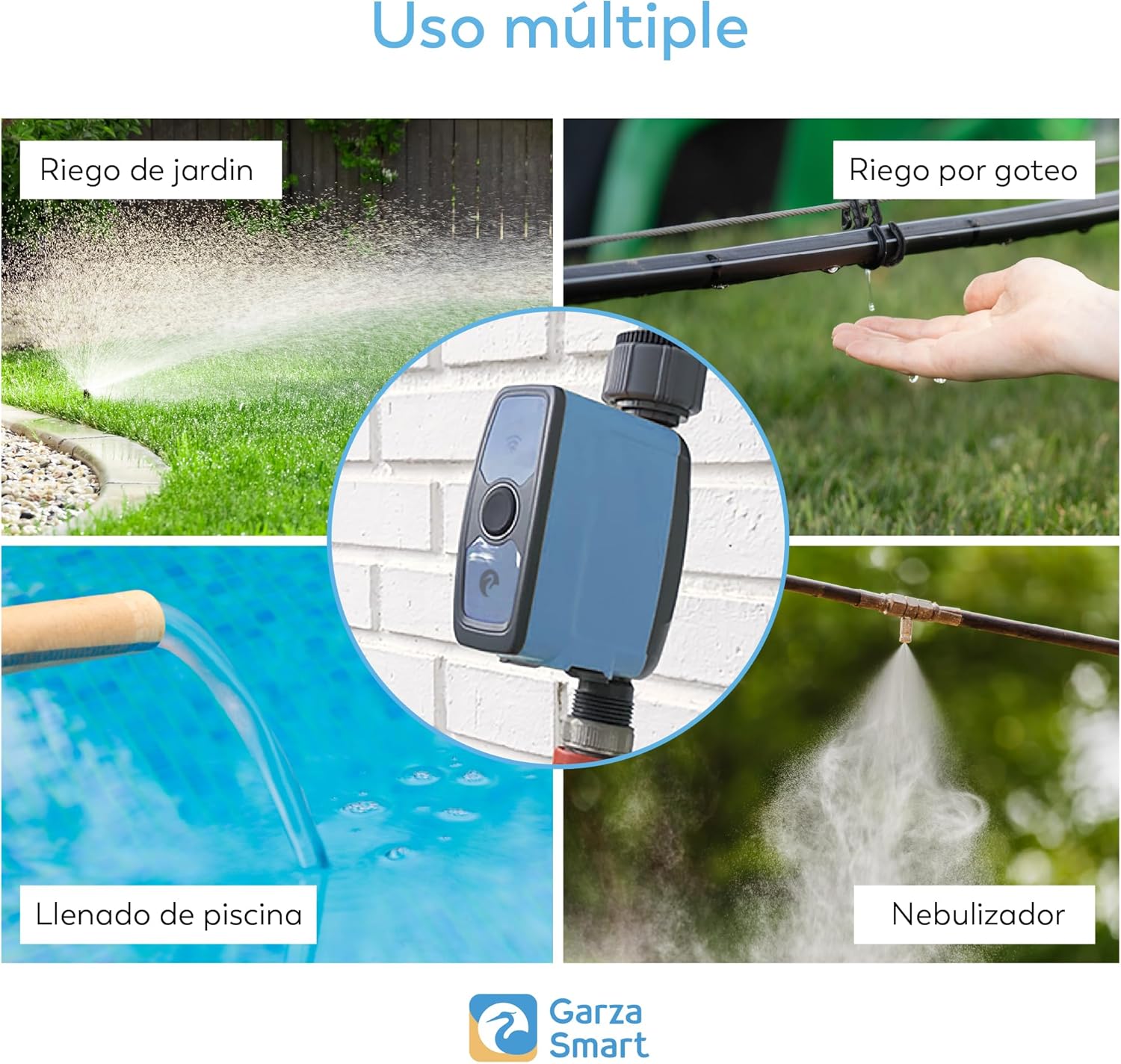
Figure 4.2: Examples of multiple irrigation uses. This image displays four scenarios: garden watering with sprinklers, drip irrigation, pool filling, and misting, demonstrating the versatility of the controller.
4.3 Voice Control
The Garza Smart WiFi Irrigation Controller is compatible with popular voice assistants like Amazon Alexa and Google Assistant. Once integrated, you can control your watering system using simple voice commands.
- Ensure your Smart Hub and irrigation controller are successfully connected to the app.
- Link your Garza Smart/Tuya Smart/Smart Life account with your Alexa or Google Assistant app.
- Use commands such as: "Alexa, turn on the garden watering" or "Hey Google, start irrigation for 10 minutes."

Figure 4.3: Voice control functionality with Alexa. The image shows the irrigation controller in a garden setting with a sprinkler, and an Amazon Echo Dot device, illustrating voice command capabilities.
4.4 Family Sharing
The app allows multiple users to control the irrigation system, making it convenient for households with shared responsibilities.

Figure 4.4: Family control feature. This image depicts three individuals using smartphones, with a central diagram showing multiple users connected to the smart home settings, indicating shared control over the device.
5. Maintenance
5.1 Battery Replacement
The irrigation controller requires 4 x AA batteries. When the battery level is low, the device's performance may be affected, or it may cease operation. Replace batteries promptly when indicated by the app or if the device becomes unresponsive. Ensure the battery compartment is sealed properly after replacement to maintain water resistance.
5.2 Cleaning
Regularly inspect the irrigation controller for any debris or mineral buildup, especially around the water inlet and outlet. Clean with a soft, damp cloth. Do not use abrasive cleaners or immerse the entire unit in water.
6. Troubleshooting
- Device Not Connecting to App:
- Ensure your WiFi network is 2.4 GHz. The device does not support 5 GHz WiFi.
- Check if the Smart Hub is powered on and within range of your WiFi router.
- Verify that the irrigation controller is within range of the Smart Hub (up to 100 meters).
- Restart your router, the Smart Hub, and the irrigation controller (by removing and reinserting batteries).
- Ensure the app is updated to the latest version.
- Watering Not Starting/Stopping:
- Check battery levels in the irrigation controller. Low batteries can cause malfunctions.
- Verify that the water tap connected to the controller is open.
- Ensure there are no physical obstructions in the water flow.
- Check the app for any active schedules, manual overrides, or rain delay settings that might be preventing watering.
- Inaccurate Water Consumption Readings:
- Ensure the device is installed correctly and there are no leaks before or after the controller.
- Calibrate the flow sensor if the app provides such an option, or contact support.
- App Crashing or Unresponsive:
- Clear the app's cache and data, then restart it.
- Reinstall the app if the issue persists.
- Ensure your phone's operating system is up to date.
7. Specifications
| Feature | Specification |
|---|---|
| Model Number | 401303 |
| Product Dimensions (L x W x H) | 12 x 15 x 20 cm |
| Item Weight | 850 Grams |
| Display Type | LED |
| Batteries Required | Yes (4 x AA, not included) |
| Voltage | 6 Volts |
| Wireless Connectivity | 2.4 GHz WiFi, 433 MHz RF |
| Hub Plug Max Load | 3680 W / 16 A |
| Included Components | 1 x Irrigation Controller, 1 x Smart Hub Plug |
8. Warranty and Support
For warranty information and technical support, please refer to the documentation provided with your purchase or visit the official Garza website. You can also contact customer service through the Garza Smart, Tuya Smart, or Smart Life application for assistance with device setup and operation.
Related documents401303


Ask a question about this manual
Ask about setup, troubleshooting, compatibility, parts, safety, or missing instructions. Manuals+ will review the question and use this page’s manual context to help answer it.