
Fresh SFW13H/IP-SEW13H/O
Fresh Smart Inverter Air Conditioner User Manual
Model: SFW13H/IP-SEW13H/O
Introduction
Thank you for choosing the Fresh Smart Inverter Air Conditioner. This manual provides essential information for the safe and efficient operation, maintenance, and troubleshooting of your new air conditioning unit. Please read this manual thoroughly before installation and use, and keep it for future reference.
Safety Information
To ensure safe operation, always adhere to the following precautions:
- Ensure the unit is installed by a qualified technician.
- Do not attempt to repair or modify the unit yourself. Contact authorized service personnel.
- Keep the unit away from water and flammable materials.
- Ensure proper ventilation around the outdoor unit.
- Unplug the unit before cleaning or performing any maintenance.
Product Overview
Indoor Unit

Figure 1: The indoor unit of the Fresh Smart Inverter Air Conditioner, featuring a sleek white design with the Fresh logo centrally placed. This unit is responsible for circulating conditioned air within the room.
Outdoor Unit
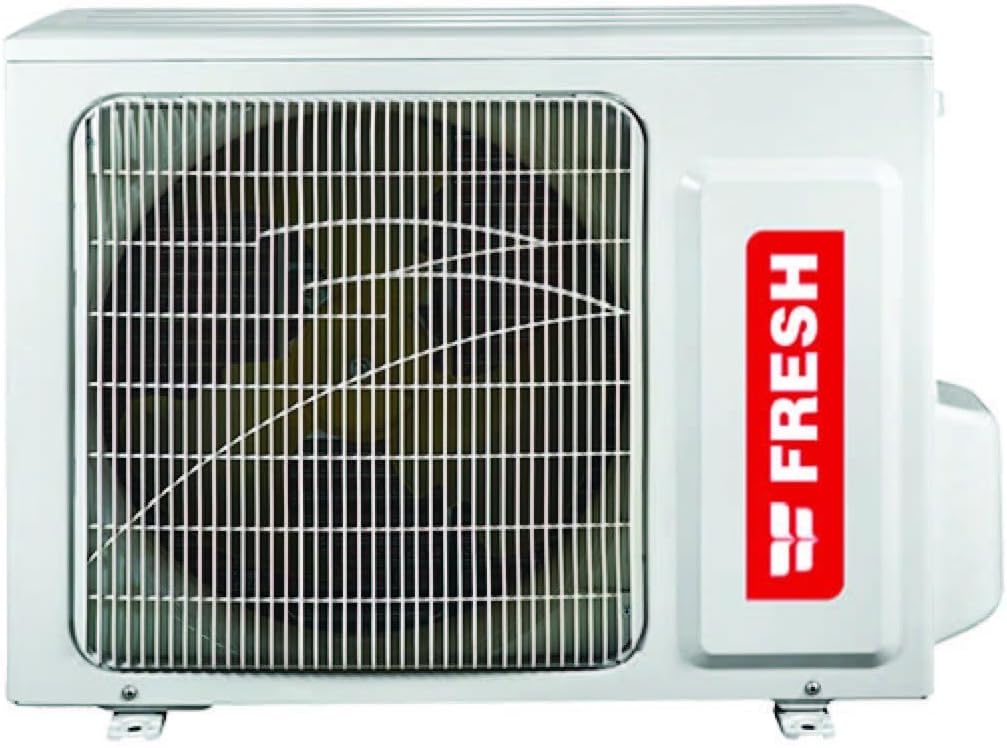
Figure 2: The outdoor unit of the Fresh Smart Inverter Air Conditioner, designed to withstand outdoor conditions with a rust-proof exterior. It houses the compressor and condenser coil.
Key Features:
- Inverter Technology: Saves up to 40% electricity.
- Eco-friendly Refrigerant: Uses R41.a refrigerant.
- High Efficiency: Higher efficiency with lower power consumption.
- Economic Sleep Mode: Optimized operation for comfortable sleep.
- Low Voltage Operation: Designed to operate efficiently even with lower voltage.
- Self-Cleaning Function: Maintains internal cleanliness.
- LED Display: Clear display for settings and status.
- Self-Protection: Automatic protection during multiple restarts.
- Automatic Error Location: Identifies and displays system errors.
- Turbo Cooling: Rapid cooling function.
- Auto Restart: Automatically resumes operation after power interruption.
Setup and Installation
Installation of the Fresh Smart Inverter Air Conditioner should only be performed by certified professionals to ensure proper functioning and safety. Incorrect installation can lead to electric shock, fire, or serious injury.
Pre-Installation Checks:
- Verify the power supply matches the unit's requirements (220 Volts).
- Ensure the installation location is structurally sound and provides adequate space for air circulation.
- Confirm all necessary accessories and components are present.
General Installation Steps (Professional Installation Recommended):
- Mount the indoor unit securely on the wall, ensuring it is level.
- Install the outdoor unit on a stable, elevated surface, away from direct sunlight and obstructions. The rust-proof design ensures durability.
- Connect the refrigerant pipes and electrical wiring between the indoor and outdoor units. Ensure proper insulation and sealing.
- Perform a vacuum test to remove air and moisture from the refrigerant lines.
- Charge the system with the appropriate amount of R41.a refrigerant.
- Connect the power supply and perform a test run to check for leaks and proper operation.
Operating Instructions
Your Fresh Smart Inverter Air Conditioner is designed for user-friendly operation. Use the remote control (not pictured) to access various functions.
Basic Operation:
- Power On/Off: Press the power button on the remote control to turn the unit on or off.
- Mode Selection: Use the "Mode" button to cycle through available modes:
- Cool Mode: For cooling the room.
- Heat Mode: For heating the room (if applicable to your model).
- Fan Mode: Circulates air without heating or cooling.
- Dry Mode: Reduces humidity.
- Auto Mode: Automatically selects the appropriate mode based on room temperature.
- Temperature Adjustment: Use the Up/Down arrows to set your desired temperature. The LED display will show the current setting.
- Fan Speed: Adjust the fan speed to your preference (Auto, Low, Medium, High).
Advanced Functions:
- Turbo Mode: Activates rapid cooling or heating for quick temperature changes. Press the "Turbo" button.
- Sleep Mode: Optimizes temperature and fan speed for quiet and energy-efficient operation during sleep. Press the "Sleep" button.
- Timer Function: Set the unit to turn on or off automatically at a specified time. Refer to the remote control's specific instructions for setting the timer.
- Self-Cleaning: Initiate the self-cleaning cycle to prevent mold and bacteria buildup. Consult the remote control or main unit for activation.
Maintenance
Regular maintenance ensures optimal performance and extends the lifespan of your air conditioner. Always unplug the unit before performing any maintenance.
Filter Cleaning:
- Open the front panel of the indoor unit.
- Remove the air filters.
- Clean the filters with a vacuum cleaner or wash them with lukewarm water and mild detergent.
- Allow filters to dry completely before reinserting them.
- Clean filters every two weeks or more frequently depending on usage and air quality.
Self-Cleaning Function:
The unit features a self-cleaning function that helps to remove moisture and prevent mold growth inside the indoor unit. Activate this function periodically as per the remote control instructions.
Outdoor Unit Maintenance:
- Ensure the outdoor unit is free from obstructions like leaves, dirt, or debris.
- Periodically clean the outdoor coil with a soft brush or water spray (ensure power is off).
- The rust-proof design minimizes corrosion, but regular inspection is recommended.
Troubleshooting
This section provides solutions to common issues. If the problem persists, contact Fresh customer support.
| Problem | Possible Cause | Solution |
|---|---|---|
| Unit does not turn on. | No power, circuit breaker tripped, remote control batteries dead. | Check power supply, reset circuit breaker, replace remote control batteries. |
| Insufficient cooling/heating. | Dirty air filters, blocked outdoor unit, low refrigerant, wrong mode selected. | Clean filters, clear obstructions, check refrigerant (professional service), select correct mode. |
| Unusual noise. | Loose parts, foreign objects, fan issues. | Inspect for loose parts, remove foreign objects. If noise persists, contact service. |
| Error code on LED display. | Internal system fault. The unit automatically locates errors. | Note the error code and contact Fresh customer support for diagnosis and repair. |
| Unit restarts unexpectedly. | Power fluctuation, self-protection mechanism. | This is often due to the self-protection feature or auto-restart after power return. If frequent, check power stability. |
Specifications
| Feature | Detail |
|---|---|
| Brand | Fresh |
| Model Information | SFW13H/IP-SEW13H/O |
| Product Dimensions (D x W x H) | 25 x 95 x 30 cm |
| Item Weight | 68 Kilograms |
| Capacity | 1.5 HP (1.5 Liters) |
| Energy Efficiency | A++++ |
| Annual Energy Consumption | 150 kWh |
| Noise Level | 15 dB |
| Installation Type | Split System |
| Form Factor | Mini Split |
| Color | White |
| Voltage | 220 Volts |
| Wattage | 50 Watts |
| Included Components | Air Conditioner Unit |
| Batteries Required | No |
| First Available Date | March 1, 2021 |
| Seasonal Energy Efficiency Ratio (SEER) | 16 |
| BEE Star Rating | 5 Stars |
Warranty and Support
Your Fresh Smart Inverter Air Conditioner comes with a comprehensive warranty and dedicated customer support.
Warranty Information:
The product includes a 5-year warranty. Please retain your purchase receipt for warranty claims. Installation for retail orders is handled by Fresh company.
Customer Support:
For any inquiries, technical assistance, or to schedule installation (for retail orders), please contact Fresh customer support:
- Fresh Support Hotline: 19059
- Please have your model number (SFW13H/IP-SEW13H/O) and purchase details ready when contacting support.
Related documentsSFW13H/IP-SEW13H/O


Ask a question about this manual
Ask about setup, troubleshooting, compatibility, parts, safety, or missing instructions. Manuals+ will review the question and use this page’s manual context to help answer it.