
Introduction
This manual provides essential instructions for the proper use, setup, and maintenance of your Tronsmart MUC03 Micro USB Cable. Please read this manual thoroughly before using the product to ensure optimal performance and safety.
Product Overview
The Tronsmart MUC03 is a high-quality Micro USB cable designed for charging and data transfer. It features a durable braided nylon material and supports fast charging up to 2.4A and data transfer speeds up to 480 Mbps.
- Model: MUC03
- Cable Type: Micro USB
- Material: Braided Nylon
- Output: Up to 2.4 A
- Data Transfer: Up to 480 Mbps
- Length: 3 meters
- Color: Black
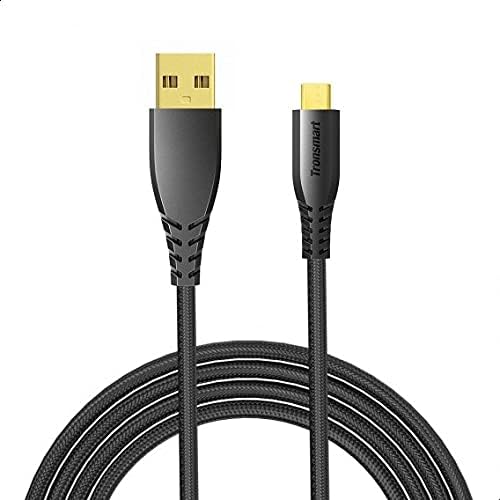
Image 1: The Tronsmart MUC03 Micro USB Cable, showcasing its black braided design and gold-plated connectors.
Setup
Using the Tronsmart MUC03 Micro USB Cable is straightforward. Follow these steps to connect your device:
- Identify Ports: Locate the Micro USB port on your device (e.g., smartphone, tablet, power bank) and a standard USB-A port on your charging adapter, computer, or other power source.
- Connect Micro USB: Gently insert the Micro USB connector of the cable into the Micro USB port of your device. Ensure it is oriented correctly to avoid damage.
- Connect USB-A: Insert the standard USB-A connector of the cable into the USB-A port of your power source or computer.
- Verify Connection: Once connected, your device should indicate that it is charging or connected for data transfer.
Operating Instructions
Charging Devices
To charge your device using the Tronsmart MUC03 Micro USB Cable:
- Connect the cable as described in the "Setup" section.
- Ensure your power source (wall adapter, power bank) is active and providing power.
- Monitor your device's screen for the charging indicator. The cable supports up to 2.4A output for efficient charging.
Data Transfer
To transfer data between your device and a computer:
- Connect the cable between your device and a computer's USB-A port.
- Your device may prompt you to select a connection mode (e.g., "File Transfer," "MTP," "PTP"). Select the appropriate mode for data transfer.
- Access your device's storage from your computer's file explorer to transfer files. The cable supports data transfer speeds up to 480 Mbps.
Maintenance and Care
To ensure the longevity and optimal performance of your Tronsmart MUC03 Micro USB Cable, follow these care guidelines:
- Storage: Store the cable in a cool, dry place away from direct sunlight and extreme temperatures. Avoid tightly coiling or bending the cable at sharp angles.
- Cleaning: If the cable or connectors become dirty, gently wipe them with a soft, dry cloth. Do not use liquid cleaners or abrasive materials.
- Handling: Always grasp the connector head when plugging or unplugging the cable, rather than pulling on the cable itself. This prevents damage to the internal wires and connectors.
- Avoid Stress: Do not subject the cable to excessive pulling, twisting, or bending, especially near the connectors. The braided nylon design offers enhanced durability, as shown in the image below.

Image 2: An illustration comparing the durability of Tronsmart cables, highlighting their robust construction and bend lifespan compared to conventional cables.

Image 3: A cross-section diagram illustrating the internal structure of the Tronsmart Micro USB cable, showing multiple protective layers including nylon braided, shielded tinned copper braid, aluminum foil, and various gauge power and data wires.
Troubleshooting
If you encounter issues with your Tronsmart MUC03 Micro USB Cable, consider the following common solutions:
- Device Not Charging:
- Ensure both ends of the cable are securely connected.
- Try a different power adapter or USB port.
- Test the cable with another device to rule out a device-specific issue.
- Check if the power source is active.
- Slow Charging:
- Ensure your power adapter provides sufficient output (e.g., 2.4A for fast charging).
- Avoid using the device heavily while charging.
- Check for any debris in the device's charging port or the cable's connector.
- Data Transfer Issues:
- Ensure your device is set to "File Transfer" or "MTP" mode when connected to a computer.
- Try a different USB port on your computer.
- Restart both your device and computer.
- Verify that your computer's drivers for the device are up to date.
- Cable Damage:
- Visually inspect the cable for any signs of fraying, cuts, or bent connectors. Discontinue use if damage is found.
Specifications
| Feature | Detail |
|---|---|
| Model | MUC03 |
| Cable Type | Micro USB |
| Material | Braided Nylon |
| Output (USB) | Up to 2.4 A |
| Data Transfer Speed | Up to 480 Mbps |
| Length | 3 meters |
| Color | Black |
| Manufacturer | Tronsmart |
| Package Dimensions | 16 x 8 x 4 cm |
| Item Weight | 96 g |
Safety Information
Please observe the following safety precautions:
- Do not expose the cable to water or excessive moisture.
- Avoid using the cable in environments with extreme temperatures.
- Keep the cable out of reach of children and pets.
- Do not attempt to modify or disassemble the cable.
- Use only with compatible devices and power adapters.
- If the cable shows signs of damage, discontinue use immediately to prevent potential hazards.
Warranty and Support
For warranty information or technical support, please refer to the official Tronsmart website or contact their customer service. Keep your purchase receipt as proof of purchase.
Note: Specific warranty terms may vary by region and retailer.