
1. Introduction
This manual provides comprehensive instructions for the assembly, operation, maintenance, and troubleshooting of your TVON Heavy Duty Rolling TV Stand. Designed for versatility and mobility, this stand accommodates 32-83 inch TVs and features a built-in power outlet for convenience. Please read this manual thoroughly before assembly and use to ensure safe and optimal performance.

Figure 1.1: TVON Heavy Duty Rolling TV Stand in use.
2. Safety Information
- Ensure all components are present and undamaged before assembly. Do not use if any parts are missing or defective.
- Do not exceed the maximum weight capacity of 110 lbs (50 kg) for the TV or 11 lbs (5 kg) for the media shelf.
- Ensure the TV's VESA pattern is compatible (100x100mm to 600x400mm) before mounting.
- Assemble the stand on a soft, flat surface to prevent scratches and damage.
- Always lock the wheels when the stand is stationary to prevent accidental movement.
- Keep children and pets away from the assembly area.
- Do not attempt to modify the product. Any modifications may void the warranty and pose safety risks.
- When moving the stand, ensure the TV is securely mounted and the path is clear of obstacles.
- The integrated power outlet is rated for 125V/12A. Do not overload the power strip.
3. Package Contents
Verify that all parts listed below are included in your package. If any parts are missing or damaged, please contact customer support.
- Base Frame with Wheels (1)
- Vertical Support Poles (2)
- TV Mounting Bracket (1)
- Adjustable Media Shelf (1)
- Integrated Power Strip (1)
- Cable Management Clips (Set)
- Hardware Kit (Screws, Washers, Spacers, Allen Key, Wrench)
- Instruction Manual (This document)
4. Setup and Assembly
Follow these steps carefully for proper assembly. It is recommended to have two people for certain steps, especially when mounting the TV.
4.1. Base Assembly
- Unpack all components and lay them out on a soft, clean surface.
- Attach the vertical support poles to the base frame using the provided screws and tools. Ensure they are securely fastened.
- Verify that the pre-installed 360° lockable wheels are functioning correctly. Lock them during assembly for stability.
4.2. Media Shelf and Power Outlet Installation
- Slide the adjustable media shelf onto the vertical support poles at your desired height. Secure it with the locking mechanism.
- Attach the integrated power strip to one of the vertical support poles using the designated mounting points. Ensure the power cord is routed safely.

Figure 4.1: Detail of the integrated power outlet.
4.3. TV Mounting Bracket Installation
- Attach the TV mounting bracket to the rear of your television using the appropriate VESA screws, washers, and spacers from the hardware kit. Refer to your TV's manual for specific VESA hole patterns.
- Ensure the bracket is centered and securely attached to the TV.
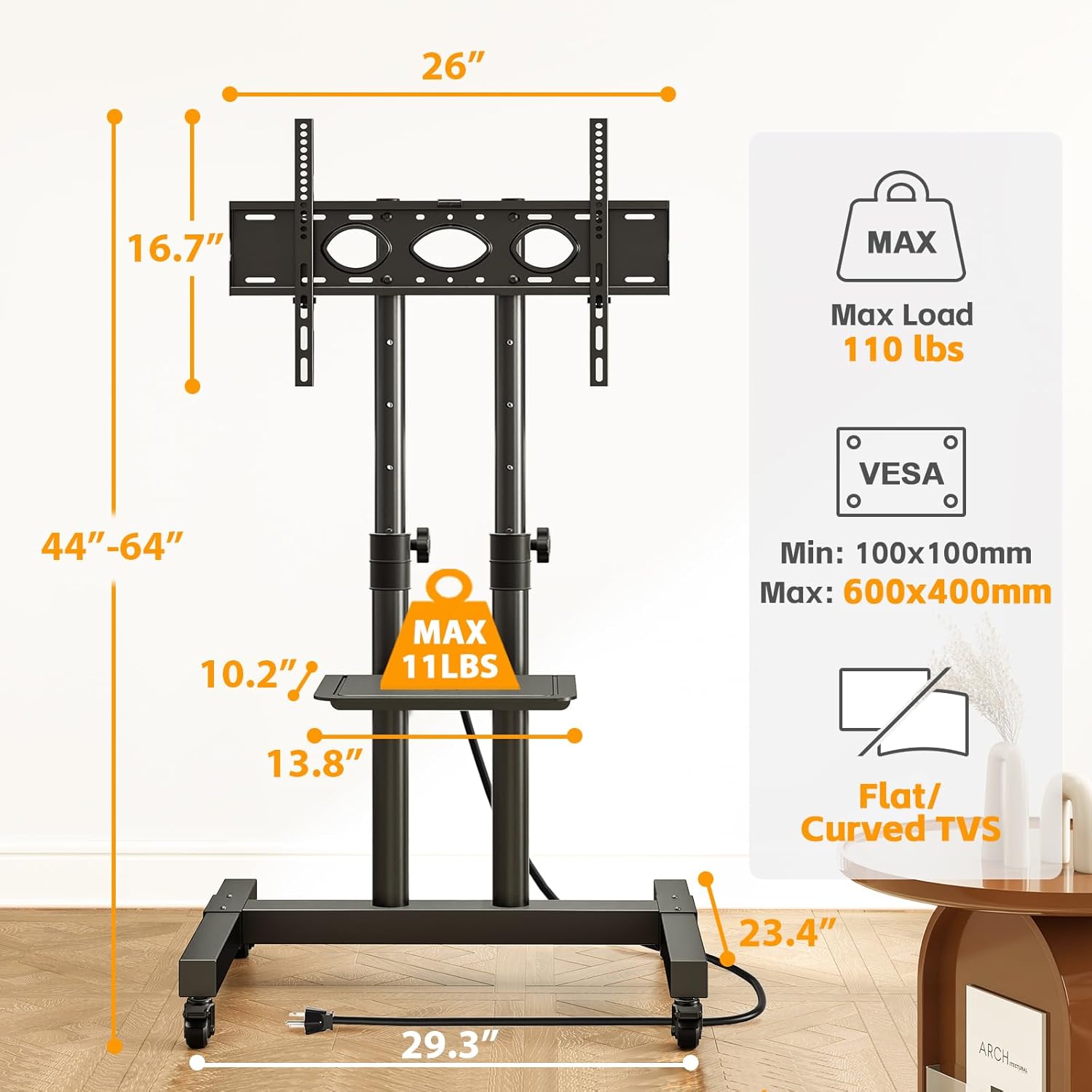
Figure 4.2: Stand dimensions and VESA compatibility.
4.4. Mounting the TV to the Stand
- With assistance, carefully lift the TV with the attached bracket and hook it onto the vertical support poles of the stand.
- Secure the TV to the stand using the safety screws or locking mechanisms provided on the bracket. Ensure the TV is level and stable.

Figure 4.3: Assembly is designed to be straightforward.
5. Operating Instructions
5.1. Height Adjustment
The TVON Rolling TV Stand allows for height adjustment of both the TV mounting bracket and the media shelf. To adjust the TV height, loosen the locking knobs on the vertical support poles, carefully slide the TV to the desired height, and then securely tighten the knobs. The media shelf can be adjusted similarly by loosening its locking mechanism, repositioning, and re-tightening.

Figure 5.1: Adjustable height for optimal viewing.
5.2. Mobility and Locking Wheels
The stand is equipped with 360° solid casters for easy movement across various floor types. To move the stand, unlock all four wheels by flipping their respective levers. Once the stand is in the desired position, firmly press down on the levers to lock the wheels and prevent unintended movement.

Figure 5.2: Easy mobility with lockable wheels.
5.3. Using the Power Outlet
The integrated power strip provides four AC outlets for powering your TV and other devices. Plug the stand's main power cord into a wall outlet. Use the master switch on the power strip to turn power on or off to all connected devices. This switch helps prevent false touches and enhances safety.
6. Maintenance
- Cleaning: Wipe the stand with a soft, damp cloth. Avoid abrasive cleaners or solvents that could damage the finish.
- Hardware Check: Periodically check all screws and connections to ensure they remain tight and secure. Re-tighten if necessary.
- Wheel Inspection: Keep the wheels free of debris to ensure smooth movement.
- Cable Management: Ensure cables are neatly organized using the provided clips to prevent tripping hazards and cable damage.
7. Troubleshooting
| Problem | Possible Cause | Solution |
|---|---|---|
| Stand is unstable or wobbly. | Loose connections; uneven floor; overloaded. | Ensure all screws are tightened. Move to a level surface. Verify TV weight is within limits. |
| Wheels do not roll smoothly. | Wheels are locked; debris in wheels. | Unlock all wheels. Clear any debris from the casters. |
| Power outlet not working. | Master switch off; not plugged in; overloaded circuit. | Ensure master switch is ON. Check if the stand's power cord is plugged into a live wall outlet. Reduce the number of devices connected. |
| TV cannot be mounted. | Incorrect VESA pattern; TV too heavy. | Verify TV's VESA pattern is between 100x100mm and 600x400mm. Check TV weight against 110 lbs limit. |
8. Specifications
| Feature | Detail |
|---|---|
| Brand | TVON |
| Model Number | Rolling TV Stand |
| Material | Alloy Steel |
| Color | Black |
| Product Dimensions (L x W x H) | 33.2 x 23.1 x 71.2 inches |
| Item Weight | 23.1 pounds |
| Compatible TV Sizes | 32 - 83 Inches |
| Maximum TV Load Capacity | 110 lbs (50 kg) |
| Maximum Media Shelf Load Capacity | 11 lbs (5 kg) |
| VESA Compatibility | 100x100mm to 600x400mm |
| Movement Type | Swivel, Mobile (360° Lockable Wheels) |
| Power Outlet | 4 AC Outlets, 125V/12A, Master Switch, 6.5 ft Power Cord |
| Country of Origin | China |
9. Warranty and Support
For warranty information or technical support, please contact TVON customer service. Keep your purchase receipt as proof of purchase.
- Online Support: Visit the official TVON website for FAQs and support resources.
- Email Support: Refer to your product packaging or the TVON website for contact email.
- Phone Support: Refer to your product packaging or the TVON website for contact phone number.
