
BLUETTI AC200P
BLUETTI AC200P Portable Power Station User Manual
Model: AC200P
Brand: BLUETTI
Product Overview
The BLUETTI AC200P is a portable power station designed to provide reliable power for various applications, including home backup, outdoor camping, and van life. It features a 2000Wh capacity and a 2000W AC inverter (4800W surge), capable of powering a wide range of devices. This kit includes the AC200P power station and three 200W foldable solar panels (BLUETTI SP200) for efficient solar recharging.
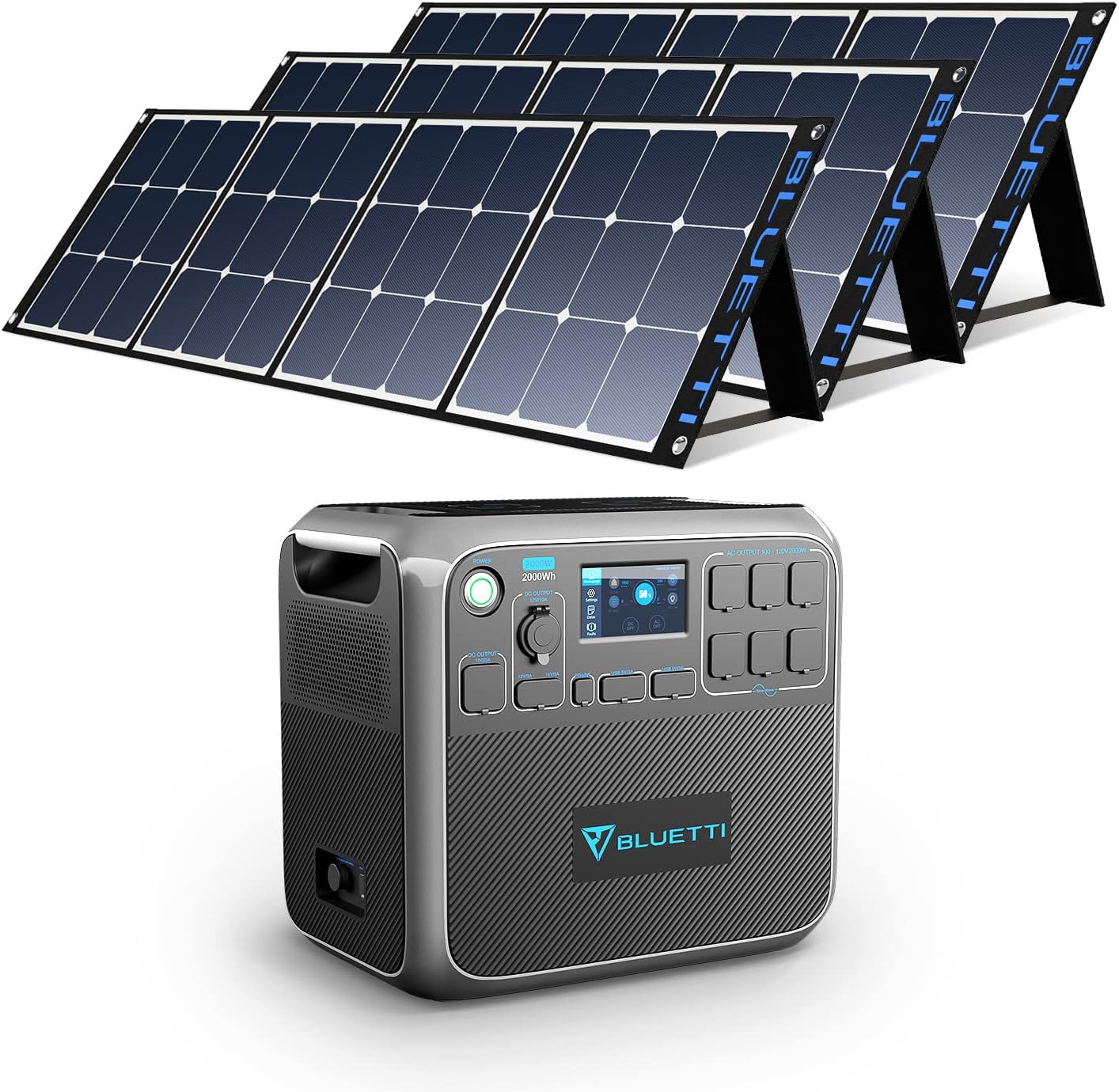
Figure 1: BLUETTI AC200P Portable Power Station and SP200 Foldable Solar Panels.
The AC200P is equipped with multiple output ports, including AC outlets, DC outputs, and USB ports, to meet diverse power needs. Its robust LiFePO4 battery ensures long cycle life and enhanced safety. The included SP200 solar panels are highly efficient and designed for portability and easy setup.
Video 1: An overview of the BLUETTI AC200P Portable Power Station, showcasing its features and various applications.
Setup Guide
1. Unboxing and Initial Inspection
Upon receiving your BLUETTI AC200P kit, carefully unbox all components and inspect them for any signs of damage. Ensure all items listed below are present:
- 1 x BLUETTI AC200P Power Station
- 3 x BLUETTI SP200 200W Foldable Solar Panels
- 1 x AC Adapter Charger (with AC charging cable)
- 1 x Solar Charging Cable (MC4 to XT90)
- 1 x Car Charging Cable (Car to XT90)
- 1 x XT90 to Aviation Plug (input)
- 1 x User Manual
- 1 x Warranty Card
- 1 x Certificate

Figure 2: Contents of the BLUETTI AC200P package, including the power station, solar panels, and various charging cables.
2. Connecting Solar Panels
To charge the AC200P using solar power, connect the SP200 foldable solar panels. The AC200P supports a wide solar input range of 35-150V and a maximum of 700W. For optimal charging, connect at least three SP200 panels in series. The SP200 panels feature an adjustable kickstand design to maximize sunlight absorption.

Figure 3: The BLUETTI AC200P connected to multiple solar panels, illustrating the solar charging capability.

Figure 4: Diagram showing how to connect solar panels in series and estimated charging times for different panel configurations.
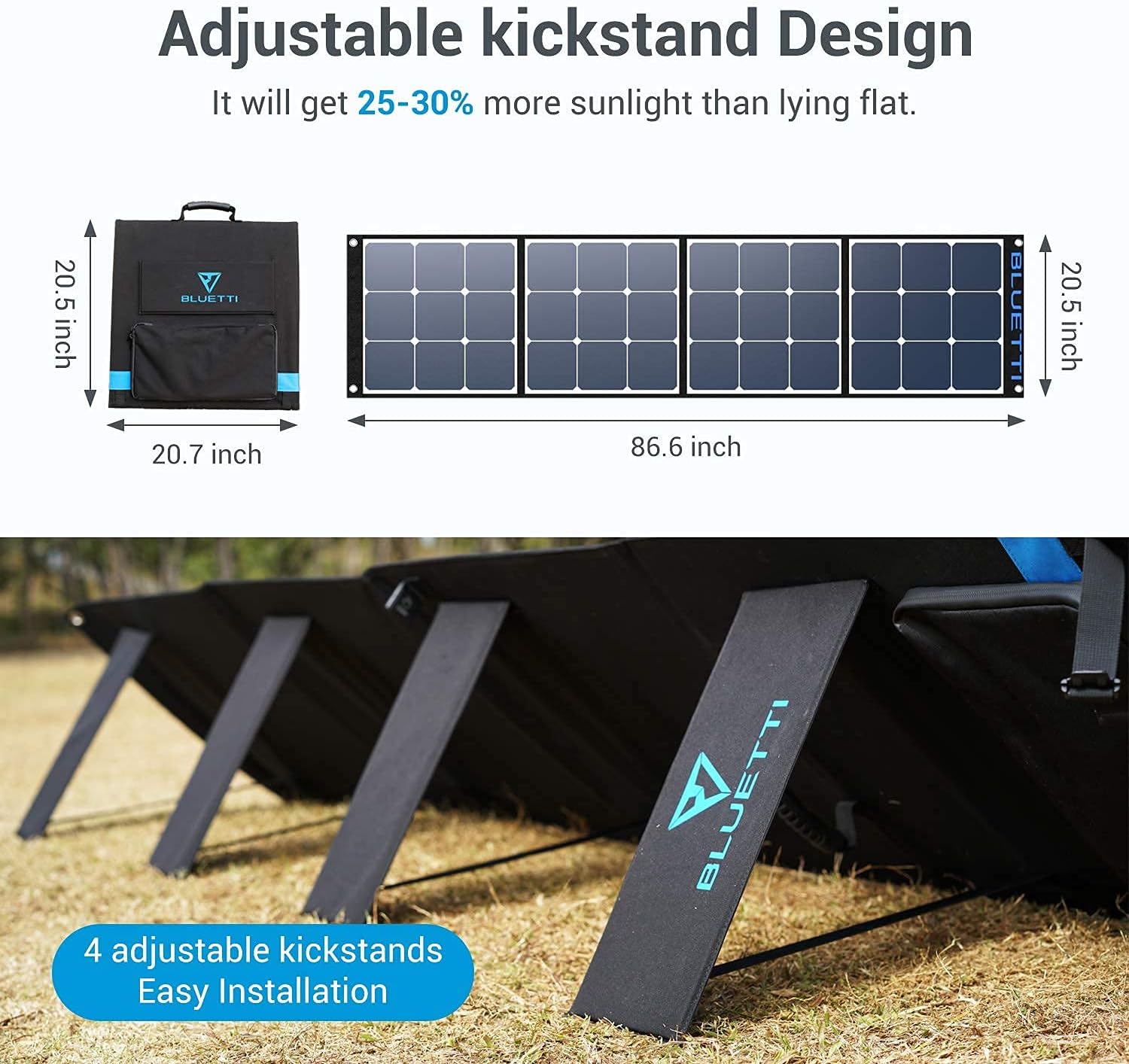
Figure 5: The adjustable kickstand feature of the BLUETTI solar panels, allowing for optimal angle adjustment for maximum sun exposure.

Figure 6: Close-up view of the BLUETTI solar panel features, including the kickstand, integrated handle, carrying bag, and MC4 connectors.
3. Initial Charging
Before first use, it is recommended to fully charge the BLUETTI AC200P. It supports multiple recharging methods:
- AC Wall Outlet: Use the provided AC adapter. A full charge takes approximately 5.5 hours with one 400W adapter, or about 2.5-3 hours with dual AC adapters (second adapter and DC7909 to XT90 cable sold separately).
- Solar Panel: Connect solar panels as described above. With Max. 700W solar input, full recharge can be achieved in 3-3.5 hours.
- Car Charging: Use the car charging cable to charge from a 12V or 24V car outlet. This takes approximately 20 hours (12V) or 10 hours (24V).
- Generator: The unit can be charged via a generator.
- Lead-acid Battery: It can also be charged from a lead-acid battery.
The AC200P can be recharged by AC and PV simultaneously for faster charging, taking about 2.5 hours.
Video 2: Demonstrates the five flexible recharging methods for the BLUETTI AC200P, including wall, gas generator, car, lead-acid battery, and solar charging.
Operating Instructions
1. Powering On/Off
To power on the BLUETTI AC200P, press and hold the main power button until the LCD screen illuminates. To power off, press and hold the same button until the screen turns off. The unit features a smart touchable LCD screen for easy operation and monitoring.

Figure 7: The BLUETTI AC200P in use, powering a drill, demonstrating its capability to handle high-wattage tools.
2. Using AC Outlets
The AC200P provides six 120V AC outlets with a continuous output of 2000W and a surge capability of 4800W. To activate the AC output, navigate to the AC output section on the LCD screen and turn it on. Ensure the total power consumption of your devices does not exceed the rated output.
Video 3: Illustrates the various output ports of the BLUETTI AC200P, including AC, DC, and USB, highlighting its versatility.
3. Using DC and USB Outputs
The unit includes multiple DC output ports (12V/25A, 12V/10A, 12V/3A) and four USB ports (5V/3A) along with a 60W PD (Power Delivery) port. These are suitable for charging smaller electronics, laptops, and other DC-powered devices. Activate the DC output via the LCD screen as needed.
4. Wireless Charging
The BLUETTI AC200P features two wireless charging pads on top of the unit. Simply place your compatible smartphone or other Qi-enabled device on the charging pad to initiate wireless charging.
Video 4: Shows the dual wireless charging pads on the BLUETTI AC200P, demonstrating simultaneous charging of two smartphones.
5. Energy Saving Mode
The AC200P includes an Eco-mode designed to save power for low loads (below 50W). This feature helps conserve battery life when only small devices are connected. Refer to the LCD screen interface for options to enable or disable this mode.
Maintenance
Proper maintenance ensures the longevity and optimal performance of your BLUETTI AC200P.
- Battery Life: The AC200P uses a LiFePO4 battery cell, designed for 3500+ super long life cycles at 80% capacity. To preserve battery life, avoid consistently draining the battery to 0% or keeping it at 100% for extended periods when not in use.
- Cleaning: Regularly clean the exterior of the unit with a soft, dry cloth. Ensure all ports are free from dust and debris. For solar panels, the ETFE lamination makes them durable and easy to clean with a wet cloth.
- Storage: When storing the unit for extended periods, ensure it is charged to approximately 50-80% and stored in a cool, dry place away from direct sunlight and extreme temperatures. Recharge every 3-6 months to prevent deep discharge.
- Temperature Management: The unit features an intelligent temperature-activated fan system to maintain optimal operating temperatures. Ensure proper ventilation around the unit during operation.
Video 5: Highlights the intelligent temperature-activated fan system within the BLUETTI AC200P, ensuring efficient cooling and stable operation.
Troubleshooting
This section addresses common issues you might encounter with your BLUETTI AC200P.
| Problem | Possible Cause | Solution |
|---|---|---|
| Unit does not power on. | Battery is completely drained or power button not held long enough. | Charge the unit using AC adapter. Ensure the power button is pressed and held for a few seconds. |
| AC output not working. | AC output not enabled on LCD screen; overload; device malfunction. | Ensure AC output is enabled. Reduce connected load. Check device. |
| Solar charging is slow or not working. | Insufficient sunlight; incorrect panel connection; dirty panels; wrong voltage/current. | Ensure panels are in direct sunlight and angled correctly. Clean panels. Verify connections and voltage. |
| LCD screen difficult to read in sunlight. | Direct sunlight glare. | Shade the screen with your hand or body to improve visibility. |
If the problem persists after attempting these solutions, please contact BLUETTI customer support.
Technical Specifications
| Feature | Specification |
|---|---|
| Model | AC200P |
| Battery Type | LiFePO4 |
| Capacity | 2000Wh |
| AC Output | 2000W (Pure Sine Wave), 4800W Surge, 120V AC, 6 outlets |
| DC Output | 12V/25A (RV Port), 12V/10A (Car Port), 2 x 12V/3A |
| USB Output | 4 x 5V/3A, 1 x 60W PD USB-C |
| Solar Input | 35-150V, Max. 700W, 12A |
| AC Input | Max. 400W (single adapter) |
| Dimensions (L x W x H) | 16.5" x 11" x 15.2" |
| Weight | 60.6 lbs |
| Solar Panel (SP200) Type | Monocrystalline Silicon with ETFE Lamination |
| Solar Panel (SP200) Max Power | 200W |
Warranty and Support
1. Warranty Information
BLUETTI products typically come with a standard warranty that covers defects in materials and workmanship. Please refer to the included Warranty Card in your package for specific terms, conditions, and duration of the warranty for your AC200P and SP200 solar panels. Retain your proof of purchase for warranty claims.
2. Customer Support
For technical assistance, troubleshooting beyond this manual, or warranty inquiries, please contact BLUETTI customer support. You can typically find contact information on the BLUETTI official website or on the Warranty Card provided with your product. When contacting support, please have your product model number (AC200P) and proof of purchase readily available.
Visit the official BLUETTI website for the most up-to-date support resources and contact details: www.bluettipower.com
Related documentsAC200P


Ask a question about this manual
Ask about setup, troubleshooting, compatibility, parts, safety, or missing instructions. Manuals+ will review the question and use this page’s manual context to help answer it.