
Introduction
This manual provides detailed instructions for the safe and effective operation of your BAOFENG UV-82 High Power Ham Radio. Please read this manual thoroughly before using the device to ensure proper functionality and to prevent damage.
What's in the Box
Upon unpacking, please verify that all items listed below are present and in good condition:
- 1 x BAOFENG UV-82 Radio
- 1 x 2800mAh Battery
- 1 x Dual Band Standard Antenna
- 1 x Dual PTT Earpiece
- 1 x Charger and Adapter
- 1 x Wrist Strap
- 1 x Belt Clip
- 1 x User Manual
Product Overview
The BAOFENG UV-82 is a dual-band FM transceiver designed for reliable two-way communication. It features a robust design and intuitive controls.
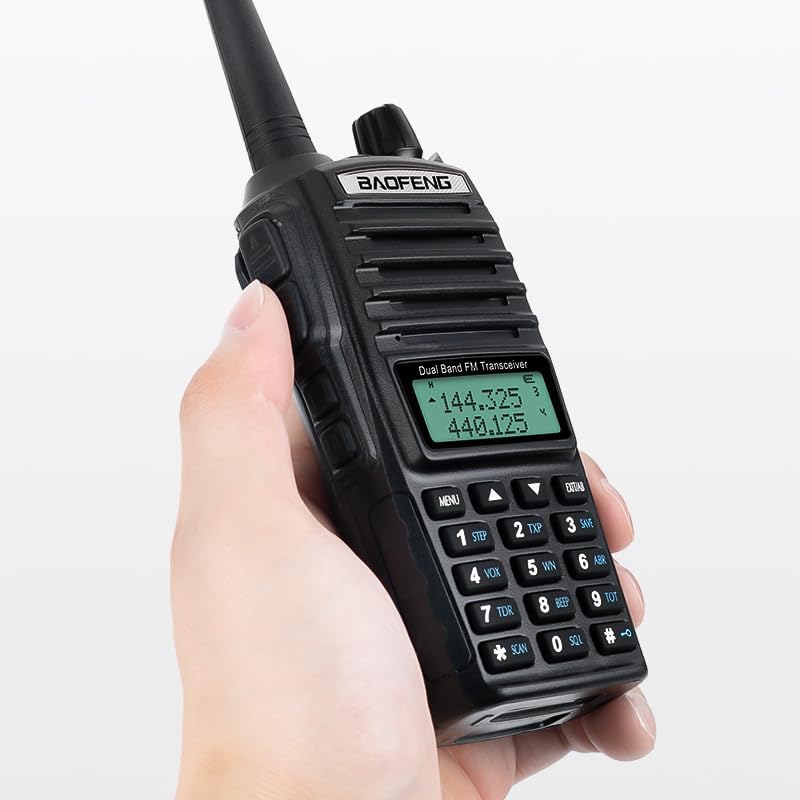
Figure 1: BAOFENG UV-82 radio held in hand, showing its compact size and ergonomic design.

Figure 2: Key features of the BAOFENG UV-82, highlighting the LED flashlight, dual PTT button, earphone jack, and large LCD display for easy navigation.
Key Components:
- Dual PTT Button: Allows selection between two frequencies for transmission without changing channels.
- LED Flashlight: Integrated light for illumination in low-light conditions.
- Earphone Jack: For connecting the included earpiece or other compatible audio accessories.
- Large LCD Display: Provides clear visibility of frequencies, channels, and menu options.
- Keypad: For manual frequency input and menu navigation.
- Volume/Power Knob: Controls power on/off and audio volume.
- Antenna Connector: For attaching the dual-band antenna.
Setup
1. Battery Installation and Charging:
The BAOFENG UV-82 comes with a 2800mAh Lithium Polymer battery. Ensure the battery is fully charged before first use.
- Align the battery with the grooves on the back of the radio and slide it into place until it clicks securely.
- Connect the charger adapter to a power outlet and place the radio (with battery installed) into the charging cradle.
- The charging indicator light will show the charging status. A full charge typically takes several hours.

Figure 3: The 2800mAh battery, providing extended operational time for the radio.
2. Antenna Attachment:
Carefully screw the dual-band antenna clockwise onto the antenna connector at the top of the radio until it is finger-tight. Do not overtighten.
3. Earpiece Connection:
Insert the dual PTT earpiece into the earphone jack on the side of the radio. Ensure it is fully seated for proper audio and microphone function.
Operating Instructions
1. Power On/Off and Volume:
Rotate the volume/power knob clockwise to turn the radio on. Continue rotating to increase the volume. Rotate counter-clockwise to decrease volume and turn off the radio.
2. Frequency and Channel Selection:
Use the keypad to directly input frequencies or navigate through programmed channels. The up/down arrow buttons can also be used to scroll through frequencies or channels.
3. Dual PTT Function:
The UV-82 features a unique dual PTT button. This allows you to transmit on either the upper or lower displayed frequency without manually switching between them. Press the upper part of the PTT button to transmit on the upper frequency, and the lower part to transmit on the lower frequency.

Figure 4: The dual PTT button, enabling quick transmission on two different frequencies.
4. VOX Function (Voice Operated Exchange):
The VOX function allows for hands-free transmission. When activated, the radio will automatically transmit when it detects your voice. Adjust the VOX sensitivity in the menu to suit your environment.

Figure 5: Hands-free communication using the VOX function.
5. Scanning Function:
The radio can scan for active frequencies or channels. Refer to the detailed menu instructions in the full user manual for activating and configuring scanning modes (e.g., Busy Channel Lock-Out - BCLO).

Figure 6: The radio's scanning capability for active channels.
6. LED Flashlight:
Press the dedicated flashlight button to turn the LED light on. Press again to activate strobe mode, and a third time to turn it off.

Figure 7: Flashlight modes: constant and strobe.
7. Alarm Function:
The radio includes an alarm function for emergency situations. Consult the full user manual for specific instructions on how to activate and deactivate the alarm.

Figure 8: Activating the SOS alarm sound in an emergency.
8. Programming:
The radio supports programming via CHIRP software or manufacturer software on a computer. A programming cable (not included) is required for this method. Manual programming is also possible directly through the radio's keypad and menu system.
Maintenance
- Cleaning: Use a soft, damp cloth to clean the radio's exterior. Do not use harsh chemicals or abrasive cleaners.
- Battery Care: To prolong battery life, avoid overcharging and fully discharging the battery regularly. Store the radio and battery in a cool, dry place.
- Water Resistance: The radio is water-resistant, but not waterproof. Avoid submerging it in water. Ensure the earphone jack cover is securely closed when not in use.
Troubleshooting
| Problem | Possible Cause | Solution |
|---|---|---|
| Radio does not power on. | Battery is low or not installed correctly. | Charge the battery or re-install it securely. |
| Cannot transmit or receive. | Incorrect frequency/channel, antenna not connected, or out of range. | Verify frequency/channel settings, ensure antenna is attached, or move closer to the other radio/repeater. |
| Poor audio quality. | Low signal strength, earpiece/microphone issue, or volume too low/high. | Adjust volume, check earpiece connection, or move to an area with better signal. |
Specifications
- Model Number: BAOFENG UV-82
- Frequency Range: VHF/UHF (Dual Band)
- Number of Channels: 128
- Battery: 1 Lithium Polymer battery (2800mAh, 7.4 Volts)
- Item Weight: 1.08 pounds
- Product Dimensions: 8 x 2 x 10 inches
- Talking Range Maximum: Up to 10 Kilometers (approximately 6.2 miles, actual range varies with terrain and conditions)
- Water Resistance Level: Water Resistant
- Special Feature: Portable
- FCC ID: 2AJGM-UV82

Figure 9: Back of the BAOFENG UV-82 radio, displaying the FCC ID and battery information.
Important Safety Information
Operation of this radio may require a license depending on the frequencies used and your location. Users are responsible for complying with all applicable regulations and obtaining necessary licenses (e.g., Amateur Radio License from the FCC in the United States) for transmission. Listening to frequencies generally does not require a license.
Always ensure the antenna is properly connected before transmitting to prevent damage to the radio.
Warranty and Support
For warranty information, technical support, or service inquiries, please refer to the contact details provided with your product packaging or visit the official BAOFENG website. Keep your purchase receipt as proof of purchase for warranty claims.