
1. Introduction
Thank you for purchasing the DOSHISHA PIERIA FSW-113U Desk Fan with Drawers. This compact and versatile desk fan is designed to provide comfortable airflow while offering convenient storage for small items. Please read this manual thoroughly before use to ensure proper operation and to maximize the product's lifespan. Keep this manual for future reference.
2. Safety Precautions
Always follow basic safety precautions when using electrical appliances to reduce the risk of fire, electric shock, and personal injury.
- Do not operate the fan with a damaged cord or plug.
- Keep the fan away from water or other liquids.
- Do not insert fingers or objects into the fan grille.
- Ensure the power source matches the fan's voltage requirements (5V).
- Unplug the fan when not in use or before cleaning.
- This appliance is for indoor use only.
3. Package Contents
Verify that all items are present in the package:
- Main Unit (Desk Fan with Drawers)
- AC Adapter
- USB Cable
- Replacement Felt (for aroma case)
- Instruction Manual / Warranty Card
4. Product Features

This image displays the DOSHISHA PIERIA Hikidashi Desk Fan FSW-113U in both Cream (CR) and Light Blue (LBL) color options. Key features highlighted are the DC motor, 3-level air volume control, adjustable up/down airflow direction, USB power compatibility, and the inclusion of an aroma case.
4.1 Integrated Storage Drawers

A detailed diagram of the fan, showing its components: the fan unit, the aroma case, and the pull-out drawer designed for convenient storage of small desk items like paper clips and pushpins.
The fan features two pull-out drawers, providing convenient storage for small desk accessories such as pens, paper clips, or jewelry. This design helps keep your workspace tidy and organized.

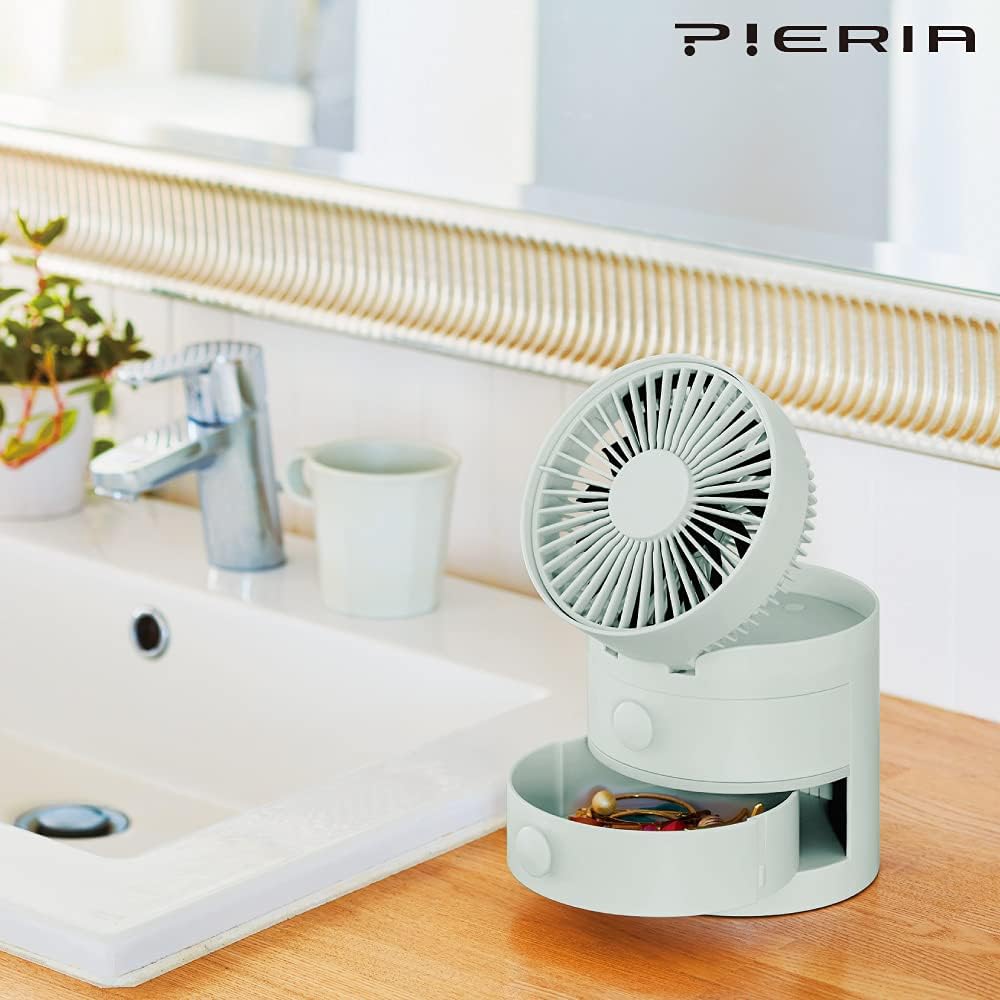
The light blue version of the desk fan is shown on a bathroom counter. Its pull-out drawer is open, revealing small accessories stored inside, demonstrating its practical storage capability.
4.2 Adjustable Airflow and Speed
Enjoy personalized comfort with 3 levels of air volume adjustment. The fan head can also be manually adjusted up and down to direct airflow precisely where you need it.
The cream-colored desk fan is shown on a workspace next to a laptop. Sticky notes are attached to the side of the fan, illustrating its compact design and how it can integrate into a desk environment.
4.3 USB Power and Aroma Case
The fan is conveniently powered via USB, making it ideal for use with computers, power banks, or the included AC adapter. An integrated aroma case allows you to add your favorite essential oils for a pleasant scent while the fan operates.

This image highlights the aroma case feature of the fan. A small dropper bottle is depicted, suggesting the use of essential oils or fragrances within the aroma case to diffuse scents while the fan operates.
5. Setup
5.1 Power Connection
- Connect the small end of the provided USB cable to the USB port on the back of the fan.
- Connect the larger end of the USB cable to either:
- A USB port on your computer or laptop.
- A USB power bank.
- The included AC adapter, then plug the AC adapter into a standard wall outlet.
- Ensure the connection is secure.
5.2 Placement
Place the fan on a stable, flat surface such as a desk or table. Ensure there are no obstructions to the airflow in front of or behind the fan.
6. Operating Instructions
6.1 Power On/Off and Speed Adjustment
- To turn on the fan, press the power button located on the front/base of the unit. The fan will start at speed 1.
- Press the power button repeatedly to cycle through the 3 air volume levels:
1st Press: Speed 1 (Low)
2nd Press: Speed 2 (Medium)
3rd Press: Speed 3 (High) - To turn off the fan, press the power button a fourth time after Speed 3, or press and hold the button for a few seconds at any speed.
6.2 Adjusting Airflow Direction
Manually tilt the fan head up or down to adjust the vertical airflow direction to your preference.
6.3 Using the Aroma Case
- Locate the aroma case, typically a small compartment near the fan grille or within one of the drawers.
- Open the aroma case and place a few drops of your preferred essential oil onto the felt pad.
- Close the aroma case securely. As the fan operates, the scent will be diffused into the air.
- Replace the felt pad periodically or when changing scents.
7. Maintenance
7.1 Cleaning the Fan
- Always unplug the fan from the power source before cleaning.
- Use a soft, dry cloth to wipe the exterior surfaces of the fan.
- For dust accumulation on the fan grille, use a soft brush or a vacuum cleaner with a brush attachment to gently remove dust. Do not use water or abrasive cleaners.
- Ensure the fan is completely dry before plugging it back in.
7.2 Aroma Felt Replacement
When the aroma felt pad becomes discolored, worn, or if you wish to change scents, replace it with the provided replacement felt or a new compatible felt pad.
8. Troubleshooting
If you encounter any issues with your fan, please refer to the following common problems and solutions:
| Problem | Possible Cause | Solution |
|---|---|---|
| Fan does not turn on. | No power supply. | Check if the USB cable is securely connected and the power source (USB port, AC adapter, power bank) is active. |
| Weak or no airflow. | Fan grille is blocked or fan speed is too low. | Ensure the fan grille is clear of obstructions. Increase the fan speed by pressing the power button. |
| Unusual noise during operation. | Foreign object in fan or fan not on a stable surface. | Unplug the fan and carefully check for any foreign objects. Place the fan on a stable, flat surface. |
9. Specifications
| Feature | Detail |
|---|---|
| Brand | DOSHISHA |
| Model Number | FSW-113U |
| Color | Cream |
| Fan Design | Desk Fan |
| Power Source | Corded Electric (USB) |
| Voltage | 5 Volts |
| Air Volume Levels | 3 |
| Control Type | Button Control |
| Mounting Type | Tabletop Mount |
| Product Weight | 0.6 Kilograms |
| Special Features | 3-level air volume, Storage drawers, Aroma case |
10. Official Product Video
This video provides a visual demonstration of the desk fan's features, showcasing its airflow capabilities and highlighting its quiet operation, particularly in low-speed modes suitable for nighttime use.
11. Warranty and Support
11.1 Warranty Information
This product comes with a 1-year warranty for the main unit from the date of purchase. Please retain your proof of purchase (receipt) and the warranty card for any warranty claims.
11.2 Customer Support
For technical assistance, troubleshooting beyond this manual, or warranty inquiries, please contact your retailer or the DOSHISHA customer service department. Contact information can typically be found on the product packaging or the official DOSHISHA website.