
1. Safety Instructions
- Do not use the power supply and batteries simultaneously, as this may damage the machine.
- Ensure correct polarity when inserting batteries. Incorrect insertion may cause the machine to operate in reverse and lead to damage.
- This machine is not recommended for sewing very thin, soft, or elastic fabrics. For better results with such materials, place a piece of paper underneath the fabric.
- Before powering on, manually turn the hand-wheel counter-clockwise to ensure there is no thread jamming or other issues.
- Always refer to the manual and instructional videos for proper operation to prevent misuse and potential damage.
2. Package Contents
The Magicfly Portable Sewing Machine MF5506 package includes the following items:
- Magicfly Portable Sewing Machine
- Power Adapter
- Foot Pedal
- Extension Table
- Instruction Manual
- Accessory Kit (including various colored threads, bobbins, needles, scissors, thimble, seam ripper, threader, and tape measure)
- 3 Replaceable Presser Feet (Buttonhole, Zipper, Invisible Zipper)
- 3 Needle Types (Size 80/11 for lightweight, 90/14 for medium, 100/16 for heavyweight fabrics)
3. Setup
3.1 Powering the Machine
The sewing machine can be powered by either the included AC power adapter or 4 AA batteries (not included). Ensure only one power source is used at a time.
3.2 Attaching the Extension Table
To attach the extension table, unfold its legs and slide it onto the machine's free arm until it clicks into place. This provides a larger working surface for bigger projects.

Image: The Magicfly sewing machine with its extension table attached, alongside the accessory kit.
3.3 Threading the Machine
Follow the numbered threading guide printed on the machine's body for upper thread installation. The machine may come pre-threaded with a test fabric to demonstrate proper threading.

Image: Detailed diagram illustrating the various parts of the sewing machine and the correct upper thread path.
3.4 Needle Selection
The machine includes three types of needles for different fabric thicknesses:
- Size 80/11: For lightweight fabrics.
- Size 90/14: For medium-weight fabrics (up to 2mm thick).
- Size 100/16: For heavyweight fabrics.
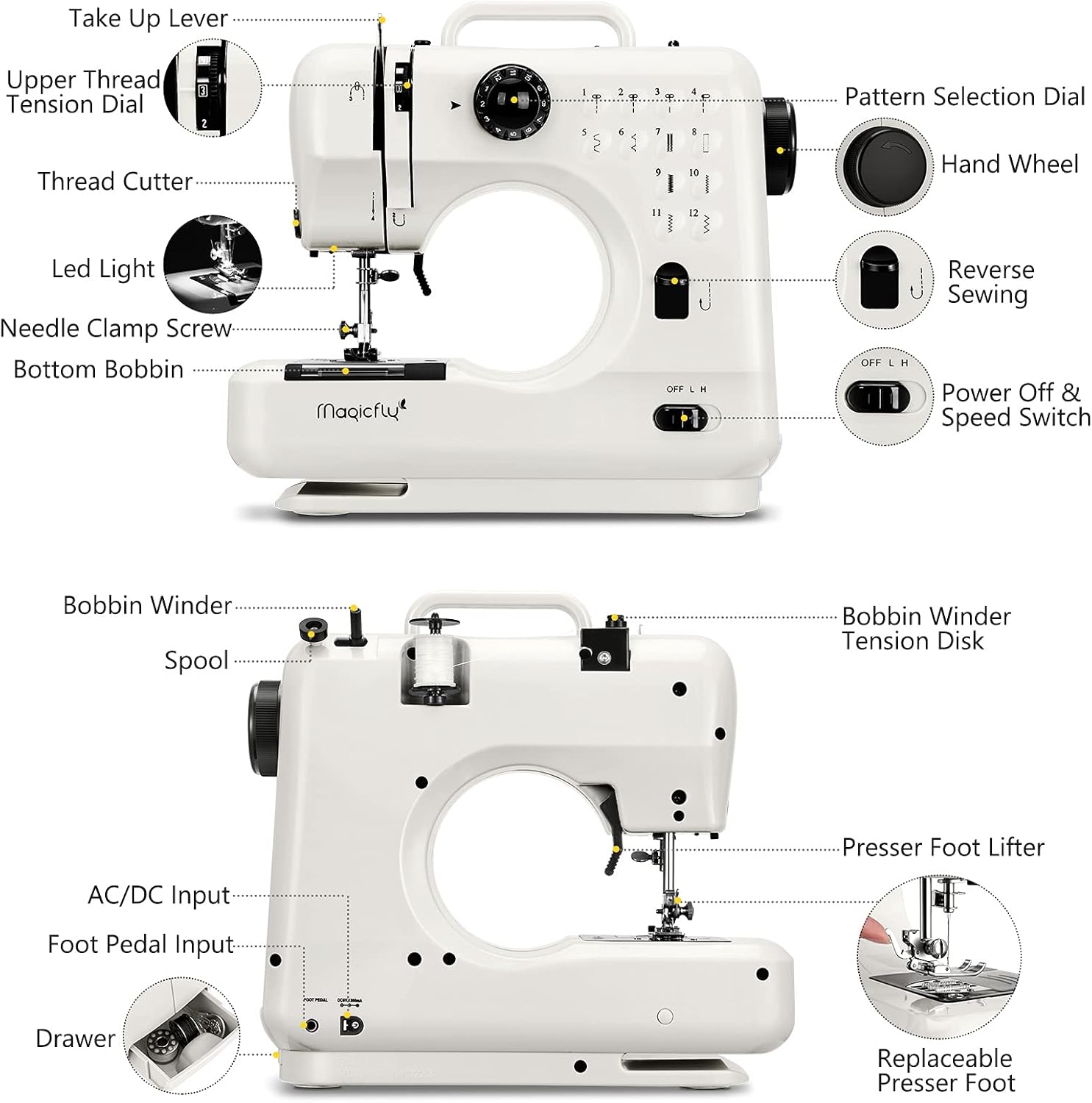
Image: Visual guide for selecting the appropriate needle size based on fabric thickness.
3.5 Unboxing and Initial Overview Video
Video: An overview of the Magicfly Portable Sewing Machine, including unboxing and initial components. This video demonstrates the contents of the package and the machine's basic features.
4. Operating Instructions
4.1 Stitch Pattern Selection
The machine offers 12 built-in stitch patterns. Use the pattern selection dial to choose the desired stitch (e.g., straight, zigzag, buttonhole). The selected stitch will be automatically configured.

Image: Visual representation of the 12 available stitch patterns and the selection dial.
4.2 Reverse Sewing
Engage the reverse sewing function for reinforcing stitches at the beginning and end of seams. This feature is typically activated by a dedicated button or lever.
4.3 Speed Control
Adjust the sewing speed using the 'OFF', 'L' (Low), and 'H' (High) switch located on the machine. This allows for precise control depending on your project and skill level.
4.4 Foot Pedal Usage
Connect the foot pedal to the designated port. The foot pedal provides hands-free speed control, allowing you to start and stop sewing by pressing and releasing the pedal.
4.5 Thread Cutter and LED Light
A built-in thread cutter is located on the machine for convenient trimming of threads after sewing. The integrated LED light illuminates the sewing area for improved visibility.
4.6 Replacing Presser Feet
The machine comes with 3 replaceable presser feet for various tasks:
- Buttonhole Foot: For creating buttonholes.
- Zipper Foot: For sewing zippers.
- Invisible Zipper Foot: For installing invisible zippers.

Image: Close-up view of the interchangeable presser feet, including buttonhole, zipper, and invisible zipper feet.
5. Maintenance
5.1 Cleaning
Regularly clean lint and dust from the bobbin area and feed dogs using a small brush. Ensure the machine is unplugged before cleaning.
5.2 Needle Replacement
Replace needles frequently, especially when working with different fabric types or if the needle becomes dull or bent. A dull needle can cause skipped stitches or damage to fabric.
6. Troubleshooting Tips
- Thread Jamming: If thread jams, turn the hand-wheel counter-clockwise manually to ensure smooth operation before restarting. Check for proper threading and bobbin installation.
- Skipped Stitches: Ensure the correct needle type is used for the fabric. Replace the needle if it is dull or bent. Check upper thread tension.
- Uneven Stitches: Adjust the tension dial. Ensure the bobbin is wound evenly and inserted correctly.
- Fabric Not Moving: Check if the presser foot is lowered. Ensure the feed dogs are engaged.
7. Specifications
| Feature | Detail |
|---|---|
| Package Dimensions | 14.09 x 12.44 x 7.32 inches |
| Item Weight | 6.82 pounds |
| Manufacturer | Magicfly |
| ASIN | B08XMF3RLS |
| Item Model Number | MF5506 |
| Brand | Magicfly |
| Color | White |
| Material | Stainless Steel |
| Power Source | Battery Powered / Electric |
| Is Electric | Yes |
8. Warranty and Support
For warranty information or technical support, please refer to the contact details provided in your product packaging or visit the official Magicfly website. Keep your purchase receipt for any warranty claims.


