
Introduction
Thank you for choosing the Outon LED Floor Lamp MF18806. This manual provides essential information for the safe and efficient use of your new lamp. Please read it thoroughly before assembly and operation, and retain it for future reference.

Image: The Outon LED Floor Lamp, showcasing its sleek design, included remote control, and integrated touch control panel.
Safety Information
- Ensure the power supply voltage matches the lamp's requirements before connecting.
- Do not disassemble or modify the lamp. Refer all servicing to qualified personnel.
- Keep the lamp away from water and high humidity environments.
- Avoid direct eye exposure to the LED light for extended periods.
- This lamp is designed for indoor use only.
- Always unplug the lamp from the power outlet before cleaning or performing any maintenance.
Package Contents
Please check that all components are present and in good condition:
- LED Lamp Head with Flexible Gooseneck
- Upper Pole Section
- Middle Pole Section
- Lower Pole Section with Power Cord
- Weighted Base
- Remote Control (batteries not included)
- User Manual
Setup and Assembly
Assembly of the Outon LED Floor Lamp is quick and requires no tools. Follow these steps:
- Carefully unpack all components from the packaging.
- Screw the lower pole section into the weighted base by turning clockwise until secure. Ensure the power cord passes through the base without being pinched.
- Connect the middle pole section to the lower pole section by screwing them together clockwise.
- Connect the upper pole section (with the flexible gooseneck and lamp head) to the middle pole section by screwing them together clockwise.
- Ensure all connections are tight and stable.
- Plug the power adapter into a suitable wall outlet.

Image: An exploded view diagram illustrating the simple, tool-free assembly process of the lamp, highlighting the screw-together pole sections and stable metal base.

Image: A detailed view of the lamp's pole sections, demonstrating how they easily screw together for quick assembly.
Operating Instructions
Controls: Remote and Touch
The lamp can be controlled using either the integrated touch panel on the pole or the included remote control. The remote control has a range of up to 15 meters.

Image: A visual guide to the lamp's touch control panel and the remote control, detailing buttons for brightness, color temperature, power, and timer functions.

Image: A close-up of the lamp's touch control panel, showing the intuitive buttons for adjusting brightness, color temperature, and power.
Power On/Off
- Touch Control: Short press the power button (U) on the lamp pole.
- Remote Control: Press the power button (U) on the remote.
Brightness Adjustment (Dimmable 10%-100%)
- Touch Control: Use the '+' and '-' buttons on the lamp pole to increase or decrease brightness.
- Remote Control: Use the brightness adjustment buttons on the remote.
Color Temperature Adjustment (4 Modes)
The lamp offers four color temperature modes: Warm (3000K), Warm White (4000K), Cool White (5000K), and Daylight (6000K).
- Touch Control: Press the 'M' button on the lamp pole to cycle through the color temperatures.
- Remote Control: Use the dedicated color temperature buttons on the remote.

Image: Visual representation of the four available color temperatures (3000K Warm, 4000K Warm White, 5000K Cool White, 6000K Daylight) and the stepless dimmable brightness from 10% to 100%.
1-Hour Sleep Timer
Activate the 1-hour timer to automatically turn off the lamp after one hour, ideal for bedtime.
- Touch Control: Long press the power button (U) on the lamp pole.
- Remote Control: Press the timer button on the remote.

Image: A depiction of the lamp's 1-hour timer function, showing a sleeping child and an alarm clock, indicating its use for peaceful sleep.

Image: A graphic icon clearly indicating the 1-hour timer feature of the lamp.
Memory Function
The lamp features a memory function that remembers your last brightness and color temperature settings when you turn it off and on again.

Image: A graphic icon symbolizing the lamp's memory function, indicating it retains previous settings.
Multiple Lighting Modes
The remote control allows quick selection of various preset lighting modes suitable for different activities.

Image: The remote control displaying buttons for various lighting modes such as Leisure, Reading, Office, Breastfeeding, and Night Light, allowing quick scene selection.
Features
- Flexible Gooseneck: The 360-degree rotating gooseneck allows you to precisely direct the light to your desired area, making it versatile for various tasks.
- Stable and Safe Design: An extra-large, weighted metal base ensures the lamp remains stable and upright, preventing accidental tipping. The slim design allows it to fit into narrow spaces.
- Eye-Caring LED: The 12W LED light source provides 1200 lumens of soft, anti-glare, flicker-free illumination, reducing eye strain during prolonged use.
- Long Lifespan: The integrated LED has a lifespan of over 50,000 hours, providing long-lasting, energy-efficient lighting.
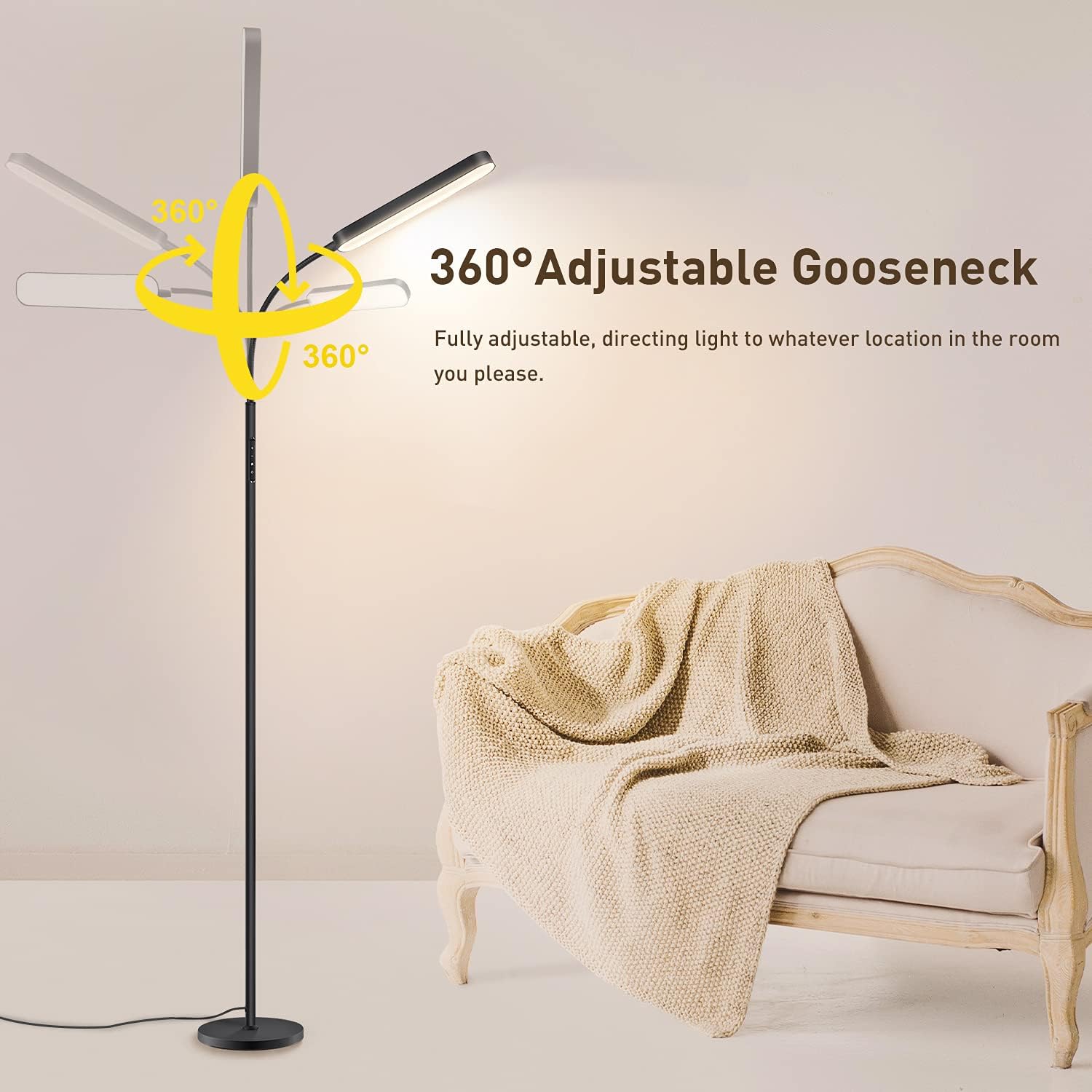
Image: The lamp demonstrating its 360-degree adjustable gooseneck, allowing the light to be directed to any desired location in the room.

Image: A graphic icon indicating the lamp's eye-caring properties, designed to reduce visual fatigue.
Maintenance
- Cleaning: Disconnect the lamp from the power supply before cleaning. Use a soft, dry cloth to wipe the lamp's surface. Do not use abrasive cleaners or solvents.
- LED Care: The LED light source is integrated and designed for long-term use. It does not require replacement.
- Remote Control Batteries: Replace the remote control batteries when its range or responsiveness decreases. Refer to the remote for battery type (typically AAA).
Troubleshooting
| Problem | Possible Cause | Solution |
|---|---|---|
| Lamp does not turn on. | No power supply. Loose connection. |
Ensure the power cord is securely plugged into a working outlet. Check all pole connections are tight. |
| Remote control not working. | Batteries are dead or incorrectly inserted. Remote is too far from the lamp. Obstruction between remote and lamp. |
Replace batteries with new ones, ensuring correct polarity. Move closer to the lamp (within 15m). Remove any objects blocking the signal. |
| Light flickers or is unstable. | Unstable power supply. Loose internal wiring. |
Try plugging the lamp into a different outlet. Contact customer support if the issue persists. |
Specifications
| Feature | Detail |
|---|---|
| Brand | OUTON |
| Model Number | MF18806 |
| Product Dimensions (L x W x H) | 20 x 20 x 174 cm |
| Item Weight | 2.4 Kilograms |
| Material | Metal |
| Color | Black |
| Style | Modern |
| Light Source Type | LED |
| Wattage | 12 Watts |
| Luminous Flux | 1200 lm |
| Special Features | Flexible, Dimmable, Remote or Touch Control, 1-Hour Timer, Memory Function |
| Color Temperatures | 4 (Warm, Warm White, Cool White, Daylight) |
| Power Source | Corded Electric |
| Usage | Indoor Use Only |
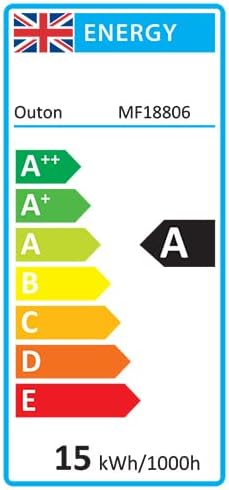
Image: The energy efficiency label for the Outon LED Floor Lamp MF18806, indicating its energy class.

Image: A visual representation of Color Rendering Index (CRI) values (65Ra, 75Ra, 85Ra), demonstrating the lamp's ability to accurately render colors.
Warranty and Support
Outon is committed to providing high-quality products. For any questions, concerns, or technical support regarding your LED Floor Lamp MF18806, please contact Outon customer service. Please refer to your purchase documentation or the official Outon website for specific warranty details and contact information.
Information regarding spare parts availability and software updates is not explicitly provided in the product specifications.


