
Remax RB-T35
Remax RB-T35 Wireless Bluetooth Mono Earphone User Manual
Model: RB-T35
1. Introduction
Thank you for choosing the Remax RB-T35 Wireless Bluetooth Mono Earphone. This device is designed to provide a convenient and high-quality audio experience for calls and media playback. Please read this manual carefully before use to ensure proper operation and to maximize the lifespan of your earphone.
2. Package Contents
Please check the package for the following items:
- Remax RB-T35 Mono Earphone
- USB / Micro USB Charging Cable
- User Manual
- Ear Cushions
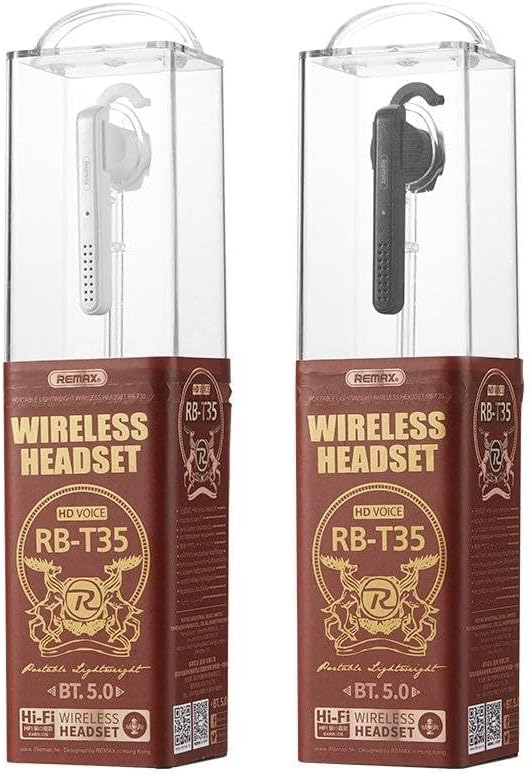
Figure 2.1: Remax RB-T35 Mono Earphone in its retail packaging, showing the black earphone and its clear plastic case.
3. Product Overview
The Remax RB-T35 features a comfortable ear hook design for secure wear and easy access to controls.

Figure 3.1: Side view of the Remax RB-T35 Mono Earphone, highlighting the ear hook and the main body with the Remax logo and speaker grille.

Figure 3.2: The Remax RB-T35 Mono Earphone being worn, demonstrating its ergonomic fit and discreet profile.
Key Features:
- Bluetooth 5.0 for stable connection
- Ergonomic ear hook design
- Integrated microphone for calls
- Lightweight and comfortable
4. Setup and Pairing
Follow these steps to pair your Remax RB-T35 earphone with your Bluetooth-enabled device.
- Charge the Earphone: Before first use, fully charge the earphone (refer to Section 6 for charging instructions).
- Power On: Press and hold the Multi-function Button (usually the main button on the earphone) for approximately 3-5 seconds until the LED indicator flashes blue and red, indicating it is in pairing mode.
- Activate Bluetooth: On your mobile phone or other Bluetooth device, enable Bluetooth.
- Search for Devices: In your device's Bluetooth settings, search for available devices. You should see "RB-T35" or "Remax RB-T35" in the list.
- Connect: Select "RB-T35" to connect. Once successfully paired, the LED indicator on the earphone will flash blue slowly or turn off, and you will hear a confirmation tone.
- Reconnect: The earphone will automatically attempt to reconnect to the last paired device when powered on and within range.
Note: If pairing fails, turn off the earphone and your device's Bluetooth, then repeat the steps. Ensure the earphone is sufficiently charged.
5. Operating Instructions
Power On/Off:
- Power On: Press and hold the Multi-function Button for 3 seconds.
- Power Off: Press and hold the Multi-function Button for 5 seconds.
Call Management:
- Answer/End Call: Press the Multi-function Button once.
- Reject Call: Press and hold the Multi-function Button for 2 seconds.
- Redial Last Number: Double-press the Multi-function Button.
Music Playback:
- Play/Pause: Press the Multi-function Button once.
Volume Control:
Volume is typically controlled directly from your connected device. Some earphones may have dedicated volume buttons; refer to the physical earphone for these controls if present.
6. Charging
To charge your Remax RB-T35 earphone:
- Connect the Micro USB end of the charging cable to the charging port on the earphone.
- Connect the USB-A end of the charging cable to a USB power source (e.g., computer USB port, USB wall adapter).
- The LED indicator will typically show a red light during charging and turn off or change to blue when fully charged.
- Charging time is approximately 1.5 hours.
Important: Use only the provided charging cable or a certified equivalent. Do not use damaged cables or chargers.
7. Maintenance
Proper care will extend the life of your earphone:
- Keep the earphone dry. Avoid exposure to moisture, rain, or liquids.
- Clean the earphone with a soft, dry cloth. Do not use harsh chemicals or abrasive materials.
- Store the earphone in a cool, dry place away from extreme temperatures.
- Avoid dropping or subjecting the earphone to strong impacts.
8. Troubleshooting
| Problem | Possible Cause | Solution |
|---|---|---|
| Cannot power on | Low battery | Charge the earphone fully. |
| Cannot pair with device | Bluetooth not enabled; earphone not in pairing mode; too far from device | Ensure Bluetooth is on; put earphone in pairing mode (flashing red/blue); keep devices within 1 meter during pairing. |
| No sound | Volume too low; earphone not connected; media paused | Increase volume on device; re-pair earphone; check media playback status. |
| Poor sound quality | Interference; out of range; low battery | Move closer to device; avoid obstacles; charge earphone. |
9. Specifications
| Feature | Detail |
|---|---|
| Brand | Remax |
| Model | RB-T35 |
| Bluetooth Version | 5.0 |
| Wireless Range | Up to 12 meters |
| Frequency Range | 20Hz-20KHz |
| Driver Unit | 10mm |
| Impedance | 16 Ohm |
| Rated Power | 10 mW |
| Output Sensitivity | 92 dB |
| Microphone Sensitivity | 42 dB |
| Talk Time | Approximately 8 hours |
| Standby Time | Approximately 80 hours |
| Charging Time | Approximately 1.5 hours |
| Battery Capacity | 85 mAh |
| Weight (Earphone) | 10g |
| Color | Black |
10. Warranty and Support
Remax products are manufactured to high-quality standards. For warranty information and customer support, please refer to the warranty card included in your product packaging or visit the official Remax website. Keep your purchase receipt as proof of purchase.
For further assistance, please contact Remax customer service.
Ask a question about this manual
Ask about setup, troubleshooting, compatibility, parts, safety, or missing instructions. Manuals+ will review the question and use this page’s manual context to help answer it.