
LOUTOC 1315a
LOUTOC Replacement Remote Control User Manual
Model: BN59-01315A (1315a)
Introduction
This manual provides comprehensive instructions for the LOUTOC Replacement Remote Control, model BN59-01315A. This remote is designed as a direct replacement for various Samsung 4K Crystal UHD Smart TVs, including 6/7/8/9/TU-7000 Series, and is compatible with original Samsung remotes BN59-01315J and BN59-01315E. It offers immediate functionality without the need for complex programming or pairing.

Figure 1: LOUTOC Replacement Remote Control (BN59-01315A) - Front and Side View
Compatibility
The LOUTOC BN59-01315A remote control is compatible with a wide range of Samsung 4K Crystal UHD Smart TVs. Key compatible series and models include:
- 2019 Model Samsung 4K UHD 7 Series Ultra HD Smart TV
- 2020 Model Samsung TU-7000 Series Class Smart TV | Crystal UHD - 4K HDR
- Samsung 6/7/8/9 Series TV
- Directly replaces Samsung remotes BN59-01315J and BN59-01315E.
Specific compatible models include, but are not limited to:
- UN55RU7300FXZA, UN65RU7300FXZA, UN58RU7100FXZA, UN43RU7100FXZA
- UN43TU7000FXZA, UN50TU7000FXZA, UN55TU7000FXZA, UN58TU7000FXZA, UN65TU7000FXZA, UN70TU7000FXZA, UN75TU7000FXZA
- UN50RU7100FXZA, UN55RU7100FXZA, UN75RU7100FXZA
- QN43TU700DAFXZA, QN50TU700DAFXZA, QN55TU700DAFXZA, QN58TU700DAFXZA, QN65TU700DAFXZA, QN70TU700DAFXZA, QN75TU700DAFXZA, QN82TU700DFXZA
- UN43TU7000F, UN50TU7000F, UN55TU7000F, UN58TU7000F, UN65TU7000F, UN70TU6980F, UN70TU7000B, UN75TU7000F, UN82TU6950F

Figure 2: Compatibility with Samsung 4K Crystal UHD Smart TVs
Setup
This replacement remote control is designed for immediate use without any complex setup procedures. No programming or pairing is required.
Battery Installation:
- Open the battery cover located on the back of the remote control.
- Insert two (2) AAA alkaline batteries, ensuring the positive (+) and negative (-) terminals align correctly with the indicators inside the battery compartment.
- Close the battery cover securely.
Note: Batteries are NOT included with the remote control.

Figure 3: Battery Installation Guide
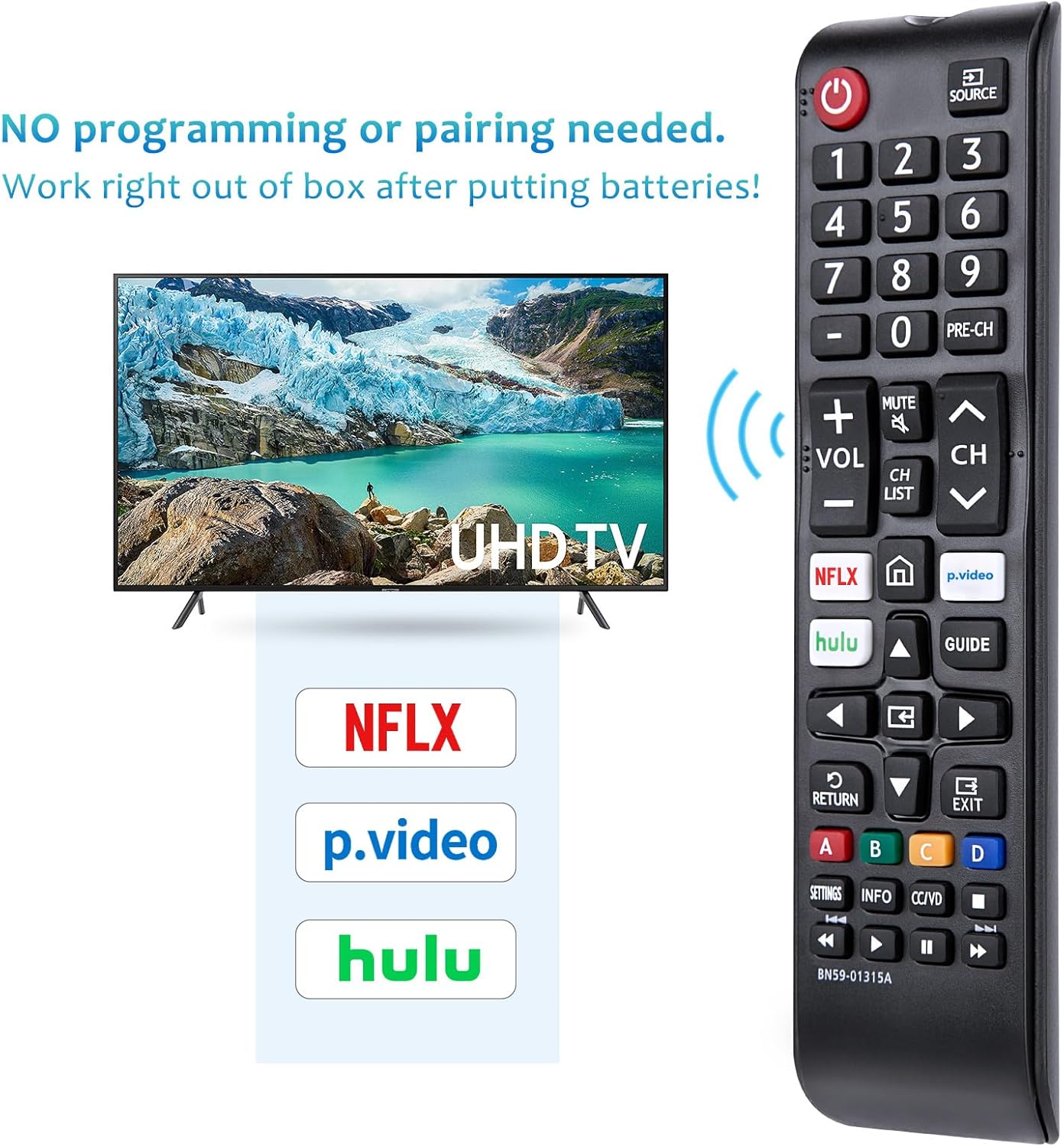
Figure 4: No Programming or Pairing Needed
Operating Instructions
Once batteries are installed, the remote is ready for use. Point the remote directly at your Samsung TV for optimal performance. This is an IR (Infrared) remote control and requires a clear line-of-sight to the TV's IR receiver.
Button Functions:
| Button | Function |
|---|---|
| Power (Red Button) | Turns the TV on/off. |
| SOURCE | Displays and selects available video sources. |
| Number Buttons (0-9) | Direct channel selection. |
| PRE-CH | Returns to the previous channel. |
| VOL +/- | Adjusts volume. |
| CH +/- | Changes channels. |
| MUTE | Cuts off the sound temporarily. |
| CH LIST | Displays channel lists on the screen. |
| NETFLIX | Accesses the Netflix application directly. |
| p.video | Accesses the Prime Video application directly. |
| Hulu | Accesses the Hulu application directly. |
| Home (House Icon) | Press to access the Smart Hub home dashboard or hold it down to access your most recently used apps, as well as any notifications. |
| GUIDE | Displays the Electronic Program Guide. |
| RETURN | Returns to the previous menu or screen. |
| EXIT | Exits the current menu or application. |
| Color Buttons (A, B, C, D) | Shortcut keys for interactive functions, varies by TV model and content. |
| SETTINGS | Accesses TV settings menu. |
| INFO | Displays information on the TV screen. |
| CC/VD | Activates Closed Captions/Video Description. |
| Playback Controls | Play, Pause, Fast Forward, Rewind, Stop. |

Figure 5: Remote Control Button Functions
Operating Range:
The remote control has an effective operating range of up to 26 feet (approximately 8 meters). Ensure there are no obstructions between the remote and the TV's IR receiver for reliable operation.

Figure 6: Optimal Operating Range
Maintenance
- Cleaning: Use a soft, dry cloth to clean the remote control. Avoid using abrasive cleaners or solvents.
- Battery Replacement: Replace batteries when the remote's response becomes sluggish or stops working. Always replace both batteries at the same time with new AAA alkaline batteries.
- Storage: Store the remote in a cool, dry place away from direct sunlight and extreme temperatures.
- Avoid Damage: Do not drop the remote or expose it to water or excessive moisture. Keep it out of reach of pets and young children to prevent chewing or damage.
Troubleshooting
| Problem | Possible Cause / Solution |
|---|---|
| Remote is not working. |
|
| Buttons are unresponsive or sticky. |
|
| Limited operating range. |
|
Specifications
| Feature | Detail |
|---|---|
| Model Number | 1315a (BN59-01315A) |
| Brand | LOUTOC |
| Product Dimensions | 6.88 x 0.78 x 1.73 inches |
| Item Weight | 2.12 ounces |
| Batteries Required | 2 AAA batteries (not included) |
| Special Features | Universal, Ergonomic, Lightweight, Pre-Programmed, No Programming Required |
| Max Number of Supported Devices | 1 (Television) |
Warranty and Support
LOUTOC is committed to customer satisfaction. If you have any questions or concerns regarding your order or the product, please do not hesitate to reach out to us directly. We aim to respond to all queries within 12 hours during the work week.
The product is also backed by a 60-day replacement policy.

Figure 7: 60-Day Replacement Policy
Ask a question about this manual
Ask about setup, troubleshooting, compatibility, parts, safety, or missing instructions. Manuals+ will review the question and use this page’s manual context to help answer it.