
1. Introduction
Thank you for choosing the Remax RB-M36 Portable Wireless Bluetooth Soundbar Speaker. This manual provides essential information for the safe and efficient operation of your device. Please read it carefully before use and retain it for future reference.
2. Product Overview
The Remax RB-M36 is a versatile portable soundbar speaker offering multiple playback options including Bluetooth, TF card, FM radio, and AUX input. It also features an integrated alarm clock function and call reception capabilities.
2.1 Control Buttons and Ports
Familiarize yourself with the speaker's control layout:
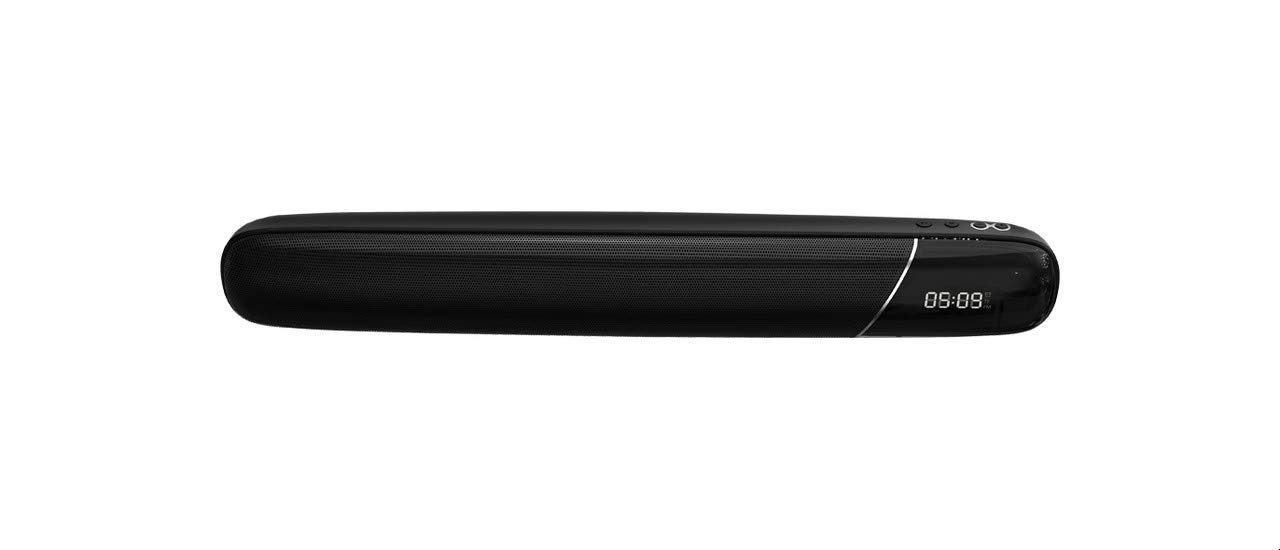
Image: Side view of the Remax RB-M36 speaker showing the control buttons. From left to right, these include Volume Down/Previous Track (-), Volume Up/Next Track (+), Mode (M), and Play/Pause/Call Answer buttons.
- Volume Down / Previous Track (-): Short press to decrease volume. Long press to go to the previous track.
- Volume Up / Next Track (+): Short press to increase volume. Long press to go to the next track.
- Mode (M): Press to switch between Bluetooth, TF Card, FM Radio, and AUX modes.
- Play/Pause / Call Answer: Press to play or pause audio. Press to answer or end a call. Long press to reject a call.
- Power Button: Typically located on the side or back. Long press to power on/off.
- Charging Port (USB): For charging the speaker's internal battery.
- TF Card Slot: Insert a TF (MicroSD) card for local music playback.
- AUX Input: Connect external audio devices via a 3.5mm audio cable.
3. Setup
3.1 Charging the Speaker
- Connect the provided USB charging cable to the speaker's charging port.
- Connect the other end of the USB cable to a USB power adapter (5V/1A recommended) or a computer's USB port.
- The charging indicator light will illuminate, typically red, during charging.
- Once fully charged (approximately 7-8 hours operating time, 36 hours standby), the indicator light will change color or turn off.
3.2 Powering On/Off
- To Power On: Long press the Power button until you hear an audible prompt or see an indicator light.
- To Power Off: Long press the Power button again until you hear an audible prompt or the indicator light turns off.
3.3 Bluetooth Pairing
- Ensure the speaker is powered on and in Bluetooth mode (press the 'M' button if necessary). The Bluetooth indicator light will typically flash, indicating it's in pairing mode.
- On your mobile device (smartphone, tablet, computer), enable Bluetooth and search for available devices.
- Select "RB-M36" from the list of found devices.
- Once paired, the speaker will emit a confirmation sound, and the Bluetooth indicator light will become solid.
4. Operating Instructions
4.1 Bluetooth Mode
- After successful pairing, audio from your connected device will play through the speaker.
- Use the Play/Pause button to control playback.
- Use the '+' and '-' buttons for volume adjustment (short press) or track navigation (long press).
4.2 TF Card Mode
- Insert a TF (MicroSD) card with MP3 audio files into the TF card slot.
- The speaker should automatically switch to TF card mode. If not, press the 'M' button to select it.
- Use the Play/Pause button to control playback.
- Use the '+' and '-' buttons for volume adjustment (short press) or track navigation (long press).
4.3 FM Radio Mode
- Press the 'M' button repeatedly until you enter FM Radio mode.
- Long press the Play/Pause button to initiate an automatic scan for FM stations. The speaker will save found stations.
- Short press the '+' or '-' buttons to switch between saved FM stations.
- Short press the Play/Pause button to mute/unmute the radio.
4.4 AUX Mode
- Connect one end of a 3.5mm audio cable to the speaker's AUX input port.
- Connect the other end to the audio output of your external device (e.g., laptop, MP3 player).
- Press the 'M' button to switch to AUX mode.
- Control playback and volume primarily from your connected device.
4.5 Call Handling
- Answer Call: When a call comes in, press the Play/Pause/Call button once to answer.
- End Call: During a call, press the Play/Pause/Call button once to end the call.
- Reject Call: When a call comes in, long press the Play/Pause/Call button to reject it.
4.6 Alarm Clock Function
Specific instructions for setting the alarm clock are not detailed in the provided product description. Please refer to the packaging or a dedicated quick start guide for precise steps on setting and managing the alarm function.
5. Maintenance
- Cleaning: Use a soft, dry cloth to clean the speaker. Do not use abrasive cleaners, alcohol, or chemical solvents.
- Storage: Store the speaker in a cool, dry place away from direct sunlight and extreme temperatures.
- Battery Care: To prolong battery life, charge the speaker regularly, even if not in frequent use. Avoid fully discharging the battery for extended periods.
- Water Exposure: This speaker is not waterproof. Avoid exposure to water or high humidity.
6. Troubleshooting
| Problem | Possible Solution |
|---|---|
| Speaker does not power on. | Ensure the battery is charged. Connect to a power source and try again. |
| Cannot pair via Bluetooth. | Ensure the speaker is in Bluetooth pairing mode (flashing indicator). Make sure your device's Bluetooth is on and within 10 meters. Forget previous pairings on your device and try again. |
| No sound. | Check volume levels on both the speaker and the connected device. Ensure the correct input mode (Bluetooth, TF, FM, AUX) is selected. |
| FM radio reception is poor. | Try repositioning the speaker. Ensure no strong interference sources are nearby. |
| Speaker disconnects frequently. | Ensure the speaker and connected device are within the 10-meter range and there are no obstacles. Check for low battery on either device. |
7. Specifications
- Brand: Remax
- Model: RB-M36
- Bluetooth Version: 4.2
- Wireless Connectivity Technology: Bluetooth
- Reception Distance: Up to 10 meters
- Frequency Response Range: 90 Hz - 20 kHz
- Impedance: 4 Ohm
- Output Power: 5 Watt
- Standby Time: 36 hours
- Operating Time: Approximately 7 to 8 hours
- Signal-to-Noise Ratio: > 65 dB
- Power Source: Battery Powered
- Speaker Type: Soundbar
- Sound Output Mode: Surround (Note: This refers to the speaker's design, not true multi-channel surround sound)
- Surround Sound Channel Configuration: 1
- Mounting Type: Tabletop
- Special Features: Bluetooth, Portable, Wireless, TF Card Support, FM Radio, AUX Input, Alarm Clock, Call Reception
- Compatible Devices: Multiple (Smartphones, Tablets, Laptops, etc.)
- Color: Black
- Item Weight: 1 kg
- Shipping Dimensions: 55.2 x 11.8 x 11.8 cm
- Manufacturer: Remax
8. Safety Information
- Do not expose the speaker to extreme temperatures, direct sunlight, or high humidity.
- Avoid dropping or subjecting the speaker to strong impacts.
- Do not disassemble, repair, or modify the device yourself. This may void the warranty and cause damage.
- Keep the speaker away from children and pets.
- Use only the specified charging voltage and current.
- Dispose of the product and its battery responsibly according to local regulations.
9. Warranty and Support
For warranty information, technical support, or service inquiries, please refer to the warranty card included with your purchase or contact your retailer or the official Remax customer service. Keep your proof of purchase for any warranty claims.


