
Sharp SPC585BCAMZ
Sharp Projection Alarm Clock User Manual
Model: SPC585BCAMZ
Brand: Sharp
Introduction
This manual provides detailed instructions for the operation and maintenance of your Sharp Projection Alarm Clock (Model SPC585BCAMZ). This device is designed to display the time on your ceiling or wall and features 8 soothing nature sleep sounds to aid in relaxation and sleep.
Please read this manual thoroughly before using the product to ensure proper function and to maximize your user experience.

Figure 1: Front view of the Sharp Projection Alarm Clock, displaying the time 10:45 PM and alarm settings.
Key Features
- Time Projection: Projects the current time onto your ceiling or wall. The projection arm is 90° adjustable for optimal viewing. This feature works best in darker environments.
- 8 Soothing Sleep Sounds: Choose from a selection of nature sounds to help you fall asleep. Available sounds include Campfire, Thunder, Rain, Ocean, White Noise, Fan, Stream, and Rainforest. Sound volume is adjustable.
- Dual Alarms: Set two independent alarm times, allowing for separate weekday and weekend wake-up schedules. Bell indicators on the display show when alarms are active.
- Display Dimmer Control: Adjust the brightness of the LCD clock screen to your preference.
- Battery Backup: Requires 2 AAA batteries (not included) to maintain time and alarm settings during a power outage.

Figure 2: Visual representation of the alarm clock's key features, including adjustable time projection, 8 sleep sounds, dual alarms, display dimmer, and optional battery backup.
Parts and Controls
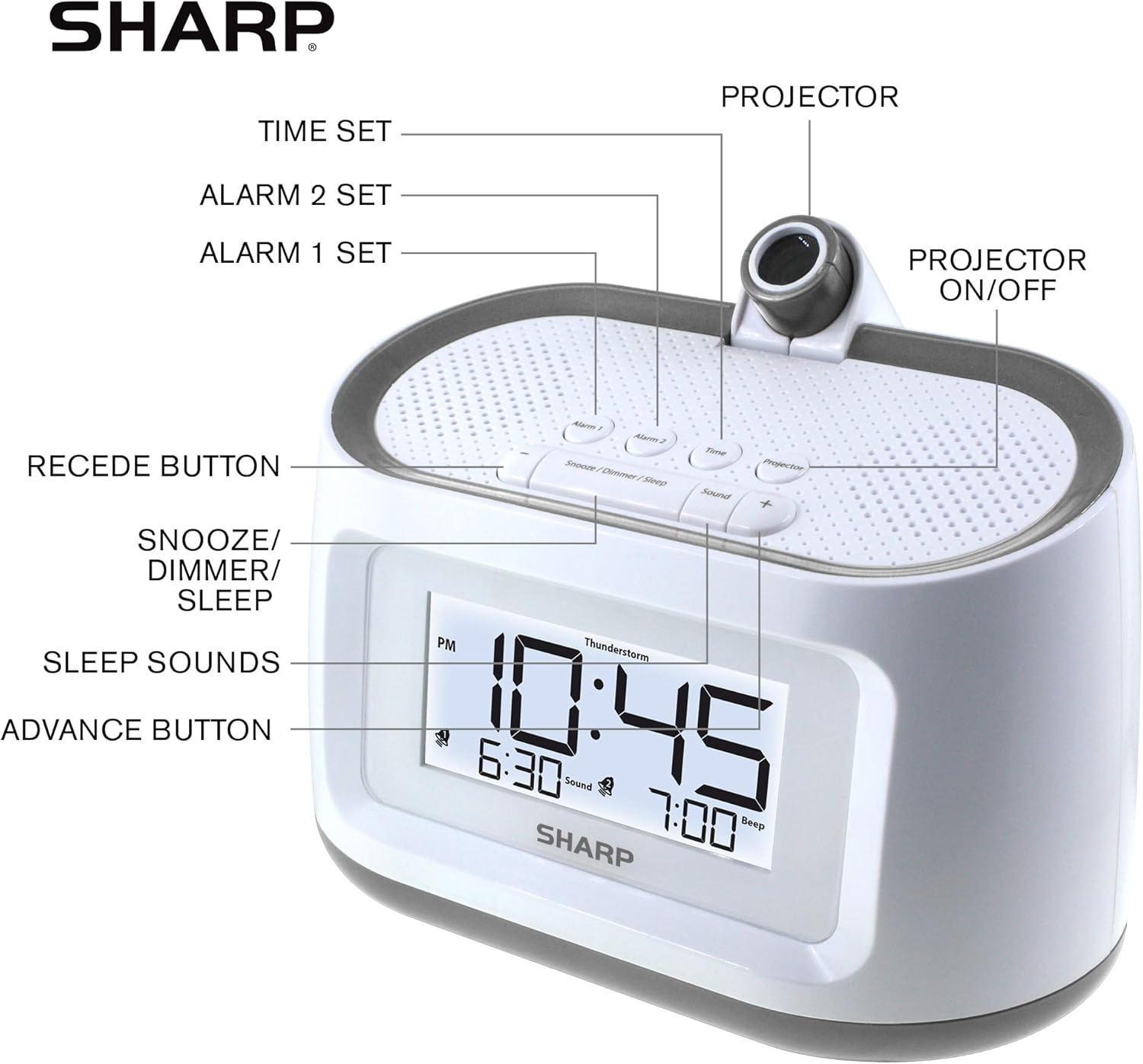
Figure 3: Diagram illustrating the various buttons and components of the alarm clock.
- Time Set Button: Used to enter and adjust time settings.
- Alarm 1 Set Button: Used to set the first alarm time.
- Alarm 2 Set Button: Used to set the second alarm time.
- Projector: The lens through which the time is projected.
- Projector On/Off Button: Toggles the time projection feature.
- Recede Button (-): Decreases values during setting or adjusts volume/brightness.
- Snooze/Dimmer/Sleep Button: Activates snooze, adjusts display brightness, or sets sleep timer for sounds.
- Sleep Sounds Button: Cycles through available nature sounds.
- Advance Button (+): Increases values during setting or adjusts volume/brightness.
Setup
1. Power Connection
Connect the provided AC adapter to the DC input jack on the back of the alarm clock and then plug it into a standard electrical outlet. The display will light up.
2. Battery Backup Installation
For battery backup, insert 2 AAA batteries (not included) into the battery compartment located on the bottom of the unit. Ensure correct polarity (+/-) as indicated inside the compartment. The battery backup preserves time and alarm settings during a power interruption but does not power the display or projection.
3. Initial Time Setting
- Press and hold the Time Set button until the hour digits begin to flash.
- Use the Advance (+) or Recede (-) buttons to adjust the hour. Pay attention to the PM indicator.
- Press the Time Set button again to confirm the hour and move to the minute setting. The minute digits will flash.
- Use the Advance (+) or Recede (-) buttons to adjust the minutes.
- Press the Time Set button one last time to save the time and exit time setting mode.
Operating Instructions
Setting Alarms (Alarm 1 and Alarm 2)
- Press and hold the Alarm 1 Set or Alarm 2 Set button until the alarm hour digits flash.
- Use the Advance (+) or Recede (-) buttons to set the desired alarm hour. Observe the PM indicator.
- Press the respective Alarm Set button again to confirm the hour and move to the minute setting.
- Use the Advance (+) or Recede (-) buttons to set the desired alarm minutes.
- Press the respective Alarm Set button again to select the alarm sound type (Beep or Sound). Use Advance (+) or Recede (-) to toggle.
- Press the respective Alarm Set button one last time to save the alarm setting and exit. The corresponding bell icon will appear on the display, indicating the alarm is active.
To turn an alarm ON or OFF, repeatedly press the Alarm 1 Set or Alarm 2 Set button (without holding) until the bell icon appears or disappears.
Using Sleep Sounds
- Press the Sound button to cycle through the 8 available nature sounds: Campfire, Thunder, Rain, Ocean, White Noise, Fan, Stream, Rainforest.
- To adjust the volume of the sleep sound, use the Advance (+) or Recede (-) buttons while a sound is playing.
- To set a sleep timer for the sounds, press the Snooze/Dimmer/Sleep button repeatedly while a sound is playing to select the desired duration (e.g., 15, 30, 60, 90 minutes, or OFF).
- To turn off the sleep sound immediately, press the Sound button until no sound is playing, or cycle through the sleep timer options until OFF is selected.
Time Projection

Figure 4: The alarm clock projecting the time onto a ceiling in a bedroom setting, demonstrating the 90-degree adjustable projection.
- Press the Projector On/Off button to activate or deactivate the time projection.
- Adjust the angle of the projection by manually rotating the projector arm up to 90 degrees.
- For optimal clarity, ensure the room is dark. The projection may appear faint in brightly lit environments.
- The focus of the projected time is fixed and cannot be adjusted.

Figure 5: Close-up view of the alarm clock with the time 10:45 PM projected in red, illustrating the projection feature.
Display Dimmer Control
Press the Snooze/Dimmer/Sleep button (when no alarm is sounding and no sleep sound is playing) to cycle through different brightness levels for the LCD display.
Snooze Function
When an alarm sounds, press the Snooze/Dimmer/Sleep button to temporarily silence the alarm for a few minutes (default snooze time). The alarm will sound again after the snooze period ends.
Maintenance
- Cleaning: To clean the clock, gently wipe the surface with a soft, dry cloth. Do not use abrasive cleaners, waxes, or solvents as they may damage the finish.
- Battery Replacement: If the clock experiences a power outage and the time/settings are not retained, it may be time to replace the AAA backup batteries. Ensure the AC adapter is connected before replacing batteries to avoid losing settings.
- Placement: Place the clock on a stable, flat surface away from direct sunlight, heat sources, and excessive moisture.
Troubleshooting
| Problem | Possible Cause | Solution |
|---|---|---|
| Clock display is blank. | No power connection. | Ensure the AC adapter is securely plugged into the clock and a working electrical outlet. |
| Alarm does not sound. | Alarm is not activated or set incorrectly. | Verify the alarm time is set correctly and the alarm bell icon is visible on the display. Ensure alarm volume is not set to zero. |
| Time projection is dim or unclear. | Room is too bright; projector lens is obstructed. | Ensure the room is dark for optimal projection visibility. Check if anything is blocking the projector lens. |
| Sleep sounds are not playing. | Sound feature is off or volume is too low. | Press the Sound button to activate. Adjust volume using Advance (+) or Recede (-). Check if sleep timer is set to OFF. |
| Time/settings reset after power outage. | Backup batteries are dead or not installed. | Install 2 new AAA batteries or replace existing ones in the battery compartment. |
Specifications

Figure 6: Dimensions of the Sharp Projection Alarm Clock: 6.85 inches wide, 4.5 inches high, and 4.2 inches deep.
| Brand | Sharp |
| Model Number | SPC585BCAMZ |
| Color | White - Gunmetal Trim |
| Display Type | Digital |
| Product Dimensions (W x H) | 6.85"W x 4.5"H |
| Item Weight | 1.08 pounds |
| Power Source | Electrical (AC Adapter) |
| Battery Backup | 2 x AAA batteries (not included) |
| Material | Plastic, Metal Frame |
| Mounting Type | Tabletop (Projection for Ceiling/Wall Mount) |
| Special Features | Time Projection, 8 Nature Sleep Sounds, Dual Alarms, Display Dimmer, Battery Backup |
| UPC | 049353006024 |
Warranty and Support
For warranty information and technical support, please refer to the official Sharp website or contact their customer service department. Keep your purchase receipt as proof of purchase for any warranty claims.
You can typically find support contact details and warranty terms on the manufacturer's official product page or in the packaging materials that came with your device.
For more information, visit the Sharp Store on Amazon.
Related documentsSPC585BCAMZ


Ask a question about this manual
Ask about setup, troubleshooting, compatibility, parts, safety, or missing instructions. Manuals+ will review the question and use this page’s manual context to help answer it.