
1. Introduction
This manual provides essential information for setting up, operating, maintaining, and troubleshooting your MSI GE75 Raider Gaming Laptop. Designed for high-performance gaming and demanding tasks, this laptop features a powerful Intel processor, NVIDIA GeForce RTX graphics, and a high-refresh-rate display. Please read this manual thoroughly to ensure optimal performance and longevity of your device.
2. Package Contents
Upon opening the package, verify that all items are present and in good condition:
- MSI GE75 Raider Gaming Laptop
- AC Adapter and Power Cord
- User Manual (this document)
- Generic Microfiber Cloth
3. Product Features
The MSI GE75 Raider Gaming Laptop is equipped with advanced components for an immersive computing experience:
- Processor: Intel Six-Core i7-10750H
- Graphics: NVIDIA GeForce RTX 2070
- Display: 15.6" FHD (1920 x 1080) IPS-Level 144Hz Display
- Memory: 32 GB high-bandwidth DDR4 RAM
- Storage: 1TB PCIe NVMe SSD + 2TB HDD
- Operating System: Windows 10 Home, 64-bit
- Connectivity: Intel Wi-Fi 6 AX201 (2x2 ax) and Bluetooth 5.1
- Ports: 2x USB3.2 Gen 1, 2x USB 3.2 Gen1 Type C, 1x HDMI (supports 4K @ 60Hz), 1x Headset AMP + Gold Flash jacks
4. Setup
Follow these steps to set up your new MSI GE75 Raider laptop:
- Unpack the Laptop: Carefully remove the laptop and all accessories from the packaging.
- Connect Power:
Connect the AC adapter to the power jack on the laptop and then plug the power cord into an electrical outlet. The power indicator light will illuminate.

Figure 4.1: MSI GE75 Raider Gaming Laptop. This image shows the overall design of the laptop, highlighting its display and keyboard.
- Initial Boot-up:
Open the laptop lid and press the power button. The laptop will begin the initial boot-up process, which may take a few minutes as Windows 10 configures itself.

Figure 4.2: Front view of the MSI GE75 Raider Gaming Laptop. This image provides a clear view of the screen and the MSI logo below it.
- Complete Windows Setup: Follow the on-screen prompts to complete the Windows 10 setup, including language selection, network connection, and user account creation.
- Install Updates: After setup, it is recommended to connect to the internet and allow Windows to download and install any pending updates to ensure system stability and security.
5. Operating the Laptop
This section covers basic operation of your MSI GE75 Raider laptop.
5.1 Keyboard and Touchpad
The laptop features a full-size keyboard with a numeric keypad and a multi-touch touchpad.
- Keyboard Backlighting: Adjust keyboard backlighting using the dedicated function keys (Fn + Fx keys, refer to your laptop's specific key layout).
- Touchpad Gestures: The touchpad supports multi-touch gestures for scrolling, zooming, and navigating. Refer to Windows settings for customization.
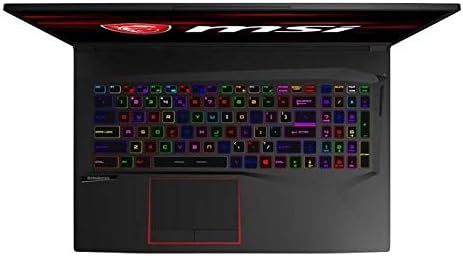
Figure 5.1: Top-down view of the MSI GE75 Raider keyboard and touchpad. This image highlights the RGB backlit keyboard and the touchpad with a red outline.
5.2 Connecting Peripherals
Your laptop provides various ports for connecting external devices:
- USB Ports: Connect USB devices such as external hard drives, mice, or keyboards.
- HDMI Port: Connect an external monitor or TV for extended display.
- Audio Jacks: Connect headphones, microphones, or external speakers.
- Ethernet Port: For wired network connection.

Figure 5.2: Left side view of the MSI GE75 Raider laptop, showing various ports including USB, HDMI, Ethernet, and audio jacks.

Figure 5.3: Right side view of the MSI GE75 Raider laptop, showing additional USB ports and the power input.
6. Maintenance
Proper maintenance ensures the longevity and performance of your laptop.
- Cleaning: Use a soft, lint-free cloth to clean the screen and chassis. For stubborn marks, dampen the cloth slightly with water or a screen cleaner. Avoid harsh chemicals.
- Ventilation: Ensure the ventilation openings are clear of obstructions to prevent overheating. Do not operate the laptop on soft surfaces like beds or couches that can block airflow.
- Battery Care: For optimal battery life, avoid frequently discharging the battery completely. If storing the laptop for an extended period, charge the battery to about 50-60%.
- Software Updates: Regularly update your operating system, drivers, and applications to ensure security and performance.
7. Troubleshooting
This section addresses common issues you might encounter.
| Problem | Possible Cause | Solution |
|---|---|---|
| Laptop does not power on. | No power, battery drained, power adapter issue. | Ensure AC adapter is securely connected and power outlet is working. Charge battery for at least 30 minutes before attempting to power on. |
| Screen remains black. | Display issue, external monitor connected, sleep mode. | Press any key or move the mouse to wake from sleep. Disconnect any external monitors. Try restarting the laptop. |
| Wi-Fi connection issues. | Wi-Fi disabled, driver issue, router problem. | Check Wi-Fi settings in Windows to ensure it's enabled. Restart your router. Update Wi-Fi drivers. |
| Laptop is overheating. | Blocked vents, heavy workload. | Ensure vents are clear. Use the laptop on a hard, flat surface. Reduce demanding applications or games. |
8. Specifications
Detailed technical specifications for the MSI GE75 Raider Gaming Laptop.
| Feature | Detail |
|---|---|
| Brand | MSI |
| Model Name | GE75 Raider (Item Model Number: GL65) |
| Screen Size | 15.6 Inches |
| Screen Resolution | 1920 x 1080 pixels (FHD) |
| Refresh Rate | 144Hz |
| Processor | Intel Six-Core i7-10750H |
| RAM | 32 GB DDR4 |
| Hard Drive | 1 TB SSD (PCIe NVMe) |
| Graphics Coprocessor | NVIDIA GeForce RTX 2070 |
| Operating System | Windows 10 Home |
| Wireless Type | 5 GHz Radio Frequency, Bluetooth |
| Item Weight | 5.7 pounds |
| Product Dimensions (LxWxH) | 10.23 x 14.17 x 0.91 inches |
| Date First Available | January 27, 2021 |
9. Warranty and Support
MSI provides a limited warranty for its products. Please refer to the warranty card included with your product or visit the official MSI website for detailed warranty terms and conditions specific to your region.
For technical support, driver downloads, and frequently asked questions, please visit the official MSI support website. You can typically find support resources by searching for "MSI Support" and your specific model number (GE75 Raider or GL65).
Online Resources:
- MSI Official Website
- MSI Support Page (General link, specific model support may require navigation)


