
1. Introduction
The Gustard X26 Pro is a high-performance, full-balanced MQA Digital-to-Analog Converter (DAC) designed for discerning audiophiles. It features dual ES9038PRO DAC chips, an ultra-low noise K2 clock synthesizer, and advanced DSP digital filtering to deliver exceptional audio fidelity. This manual provides detailed instructions for setting up, operating, and maintaining your X26 Pro DAC.

Video 1.1: Official product overview of the Gustard X26 Pro DAC, highlighting its features and design.
2. Key Features
- Dual ES9038PRO Chips: Utilizes two ESS ES9038PRO chips for dual mono audio digital-to-analog conversion, ensuring independent power supply and grounding for each channel for optimal performance.
- MQA Support: USB input supports MQA decoding.
- K2 Clock Synthesizer: Features an ultra-low noise K2 clock synthesizer, reducing the impact of the front-end signal source clock performance on decoding.
- DSP Digital Filter: Independent R&D of DSP digital filter on Analog Device SHARC platform, equipped with a high-performance anti-aliasing noise algorithm.
- CPLD Programmable Logic Chips: Self-constructed digital integrated circuits for clock management, 2nd PLL, digital shaping, DOP decoder, and PCM/DSD depop switch.
- Versatile Inputs: USB, IIS, AES, Coaxial, Optical, and Bluetooth 5.0 (CSR8675) input modes.
- Multiple Outputs: RCA and XLR balanced analog outputs.
- Bluetooth 5.0: Supports LDAC, AAC, SBC, APTX, APTX LL, and APTX HD high-frequency encoding.

3. Package Contents
Upon opening the package, please verify that all items listed below are present and in good condition:
- 1 x Gustard X26 Pro DAC Unit
- 1 x Bluetooth Antenna
- 1 x USB Cable
- 1 x AC Adapter (Power Cable)
- 1 x Warranty Card
- 1 x Remote Control
Note: The remote control is universal for Gustard products. Long press the "DAC" button to control the X26 Pro.

For a visual guide on package contents, refer to Video 1.1 from timestamp 1:11 to 1:50.
4. Setup
4.1 Front Panel Overview
The front panel provides essential controls and display for the X26 Pro DAC.
- Power Switch: Press to power on/off the unit.
- Display Screen: Shows current input, sample rate, and volume level.
- Rotary Encoder (Right): Used for volume control, input selection, and menu navigation.
Refer to Video 1.1 from timestamp 0:57 to 1:00 for a visual guide to the front panel controls.
4.2 Rear Panel Connections
Connect your audio sources and output devices to the appropriate ports on the rear panel.

- XLR Balance Output (Left/Right): For balanced audio output to compatible amplifiers.
- RCA Output (Left/Right): For unbalanced audio output to compatible amplifiers.
- USB Input: Connect to a computer or digital audio player. Supports PCM 16-32bit/44.1-768kHz, DSD DOP64-DOP256, Native DSD64-DSD512.
- IIS Input (HDMI): High-specification audio interface. Note: This is an IIS-HDMI input, not for standard TV HDMI connections.
- COAX Input: Coaxial digital audio input. Supports PCM 16-24bit/44.1-192kHz, DSD DOP64.
- AES Input: AES/EBU digital audio input. Supports PCM 16-24bit/44.1-192kHz, DSD DOP64.
- OPT Input: Optical digital audio input. Supports PCM 16-24bit/44.1-192kHz, DSD DOP64.
- Bluetooth Antenna: Connect the included Bluetooth antenna for wireless audio reception.
- External Clock Input: For connecting an external 10M constant temperature clock source.
- AC Power Socket: Connect the AC power cable. Supports AC 115V/230V 50/60Hz.
- Voltage Transfer Switch: Ensure this switch is set to the correct voltage for your region (115V or 230V) before connecting power.
- Fuse: Contains the main fuse (5*20; 2-3A).
Refer to Video 1.1 from timestamp 1:01 to 1:10 for a visual guide to the rear panel connections.
4.3 Driver Installation (for USB Input)
For Windows operating systems (Win7 SP1/Win8/Win10 32-64bit), a dedicated USB driver is required for optimal performance. Drivers are typically available for download on the official Gustard website. macOS and Linux operating systems usually do not require specific drivers.
5. Operating Instructions
5.1 Power On/Off
Press the Power button on the front panel to turn the unit on or off. The display screen will illuminate upon power-on.
5.2 Input Selection
Use the rotary encoder on the front panel or the remote control to cycle through available input sources (USB, IIS, AES, Coaxial, Optical, Bluetooth). The selected input will be displayed on the screen.
5.3 Volume Control
Rotate the encoder on the front panel or use the VOL+ / VOL- buttons on the remote control to adjust the output volume. The volume level will be shown on the display.
5.4 Digital Filter Settings
The X26 Pro offers various digital filter modes to tailor the sound to your preference. These modes are: VIVID (Recommended), COMPOSITE, GENTLE, and NOS Mode (No Oversampling, direct analog conversion). Access these settings via the menu system using the rotary encoder or remote control.
6. Internal Design & Technology
The X26 Pro incorporates advanced components and design principles for superior audio performance.
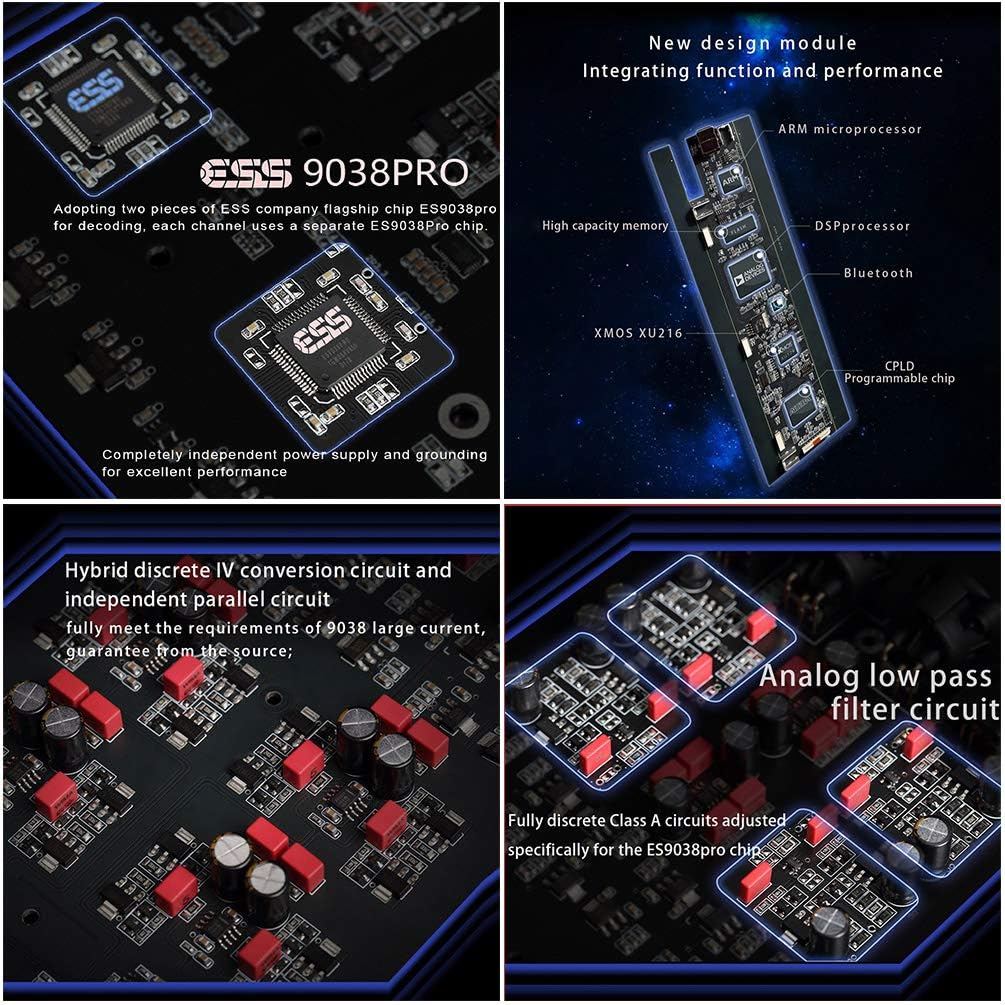
- Dual ES9038PRO: Each channel uses a dedicated ES9038Pro chip with independent power supply and grounding.
- K2 Ultra-low Noise Clock Synthesizer: Ensures precise timing and reduces jitter.
- DSP Digital Filter: High-performance digital filter developed on the Analog Device SHARC platform for anti-aliasing noise reduction.
- CPLD Programmable Logic Chips: Manages clock, PLL, digital shaping, and decoding functions.

- XMOS XU216: The USB interface adopts this chip, supporting high-resolution PCM up to 768KHz and DSD512.
- CSR8675 Bluetooth Chip: Provides stable Bluetooth 5.0 connectivity with support for various high-quality codecs.

- Dual Toroidal Transformers: Two high-quality audio-dedicated toroidal transformers separately supply power for digital and analog circuits, minimizing mutual interference.
- Independent Voltage Regulators: Multi-stage filtering and independent voltage regulation ensure clean power delivery to all components, preventing interference between left and right channels.
7. Specifications
| Category | Specification |
|---|---|
| Model Number | x26 pro |
| Digital Input Sample Rates (COAX/AES/OPT) | PCM 16-24bit/44.1-192kHz; DSD DOP64 |
| Digital Input Sample Rates (USB) | PCM 16-32bit/44.1-768kHz; DSD DOP64-DOP256; Native DSD64-DSD512 |
| Digital Input Sample Rates (IIS) | PCM 16-32bit/44.1-768kHz; DSD DOP64-DOP256; Native DSD64-DSD512 |
| Bluetooth Version | 5.0 (LDAC, AAC, SBC, APTX, APTX LL, APTX HD) |
| Amplitude Frequency Response | 20-20kHz /±0.1dB |
| SNR | >128dB |
| Crosstalk | -140dB@1kHz |
| THD+N | ≤0.0001%@1kHz |
| IMD | <0.0006% @-1dBFs |
| RCA Output Level | 2.5Vrms (Volume 00dB) |
| RCA Output Impedance | 100 ohms |
| XLR Output Level | 5Vrms (Volume 00dB) |
| XLR Output Impedance | 100 ohms |
| AC Power Supply | AC 115V/230V 50/60Hz |
| Power Consumption | <60W |
| Dimensions (W*H*D) | 330mm * 65mm * 260mm (Excluding protrusions) |
| Item Weight | 14.65 pounds (approx. 6.65 kg) |
8. Maintenance
To ensure the longevity and optimal performance of your Gustard X26 Pro DAC, follow these maintenance guidelines:
- Cleaning: Use a soft, dry cloth to wipe the exterior of the unit. Avoid using liquid cleaners or abrasive materials, as they may damage the finish.
- Ventilation: Ensure adequate ventilation around the unit. Do not block the ventilation holes. The unit may generate some heat during operation, which is normal.
- Environment: Keep the unit in a dry, dust-free environment, away from direct sunlight, heat sources, and excessive humidity.
- Power Off: Always power off the unit before disconnecting any cables or performing maintenance.
9. Troubleshooting
If you encounter any issues with your X26 Pro DAC, please refer to the following common troubleshooting steps:
- No Power:
- Check if the power cable is securely connected to both the DAC and the power outlet.
- Verify that the voltage transfer switch on the rear panel is set correctly for your region (115V or 230V).
- Check the fuse located on the rear panel. If blown, replace it with a fuse of the same type and rating (5*20; 2-3A).
- No Sound Output:
- Ensure the correct input source is selected on the DAC.
- Verify that the volume level is not set to minimum or muted.
- Check all audio cables (RCA, XLR) for secure connections to both the DAC and your amplifier/speakers.
- Confirm that your amplifier/speakers are powered on and set to the correct input.
- For USB input, ensure the correct drivers are installed on your computer and the DAC is selected as the audio output device.
- Intermittent Audio/Distortion:
- Check for loose cable connections.
- Ensure the source audio file is not corrupted.
- Try a different input source or cable to isolate the issue.
- Ensure the DAC is not placed near strong electromagnetic interference sources.
- Bluetooth Connection Issues:
- Ensure the Bluetooth antenna is securely attached.
- Make sure the DAC is in Bluetooth input mode.
- Unpair and re-pair the device from your source device's Bluetooth settings.
- Ensure your source device is within the effective range of the DAC.
If the problem persists after trying these steps, please contact customer support.
10. Warranty and Support
AOSHIDA Audio specializes in the supply and production of audio products and is committed to providing excellent customer service.
- Warranty: The product typically comes with a one-year free repair period, which may vary depending on the specific brand and product. Please refer to your warranty card or purchase documentation for exact terms.
- Return Policy: A 30-day return policy is generally supported.
- Customer Service: AOSHIDA Audio offers 24-hour online service. For any questions or support needs, please feel free to contact their after-sales team.
For further assistance, you can reach out via the contact information provided by AOSHIDA Audio, typically found on their official website or through your purchase platform.
