
Introduction
This manual provides essential information for the proper installation, operation, and maintenance of your Maxblue RF-U8 Replacement Water Filter. Designed for use with Maxblue U8-ST and U8-FC Under Sink Water Filtration Systems, this filter ensures access to purified water.
- Carefully Selected Materials: The Maxblue under sink water filter is free of harmful heavy metals, ensuring safe and clean drinking water.
- Efficient Filtration: Premium activated carbon block and PP cotton effectively reduce chlorine, odor, large particles, silt, rust, fluoride, heavy metals, and VOCs.
- Ultra-High Capacity: The filter's design provides extended protection for household filtration with a lifespan of up to 2 years.
- Extensive Water Flow: Provides a smooth and fast water flow with a stable rate of up to 1.3 gallons per minute.
Setup and Installation
The Maxblue RF-U8 filter is designed for effortless replacement within compatible Maxblue U8-ST and U8-FC systems. No need to turn off the main water valve during replacement, as the system automatically cuts off water supply.
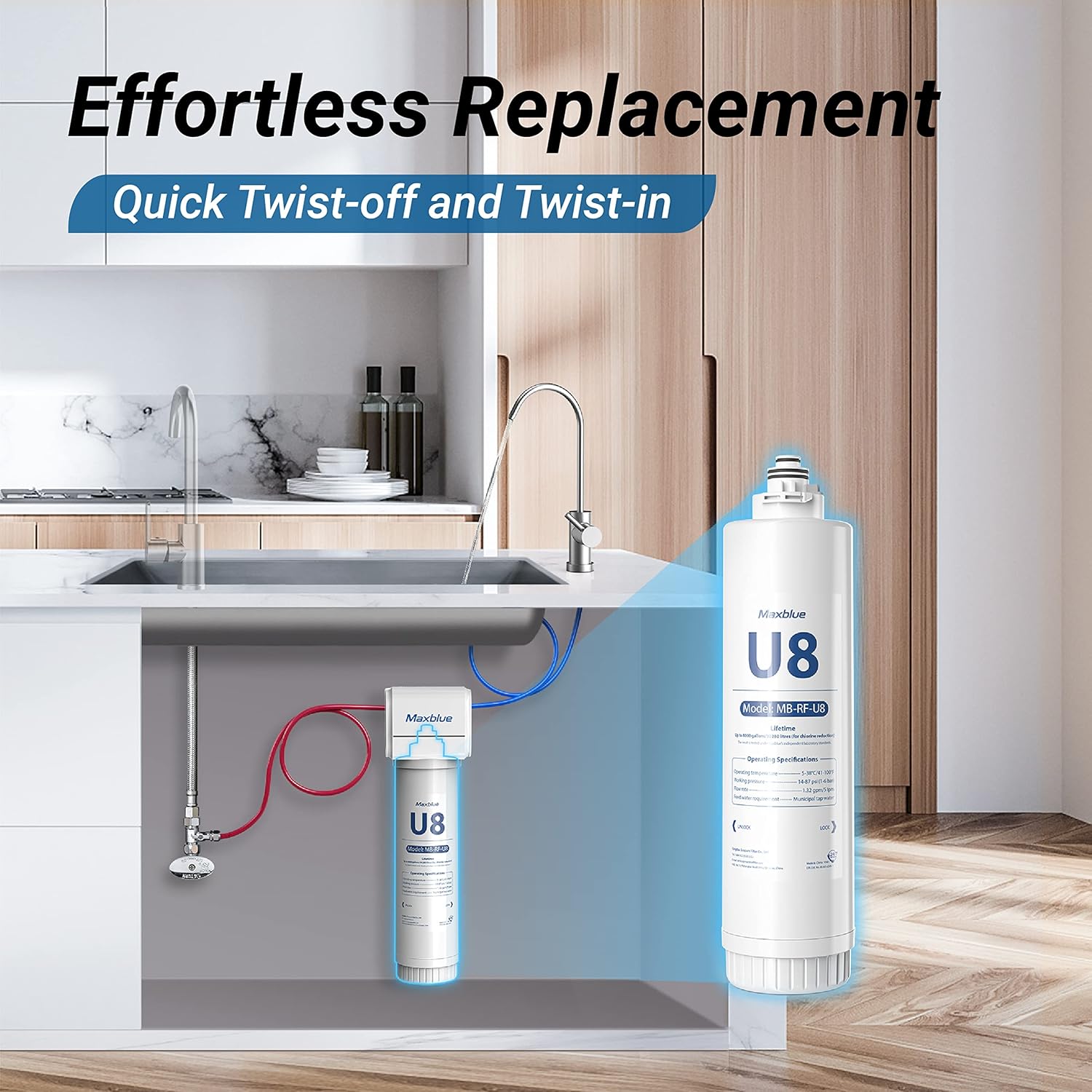
To install or replace the filter:
- Ensure the system is compatible with Maxblue RF-U8 filters (compatible with MB-U8-ST/MB-U8-FC).
- Locate the existing filter cartridge within your under-sink system.
- Twist the old filter cartridge counter-clockwise to unlock and remove it. The system will automatically shut off water flow.
- Remove any protective packaging from the new Maxblue RF-U8 filter.
- Align the new filter with the system head and insert it.
- Twist the new filter clockwise until it locks securely into place.
- After installation, slowly turn on the water supply to the system (if it was manually turned off) and check for any leaks.
- Flush the new filter by running water through the faucet for approximately 5-10 minutes to remove any carbon fines and air from the system.

Operating Instructions
Once installed and flushed, your Maxblue RF-U8 filter operates automatically with your under-sink water filtration system. Simply turn on your dedicated filtered water faucet to dispense purified water.
- For optimal performance, ensure the water flow rate is consistent.
- If water flow significantly decreases, it may indicate that the filter is nearing the end of its lifespan and requires replacement.
Maintenance and Filter Replacement
Regular replacement of your Maxblue RF-U8 filter is crucial to maintain water quality and system performance. The filter has an ultra-long lifespan of up to 2 years, depending on water quality and usage.

Replacement Schedule:
- Replace the filter every 2 years or when the flow rate noticeably decreases.
- The replacement process is designed to be effortless, as detailed in the Setup and Installation section.


Troubleshooting
If you encounter issues with your Maxblue RF-U8 filter or filtration system, refer to the following common troubleshooting steps:
- Reduced Water Flow: This is often an indication that the filter is clogged and needs replacement. Ensure the filter is installed correctly and flush the system.
- Leaks: Check all connections to ensure they are tight. Verify that the O-rings on the filter are properly seated and not damaged.
- Unusual Taste or Odor: If you notice an unusual taste or odor in your filtered water, it may be time to replace the filter. Ensure the filter is properly flushed after installation.
- No Water Flow: Confirm that the main water supply to the system is turned on. Check if the filter is correctly installed and locked into place.
Specifications
| Feature | Detail |
|---|---|
| Material | Activated Carbon, Cotton |
| External Testing Certification | NSF |
| Product Benefits | Removes impurities and harmful substances, enhances water taste, ensures long-lasting filtration, and simplifies replacement |
| Brand | Maxblue |
| Set Name | U8 |
| Unit Count | 1 Count |
| Number of Items | 1 |
| Item Model Number | RF U8 |
| Item Weight | 2.97 pounds |
| Package Dimensions | 17.01 x 5.55 x 5.43 inches |
Warranty Information
For detailed warranty information regarding your Maxblue RF-U8 Replacement Water Filter, please refer to the documentation included with your original Maxblue Under Sink Water Filtration System or contact Maxblue customer support directly. The product is noted to have an EU Spare Part Availability Duration of 2 Years.
Customer Support
If you require further assistance or have questions not covered in this manual, please contact Maxblue customer support. Visit the official Maxblue website or refer to your product packaging for contact details.


