
soundcore A3951
Contents
soundcore Anker Liberty Air 2 Pro Bluetooth Headphones User Manual
Model: A3951
Introduction
Welcome to the user manual for your soundcore Anker Liberty Air 2 Pro Bluetooth Headphones. These premium true wireless earbuds are designed to deliver an exceptional audio experience with advanced features like Active Noise Cancellation, PureNote Technology, and crystal-clear call quality. This manual will guide you through the setup, operation, maintenance, and troubleshooting of your new headphones to ensure you get the most out of them.
Product Overview
The soundcore Liberty Air 2 Pro headphones are engineered for superior sound and user comfort. Key features include:
- Fantastic Sound: Immerse yourself in pure sound quality by selecting your preferred scenario in the Soundcore app.
- PureNote Technology: Exclusive audio technologies analyze the sound profile in real-time, automatically boosting bass by 45% and extending sound frequencies by 30%. Audio drivers are coated with 10 nano-layers for crystal-clear precision.
- HearID Customization: The smart HearID program tests your hearing and music preferences to precisely adjust the sound profile for an ideal listening experience. Alternatively, use the Soundcore app with 22 preset sound profiles for EQ control.
- Strong Endurance: Enjoy 7 hours of wireless playback on a single charge, with an additional 26 hours provided by the compact charging case.
- Crystal-Clear Calling: Six microphones with integrated noise reduction ensure premium music enjoyment and precise phone conversations.

Image: The soundcore Liberty Air 2 Pro earbuds, showcasing their sleek design.
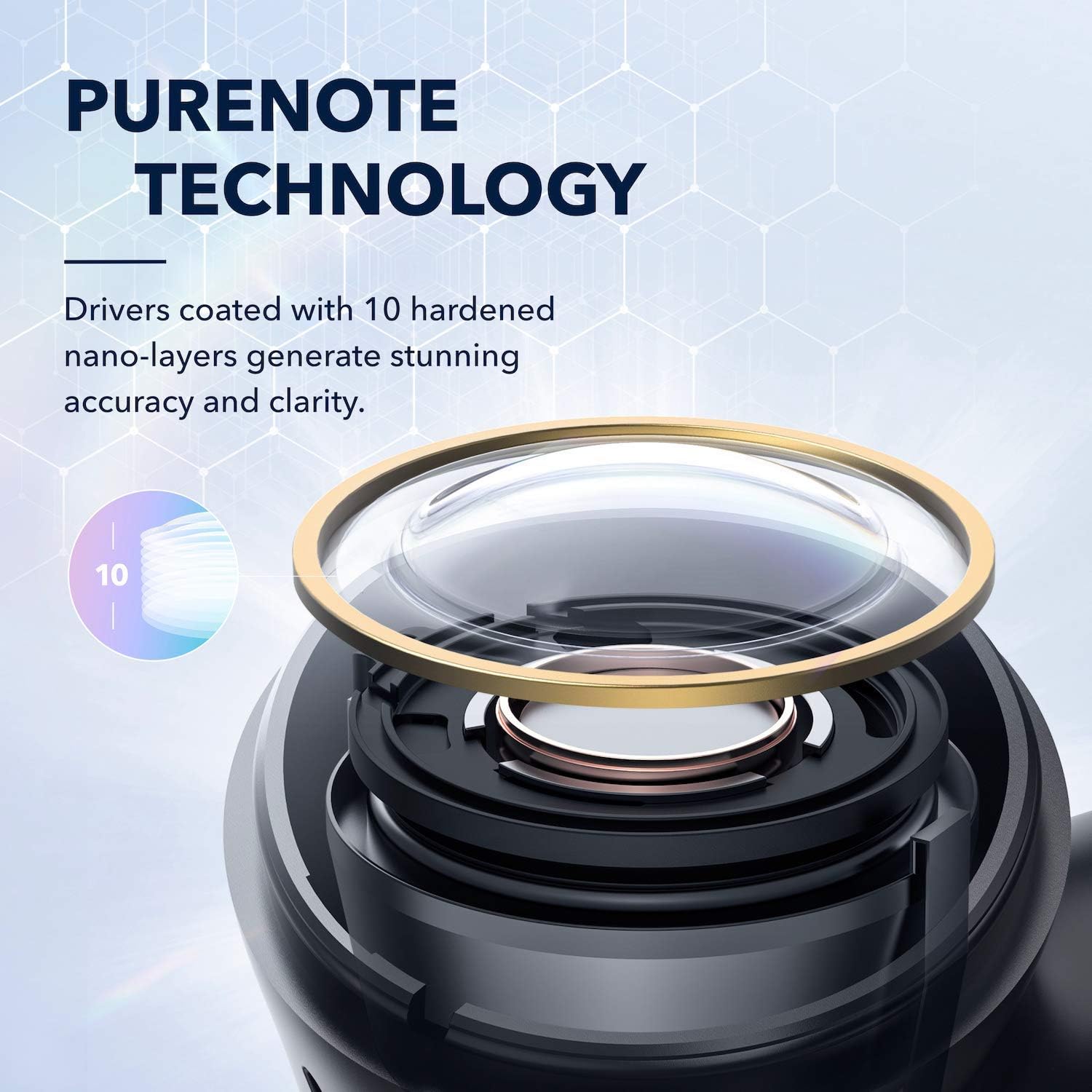
Image: A detailed view of the PureNote Technology driver, highlighting the 10 hardened nano-layers for enhanced audio accuracy.
Package Contents
Ensure all items are present in your package:
- soundcore Liberty Air 2 Pro Earbuds
- Wireless Charging Case
- USB-C Charging Cable
- Multiple Sizes of EarTips (up to 9 pairs for optimal fit)
- Quick Start Guide
- Safety Card
Setup
1. Charging the Case and Earbuds
Before first use, fully charge the charging case and earbuds. Connect the charging case to a power source using the provided USB-C cable. The LED indicators on the case will show the charging status. You can also charge the case wirelessly.
- Wired Charging: Use the USB-C cable.
- Wireless Charging: Place the charging case on a Qi-certified wireless charger.
2. Power On and Bluetooth Pairing
The earbuds will automatically power on when removed from the charging case. To pair with your device:
- Open the charging case. The earbuds will enter Bluetooth pairing mode automatically (LEDs will flash white).
- On your device, enable Bluetooth and search for "Soundcore Liberty Air 2 Pro".
- Select the device name to connect. Once connected, the earbud LEDs will turn solid white.
Note: To manually enter pairing mode, place both earbuds in the charging case, leave the lid open, and press and hold the button on the case for 3 seconds until the earbud LEDs flash white.
3. Installing the Soundcore App
For the best experience, download the Soundcore app from the App Store (iOS) or Google Play Store (Android). The app allows for HearID sound customization, EQ adjustments, firmware updates, and control customization.
4. Choosing the Right EarTips and Fit
A proper fit is crucial for optimal sound quality and noise cancellation. The Liberty Air 2 Pro comes with multiple sizes of EarTips. Use the "Tip Fit Test" feature in the Soundcore app to find the best seal for your ears.
- Insert the earbuds into your inner ear canals.
- Gently rotate and twist until they fit snugly and comfortably.
- Perform the "Tip Fit Test" in the Soundcore app to verify the seal.
Operating Your Headphones
Touch Controls
The touch-sensitive panels on the earbuds allow for easy control of music playback, calls, and noise cancellation modes. Controls can be customized via the Soundcore app.
| Action | Left Earbud | Right Earbud |
|---|---|---|
| Play/Pause | Double-tap | Double-tap |
| Next Track | (Customizable) | Hold 2s |
| Previous Track | Hold 2s | (Customizable) |
| Answer/End Call | Double-tap | Double-tap |
| Reject Call | Hold 2s | Hold 2s |
| Switch ANC Mode | Hold 2s | (Customizable) |
Active Noise Cancellation (ANC)
The Liberty Air 2 Pro features targeted active noise cancellation to reduce ambient noise. You can switch between different ANC modes via the Soundcore app or by using the earbud touch controls.
- Transport Mode: Targets low-frequency noises like engine sounds.
- Outdoor Mode: Reduces ambient noise while still allowing some awareness of surroundings.
- Indoor Mode: Optimized for reducing voices and mid-frequency noises in quiet environments.

Image: Illustration of the targeted active noise cancellation feature, showing its effectiveness in transport, outdoor, and indoor environments.
Transparency Mode
Transparency mode allows you to hear your surroundings without removing the earbuds. This is useful for conversations or when you need to be aware of your environment.
- Fully Transparent: Allows all ambient sounds to pass through.
- Vocal Mode: Enhances human voices while still reducing background noise.
Call Functionality
The six built-in microphones ensure clear call quality. Use the touch controls to manage incoming and outgoing calls.
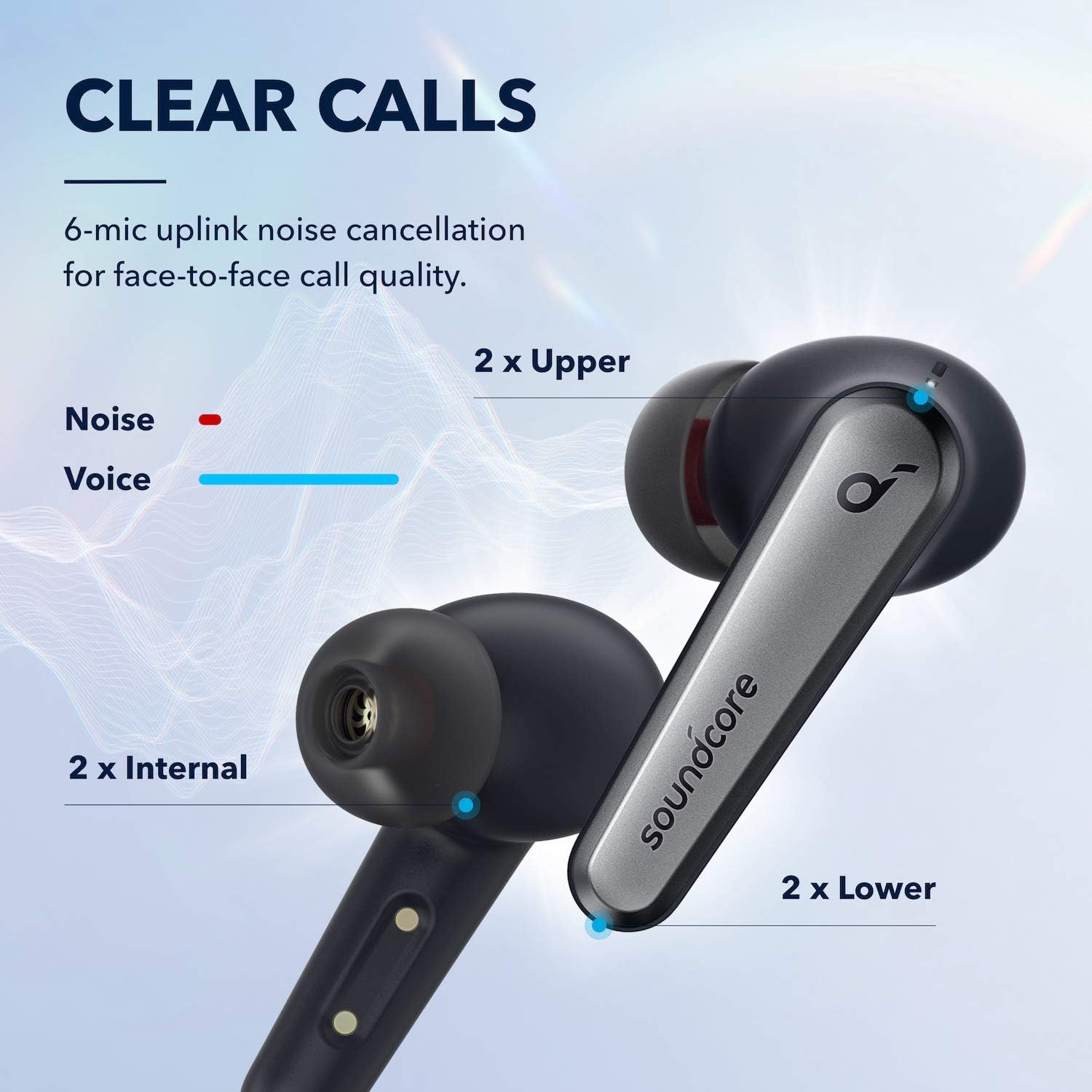
Image: Diagram illustrating the 6-microphone uplink noise cancellation system for clear face-to-face call quality, showing the location of upper, internal, and lower microphones.
HearID Sound Customization
Utilize the HearID feature in the Soundcore app to create a personalized sound profile tailored to your unique hearing. This optimizes the audio output for your ears, providing a truly customized listening experience.
Maintenance
Cleaning
Regular cleaning helps maintain optimal performance and hygiene.
- Gently wipe the earbuds and charging case with a soft, dry, lint-free cloth.
- Remove ear tips and clean them with mild soap and water if necessary. Ensure they are completely dry before reattaching.
- Use a dry cotton swab to clean the charging contacts on both the earbuds and the case.
Storage
When not in use, always store the earbuds in their charging case to protect them and keep them charged.
Troubleshooting
| Issue | Possible Solution |
|---|---|
| Earbuds not pairing | Ensure earbuds are charged. Place both earbuds in the case, close and reopen the lid. Manually enter pairing mode by holding the case button for 3 seconds. Forget the device on your Bluetooth list and re-pair. |
| Only one earbud working | Ensure both earbuds are charged. Place both in the case, close the lid for 5 seconds, then reopen. Reset the earbuds (refer to Soundcore app for specific reset instructions). |
| Poor sound quality | Ensure ear tips provide a good seal. Clean ear tips and earbud nozzles. Try different ear tip sizes. Check EQ settings in the Soundcore app. Move closer to your device to avoid interference. |
| ANC not effective | Ensure a proper ear tip seal. Select the appropriate ANC mode for your environment in the Soundcore app. |
| Earbuds not charging | Clean the charging contacts on both earbuds and case. Try a different USB-C cable or power adapter. Ensure wireless charger is Qi-certified and properly aligned. |
Specifications
| Feature | Detail |
|---|---|
| Model Number | A3951 |
| Brand | soundcore |
| Connectivity Technology | Wireless (Bluetooth 5) |
| Noise Control | Active Noise Cancellation |
| Ear Placement | In Ear |
| Form Factor | In Ear |
| Battery Type | Lithium-Polymer |
| Earbud Playtime | Up to 7 hours (single charge) |
| Total Playtime (with case) | Up to 26 hours |
| Microphones | 6 (for clear calls) |
| Product Dimensions | 11.7 x 6.1 x 17.1 cm; 68.04 Grams |
Warranty and Support
soundcore products come with a limited warranty. For detailed warranty information, please refer to the warranty card included in your package or visit the official soundcore website. If you encounter any issues or have questions, please contact soundcore customer support through their official website or the Soundcore app.
For the latest FAQs and more information, please visit: soundcore Support
Documents and downloads
Ask a question about this manual
Ask about setup, troubleshooting, compatibility, parts, safety, or missing instructions. Manuals+ will review the question and use this page’s manual context to help answer it.