
ALLIMITY AKB73855909
ALLIMITY AKB73855909 Remote Control User Manual
For LG Sound Bar Models S73A1-D and NB5530A
1. Introduction
This manual provides comprehensive instructions for the ALLIMITY AKB73855909 replacement remote control. It is specifically designed to operate LG Sound Bar models S73A1-D and NB5530A. Please review this manual thoroughly before using the remote control to ensure correct operation and to enhance your overall user experience.
2. Product Overview
The AKB73855909 remote control functions as a direct replacement unit, eliminating the need for any programming or complex setup procedures. It offers complete functionality for its compatible LG Sound Bar models.

Figure 1: Front view of the ALLIMITY AKB73855909 remote control, displaying all buttons and their respective labels.
3. Setup
3.1 Battery Installation
- Locate the battery compartment situated on the rear side of the remote control.
- Gently slide the battery cover in the direction indicated by an arrow or downwards to open it.
- Insert two AAA alkaline batteries. Ensure that the positive (+) and negative (-) terminals are correctly aligned with the polarity markings inside the compartment.
- Reattach the battery cover by sliding it back into its original position until it securely clicks into place.
Note: This remote control does not require any programming or pairing. It is ready for immediate use once the batteries are installed.

Figure 2: Back view of the remote control, illustrating the battery compartment designed for AAA batteries.
4. Operating Instructions
This section provides detailed information on the functions of each button on your AKB73855909 remote control.
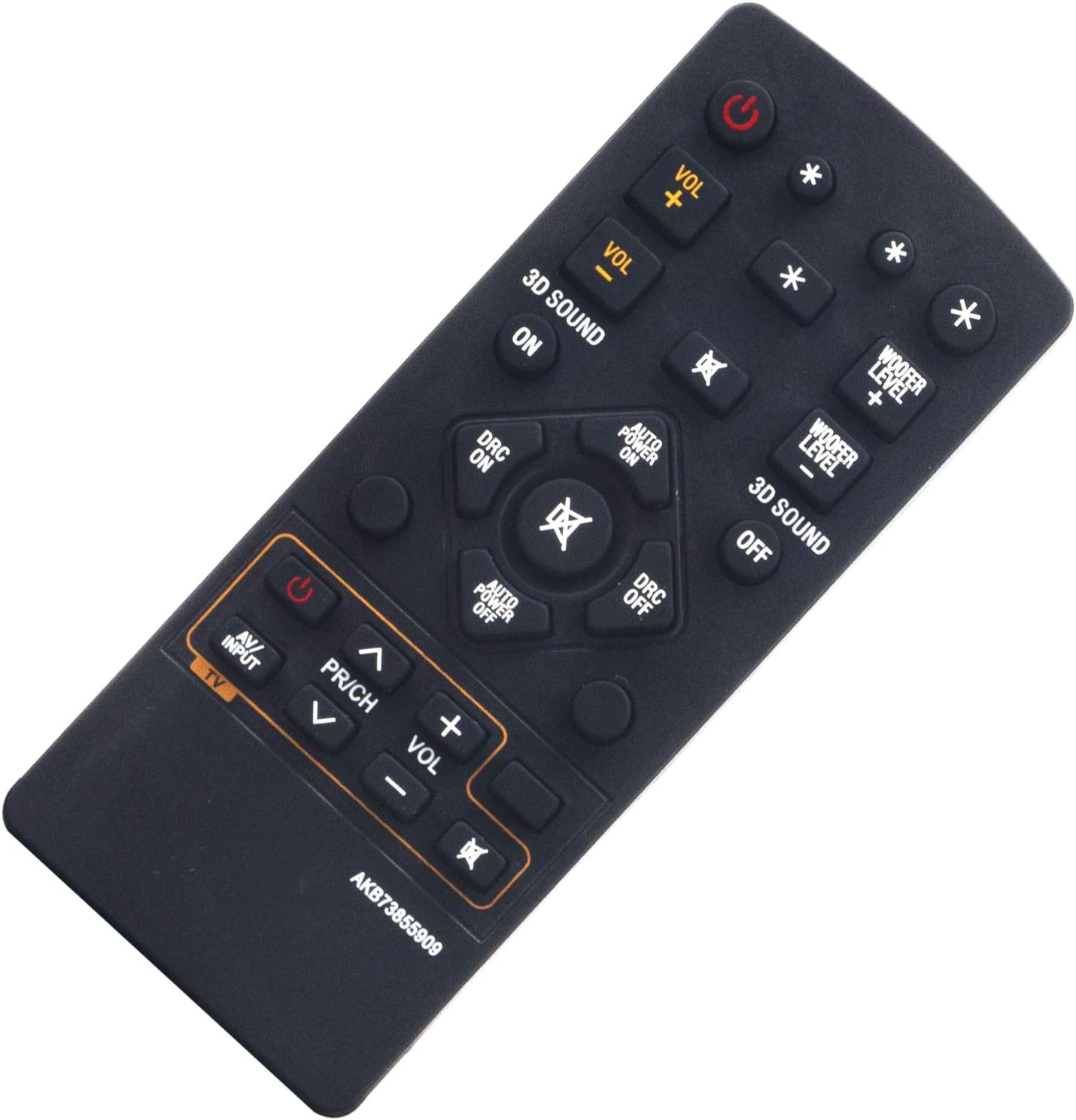
Figure 3: Angled view of the remote control, showcasing the arrangement of various function buttons.
4.1 Button Functions
- Power (●): Toggles the sound bar's power on or off.
- VOL + / VOL -: Adjusts the main volume level of the sound bar.
- WOOFER LEVEL + / WOOFER LEVEL -: Controls the volume level of the connected subwoofer.
- 3D SOUND ON / 3D SOUND OFF: Activates or deactivates the three-dimensional sound effect.
- DRC ON / DRC OFF: Enables or disables Dynamic Range Control (DRC), which compresses the audio's dynamic range.
- AUTO POWER ON / AUTO POWER OFF: Turns the automatic power-on feature on or off.
- AV/INPUT: Cycles through the available audio input sources for the sound bar.
- PR/CH ^ / v: (If applicable for TV control) Navigates channels up or down.
- TV VOL + / -: (If applicable for TV control) Adjusts the television's volume.
- Mute (🔇): Mutes or unmutes the sound output.
- Navigation Buttons (Up, Down, Left, Right, Enter): Used for menu navigation and confirming selections.
5. Maintenance
- Cleaning: Use a soft, dry cloth to clean the remote control. Avoid using liquid cleaners, solvents, or abrasive materials, as these can damage the surface or internal components.
- Battery Replacement: Replace the batteries when the remote control's responsiveness decreases or it ceases to function. Always replace both batteries simultaneously with new AAA alkaline batteries of the same type.
- Storage: If the remote control will not be used for an extended period, remove the batteries to prevent potential leakage and damage to the device.
6. Troubleshooting
- Remote not responding:
- Ensure the remote control is aimed directly at the sound bar's infrared sensor.
- Verify that the batteries are inserted correctly, observing the proper polarity.
- Replace existing batteries with fresh AAA alkaline batteries.
- Remove any physical obstructions between the remote control and the sound bar.
- Intermittent operation:
- This symptom often indicates low battery power. Replace the batteries.
- Confirm that no strong light sources (e.g., direct sunlight, certain fluorescent lights) are interfering with the remote's infrared signal.
- Specific buttons not working:
- Clean the remote control's surface, particularly around the unresponsive buttons, to remove any dirt or debris.
- If only certain buttons are affected and battery replacement does not resolve the issue, the remote control may need to be replaced.
7. Specifications
| Feature | Detail |
|---|---|
| Model Number | AKB73855909 |
| Compatible Devices | LG Sound Bar S73A1-D, NB5530A |
| Power Source | 2 x AAA Batteries (not included) |
| Connectivity Technology | Infrared (IR) |
| Product Dimensions | 4.13 x 1.57 x 0.6 inches |
| Item Weight | 1.12 ounces |
| Special Feature | No Programming Required |
8. Support
For additional assistance or any questions regarding your ALLIMITY AKB73855909 remote control, please consult the seller's support channels or refer to the original product documentation provided with your LG Sound Bar.
As this is a replacement remote control, specific warranty details should be obtained directly from your point of purchase or the seller.
Ask a question about this manual
Ask about setup, troubleshooting, compatibility, parts, safety, or missing instructions. Manuals+ will review the question and use this page’s manual context to help answer it.