
Introduction
Thank you for choosing the Lefant M210 Robot Vacuum with Mopping Accessory. This manual provides essential information for the safe and efficient operation of your device. Please read it thoroughly before use and keep it for future reference.
The Lefant M210 is designed to provide comprehensive floor cleaning, combining powerful vacuuming with effective wet mopping for small stains. Its compact design and intelligent features make it an ideal solution for maintaining clean floors in your home.
Product Overview
Main Features
- 2-in-1 Cleaning: Combines vacuuming and wet mopping for small stain removal.
- Compact Design: Allows for easy navigation under furniture.
- User-Friendly Control: Features button and touch controls for simple operation.
- Reusable Mopping Cloth: The mopping accessory uses washable and reusable cloths for eco-friendly cleaning.
Components
The Lefant M210 robot vacuum comes with the main unit and a mopping accessory. Familiarize yourself with the components before first use.

Image: Lefant M210 Robot Vacuum with its mopping accessory attached, showing the underside.
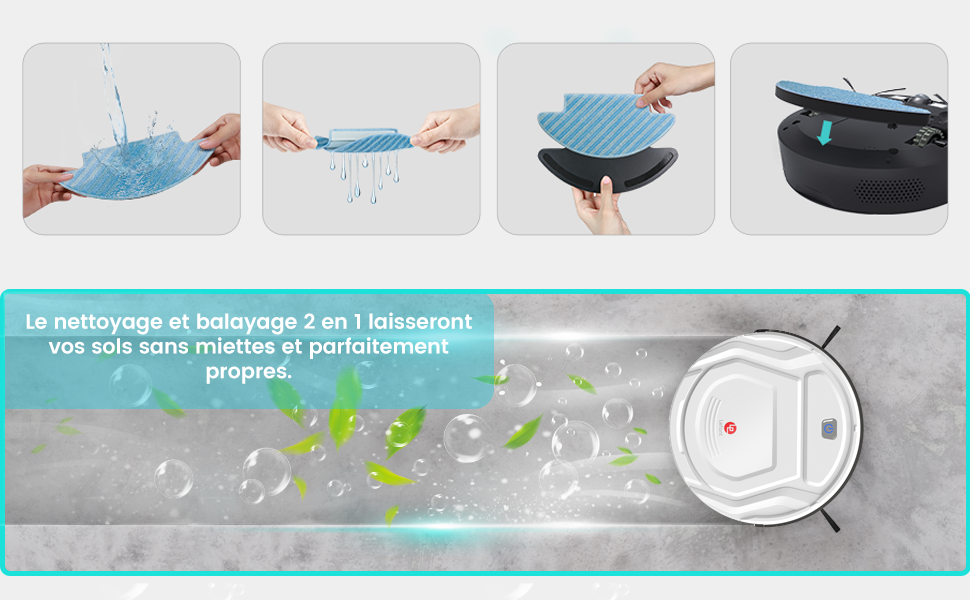
Image: The Lefant M210 robot vacuum cleaner shown with its mopping accessory.
Setup
- Unpack the Robot: Carefully remove the robot vacuum and all accessories from the packaging.
- Charge the Robot: Place the robot on its charging base and ensure it is fully charged before first use. Refer to the main robot vacuum manual for detailed charging instructions.
- Attach the Mopping Accessory:
- Ensure the robot is powered off.
- Align the mopping accessory with the designated slot on the underside of the robot.
- Press firmly until it clicks into place.

Image: Diagram showing how to easily install and remove the mopping accessory from the robot vacuum's underside.
- Prepare the Mop Cloth: Wet the mop cloth with water and wring it out to remove excess water. Attach it to the mopping accessory.
Operating Instructions
The Lefant M210 can be operated using its onboard buttons or touch controls. For detailed instructions on specific cleaning modes and scheduling, please refer to the main robot vacuum manual.
- Start Cleaning: Press the power button on the robot or use the touch controls to initiate a cleaning cycle. The robot will begin vacuuming and, if the mopping accessory is attached and prepared, it will also mop simultaneously.
- Mopping Function: The mopping accessory is designed for wet small stain cleaning and general floor wiping. It is not intended for heavy spills or deep cleaning.
- Recommended Use: Use the mopping function on hard floor surfaces such as tile, laminate, or sealed wood. Avoid using it on carpets or rugs.
- Pause/Stop Cleaning: Press the power button again to pause or stop the cleaning cycle.
- Return to Charging: The robot will automatically return to its charging base when the battery is low or when a cleaning cycle is complete.
Maintenance
Regular maintenance ensures the longevity and optimal performance of your Lefant M210 robot vacuum and its mopping accessory.
Mopping Accessory Maintenance
- Clean the Mop Cloth: After each use, remove the mop cloth from the accessory. It is machine washable and reusable. Wash it with mild detergent and air dry completely before reattaching.
- Inspect the Accessory: Periodically check the mopping accessory for any debris or damage. Clean as needed.

Image: Close-up of the mop cloth, highlighting its machine washable and reusable properties.

Image: Illustration showing the mop cloth being washed, emphasizing its reusability.
Robot Vacuum Maintenance
- Empty Dustbin: Empty the dustbin after each cleaning cycle.
- Clean Brushes: Regularly clean the side brushes and main brush (if applicable) to remove tangled hair and debris.
- Clean Sensors: Wipe the robot's sensors with a dry cloth to ensure proper navigation.
- For detailed instructions on robot vacuum maintenance, refer to the main Lefant M210 user manual.
Troubleshooting
If you encounter issues with your Lefant M210, please refer to the main robot vacuum manual for comprehensive troubleshooting steps. Below are some common issues related to the mopping function:
- Poor Mopping Performance:
- Ensure the mop cloth is properly wet and attached.
- Clean the mop cloth if it is dirty or clogged.
- Verify the mopping accessory is securely installed.
- Water Streaks:
- The mop cloth might be too wet. Wring it out more thoroughly.
- The floor surface might be uneven or have residues.
Specifications
| Feature | Specification |
|---|---|
| Brand | LEFANT |
| Model Name | PJ007 (M210) |
| Key Feature | Wet small stain cleaning |
| Controller Type | Button Control, Touch Control |
| Voltage | 3.7 Volt (DC) |
| Recommended Use | Floor Cleaning, Stain Removal |
| Indoor/Outdoor Use | Indoor |
| Number of Power Levels | 1 |
| ASIN | B08X1S3PC8 |
Warranty and Support
For warranty information and technical support, please refer to the warranty card included with your product or visit the official LEFANT website. You may also contact LEFANT customer service directly for assistance with your M210 robot vacuum.
LEFANT Customer Service: Visit the LEFANT Store on Amazon


