
1. Introduction
Thank you for choosing the Stermay HT782 20 PSI 12V Dual Stage Digital Inflation Pump. This manual provides essential information for the safe and efficient operation, maintenance, and troubleshooting of your new pump. Please read this manual thoroughly before using the product and retain it for future reference.
1.1 Product Overview
The Stermay HT782 is a high-pressure 12V electric pump designed for inflating and deflating various inflatables, such as Stand-Up Paddleboards (SUPs), kayaks, and other high-pressure items. It features a dual-stage inflation system for fast initial inflation and precise high-pressure finishing, with an automatic shut-off function once the preset pressure is reached.
1.2 What's in the Box
- Stermay HT782 Digital Inflation Pump
- High-quality inflation hose
- Various adapters for different valves
- 12V DC power cable
- User Manual (this document)
2. Safety Instructions
WARNING: Failure to follow these safety instructions may result in electric shock, fire, or serious injury.
- Read all instructions before operating the pump.
- This pump is designed for 12V DC power sources only. Do not connect to other power sources.
- Do not operate the pump in wet conditions or immerse it in water.
- Keep children and pets away from the pump during operation.
- Ensure the inflation hose and adapters are securely connected before starting the pump.
- Do not block the air intake or outlet during operation.
- Do not exceed the maximum recommended pressure for the item being inflated.
- If the pump makes unusual noises or becomes excessively hot, turn it off immediately and disconnect from the power source.
- Do not attempt to service or modify the pump yourself. Contact qualified personnel for repairs.
- Always disconnect the pump from the power source when not in use or before cleaning.
3. Setup
Follow these steps to set up your Stermay HT782 pump for operation.
- Connect the Power Cable: Insert the 12V DC power cable into the pump's power input port. Connect the other end to a 12V DC power source (e.g., a car cigarette lighter socket). Ensure the connection is firm.
- Attach the Hose: Screw the inflation hose securely onto the pump's inflation port. For deflation, attach the hose to the deflation port (if applicable, refer to pump markings).
- Select the Correct Adapter: Choose the appropriate adapter for the valve of the item you wish to inflate or deflate. Attach it firmly to the end of the inflation hose.
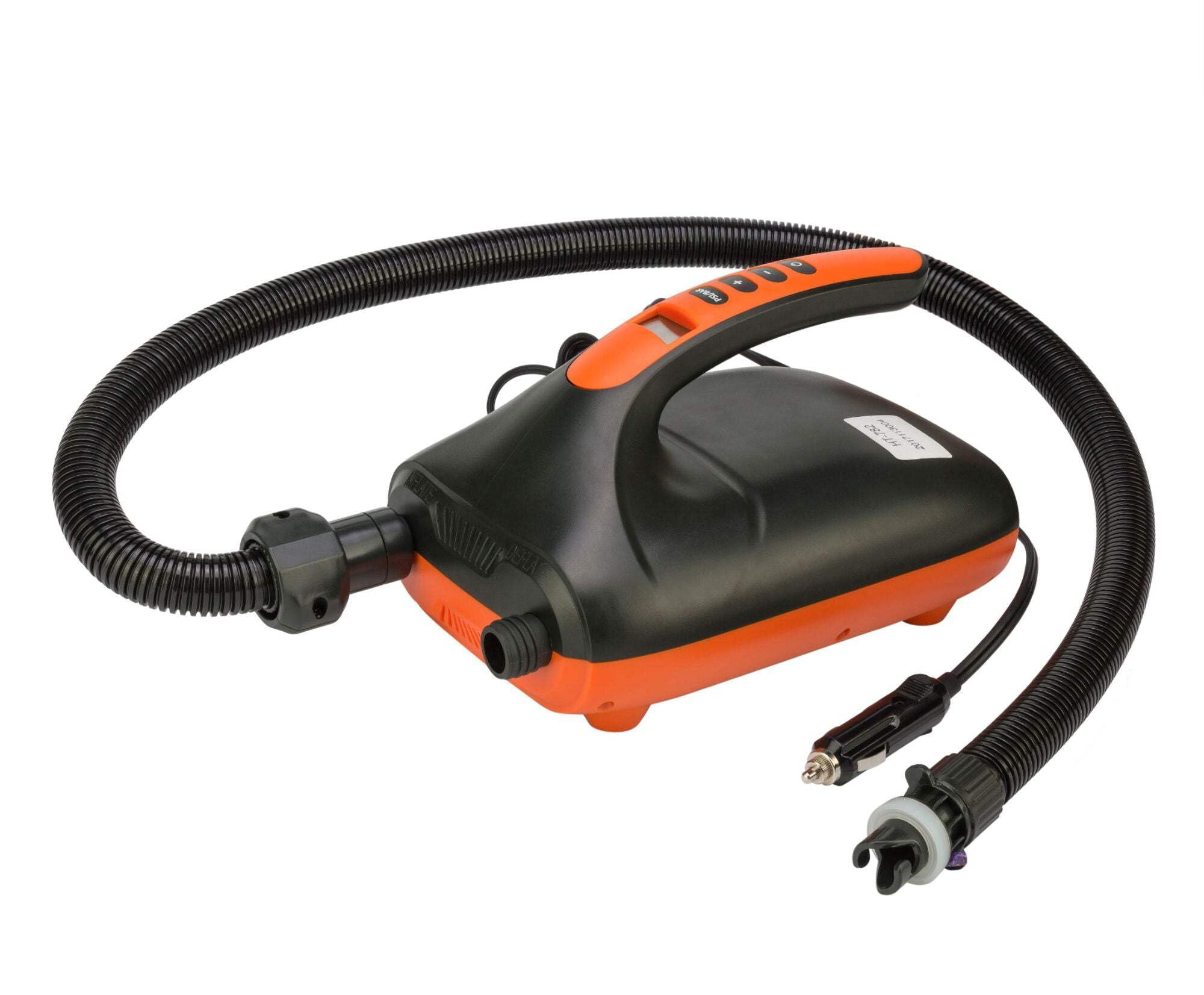
Figure 1: Stermay HT782 Digital Inflation Pump with its components, including the main unit, hose, and various adapters. This image illustrates the pump's compact design and readiness for connection.
4. Operating Instructions
4.1 Setting the Desired Pressure
- With the pump connected to power, the digital display will illuminate.
- Press the "UNIT" button to cycle through available pressure units (e.g., PSI, Bar, KPA). Select PSI for most SUPs and inflatables.
- Use the "+" and "-" buttons to adjust the target pressure. The pump can inflate up to 20 PSI.
4.2 Inflation
- Ensure the inflation hose with the correct adapter is securely attached to the item's valve.
- Press the "ON/OFF" button to start inflation.
- The pump will first operate in its high-volume, low-pressure stage (Stage 1) to quickly fill the inflatable.
- Once a certain pressure is reached (typically around 1 PSI), the pump will automatically switch to its high-pressure, low-volume stage (Stage 2) to reach the set target pressure.
- The pump will automatically shut off once the preset pressure is achieved.
- Disconnect the hose from the inflatable and then from the pump.
4.3 Deflation
The Stermay HT782 pump also supports deflation.
- Attach the inflation hose to the pump's deflation port (usually marked "DEFLATE" or with an arrow pointing inwards).
- Connect the other end of the hose with the appropriate adapter to the item's valve.
- Press the "ON/OFF" button to start the deflation process. The pump will draw air out of the inflatable.
- Once deflation is complete, turn off the pump and disconnect the hose.
5. Maintenance
Proper maintenance ensures the longevity and optimal performance of your pump.
- Cleaning: Wipe the pump's exterior with a soft, dry cloth. Do not use harsh chemicals or abrasive cleaners. Ensure no water enters the pump's vents or ports.
- Storage: Store the pump in a cool, dry place, away from direct sunlight and extreme temperatures. Keep the hose and adapters neatly coiled and stored with the pump to prevent damage or loss.
- Hose and Adapter Inspection: Regularly check the inflation hose and adapters for any signs of wear, cracks, or damage. Replace damaged components immediately to ensure proper sealing and safe operation.
- Air Filter: Periodically check the air intake filter (if accessible) for dust or debris. Clean it gently if necessary to maintain airflow.
6. Troubleshooting
If you encounter issues with your Stermay HT782 pump, refer to the following common problems and solutions.
| Problem | Possible Cause | Solution |
|---|---|---|
| Pump does not turn on. | No power connection or faulty 12V socket. | Ensure the 12V power cable is securely connected to both the pump and the power source. Check the vehicle's 12V socket for power. |
| Pump runs but does not inflate. | Hose or adapter not properly connected; valve on inflatable is closed. | Check all connections for leaks. Ensure the inflatable's valve is in the open/inflation position. |
| Pump inflates slowly or does not reach target pressure. | Air leaks; clogged air filter; incorrect pressure setting. | Inspect hose, adapters, and inflatable valve for leaks. Clean the air intake filter. Verify the target pressure setting. |
| Pump overheats and shuts off. | Extended continuous operation; blocked vents. | Allow the pump to cool down for at least 30 minutes. Ensure vents are clear and not obstructed. Avoid continuous operation for excessively long periods. |
If the problem persists after trying these solutions, please contact customer support.
7. Specifications
- Model: HT782
- Max Pressure: 20 PSI (1.37 Bar)
- Power Source: 12V DC (Electric Cable)
- Max Current Load: 15 A
- Operating Mode: Automatic (Dual Stage)
- Dimensions (L x W x H): 23 cm x 16 cm x 13 cm (9.06 in x 6.30 in x 5.12 in)
- Material: Plastic, Rubber
- Color: Black
8. Warranty and Support
Stermay products are manufactured to high-quality standards. For information regarding warranty coverage, please refer to the warranty card included with your purchase or contact your retailer.
For technical support, troubleshooting assistance beyond this manual, or to inquire about replacement parts, please contact Stermay customer service or the authorized seller from whom you purchased the product. Please have your model number (HT782) and purchase details ready when contacting support.