
1. Introduction
The Bblüv Viyü Digital WiFi Camera is a compact baby monitor designed for remote monitoring. It features Wi-Fi connectivity, allowing control and viewing via a dedicated mobile application from any location. This manual provides instructions for setup, operation, maintenance, and troubleshooting to ensure optimal performance of your device.

Image 1.1: Front view of the Bblüv Viyü Digital WiFi Camera, showing its compact design and flexible stand.
Key Features:
- Remote monitoring via mobile application.
- Wi-Fi connectivity.
- 1080p HD resolution with infrared LED night vision.
- Flexible base for versatile mounting.
- Integrated motion and sound detection.
2. Setup
2.1 Package Contents
Before proceeding, ensure all components are present:
- Bblüv Viyü Digital WiFi Camera
- Power Adapter and Cable
- Instruction Manual (this document)
2.2 Camera Placement
Position the camera in a location that provides a clear view of the monitoring area. Ensure it is within range of your Wi-Fi network and a power outlet. The flexible base allows for various placement options.

Image 2.1: The camera positioned on a nightstand, demonstrating a common placement option.
2.3 Mounting Options
The flexible base can be used to wrap around objects or as a stand. For wall mounting, ensure the camera is securely fastened and positioned to avoid falling.
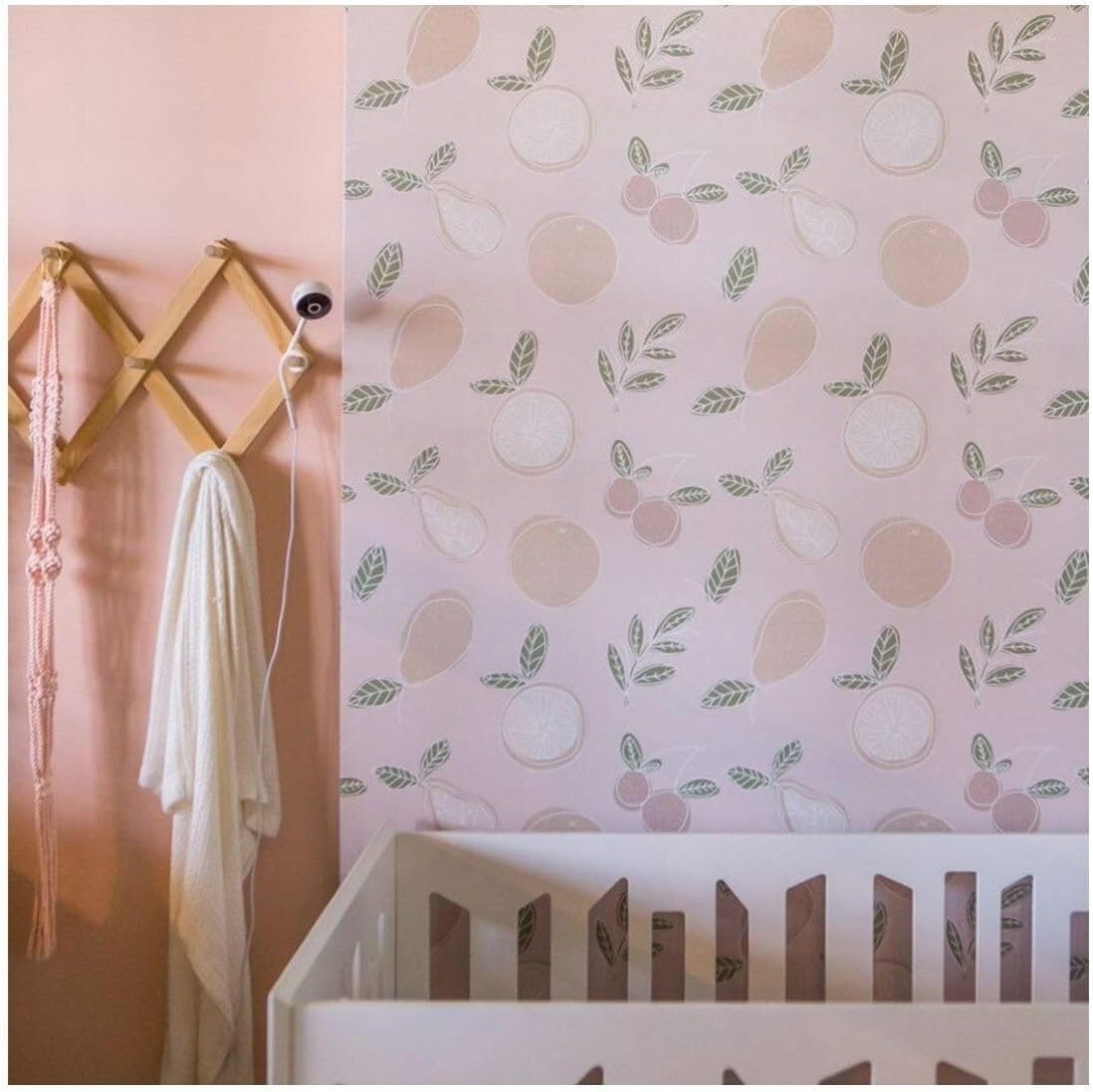
Image 2.2: Camera mounted on a wall, providing an overhead view of a crib.

Image 2.3: Camera with its flexible base wrapped around a shelf for secure placement.
2.4 Power Connection
Connect the power cable to the camera and then plug the adapter into a standard electrical outlet. The camera will power on automatically.
2.5 Mobile Application Installation and Wi-Fi Connection
- Download the dedicated Bblüv Viyü mobile application from your device's app store (compatible with iOS).
- Open the application and follow the on-screen instructions to create an account or log in.
- Add your camera to the application by following the pairing process, which typically involves scanning a QR code on the camera or entering a device ID.
- Connect the camera to your home Wi-Fi network through the application settings. Ensure your Wi-Fi network is 2.4GHz, as 5GHz networks may not be supported.

Image 2.4: Example of the mobile application interface for login and live monitoring.
3. Operating Instructions
3.1 Live View
Once connected, open the mobile application to access the live video feed from your camera. The application provides a real-time view of the monitored area in 1080p HD resolution.
3.2 Night Vision
The camera automatically switches to infrared LED night vision in low-light conditions, providing clear black and white video monitoring during the night.
3.3 Motion and Sound Detection
The integrated motion and sound detection features will alert you via the mobile application when activity is detected. You can adjust sensitivity settings within the app.
3.4 Two-Way Audio
The camera supports two-way audio communication, allowing you to speak through the camera and hear audio from the monitored area via the mobile application.
3.5 Recording and Playback
The mobile application allows for manual recording of video and playback of recorded events (if cloud storage or local storage options are configured).
4. Maintenance
- Cleaning: Use a soft, dry cloth to clean the camera lens and body. Avoid abrasive cleaners or solvents.
- Software Updates: Regularly check the mobile application for firmware updates for the camera to ensure optimal performance and security.
- Power: Disconnect the power adapter from the outlet if the camera will not be used for an extended period.
5. Troubleshooting
- Camera not connecting to Wi-Fi:
- Ensure your Wi-Fi network is 2.4GHz. Verify the Wi-Fi password. Move the camera closer to the router. Restart both the camera and your router.
- No video feed:
- Check if the camera is powered on. Ensure a stable Wi-Fi connection. Restart the mobile application. If the issue persists, try re-pairing the camera with the app.
- Poor video quality:
- Check your internet connection speed. Ensure the camera lens is clean. Adjust camera placement to optimize lighting.
- False motion/sound alerts:
- Adjust the sensitivity settings for motion and sound detection within the mobile application.
- Camera feels warm:
- It is normal for electronic devices to generate some heat during operation. If the camera becomes excessively hot or emits smoke, immediately disconnect power and contact support.
6. Specifications
| Feature | Detail |
|---|---|
| Model Number | B0124E |
| Dimensions (L x W x H) | 2.5 x 5 x 30 cm (0.98 x 1.97 x 11.8 inches) |
| Weight | 127 grams (4.48 ounces) |
| Video Resolution | 1080p HD |
| Connectivity | Wi-Fi (2.4GHz) |
| Night Vision | Infrared LED |
| Detection | Motion and Sound |
| Power Source | Electric Cable (5 Watts) |
| Compatible Devices | Smartphone (iOS) |
| Video Capture Format | MP4 |
| Optical Sensor Technology | CMOS |
| GTIN | 842084000060 |
7. Warranty and Support
For warranty information and technical support, please refer to the official Bblüv website or contact their customer service. Keep your purchase receipt as proof of purchase.
Website: www.bbluv.com
Email: Refer to the website for contact details.