
1. Introduction
Thank you for choosing the Contixo SC3 RC Stunt Car. This manual provides essential information for the safe and optimal operation of your new remote control vehicle. Please read it thoroughly before use and retain it for future reference.

Image: The Contixo SC3 RC Stunt Car in blue with its remote control.
2. Safety Information
- Adult Supervision: Always ensure adult supervision, especially for younger users (recommended age 36 months - 15 years).
- Battery Safety: Do not mix old and new batteries. Do not mix alkaline, standard (carbon-zinc), or rechargeable (nickel-cadmium) batteries. Always insert batteries with correct polarity. Remove batteries if the product is not used for a long period.
- Choking Hazard: Small parts may be present. Keep away from children under 3 years.
- Operating Environment: Avoid operating near water, heat sources, or electrical hazards. Do not operate in crowded areas to prevent injury.
- Impact: The car is designed to be durable, but excessive force or high-impact collisions can cause damage.
3. Package Contents
Verify that all items are included in your package:
- Contixo SC3 RC Stunt Car
- 2.4GHz Remote Control
- USB Charging Cable
- Wristband Controller
- User Manual (this document)

Image: The Contixo SC3 RC Stunt Car, remote control, and packaging.
Video: An unboxing demonstration of the Contixo SC3 RC Stunt Car, showing the contents of the package.
4. Setup
4.1 Charging the Car Battery
- Locate the battery compartment on the underside of the car. You may need a small screwdriver to open the compartment.
- Connect the car's battery to the provided USB charging cable.
- Plug the USB cable into a standard USB power adapter (not included) or a computer USB port.
- The charging indicator light on the USB cable will illuminate during charging and turn off when fully charged.
- Charging time is approximately 80 minutes for a full charge.
- Once charged, disconnect the cable and securely close the battery compartment.
4.2 Installing Remote Control Batteries
- Open the battery compartment on the back of the remote control.
- Insert 2 x AAA batteries (not included), ensuring correct polarity (+/-).
- Close the battery compartment securely.
4.3 Pairing the Car and Remote
- Turn on the Contixo SC3 RC Stunt Car using the ON/OFF switch located on the car.
- Turn on the remote control.
- The car and remote should automatically pair. If not, turn both off and on again.

Image: A child's hands holding the remote control and a wristband controller for the car.
5. Operating Instructions
5.1 Basic Controls
The 2.4GHz remote control allows for precise maneuvering:
- Forward/Backward: Use the left joystick or corresponding arrow buttons.
- Turn Left/Right: Use the right joystick or corresponding arrow buttons.

Image: Diagram illustrating the functions of each button on the remote control.
5.2 Stunt Functions
The Contixo SC3 is designed for thrilling stunts:
- 360° Rotation: Use the dedicated rotation buttons on the remote for continuous spins.
- Double-Sided Driving: The car can flip and continue driving on either side, allowing for seamless play after tumbles.
- Flips and Rolls: Experiment with control combinations to perform various flips and rolls.

Image: The Contixo SC3 RC Stunt Car performing a 360-degree rotation stunt.
Video: A demonstration of the Contixo SC3 RC Stunt Car performing various stunts and rotations.
5.3 LED Lights
The car features bright, colorful LED lights in its wheels that illuminate during operation, enhancing the play experience, especially in low-light conditions.

Image: The Contixo SC3 RC Stunt Car showcasing its vibrant multicolor LED lights.
5.4 All-Terrain Driving
The 4-wheel drive system and anti-skid tires allow the SC3 to navigate various surfaces, including gravel, grass, and sand.

Image: The Contixo SC3 RC Stunt Car demonstrating its ability to drive on gravel, grass, and sand.
Video: The Contixo SC3 RC Stunt Car driving across various indoor and outdoor surfaces.
6. Maintenance
- Cleaning: Use a soft, dry cloth to clean the car and remote control. Do not use water or chemical cleaners.
- Storage: Store the car and remote in a cool, dry place away from direct sunlight when not in use. Remove batteries from the remote if storing for extended periods.
- Battery Care: Fully charge the car's battery before long-term storage to maintain battery health.
7. Troubleshooting
- Car not responding: Ensure both the car and remote are turned on and batteries are charged/installed correctly. Re-pair the devices if necessary.
- Short drive time: The car's battery may not be fully charged. Ensure it is charged for the recommended 80 minutes. Battery performance can decrease over time with repeated use.
- Difficulty charging: Ensure the USB cable is properly connected to both the car's battery and the power source. Check the charging indicator light.
- Interference: The 2.4GHz remote control is designed to minimize interference. If issues occur, try operating in a different location away from other electronic devices.
8. Specifications
| Feature | Detail |
|---|---|
| Model Number | SC3 |
| Package Dimensions | 7.52 x 6.93 x 4.33 inches |
| Item Weight | 15.8 ounces |
| Recommended Age | 36 months - 15 years |
| Running Speed | 12 Km/h |
| Drive Time | Up to 20 minutes |
| Charge Time | Approx. 80 minutes |
| Scale | 1:28 |
| Control Frequency | 2.4GHz (Anti-interference) |
| Features | 4WD, Dual Motors, Anti-Skid Tires, Rechargeable Batteries, 360° Stunt Action, Double-Sided Driving, LED Lights |
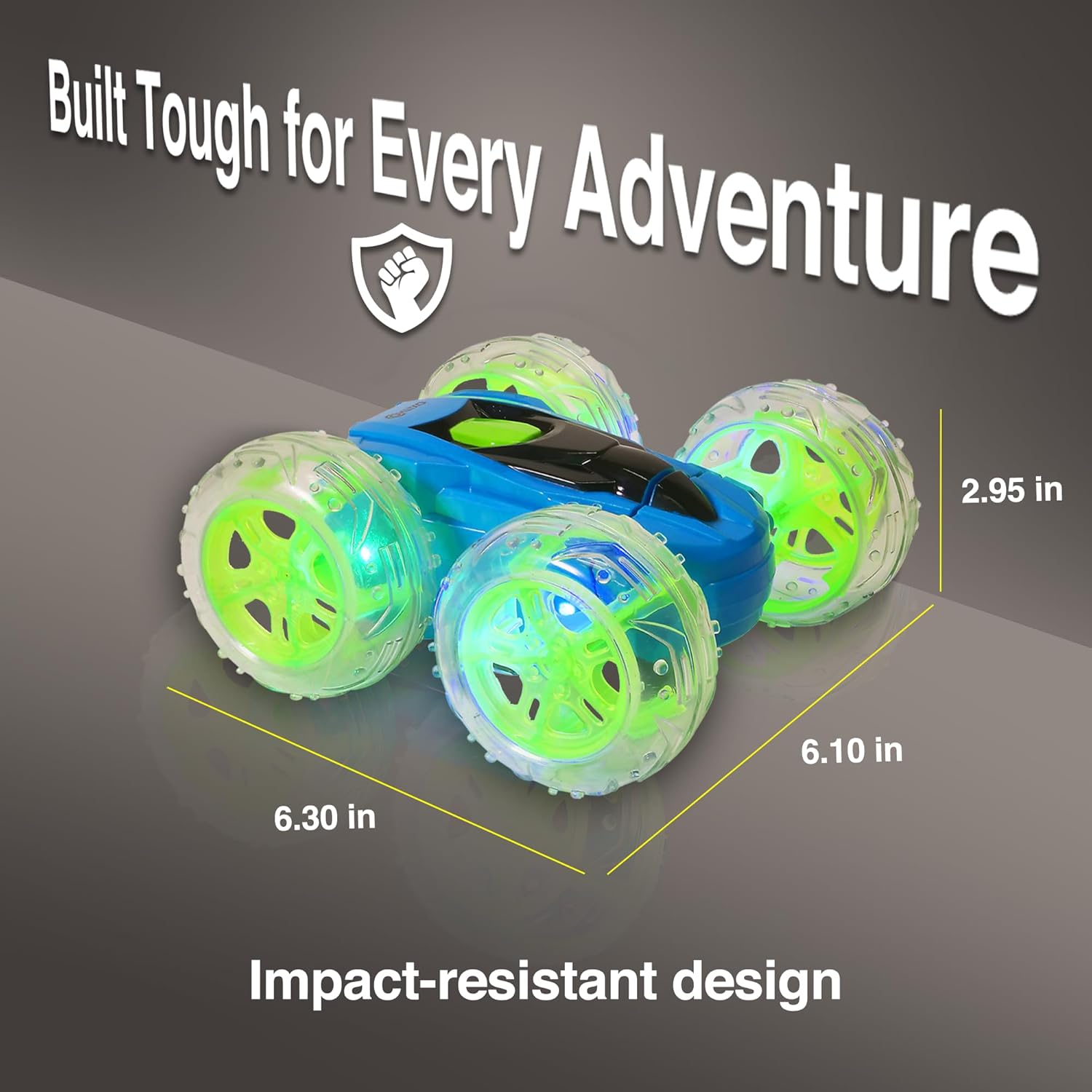
Image: The Contixo SC3 RC Stunt Car with its key dimensions highlighted.
9. Warranty and Support
Contixo offers a VIP Program with extended warranty and exclusive benefits. To register your product and claim warranty, please visit the official Contixo website or scan the QR code provided on the VIP Program card included in your package.
For support inquiries, please refer to the contact information provided on the VIP Program card or the official Contixo website.


