
Remax RB-S11
Remax RB-S11 Wireless Bluetooth Sport Earphones User Manual
Model: RB-S11 | Brand: Remax
Introduction
Thank you for choosing the Remax RB-S11 Wireless Bluetooth Sport Earphones. These earphones are designed for active lifestyles, offering wireless convenience, high-fidelity audio, and resistance to water and sweat. This manual provides essential information for setting up, operating, maintaining, and troubleshooting your new earphones.
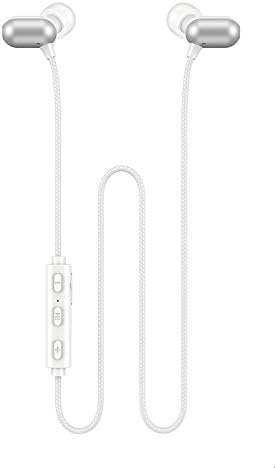
Image: Remax RB-S11 Wireless Bluetooth Sport Earphones. The image displays the white earphones with silver-colored earbud housings, connected by a white braided cable. An inline control panel with three buttons is visible on the cable.
Setup
1. Charging the Earphones
Before first use, fully charge the earphones.
- Locate the charging port on the inline control panel.
- Connect the charging cable (typically Micro-USB or USB-C, depending on model) to the earphones and a USB power source.
- The indicator light will show charging status (e.g., red for charging, blue/off for fully charged).
- A full charge takes approximately 2 hours.
2. Bluetooth Pairing
Pair your RB-S11 earphones with your Bluetooth-enabled device.
- Ensure the earphones are charged and turned off.
- Press and hold the multi-function button (usually the center button on the inline control) until the indicator light flashes red and blue alternately, indicating pairing mode.
- On your device (smartphone, tablet, etc.), enable Bluetooth and search for available devices.
- Select "RB-S11" from the list of found devices.
- Once paired, the indicator light will typically turn solid blue or flash slowly.
- The earphones have a wireless range of up to 10 meters.
Operating Instructions
Basic Functions
| Function | Action |
|---|---|
| Power On | Press and hold the multi-function button. |
| Power Off | Press and hold the multi-function button until the indicator light turns off. |
| Play/Pause Music | Short press the multi-function button. |
| Next Track | Long press the "Volume +" button. |
| Previous Track | Long press the "Volume -" button. |
| Volume Up | Short press the "Volume +" button. |
| Volume Down | Short press the "Volume -" button. |
| Answer/End Call | Short press the multi-function button during an incoming call. |
| Reject Call | Long press the multi-function button during an incoming call. |
| Redial Last Number | Double press the multi-function button. |
The earphones offer approximately 4-6 hours of play time and up to 200 hours of standby time on a full charge.
Magnetic Design
The earbuds feature a magnetic design, allowing them to snap together when not in use. This helps prevent tangling and keeps them securely around your neck.
Maintenance
- Cleaning: Use a soft, dry cloth to clean the earphones. Do not use harsh chemicals or abrasive materials.
- Storage: When not in use, store the earphones in a cool, dry place, away from direct sunlight and extreme temperatures.
- Water Resistance: The earphones are resistant to water and sweat, making them suitable for sports. However, they are not designed for submersion in water. Avoid exposing them to heavy rain or swimming.
- Charging: Always use a compatible charger. Avoid overcharging or leaving the earphones connected to a charger for extended periods after they are fully charged.
Troubleshooting
| Problem | Possible Solution |
|---|---|
| Earphones do not power on. | Ensure the earphones are fully charged. Connect to a power source and allow at least 30 minutes for charging. |
| Cannot pair with device. |
|
| No sound or low volume. |
|
| Intermittent connection. |
|
Specifications
| Feature | Detail |
|---|---|
| Brand | Remax |
| Model | RB-S11 |
| Bluetooth Version | 5.0 |
| Wireless Distance | 10 meters |
| Impedance | 16 ohm |
| Charging Time | 2 hours |
| Play Time | 4 - 6 hours |
| Standby Time | 200 hours |
| Water Resistance | Resistant to water and sweat |
| Design Feature | Magnetic earbuds |
| Headphones Form Factor | In Ear |
| Color | White |
| Material | Plastic |
| Compatible Devices | Multi |
Warranty and Support
For warranty information and customer support, please refer to the documentation provided with your purchase or visit the official Remax website.
This product is manufactured by Remax.
Ask a question about this manual
Ask about setup, troubleshooting, compatibility, parts, safety, or missing instructions. Manuals+ will review the question and use this page’s manual context to help answer it.