
Verbatim 70388
Verbatim Pinstripe USB 3.2 Gen 1 Flash Drive
Model: 70388
Introduction
This manual provides essential information for the proper use and care of your Verbatim 32GB Pinstripe USB 3.2 Gen 1 Flash Drives. These drives are designed for reliable and portable data storage, featuring a convenient retractable design and multi-color options for easy organization. This 5-pack includes drives in Green, Blue, Red, Purple, and Cyan.

Image: A set of five Verbatim Pinstripe USB 3.2 Gen 1 Flash Drives, showcasing the various colors included in the pack.
Key Features
- Retractable Design: The push-and-pull sliding feature protects the USB connection when not in use, eliminating the need for a separate cap.
- Plug and Play: Offers immediate functionality without requiring driver installation.
- Lightweight and Slim: Designed for portability and ease of transport.
- Multi-Color Pack: The 5-pack includes drives in Green, Blue, Red, Purple, and Cyan, aiding in data organization.
- Cross-Platform Compatibility: Compatible with both Windows and Mac operating systems.
- Optional Password Protection: Software available for download for Windows users to secure data.
- Limited Lifetime Warranty: Backed by Verbatim's commitment to quality since 1969.

Image: Illustration of the slim retractable design, demonstrating how the USB connector slides in and out of the drive casing.
Setup
The Verbatim Pinstripe USB Flash Drives are designed for simple plug-and-play operation. No complex installation or drivers are required for basic functionality on compatible systems.
Connecting the Drive
- Locate an available USB port on your computer (desktop, laptop, or other compatible device).
- Extend the USB connector by sliding the mechanism on the drive.
- Insert the USB connector firmly into the USB port. The drive should be recognized automatically by your operating system (Windows or Mac).
A new removable drive icon will appear in your computer's file explorer (e.g., 'This PC' on Windows, 'Finder' on Mac), indicating that the drive is ready for use.
Operating Instructions
Transferring Files
To transfer files to or from your Verbatim Pinstripe USB Flash Drive, use the standard drag-and-drop method or copy-paste functions provided by your operating system.
- To Copy Files to the Drive: Open the folder containing the files you wish to transfer. Drag and drop the selected files or folders into the opened drive window, or right-click, select 'Copy', then navigate to the drive, right-click, and select 'Paste'.
- To Copy Files from the Drive: Open the drive and locate the files you wish to transfer. Drag and drop them to your desired location on your computer, or use the copy-paste method.
Safe Removal
Always safely eject the USB drive before physically removing it from your computer to prevent data corruption.
- Windows: Click the 'Safely Remove Hardware and Eject Media' icon in the system tray (bottom-right corner), then select the Verbatim drive and click 'Eject'.
- Mac: Drag the drive icon from your desktop to the Trash, or right-click the drive icon in Finder and select 'Eject'.
Password Protection Software (Windows Only)
Verbatim offers optional password protection software for download, compatible with Windows operating systems. This software allows you to secure sensitive data on your drive. Refer to the Verbatim official website for download and installation instructions for this utility.
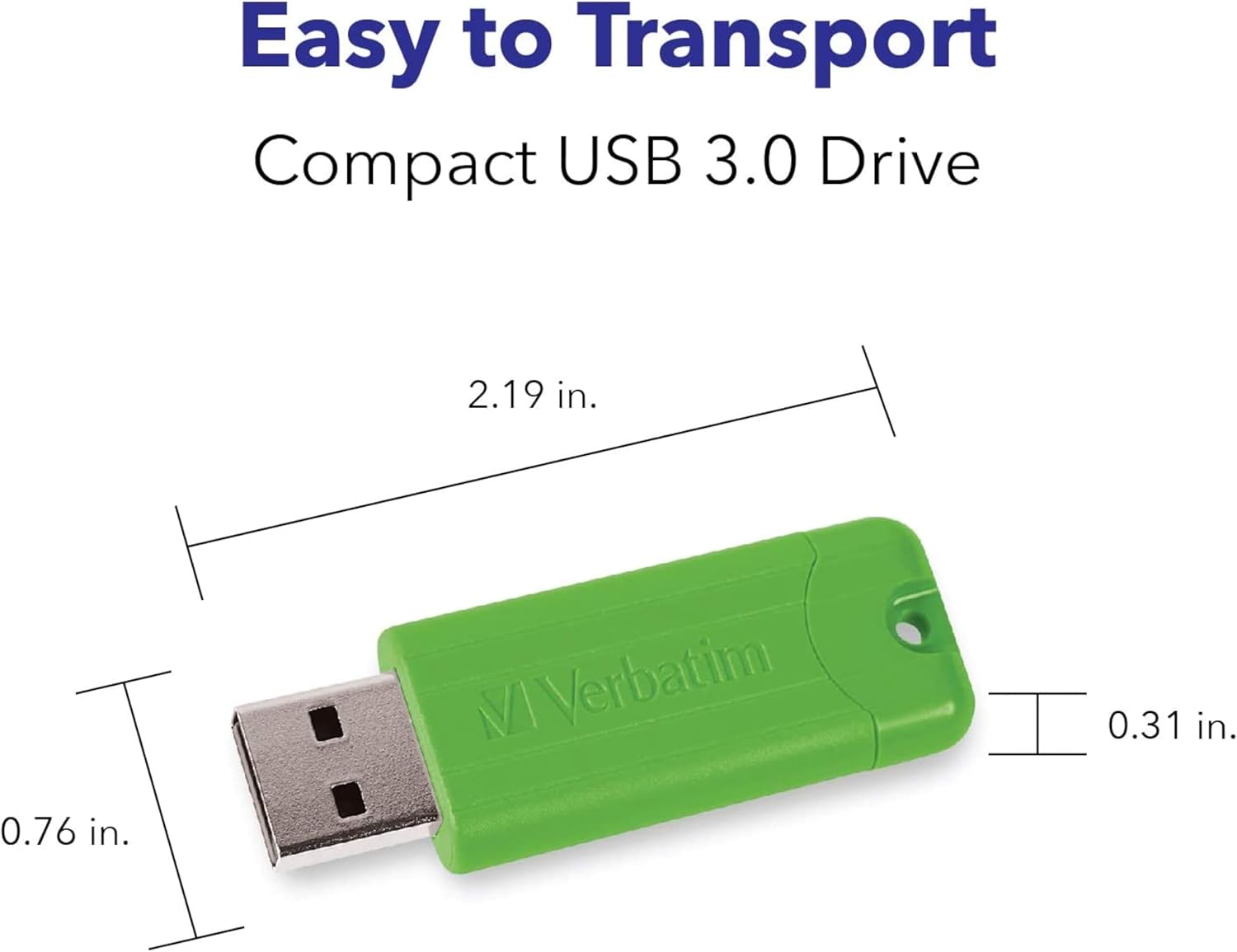
Image: Visual representation of the diverse applications for the USB flash drive, including business, music, gaming, school, video, and picture storage.
Maintenance and Care
To ensure the longevity and optimal performance of your Verbatim Pinstripe USB Flash Drives, follow these care guidelines:
- Physical Protection: Utilize the retractable mechanism to protect the USB connector when the drive is not in use. Avoid exposing the drive to extreme temperatures, direct sunlight, or high humidity.
- Cleaning: If necessary, gently wipe the exterior of the drive with a soft, dry cloth. Do not use liquid cleaners or solvents.
- Data Backup: While reliable, it is always recommended to back up important data stored on any portable storage device to another location.
- Microban Antimicrobial Protection: The Verbatim PinStripe USB Drives feature built-in Microban® antimicrobial product protection. This technology helps inhibit the growth of bacteria on the drive's surface, contributing to a cleaner product. This protection is integrated during manufacturing and will not wash off or wear away.

Image: Icons detailing the advantages of Microban antimicrobial protection, including its durability and continuous effectiveness against bacteria.

Image: A cross-section diagram explaining the mechanism of Microban protection within the USB drive material, showing how it inhibits bacterial growth.
Troubleshooting
If you encounter issues with your Verbatim Pinstripe USB Flash Drive, consider the following common problems and solutions:
| Problem | Possible Cause | Solution |
|---|---|---|
| Drive not recognized by computer | Loose connection, faulty USB port, driver issue, or drive corruption. | Try inserting the drive into a different USB port on your computer. Test the drive on another computer if possible. Ensure your operating system has the latest updates. If the issue persists, the drive may be faulty. |
| Slow data transfer speeds | USB port version mismatch (e.g., USB 2.0 drive in USB 3.0 port or vice-versa), large file sizes, or background processes. | Ensure you are using a USB 3.0 or 3.2 Gen 1 port for optimal speeds. Close unnecessary applications. Transferring many small files can be slower than one large file. |
| Cannot write or delete files | Drive is write-protected, file system error, or insufficient space. | Check if the drive is full. On Windows, right-click the drive, go to 'Properties' > 'Security' to check permissions. You may need to reformat the drive (this will erase all data). |
| Files appear corrupted or inaccessible | Improper ejection, drive corruption, or malware. | Always use the 'Safely Remove Hardware' option before disconnecting. Run a disk check utility (e.g., 'chkdsk' on Windows). Scan the drive for viruses or malware. |
Specifications
| Attribute | Detail |
|---|---|
| Brand | Verbatim |
| Model Name | 70388 |
| Memory Storage Capacity | 32 GB |
| Connectivity Technology | USB |
| Hardware Interface | USB 3.2 Gen 1 (backward compatible with USB 2.0) |
| Flash Memory Type | USB |
| Read Speed | Up to 1 Bytes Per Second (Note: This value may be a placeholder or minimum; actual speeds vary.) |
| Write Speed | Up to 10 MB/s |
| Color | Green, Blue, Red, Purple, Cyan (5-pack) |
| Product Dimensions (LxWxH) | 6.89 x 5.79 x 0.39 inches (packaging dimensions) |
| Item Weight | 1.44 ounces (total for pack) |
| Hardware Platform | Mac, PC |
| Special Feature | Capless, Retractable Design, Microban Antimicrobial Protection |
| Manufacturer | Verbatim Americas, LLC |
| UPC | 023942703884 |
| ASIN | B08WSCGJD1 |
| Date First Available | February 17, 2021 |

Image: Detailed dimensions of a single Verbatim Pinstripe USB drive, highlighting its compact size.
Warranty Information
Verbatim Pinstripe USB Flash Drives are covered by a Limited Lifetime Warranty. This warranty covers defects in materials and workmanship under normal use. For specific terms, conditions, and limitations of the warranty, please refer to the official Verbatim website or contact Verbatim customer support.

Image: Official Verbatim seal indicating the Limited Lifetime Warranty for the product.
Customer Support
For further assistance, technical support, or warranty claims, please contact Verbatim Americas, LLC. You can find detailed support resources, FAQs, and contact information on the official Verbatim website:
Visit Verbatim's Official Website
Please have your product model number (70388) and purchase information ready when contacting support.
Ask a question about this manual
Ask about setup, troubleshooting, compatibility, parts, safety, or missing instructions. Manuals+ will review the question and use this page’s manual context to help answer it.