
Alphabet vaccumm 1
Alphabet1 Dual Purpose Vacuum Cleaner User Manual
Model: vaccumm 1
1. Introduction
Thank you for purchasing the Alphabet1 Dual Purpose Vacuum Cleaner. This manual provides essential information for the safe and efficient operation, maintenance, and troubleshooting of your new appliance. Please read this manual thoroughly before first use and keep it for future reference.
This compact and lightweight handheld vacuum cleaner is designed for both suction and blowing functions, making it versatile for various cleaning tasks around your home or vehicle.
2. Safety Instructions
To reduce the risk of fire, electric shock, or injury, always follow basic safety precautions when using an electrical appliance.
- Read all instructions before using the appliance.
- Do not leave the appliance unattended when plugged in. Unplug from outlet when not in use and before servicing.
- Do not use outdoors or on wet surfaces.
- Do not allow to be used as a toy. Close attention is necessary when used by or near children.
- Use only as described in this manual. Use only manufacturer's recommended attachments.
- Do not use with damaged cord or plug. If appliance is not working as it should, has been dropped, damaged, left outdoors, or dropped into water, return it to a service center.
- Do not pull or carry by cord, use cord as a handle, close a door on cord, or pull cord around sharp edges or corners. Do not run appliance over cord. Keep cord away from heated surfaces.
- Do not unplug by pulling on cord. To unplug, grasp the plug, not the cord.
- Do not handle plug or appliance with wet hands.
- Do not put any object into openings. Do not use with any opening blocked; keep free of dust, lint, hair, and anything that may reduce airflow.
- Keep hair, loose clothing, fingers, and all parts of body away from openings and moving parts.
- Do not pick up anything that is burning or smoking, such as cigarettes, matches, or hot ashes.
- Do not pick up flammable or combustible liquids, such as gasoline, or use in areas where they may be present.
- Do not pick up toxic material, such as chlorine bleach, ammonia, or drain cleaner.
- Do not use without dust bag and/or filters in place.
- Turn off all controls before unplugging.
- Use extra care when cleaning on stairs.
3. Package Contents
Verify that all items listed below are included in your package:
- 1 x Electric Vacuum Cleaner Unit
- 1 x English User Manual (this document)
- 1 x Shoulder Belt
- 3 x Inflation Suckers (nozzles)
- 3 x Extension Tubes
- 4 x Cleaning Suckers (various nozzles/brushes)
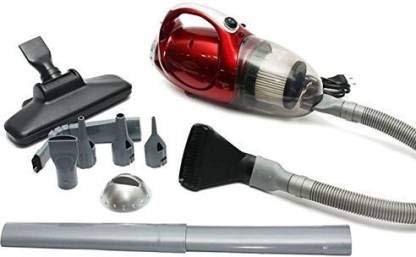
Image: The Alphabet1 vacuum cleaner unit shown with its included accessories, including various nozzles, extension tubes, and a shoulder belt.
4. Product Overview
Familiarize yourself with the main components of your vacuum cleaner.
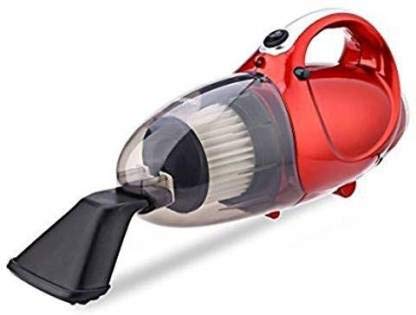
Image: Front view of the Alphabet1 vacuum cleaner, highlighting the transparent dust collection chamber and the primary nozzle attachment point.
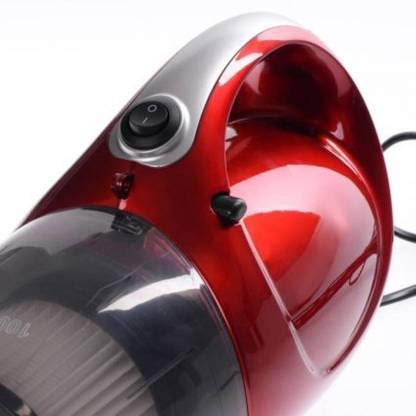
Image: Close-up of the vacuum cleaner's handle, showing the integrated power switch for easy operation.
- Power Switch: Located on the handle for easy on/off control.
- Dust Collection Chamber: Transparent chamber to view collected dust and debris.
- HEPA Filter: Located inside the dust chamber, designed to capture fine particles.
- Nozzle Attachment Point: Where various cleaning suckers and tubes connect.
- Blower Port: (Typically opposite the suction port or a dedicated outlet) for attaching inflation suckers for blowing function.
- Power Cord: For connecting to an electrical outlet.
5. Setup and Assembly
Follow these steps to prepare your vacuum cleaner for use:
- Unpack: Carefully remove all components from the packaging.
- Attach Nozzle (Suction): For vacuuming, select the appropriate cleaning sucker (e.g., crevice tool, brush nozzle) and firmly attach it to the main nozzle attachment point on the front of the vacuum. For extended reach, connect one or more extension tubes between the vacuum and the cleaning sucker.
- Attach Nozzle (Blowing): For the blowing function, attach an inflation sucker to the designated blower port. This port is typically located at the rear or side of the vacuum, opposite the suction inlet.
- Shoulder Belt: If desired, attach the shoulder belt to the designated loops on the vacuum cleaner for easier portability during use.
- Power Connection: Ensure the power switch is in the "OFF" position before plugging the power cord into a standard 220-240V, 50Hz electrical outlet.

Image: The Alphabet1 vacuum cleaner configured with a long hose and floor attachment, demonstrating its versatility for various cleaning scenarios like floors, stairs, and car interiors.
6. Operating Instructions
6.1. Suction Function (Vacuuming)
- Ensure the correct cleaning attachment is securely fitted to the suction inlet.
- Plug the vacuum cleaner into a suitable power outlet.
- Press the power switch to the "ON" position. The motor will start, and suction will begin.
- Move the nozzle over the surface to be cleaned, allowing the vacuum to pick up dust and debris.
- When finished, press the power switch to the "OFF" position and unplug the appliance from the outlet.
6.2. Blowing Function
- Ensure an inflation sucker is securely fitted to the blower port.
- Plug the vacuum cleaner into a suitable power outlet.
- Press the power switch to the "ON" position. Air will be expelled from the blower port.
- Use the blowing function to clear dust from hard-to-reach areas, inflate small items (with appropriate nozzle), or dry surfaces.
- When finished, press the power switch to the "OFF" position and unplug the appliance from the outlet.

Image: The Alphabet1 vacuum cleaner depicted in a modern living room, illustrating its suitability for daily cleaning tasks.

Image: A person using the Alphabet1 vacuum cleaner with a floor attachment, demonstrating its portable, lightweight, and compact design for effective cleaning.
7. Maintenance
Regular maintenance ensures optimal performance and extends the lifespan of your vacuum cleaner.
7.1. Emptying the Dust Collection Chamber
- Ensure the vacuum cleaner is unplugged from the power outlet.
- Locate the release mechanism for the dust collection chamber (usually a latch or button).
- Carefully detach the chamber from the main unit.
- Empty the collected dust and debris into a waste bin.
- Reattach the dust chamber securely until it clicks into place.
7.2. Cleaning the HEPA Filter
The HEPA filter should be cleaned regularly to maintain suction power. Frequency depends on usage.
- With the dust chamber removed, carefully take out the HEPA filter.
- Tap the filter gently over a waste bin to dislodge loose dust.
- If heavily soiled, the filter can be rinsed under cold running water. Ensure the filter is completely dry before reinserting it into the vacuum cleaner. Drying may take up to 24 hours.
- Once clean and dry, reinsert the HEPA filter into the dust chamber and reattach the chamber to the vacuum unit.
7.3. General Cleaning
- Wipe the exterior of the vacuum cleaner with a soft, damp cloth. Do not use abrasive cleaners or solvents.
- Check nozzles and tubes for blockages and clear them as needed.
8. Troubleshooting
If you encounter issues with your vacuum cleaner, refer to the following table for common problems and solutions.
| Problem | Possible Cause | Solution |
|---|---|---|
| Vacuum cleaner does not turn on. |
|
|
| Low suction power. |
|
|
| Unusual noise during operation. |
|
|
9. Specifications
| Brand | Alphabet |
| Model Name | handheld vacuum (vaccumm 1) |
| Power Source | Corded Electric |
| Voltage | 220-240 V |
| Frequency | 50 HZ |
| Wattage | 1000 Watts |
| Special Features | Compact, Lightweight, Portable, Dual Suction & Blower Function |
| Filter Type | HEPA Filter |
| Form Factor | Handheld |
| Color | Red |
| Item Weight | 499 g |
| Item Dimensions (LxWxH) | 24 x 10 x 10 Centimeters |
10. Warranty and Support
This Alphabet1 Dual Purpose Vacuum Cleaner comes with a manufacturer's warranty. Please refer to the warranty card included in your package for specific terms and conditions. The battery life is rated for 1 year.
For technical support, service, or warranty claims, please contact Alphabet customer service through their official website or the contact information provided with your purchase documentation.
Related documentsvaccumm 1


Ask a question about this manual
Ask about setup, troubleshooting, compatibility, parts, safety, or missing instructions. Manuals+ will review the question and use this page’s manual context to help answer it.