
1. Introduction
Thank you for choosing the CROWN CT11001 Electronic Cutter. This powerful tool is designed for precision cutting and routing tasks. To ensure safe and efficient operation, please read this manual thoroughly before using the tool. Keep this manual in a safe place for future reference.
Key Features:
- Constant power output for consistent performance.
- Lock-off button for enhanced safety during operation.
- Accurate adjustment mechanisms for precise depth and speed control.
- Electronic variable speed with soft start for controlled operation and reduced kickback.
2. General Safety Instructions
Always follow basic safety precautions to reduce the risk of fire, electric shock, and personal injury. Failure to follow these instructions may result in serious injury.
2.1 Work Area Safety
- Keep the work area clean and well-lit. Cluttered or dark areas invite accidents.
- Do not operate power tools in explosive atmospheres, such as in the presence of flammable liquids, gases, or dust. Power tools create sparks which may ignite the dust or fumes.
- Keep children and bystanders away while operating a power tool. Distractions can cause you to lose control.
2.2 Electrical Safety
- Power tool plugs must match the outlet. Never modify the plug in any way.
- Avoid body contact with earthed or grounded surfaces such as pipes, radiators, ranges, and refrigerators. There is an increased risk of electric shock if your body is earthed or grounded.
- Do not expose power tools to rain or wet conditions. Water entering a power tool will increase the risk of electric shock.
- Do not abuse the cord. Never use the cord for carrying, pulling, or unplugging the power tool. Keep cord away from heat, oil, sharp edges, or moving parts. Damaged or entangled cords increase the risk of electric shock.
2.3 Personal Safety
- Always wear eye protection. Use safety glasses, goggles, or a face shield.
- Dress properly. Do not wear loose clothing or jewelry. Keep your hair and clothing away from moving parts.
- Stay alert, watch what you are doing, and use common sense when operating a power tool.
- Use safety equipment such as dust masks, non-skid safety shoes, hard hats, or hearing protection when appropriate.
3. Setup
Before starting any work, ensure the tool is unplugged from the power source.
3.1 Installing the Router Bit
- Ensure the power tool is unplugged.
- Press and hold the spindle lock button to prevent the spindle from rotating.
- Loosen the collet nut using the appropriate wrench.
- Insert the router bit into the collet, ensuring it is fully seated but not bottomed out.
- Tighten the collet nut firmly with the wrench while still holding the spindle lock button. Release the spindle lock.
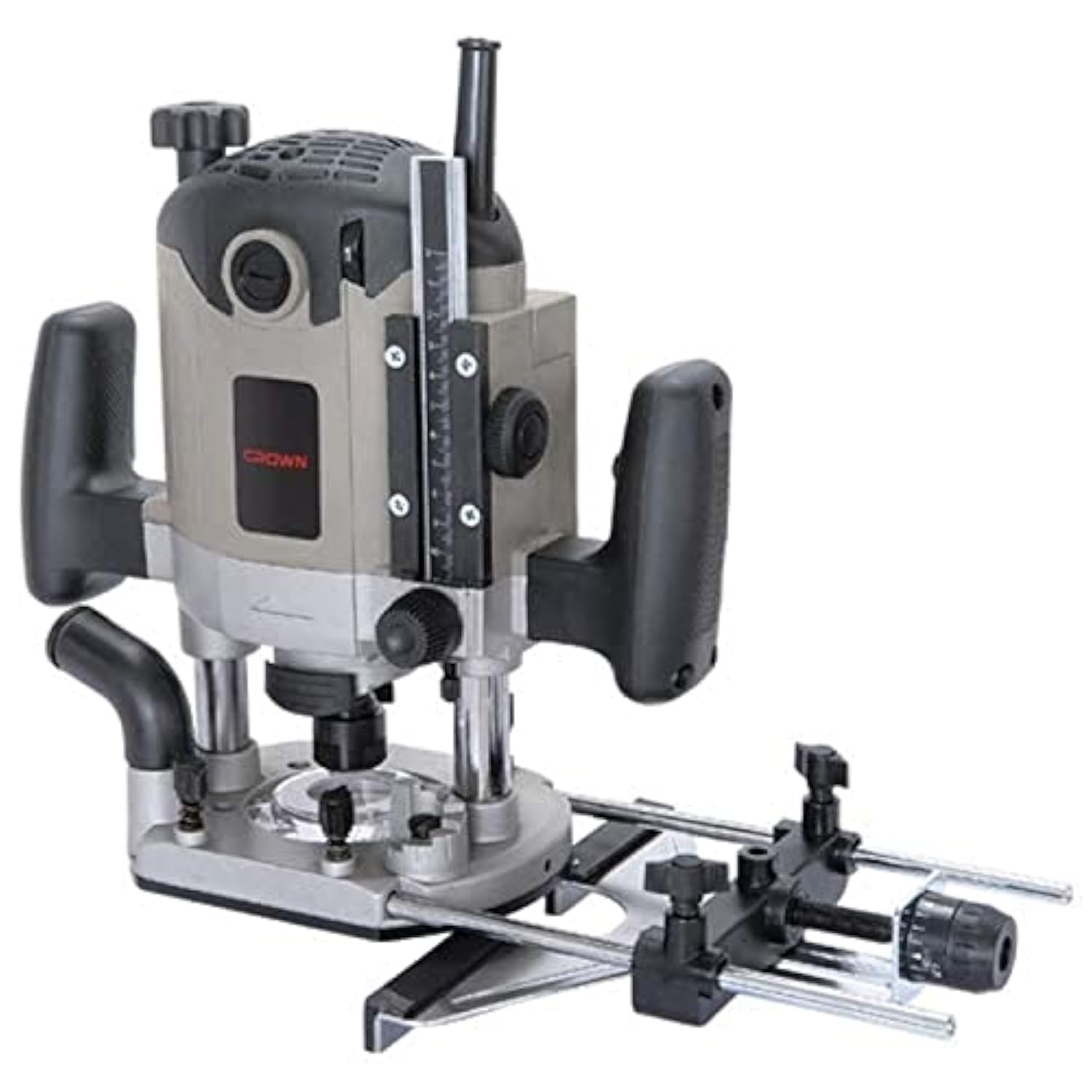
Image showing the CROWN CT11001 Electronic Cutter, a powerful woodworking tool. This view highlights the main body and handles.
3.2 Connecting to Power
Connect the power cord to a suitable 220V AC power outlet. Ensure the outlet is properly grounded.
4. Operating Instructions
Always wear appropriate personal protective equipment (PPE) including eye protection, hearing protection, and a dust mask during operation.
4.1 Adjusting Cutting Depth
- Place the router on a flat surface with the bit touching the surface.
- Loosen the depth adjustment knob/lever.
- Adjust the router body up or down until the desired cutting depth is achieved. Use the depth scale for precision.
- Tighten the depth adjustment knob/lever securely.
4.2 Setting Variable Speed
The CROWN CT11001 features electronic variable speed control. Rotate the speed dial to select the appropriate speed for your material and router bit. Lower speeds are generally used for larger diameter bits, harder materials, or when more control is needed. Higher speeds are suitable for smaller bits and softer materials.
4.3 Starting and Stopping the Tool
- To start: Press the lock-off button (if present) and then press the trigger switch. The soft start feature will gradually bring the motor up to speed.
- To stop: Release the trigger switch.
4.4 Routing Techniques
- Always ensure the workpiece is securely clamped.
- Maintain a firm grip on the router handles.
- Feed the router into the material at a consistent, moderate pace. Avoid forcing the tool.
- For best results and to prevent tear-out, route in the correct direction relative to the wood grain.
5. Maintenance
Regular maintenance ensures the longevity and safe operation of your CROWN Electronic Cutter. Always unplug the tool before performing any maintenance.
5.1 Cleaning
- After each use, clean the tool with a soft, dry cloth.
- Use compressed air to clear dust and debris from ventilation openings.
- Do not use harsh chemicals or solvents, as they may damage plastic parts.
5.2 Carbon Brushes
Periodically inspect the carbon brushes for wear. Replace both brushes when either is worn down to approximately 1/4 inch (6mm) or if the motor sparks excessively. Only use genuine CROWN replacement brushes.
5.3 Storage
Store the tool in a dry, secure location out of reach of children. Protect it from direct sunlight and extreme temperatures.
6. Troubleshooting
If you encounter issues with your CROWN Electronic Cutter, refer to the following table for common problems and solutions.
| Problem | Possible Cause | Solution |
|---|---|---|
| Tool does not start | No power supply Faulty power cord/plug Worn carbon brushes | Check power outlet and circuit breaker Inspect cord/plug for damage; replace if necessary Inspect and replace carbon brushes |
| Excessive vibration | Loose router bit Damaged or unbalanced bit Worn bearings | Ensure bit is securely tightened Replace damaged bit Contact authorized service center |
| Motor sparks excessively | Worn carbon brushes Dirty commutator | Inspect and replace carbon brushes Have the commutator cleaned by a qualified technician |
| Overheating | Blocked ventilation slots Overloading the tool | Clean ventilation slots Reduce load; allow tool to cool down |
If the problem persists after attempting these solutions, please contact an authorized service center.
7. Specifications
| Feature | Specification |
|---|---|
| Manufacturer | CROWN |
| Part Number | CT2801 |
| Item Model Number | CT11001 |
| Power Source | Corded Electric |
| Voltage | 220 Volts |
| Wattage | 2100 Watts |
| Blade Length / Collet Size | 12 Millimeters |
| Item Weight | 8 Kilograms |
| Product Dimensions (L x W x H) | 33.2 x 32 x 20.8 cm |
| Handle Material | Plastic or Rubber |
| Special Features | Spindle Lock, Electronic Variable Speed, Soft Start, Constant Power |
8. Warranty and Support
CROWN products are manufactured to high-quality standards. For information regarding warranty coverage, service, or technical support, please refer to the warranty card included with your product or contact your local CROWN authorized dealer or service center. Keep your purchase receipt as proof of purchase for any warranty claims.


