
Introduction
This manual provides essential information for the assembly, operation, maintenance, and troubleshooting of your Sauder Pacific View L-Desk. Please read these instructions carefully before beginning assembly or use to ensure proper function and longevity of your product.

Image: The Sauder Pacific View L-Desk, showcasing its L-shaped design, integrated storage, and Chalked Chestnut finish.
Setup and Assembly
The Sauder Pacific View L-Desk is designed for straightforward assembly. It features a patented T-lock drawer system and patented slide-on moldings to simplify the process. While detailed step-by-step instructions are typically included in the product packaging, here are general guidelines:
- Unpack Components: Carefully remove all parts from the packaging. Verify that all components listed in the included parts list are present and undamaged.
- Prepare Workspace: Assemble the desk in a clean, open area to prevent damage to parts and flooring.
- Follow Instructions: Adhere strictly to the manufacturer's assembly guide provided with your product. Do not skip steps.
- Tool Requirements: Ensure you have the necessary tools as specified in the assembly guide (e.g., screwdriver, hammer).
- Two-Person Assembly: For larger components, two people may be required for safe and efficient assembly.
- Drawer Assembly: Utilize the patented T-lock drawer system for quick and secure drawer construction.
- Molding Installation: The patented slide-on moldings facilitate easy attachment of decorative elements.

Image: The Sauder Pacific View L-Desk assembled in a room, demonstrating its functional use as a workstation.
Operating Instructions
Your Sauder Pacific View L-Desk is designed with several features to enhance your workspace efficiency.
File Drawer
The desk includes a file drawer equipped with full extension slides. This drawer is designed to accommodate both letter and European size hanging files, providing organized storage for documents.

Image: The file drawer, shown open with hanging files, illustrating its capacity and full extension slides.
Pencil Drawer
A dedicated pencil drawer with metal runners and safety stops is provided for smaller office essentials such as pens, pencils, and stationery. The safety stops prevent the drawer from being accidentally pulled out completely.

Image: The pencil drawer, open and displaying small office items, highlighting its utility for accessories.
Open Storage with Adjustable Shelf
The desk features an open storage area with an adjustable shelf. This allows you to customize the storage space to fit various items, such as books, binders, or decorative objects.

Image: The open storage section with an adjustable shelf, demonstrating its flexibility for storing different-sized items.
Cord Management
Two desktop grommets are integrated into the desk surface to help manage and organize electronic cords, keeping your workspace tidy and free from clutter.
Maintenance
Proper care will extend the life and appearance of your Sauder Pacific View L-Desk, which is constructed from engineered wood.
- Cleaning: Wipe surfaces with a soft, damp cloth. Avoid abrasive cleaners or harsh chemicals that can damage the finish.
- Spills: Immediately blot any spills with a clean, dry cloth to prevent moisture absorption.
- Heat and Moisture: Protect the desk surface from direct heat and excessive moisture. Use coasters under beverages and heat pads under hot items.
- Sunlight: Avoid prolonged exposure to direct sunlight, which can cause fading or discoloration.
- Hardware: Periodically check and tighten all hardware connections to ensure stability.
Troubleshooting
Drawers Not Sliding Smoothly
Ensure the drawer slides are clean and free of debris. Check that the drawer is properly aligned on its runners. If issues persist, verify that all assembly hardware for the drawer and its runners is securely tightened.
Desk Instability
Confirm that the desk is placed on a level surface. Check all connecting hardware and fasteners throughout the desk structure to ensure they are fully tightened. Uneven floors may require shims under the desk legs.
Surface Damage
For minor scratches or scuffs on the engineered wood, touch-up pens or furniture markers matching the Chalked Chestnut finish may be used. Consult the manufacturer for recommended repair products.
Specifications
| Feature | Detail |
|---|---|
| Brand | Sauder |
| Model Number | 427035 |
| Product Dimensions (L x W x H) | 58.47" x 58.43" x 29.92" (148.4 cm x 148.5 cm x 76 cm) |
| Material Type | Engineered Wood |
| Color | Chalked Chestnut Finish with Seagrass accents |
| Shape | L-Shape |
| Number of Drawers | 2 (1 file drawer, 1 pencil drawer) |
| Number of Shelves | 2 (1 adjustable in open storage) |
| Item Weight | 149.4 Pounds (67.8 Kilograms) |
| Special Features | Adjustable shelf, Cord management grommets, Patented T-lock drawer system, Patented slide-on moldings |
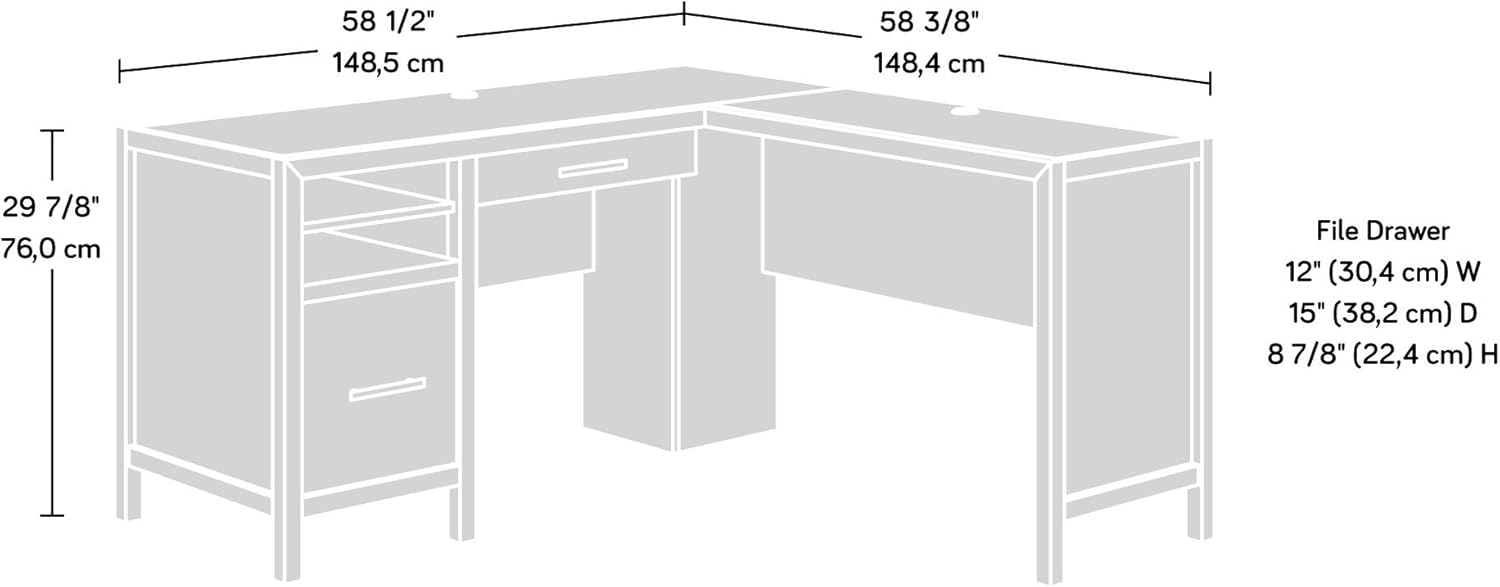
Image: Dimensional diagram of the L-Desk, showing overall length, width, height, and file drawer dimensions.
Warranty Information
The Sauder Pacific View L-Desk comes with a 5-year limited warranty. For specific terms and conditions, please refer to the warranty documentation included with your product or visit the official Sauder website.
Customer Support
Should you require assistance with assembly, parts replacement, or have any questions regarding your Sauder Pacific View L-Desk, please contact Sauder customer service. Contact information can typically be found in your product packaging or on the official Sauder website.

